照参考原画重画,想新标语
从上一段「纸条每个都放一个痛点」那句分出来,两段同时开着:照你给的参考原画重画成纸条版,再一起想普通话标语。你说「重复,难办的事情感觉都可以?」,Codex 写成「重复的事,让 AI 接手;难办的事,和 AI 联手」。涉及上司意见的部分已略去。
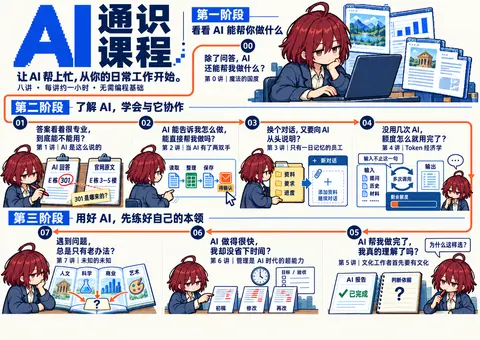

按下播放,看它一版版改出来。
我会先查看参考海报和项目文案,再做一版独立的竖版草稿:让纸条上的工作痛点先抓住视线,同时保留三阶段、完整课名和参与信息。新产物会放在单独目录,方便直接看图比较。
干了 1 分钟,4 步
打开 1 个网页,看 1 张图,运行 4 条命令,其他操作 3 次
打开 in.pinterest.com/pin/16958936097225271/;运行 cat AGENTS.md && cat course/课程邀请海报.md && cat course/课程设计/00-课程设计索引.md 等 2…
const results = await Promise.allSettled([
tools.exec_command({cmd:"cat AGENTS.md && cat course/课程邀请海报.md && cat course/课程设计/00-课程设计索引.md","max_output_tokens":12000}),
tools.exec_command({cmd:"cat ~/.codex/skills/.system/imagegen/SKILL.md && cat ~/.codex/plugins/cache/openai-curated-remote/frontend-design-premium/1.4.0/skills/frontend-design/SKILL.md && cat ~/.codex/plugins/cache/openai-curated-remote/frontend-design-premium/1.4.0/skills/frontend-design-premium/SKILL.md","max_output_tokens":18000}),
tools.web__run({open:[{ref_id:"https://in.pinterest.com/pin/16958936097225271/"}],response_length:"short"})
]); results.forEach((r,i)=>text({i,...r}));
text(ALL_TOOLS.filter(x=>/imagegen|browser|screenshot/.test(x.name)).map(x=>({name:x.name,description:x.description.slice(0,180)})));
Script completed Wall time 1.6 seconds Output: Warning: truncated output (original token count: 16533) Total output lines: 4 {"i":0,"status":"fulfilled","value":{"chunk_id":"ef3aa0","wall_time_seconds":0.000053792,"exit_code":0,"original_token_count":1516,"output":"# Repository rules\n\n项目结构与操作命令见 [README.md](README.md);课程内容的归属与判断顺序遵循 [课程设计索引](course/课程设计/00-课程设计索引.md)。\n\n## 编辑边界\n\n- 已有讲稿按需读取作参考,仅在用户主动要求时更新;更新时遵循 [课程讲稿编写规范](course/课程设计/03-课程讲稿编写规范.md)。\n\n## 课程任务流程\n\n- 大纲一节对应一页 PPT。先与用户讨论本页讲什么、用什么例子,确认后制作,再根据页面继续补充调整,不要求先写完整讲稿。\n- 修改 Slidev 时遵循 [slides/AGENTS.md](slides/AGENTS.md)。具体内容、画面与备注的归属按课程设计索引执行,不要求同步更新参考讲稿。\n- 课程设计与 PPT 制作使用已确认内容和已提供材料,不自行扩展调研或生成调研记录。发现材料不足或事实待确认时,指出具体缺口,交由独立调研补齐;继续处理不受影响的部分。\n---\ntype: reference\nmodified: 2026-09-16\n---\n\n# AI 通识课程\n\n面向公司各岗位同事 · 无需编程基础 · 八讲,每讲约一小时\n\n让 AI 帮上忙,从你的日常工作开始。\n\n整理资料、撰写内容、推进任务——哪些可以交给 AI?这八讲从实际用法讲起,介绍判断回答、借助工具、准备资料和计算成本的方法,再讨论专业知识、管理能力与开阔的视野为什么是用好这些工具的基础。\n\n## 第 0 讲|魔法的国度\n\n> 除了问答,AI 还能帮我做什么?\n\n通过实际工作中的演示,看看哪些事情可以试着让 AI 帮忙。\n\n## 第 1 讲|AI 是这么说的\n\n> 答案看着很专业,到底能不能用?\n\n了解怎样向 AI 说明需求、核查它的回答,再决定是否采用。\n\n## 第 2 讲|当 AI 有了两双手\n\n> AI 能告诉我怎么做,能直接帮我做吗?\n\n了解 AI 怎样借助工具完成工作,以及哪些操作需要自己确认。\n\n## 第 3 讲|只有一日记忆的员工\n\n> 换个对话,又要向 AI 从头说明?\n\n了解怎样整理资料、写清工作要求,让 AI 根据已有资料继续工作。\n\n## 第 4 讲|Token 经济学\n\n> 没用几次 AI,额度怎么就用完了?\n\n了解 AI 的额度怎样消耗、费用怎样计算,判断花这笔钱是否值得。\n\n## 第 5 讲|文化工作者首先要有文化\n\n> AI 帮我做完了,我真的理解了吗?\n\n理解为什么有了 AI 仍需要专业知识和判断力,给自己的思考和学习留出时间。\n\n## 第 6 讲|管理是 AI 时代的超能力\n\n> AI 做得很快,我却没省下时间?\n\n了解怎样向 AI 说明目标、提出要求、给出反馈,看清反复沟通和修改为什么 …(中间省略 34759 字)… n.pinterest.com/pin/16958936097225271/\",\"lineno\":null}); Total lines: 1\nL0: URL https://in.pinterest.com/pin/16958936097225271/ is not accessible via this tool.\n"} [{"name":"image_gen__imagegen","description":"Tools in the image_gen namespace.\n\nThe `image_gen.imagegen` tool enables image generation from descriptions and editing of existing images based on specific instructions. Use it wh"}]js
{
  "code": "let tab = await cua.createBrowserTab(\"iab\", \"https://in.pinterest.com/pin/16958936097225271/\", { visible: true });",
  "title": "查看 Pinterest 参考海报"
}
Wall time: 21.1581 seconds Output: ## Computer Use Control native apps and browsers on the user’s computer by reading or operating UI. Prefer purpose-built connectors, APIs, or CLIs when available. - Use `cua_repl` (JavaScript) for all UI actions. - Do not use other technologies besides `cua_repl` for computer interactions, unless specifically requested by the user (e.g. AppleScript, `osascript`, JXA, System Events, CGEvent synthesis). - Prefer a dedicated plugin or skill when it can complete the task; use Computer Use for interactions that are not exposed through a more specific interface. - `cua_repl` state is persistent across calls - If you create a tab or get an app, the initial UI state is automatically included in the tool result. ## API ```typescript type Vec2 = [x: number, y: number]; type ObservationOptions = { emit?: boolean }; type StateOptions = ObservationOptions & { disableDiffing?: boolean }; type StateAndScreenshot = { state: string; screenshot?: Uint8Array }; type PasteOptions = { format?: "text" | "md" | "html" }; type ClickOptions = { mouseButton?: MouseButton; clickCount?: number }; type SelectTextOptions = { prefix?: string; suffix?: string; selectionType?: SelectionType; }; type Direction = "up" | "down" | "left" | "right" | "u" | "d" | "l" | "r"; type SelectionType = "text" | "cursor_before" | "cursor_after"; type MouseButton = "left" | "right" | "middle" | "l" | "r" | "m"; interface Target { getAXState(options?: StateOptions): Promise<str …(中间省略 57878 字)… an array of televisions and fish on the ground pin page, Value: in.pinterest.com/pin/796714990377397119/ 124 container More actions 125 pop up button (collapsed) Description: More actions, Secondary Actions: Expand 126 container Footer 127 container Toast notification The focused UI element is 0 AXWebArea Pin on Children’s Book Covers, URL: in.pinterest.com/pin/16958936097225271/运行 cat ~/.codex/plugins/cache/openai-curated-remote/frontend-design-premium/1.4.0/skills/frontend-design/…
const r = await Promise.allSettled([
tools.exec_command({cmd:"cat ~/.codex/plugins/cache/openai-curated-remote/frontend-design-premium/1.4.0/skills/frontend-design/SKILL.md","max_output_tokens":6000}),
tools.exec_command({cmd:"sed -n '1,150p' ~/.codex/plugins/cache/openai-curated-remote/frontend-design-premium/1.4.0/skills/frontend-design-premium/SKILL.md && cat README.md && rg --files -g AGENTS.md -g '*DESIGN*' -g 'package.json' assets scripts && git status --short && ls assets/posters/drafts","max_output_tokens":9000}),
tools.mcp__codex_app__load_workspace_dependencies({}),
tools.view_image({path:"~/code/ai-literacy-series/assets/posters/drafts/character-reference-v1.png"})
]); for(let i=0;i<r.length;i++){if(i===3 && r[i].status==='fulfilled') image(r[i].value.image_url); else text({i,...r[i]});}
Script completed Wall time 0.1 seconds Output: {"i":0,"status":"fulfilled","value":{"chunk_id":"793b91","wall_time_seconds":0.000026584,"exit_code":0,"original_token_count":2065,"output":"---\nname: frontend-design\ndescription: Guidance for distinctive, intentional visual design when building new UI or reshaping an existing one. Helps with aesthetic direction, typography, and making choices that don't read as templated defaults.\nlicense: Complete terms in LICENSE.txt\n---\n\n# Frontend Design\n\nApproach this as the design lead at a small studio known for giving every client a visual identity that could not be mistaken for anyone else's. This client has already rejected proposals that felt templated, and is paying for a distinctive point of view: make deliberate, opinionated choices about palette, typography, and layout that are specific to this brief, and take one real aesthetic risk you can justify.\n\n## Ground it in the subject\n\nIf the brief does not pin down what the product or subject is, pin it yourself before designing: name one concrete subject, its audience, and the page's single job, and state your choice. If there's any information in your memory about the human's preferences, context about what they're building, or designs you've made before – use that as a hint. The subject's own world, its materials, instruments, artifacts, and vernacular, is where distinctive choices come from. Build with the brief's real content and subject matter throughout.\n\n## Desig …(中间省略 22825 字)… on executable: `~/.cache/codex-runtimes/codex-primary-runtime/dependencies/python/bin/python3`\n- Python packages: `~/.cache/codex-runtimes/codex-primary-runtime/dependencies/python`\n- Override binaries: `~/.cache/codex-runtimes/codex-primary-runtime/dependencies/bin/override`\n- Fallback binaries: `~/.cache/codex-runtimes/codex-primary-runtime/dependencies/bin/fallback`"}],"isError":false}} [图片]js
{
  "code": "await tab.getScreenshot();",
  "title": "检查参考图的纸张与标题布局"
}
Wall time: 11.8656 seconds Output: [图片]
思考:**Planning sprite sheet** **Planning note layout**
Planning sprite sheet
Planning note layout
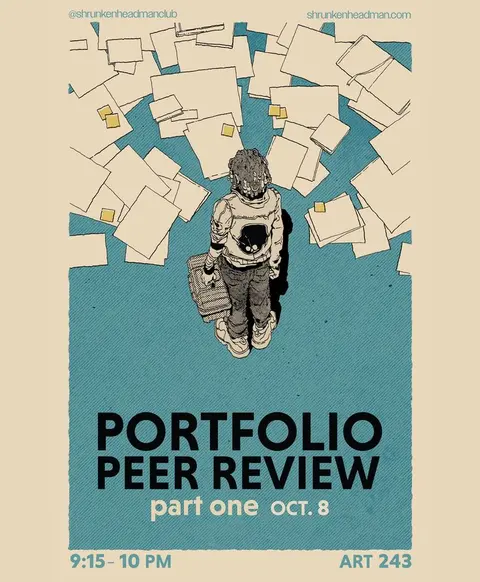
参考图已经看到了。它的吸引力来自上方密集纸页与下方大标题、留白之间的反差。我会借用这个节奏,用八张清晰可读的痛点纸条构成画面,并让三个阶段各有角色出场。
这版会使用 frontend-design 技能处理排版、imagegen 技能制作角色插画;标题暂用「AI 通识课程」,不把它当作已定宣传语。
干了 2 分钟,7 步
看 1 张图,运行 5 条命令,其他操作 3 次
运行 git status --short; ls assets/posters/drafts; cat package.json; rg --files assets | head -50; ls /System/Library/Fon…
text(await tools.exec_command({cmd:"git status --short; ls assets/posters/drafts; cat package.json; rg --files assets | head -50; ls /System/Library/Fonts | head -30","max_output_tokens":6000}));
text(await tools.view_image({path:"~/.codex/generated_images/01a0eba1-a2de-7640-8df8-66d4bf5dac71/exec-6f77a817-7ce7-4950-b3e1-e4a78688dec2.png"}).then(r=>{image(r.image_url);return 'Existing poster inspected'}));
Script completed Wall time 0.1 seconds Output: {"chunk_id":"948134","wall_time_seconds":0.000006958,"exit_code":0,"original_token_count":896,"output":" M assets/posters/README.md\n M assets/posters/course-invitation.html\n M assets/posters/course-invitation.png\n M assets/posters/course-invitation.template.html\n M assets/posters/outline-qr.svg\n M \"course/\\350\\257\\276\\347\\250\\213\\351\\202\\200\\350\\257\\267\\346\\265\\267\\346\\212\\245.md\"\n M scripts/build-course-poster.mjs\n M scripts/build-site.mjs\n M scripts/dev-site.mjs\n M scripts/export-course-poster.py\n M scripts/site-render.mjs\n?? assets/posters/course-invitation.pdf\n?? assets/posters/course-map-a3-v3.png\n?? assets/posters/course-map-base-v2.png\n?? assets/posters/design-review.md\n?? assets/posters/drafts/\n?? assets/posters/variants/\n?? scripts/build-course-qr.py\n?? scripts/build-poster-variants.mjs\nREADME.md\na3-v3-prompts.md\ncharacter-reference-v1.png\ncourse-invitation-before-a3.png\ncourse-map-refined-v1.md\ncourse-map-refined-v1.png\ncourse-scenes-v1.png\ndesign-review-before-a3.md\nlesson-01-source-check-v1.png\nproduction-base-v2-prompt.md\n{\n \"name\": \"ai-literacy-series\",\n \"version\": \"1.0.0\",\n \"private\": true,\n \"type\": \"module\",\n \"scripts\": {\n \"dev\": \"node scripts/dev-site.mjs\",\n \"slides\": \"slidev\",\n \"slides:build\": \"slidev build\",\n \"slides:build:all\": \"node scripts/build-slides.mjs\",\n \"site:build\": \"node scripts/build-si …(中间省略 2054 字)… c\nAquaKana.ttc\nArialHB.ttc\nAvenir Next Condensed.ttc\nAvenir Next.ttc\nAvenir.ttc\nCJKSymbolsFallback.ttc\nCourier.ttc\nDecoTypeNastaleeqUrdu.ttc\nGeezaPro.ttc\nGeneva.ttf\nHelveLTMM\nHelvetica.ttc\nHelveticaNeue.ttc\nHiragino Sans GB.ttc\nKeyboard.ttf\nKohinoor.ttc\nKohinoorBangla.ttc\nKohinoorGujarati.ttc\nKohinoorTelugu.ttc\nLastResort.otf\nLucidaGrande.ttc\n"} [图片] Existing poster inspected思考:**Mapping collage layout**
Mapping collage layout
运行 mkdir -p assets/posters/drafts/paper-notes-v1; sed -n '1,100p' scripts/export-course-poster.py; ls node_modules/play…
store("prompt",`Use case: illustration-story.
Create a transparent sprite sheet for a printed Chinese AI course poster. Input image is CHARACTER IDENTITY REFERENCE, not a layout to copy.
Three separate isolated full-body pixel-art vignettes on one wide canvas in three equal-width cells, each centered in its own cell with generous transparent margins. All three feature the exact same androgynous young office worker: short fluffy burgundy hair, one cowlick, half-lidded tired eyes, navy suit, open white shirt, white sneakers. Preserve this hairstyle and personality.
LEFT CELL: elevated three-quarter overhead rear view of the character standing, slightly leaning toward a small open laptop held in one arm, looking at it, one free hand lifted in curiosity.
MIDDLE CELL: three-quarter front view sitting casually on a simple low rolling office chair, holding two paper sheets and comparing them, tired but focused face.
RIGHT CELL: standing three-quarter view reading an open book, with a small stack of two books on the floor beside one shoe.
Style: deliberate crisp 16-bit pixel art with visible square pixel clusters, r

…(中间省略 579 字)…

ules/playwright*; ls ~/.cache/codex-runtimes/codex-primary-runtime/dependencies/node/node_modules | rg 'playwright|sharp'; cat ~/.codex/plugins/cache/openai-curated-remote/frontend-design-premium/1.4.0/skills/frontend-design-premium/references/verification-checklist.md","max_output_tokens":6500}));
Script completed Wall time 0.1 seconds Output: {"chunk_id":"1f2b37","wall_time_seconds":0.000009875,"exit_code":0,"original_token_count":5419,"output":"# /// script\n# requires-python = \">=3.11\"\n# dependencies = [\"weasyprint==68.1\", \"pymupdf>=1.26,<2\"]\n# ///\n\"\"\"Export a physically sized A3 PDF and a 300-ppi PNG of the poster.\"\"\"\nfrom pathlib import Path\nimport argparse\nimport logging\nimport re\nimport sys\n\n# Homebrew libraries are not on every Python distribution's dynamic loader path.\nif sys.platform == \"darwin\":\n import cffi\n original_dlopen = cffi.FFI.dlopen\n\n def homebrew_dlopen(self, name, *args, **kwargs):\n candidate = Path(\"/opt/homebrew/lib\") / str(name)\n return original_dlopen(self, str(candidate) if candidate.exists() else name, *args, **kwargs)\n\n cffi.FFI.dlopen = homebrew_dlopen\n\nfrom weasyprint import HTML, CSS\nimport pymupdf\n\nroot = Path(__file__).resolve().parent.parent\nparser = argparse.ArgumentParser(description=__doc__)\nparser.add_argument(\"files\", nargs=\"*\", type=Path, help=\"HTML posters; defaults to the current invitation\")\nparser.add_argument(\"--preview\", action=\"store_true\", help=\"Also export a 1680-pixel-wide preview\")\nargs = parser.parse_args()\nlogging.getLogger(\"weasyprint\").setLevel(logging.ERROR)\n\nfor path in args.files or [root / \"assets/posters/course-invitation.html\"]:\n path = path.resolve()\n html = path.read_text()\n # Resolve SVG presentation att …(中间省略 20232 字)… r workflow covers success, failure, keyboard, responsive, and applicable recovery paths.\n- [ ] Changed code was searched for native dialogs, non-semantic click handlers, duplicated constants, uncancelled request races, and unhandled conflicts.\n\nOnly after applicable checks pass, report concise evidence: changed files/behavior, decisions, commands/tests, browser coverage, and remaining risk.\n"}调用 image_gen__imagegen
// @exec: {"yield_time_ms": 1000, "max_output_tokens": 1000}
const r = await tools.image_gen__imagegen({prompt:load("prompt"), referenced_image_paths:["~/code/ai-literacy-series/assets/posters/drafts/character-reference-v1.png"],transparent_background:true});
store("generated",r); generatedImage(r);
Script running with cell ID 5 Wall time 1.0 seconds Output:
运行 which uv; ls ~/.cache/codex-runtimes/codex-primary-runtime/dependencies/python/bin; rg --files assets/…
text(await tools.exec_command({cmd:"which uv; ls ~/.cache/codex-runtimes/codex-primary-runtime/dependencies/python/bin; rg --files assets/posters | rg '\\.(woff|ttf|otf)$'; sed -n '1,90p' scripts/build-poster-variants.mjs; sed -n '1,12p' assets/posters/outline-qr.svg","max_output_tokens":4000}));Script completed Wall time 0.1 seconds Output: {"chunk_id":"b8b326","wall_time_seconds":0.00000825,"exit_code":0,"original_token_count":4790,"output":"Warning: truncated output (original token count: 4790)\nTotal output lines: 118\n\n~/.local/bin/uv\n2to3\n2to3-3.12\n__pycache__\ncffi-gen-src\ndumppdf.py\nf2py\nidle3\nidle3.12\nnormalizer\nnumpy-config\npdf2txt.py\npdfplumber\npip\npip3\npip3.12\npydoc3\npydoc3.12\npypdfium2\npython\npython3\npython3-config\npython3.12\npython3.12-config\nvba_extract.py\nwheel\nimport { existsSync, mkdirSync, readFileSync, writeFileSync } from 'node:fs'\nimport { dirname, join, resolve } from 'node:path'\nimport { fileURLToPath } from 'node:url'\n\nconst root = resolve(dirname(fileURLToPath(import.meta.url)), '..')\nconst output = join(root, 'assets/posters/variants')\nconst escape = value => String(value).replace(/[&<>\"']/g, c => ({ '&': '&', '<': '<', '>': '>', '\"': '"', \"'\": ''' }[c]))\nconst source = readFileSync(join(root, 'course/课程邀请海报.md'), 'utf8')\nconst lessons = [...source.matchAll(/^## 第 (\\d) 讲|(.+)\\n\\n> (.+)$/gm)].map(([, n, title, question]) => ({ n: Number(n), title, question }))\nif (lessons.length !== 8 || lessons.some((lesson, n) => lesson.n !== n)) throw new Error('海报需要按顺序排列的完整八讲')\nconst phases = ['看看 AI 能帮你做什么', '了解 AI,学会与它协作', '用好 AI,先练好自己的本领']\nconst groups = [[0], [1, 2, 3, 4], [5, 6, 7]]\nconst fields = Object.fromEntries([...source.matchAll(/^(首场时间|现场地点|报名方式|线上参与|课程主页|访问范围):(.+)$/gm)].map(( …(中间省略 14151 字)… 1H25V32H24zM25,31H26V32H25zM29,31H30V32H29zM31,31H32V32H31zM4,32H5V33H4zM5,32H6V33H5zM6,32H7V33H6zM7,32H8V33H7zM8,32H9V33H8zM9,32H10V33H9zM10,32H11V33H10zM12,32H13V33H12zM14,32H15V33H14zM15,32H16V33H15zM16,32H17V33H16zM18,32H19V33H18zM21,32H22V33H21zM23,32H24V33H23zM24,32H25V33H24zM31,32H32V33H31z\" id=\"qr-path\" fill=\"#000000\" fill-opacity=\"1\" fill-rule=\"nonzero\" stroke=\"none\" /></svg>"}js
{
  "code": "nodeRepl.write(await agent.documentation.get(\"local-web-development\")); nodeRepl.write(await (await tab.capabilities.get(\"cdp\")).documentation());",
  "title": "准备本地海报预览与打印检查"
}
Wall time: 0.0072 seconds Output: # Local Web Development When testing a user's local app on `localhost`, `127.0.0.1`, `::1`, or another local development URL, reload the page after code or build changes if the framework does not support hot reloading or hot reloading is disabled. Call `tab.reload()`, then take a fresh DOM snapshot or screenshot before continuing verification. # Tab Capability: cdp Raw Chrome DevTools Protocol access in browser for development use. Prefer higher-level Browser Use APIs. Navigate a fresh tab to its intended HTTP or HTTPS page before the first CDP command. Raw CDP access is scoped to the tab's current web origin. To observe an action, call `readEvents()` to capture `cursor`, perform the action, then read from that cursor with `afterSequence`. Continue from each returned cursor while `hasMore` is true; `truncated` means older events were evicted. Reuse the same filters while paging. Discover child target selectors from `Target.attachedToTarget` events. If you directly modify page content or browser state through CDP, outside ordinary navigation or UI interaction, and leave that change in place, tell the user what changed in the final response. ```ts const capability = await tab.capabilities.get("cdp"); type CdpEventsOptions = { afterSequence?: number; // Return events after this cursor; omit to start at the current position. limit?: number; // Maximum number of events to return, from 1 to 1000. methods?: Array<string>; // Return only thes …(中间省略 711 字)… nown>; sequence: number; source: { extensionId?: string; sessionId?: string; tabId?: number; targetId?: string } }>; hasMore: boolean; truncated: boolean }>; // Read buffered CDP events, optionally waiting for the first match. send(method: string, params?: CdpCommandParams, options?: CdpSendOptions): Promise<unknown>; // Send a permitted CDP command to this tab or an attached child target. } ```运行 ~/.cache/codex-runtimes/codex-primary-runtime/dependencies/python/bin/python3 -c 'import importlib.uti…
text(await tools.exec_command({cmd:"~/.cache/codex-runtimes/codex-primary-runtime/dependencies/python/bin/python3 -c 'import importlib.util; print({n: bool(importlib.util.find_spec(n)) for n in [\"weasyprint\",\"pymupdf\",\"PIL\",\"pypdfium2\",\"reportlab\"]})'","max_output_tokens":1000}));
text(await tools.exec_command({cmd:"rg --files ~/Library/Fonts /Library/Fonts | head -40","max_output_tokens":1000}));
Script completed Wall time 0.3 seconds Output: {"chunk_id":"402fe5","wall_time_seconds":0.054488834,"exit_code":0,"original_token_count":23,"output":"{'weasyprint': False, 'pymupdf': False, 'PIL': True, 'pypdfium2': True, 'reportlab': True}\n"} {"chunk_id":"230829","wall_time_seconds":0.000007416,"exit_code":0,"original_token_count":702,"output":"~/Library/Fonts/JetBrainsMonoNerdFontMono-LightItalic.ttf\n~/Library/Fonts/JetBrainsMonoNerdFontMono-ExtraBold.ttf\n~/Library/Fonts/JetBrainsMonoNerdFontPropo-BoldItalic.ttf\n~/Library/Fonts/JetBrainsMonoNerdFont-ExtraBoldItalic.ttf\n~/Library/Fonts/JetBrainsMonoNLNerdFontPropo-ExtraBoldItalic.ttf\n~/Library/Fonts/JetBrainsMonoNLNerdFontMono-Thin.ttf\n~/Library/Fonts/JetBrainsMonoNerdFontPropo-ExtraLightItalic.ttf\n~/Library/Fonts/JetBrainsMonoNLNerdFont-Thin.ttf\n~/Library/Fonts/JetBrainsMonoNerdFont-LightItalic.ttf\n~/Library/Fonts/JetBrainsMonoNerdFontMono-Bold.ttf\n~/Library/Fonts/JetBrainsMonoNerdFontPropo-ThinItalic.ttf\n~/Library/Fonts/JetBrainsMonoNLNerdFontMono-Regular.ttf\n~/Library/Fonts/JetBrainsMonoNerdFont-SemiBold.ttf\n~/Library/Fonts/JetBrainsMonoNerdFont-MediumItalic.ttf\n~/Library/Fonts/JetBrainsMonoNLNerdFont-Medium.ttf\n~/Library/Fonts/JetBrainsMonoNerdFontPropo-Regular.ttf\n~/Library/Fonts/JetBrainsMonoNerdFontPropo-ExtraLight.ttf\n~/Library/Fonts/JetBrainsMonoNLNerdFontMono-Italic.ttf\n~/Library/Fonts/JetBrainsMonoNLNerdFontPropo-SemiBoldItalic.ttf\n~/Library/Fonts/JetBrainsMonoNerdFontMono-Medium.ttf\n~/Librar …(中间省略 740 字)… etBrainsMonoNLNerdFont-ExtraLight.ttf\n~/Library/Fonts/JetBrainsMonoNerdFontMono-SemiBold.ttf\n~/Library/Fonts/JetBrainsMonoNerdFontMono-ExtraLight.ttf\n~/Library/Fonts/JetBrainsMonoNLNerdFontMono-ExtraLightItalic.ttf\n~/Library/Fonts/JetBrainsMonoNLNerdFontPropo-Medium.ttf\n~/Library/Fonts/JetBrainsMonoNLNerdFont-SemiBoldItalic.ttf\n~/Library/Fonts/JetBrainsMonoNerdFontMono-SemiBoldItalic.ttf\n"}思考:**Preparing export HTML**
Preparing export HTML
等待子任务
Script completed
Wall time 0.0 seconds
Output:

[图片]
Generated images are saved to ~/.codex/generated_images/01a0ec6a-edd4-70a0-a426-e8947363b261 as ~/.codex/generated_images/01a0ec6a-edd4-70a0-a426-e8947363b261/exec-0adfe188-6e4a-498f-b7a3-86d3f6e055c1.png by default.
If you need to use a generated image at another path, copy it and leave the original in place unless the user explicitly asks you to delete it.
The generated image is already displayed to the user. There is no need to render it in the final response as a Markdown image or file link.
思考:**Arranging stage-three composition**
Arranging stage-three composition
八个痛点会各占一张纸,完整课名放在纸条下缘;三阶段用独立标题标明。插画已生成,保留了酒红短发和半睁眼的角色特征,分别安排看电脑、核对纸页、读书三个动作。
版式定为 A3 竖版(297 × 420 mm),使用米色纸底、蓝绿色块和少量酒红色强调。
干了不到 1 分钟,1 步
运行 3 条命令,写 1 个文件
运行 cp ~/.codex/generated_images/01a0ec6a-edd4-70a0-a426-e8947363b261/exec-0adfe188-6e4a-498f-b7a3-86d3f6e…
text(await tools.exec_command({cmd:"cp ~/.codex/generated_images/01a0ec6a-edd4-70a0-a426-e8947363b261/exec-0adfe188-6e4a-498f-b7a3-86d3f6e055c1.png assets/posters/drafts/paper-notes-v1/characters.png","max_output_tokens":1000})); text(await tools.exec_command({cmd:"sips -g pixelWidth -g pixelHeight assets/posters/drafts/paper-notes-v1/characters.png","max_output_tokens":1000})); text(await tools.apply_patch("*** Begin Patch\n*** Add File: ~/code/ai-literacy-series/assets/posters/drafts/paper-notes-v1/build.mjs\n+import { readFileSync, writeFileSync } from 'node:fs';\n+import { fileURLToPath } from 'node:url';\n+import { dirname, resolve } from 'node:path';\n+\n+const dir = dirname(fileURLToPath(import.meta.url));\n+const root = resolve(dir, '../../../..');\n+const source = readFileSync(resolve(root, 'course/课程邀请海报.md'), 'utf8');\n+const lessons = [...source.matchAll(/^## 第 (\\d) 讲|(.+)\\n\\n> (.+)$/gm)].map(([, n, title, question]) => ({ n: +n, title, question }));\n+if (lessons.length !== 8) throw new Error('Expected eight lessons');\n+const esc = s => s.replaceAll('&', '&').replaceAll('<', '<').repl …(中间省略 5991 字)… ilt self-contained A3 portrait SVG and HTML');\n*** End Patch")); text(await tools.exec_command({cmd:"node assets/posters/drafts/paper-notes-v1/build.mjs; python3 -m http.server 8769 --bind 127.0.0.1 --directory assets/posters/drafts/paper-notes-v1","yield_time_ms":1000,"max_output_tokens":1000}));Script completed Wall time 0.5 seconds Output: {"chunk_id":"6fa291","wall_time_seconds":0.000008166,"exit_code":0,"original_token_count":0,"output":""} {"chunk_id":"e04454","wall_time_seconds":0.000009375,"exit_code":0,"original_token_count":33,"output":"~/code/ai-literacy-series/assets/posters/drafts/paper-notes-v1/characters.png\n pixelWidth: 1774\n pixelHeight: 887\n"} {} {"chunk_id":"47e9ee","wall_time_seconds":0,"exit_code":1,"original_token_count":411,"output":"Built self-contained A3 portrait SVG and HTML\nTraceback (most recent call last):\n File \"<frozen runpy>\", line 203, in _run_module_as_main\n File \"<frozen runpy>\", line 88, in _run_code\n File \"/opt/homebrew/Cellar/python@3.14/3.14.7/Frameworks/Python.framework/Versions/3.14/lib/python3.14/http/server.py\", line 1436, in <module>\n test(\n ~~~~^\n HandlerClass=handler_class,\n ^^^^^^^^^^^^^^^^^^^^^^^^^^^\n ...<6 lines>...\n tls_password=tls_key_password,\n ^^^^^^^^^^^^^^^^^^^^^^^^^^^^^^\n )\n ^\n File \"/opt/homebrew/Cellar/python@3.14/3.14.7/Frameworks/Python.framework/Versions/3.14/lib/python3.14/http/server.py\", line 1352, in test\n server = ServerClass(addr, HandlerClass)\n File \"/opt/homebrew/Cellar/python@3.14/3.14.7/Frameworks/Python.framework/Versions/3.14/lib/python3.14/socketserver.py\", line 457, in __init__\n self.server_bind()\n ~~~~~~~~~~~~~~~~^^\n File \"/opt/homebrew/Cellar/python@3.14/3.14.7/Frameworks/Python.framework/Versions/ …(中间省略 266 字)… in server_bind\n socketserver.TCPServer.server_bind(self)\n ~~~~~~~~~~~~~~~~~~~~~~~~~~~~~~~~~~^^^^^^\n File \"/opt/homebrew/Cellar/python@3.14/3.14.7/Frameworks/Python.framework/Versions/3.14/lib/python3.14/socketserver.py\", line 478, in server_bind\n self.socket.bind(self.server_address)\n ~~~~~~~~~~~~~~~~^^^^^^^^^^^^^^^^^^^^^\nPermissionError: [Errno 1] Operation not permitted\n"}
不一定要用我这大头娃娃的图,你可以保持我这个人物形象,弄一个头身比合理的?
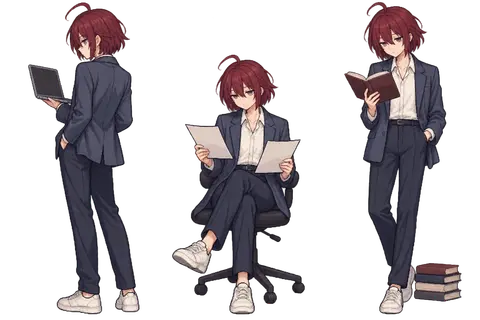
可以。保留酒红短发、呆毛、半睁眼和深蓝西装这些识别特征,把人物改成约七头身的成年人体态,姿势也更接近俯视下的办公室人物。这样会更贴近参考海报的气质。
干了 3 分钟,8 步
运行 5 条命令,写 2 个文件,其他操作 4 次
运行 python3 -m http.server 8769 --bind 127.0.0.1 --directory assets/posters/drafts/paper-notes-v1
store("adultPrompt",`Use case: illustration-story.
Create a transparent sprite sheet for an editorial print poster. Input image is ONLY a reference for hair color, hairstyle, facial attitude, and clothing. Deliberately CHANGE its chibi body proportions into believable adult human anatomy: seven heads tall, small adult head, long adult arms and legs, natural shoulders and hands. Absolutely NOT a chibi, NOT super-deformed, NOT a big-headed doll.
Three separate isolated full-body vignettes on one wide landscape canvas in three equal-width cells, each centered in its own cell with transparent margins. All three feature the same androgynous young adult office worker: short fluffy burgundy hair ending at nape, one small cowlick, half-lidded quietly tired eyes, navy tailored suit, open white shirt, white sneakers. Full height approximately seven head-heights. Restrained adult anime/editorial illustration aesthetic, crisply stepped pixel edges and halftone-inspired shading, limited muted print palette.
LEFT CELL: overhead three-quarter rear view of adult standing looking at a small laptop supported in one arm. Figur

…(中间省略 597 字)…

xec_command({cmd:"python3 -m http.server 8769 --bind 127.0.0.1 --directory assets/posters/drafts/paper-notes-v1","yield_time_ms":1000,"sandbox_permissions":"require_escalated","justification":"可否启动只绑定本机的临时预览服务,用于检查并导出这份独立海报?","prefix_rule":["python3","-m","http.server"],"max_output_tokens":1000}));
Script completed Wall time 6.9 seconds Output: {"chunk_id":"dcb7f6","wall_time_seconds":1.002795334,"session_id":97013,"original_token_count":0,"output":""}调用 image_gen__imagegen
// @exec: {"yield_time_ms": 1000, "max_output_tokens": 1000}
const r = await tools.image_gen__imagegen({prompt:load("adultPrompt"), referenced_image_paths:["~/code/ai-literacy-series/assets/posters/drafts/character-reference-v1.png"],transparent_background:true});
store("adultGenerated",r);generatedImage(r);
Script running with cell ID 10 Wall time 1.0 seconds Output:
js
{
  "code": "let posterTab = await cua.createBrowserTab(\"iab\", \"http://127.0.0.1:8769/poster.html\", { visible: false });",
  "title": "检查纸条版草稿初排"
}
Wall time: 42.7358 seconds Output: Browser tab: 2, Title: "AI 通识课程 · 纸条痛点版草稿(A3 竖版)", URL: "http://127.0.0.1:8769/poster.html". 0 AXWebArea AI 通识课程 · 纸条痛点版草稿(A3 竖版), URL: 127.0.0.1:8769/poster.html 1 container AI 通识课程 · 纸条痛点版草稿 A3 竖版课程海报。八张纸条呈现八个工作困扰,按三阶段阅读。首场 10 月 15 日 18:30–19:30,会议室 5。收到企业微信日程后选择已接收报名,腾讯会议链接见日程。二维码用于查看课程主页,公司网络内访问。, Help: A3 竖版课程海报。八张纸条呈现八个工作困扰,按三阶段阅读。首场 10 月 15 日 18:30–19:30,会议室 5。收到企业微信日程后选择已接收报名,腾讯会议链接见日程。二维码用于查看课程主页,公司网络内访问。 The focused UI element is 0 AXWebArea AI 通识课程 · 纸条痛点版草稿(A3 竖版), URL: 127.0.0.1:8769/poster.html
js
{
  "code": "await nodeRepl.emitImage(await posterTab.screenshot({fullPage:true}));",
  "title": "查看整张 A3 竖版草稿"
}
Wall time: 0.3395 seconds Output: [图片]
思考:**Adjusting footer layout**
Adjusting footer layout
运行 node assets/posters/drafts/paper-notes-v1/build.mjs;写入 build.mjs
text(await tools.apply_patch("*** Begin Patch\n*** Update File: ~/code/ai-literacy-series/assets/posters/drafts/paper-notes-v1/build.mjs\n@@\n const ink = '#192b2c', paper = '#f5eddc', accent = '#813a49';\n+// Shared headline is provisional and deliberately kept separate from artwork.\n+const headline = ['AI,係你嘅對手,', '定係你對手?'];\n@@\n-  const titleSize = n === 5 ? 23 : n === 6 ? 24 : 26;\n+  const titleSize = n === 5 ? 20 : n === 6 ? 22 : 26;\n@@\n-${text(86, 1584, 'AI', 184, 850, 'font-family=\"Helvetica Neue,Arial,sans-serif\" letter-spacing=\"-8\"')}\n-${text(303, 1584, '通识课程', 182, 850, 'letter-spacing=\"-7\"')}\n-${text(94, 1650, '让 AI 帮上忙,从你的日常工作开始。', 36, 650)}\n+${text(91, 1524, headline[0], 91, 850, 'letter-spacing=\"-2\"')}\n+${text(91, 1630, headline[1], 101, 850, 'letter-spacing=\"-2\"')}\n+${text(777, 1628, 'AI 通识课程', 45, 650)}\n@@\n-<g transform=\"translate(565 1807)\">\n+<g transform=\"translate(530 1807)\">\n@@\n-<a href=\"http://[内网地址]/ai-literacy/\" aria-label=\"查看课程主页,公司网络内访问\"><image href=\"${qr}\" x=\"1178\" y=\"1789\" width=\"162\" height=\"162\"/>${text(1162, 1847, '查看课程主页', 24, 600, 'te

…(中间省略 1583 字)…

dy{width:297mm;height:420mm}body>svg{width:297mm;height:420mm;max-width:none}*{-webkit-print-color-adjust:exact;print-color-adjust:exact}}</style>${svg}</html>`);\n*** End Patch"));
text(await tools.exec_command({cmd:"node assets/posters/drafts/paper-notes-v1/build.mjs","max_output_tokens":1000}));
Script completed Wall time 0.2 seconds Output: {} {"chunk_id":"849a30","wall_time_seconds":0.00000625,"exit_code":0,"original_token_count":12,"output":"Built self-contained A3 portrait SVG and HTML\n"}等待子任务
Script completed
Wall time 0.0 seconds
Output:

[图片]
Generated images are saved to ~/.codex/generated_images/01a0ec6a-edd4-70a0-a426-e8947363b261 as ~/.codex/generated_images/01a0ec6a-edd4-70a0-a426-e8947363b261/exec-fb8dc9fe-2353-489f-8b88-84c053c10556.png by default.
If you need to use a generated image at another path, copy it and leave the original in place unless the user explicitly asks you to delete it.
The generated image is already displayed to the user. There is no need to render it in the final response as a Markdown image or file link.
运行 cp ~/.codex/generated_images/01a0ec6a-edd4-70a0-a426-e8947363b261/exec-fb8dc9fe-2353-489f-8b88-84c053c…
text(await tools.exec_command({cmd:"cp ~/.codex/generated_images/01a0ec6a-edd4-70a0-a426-e8947363b261/exec-fb8dc9fe-2353-489f-8b88-84c053c10556.png assets/posters/drafts/paper-notes-v1/characters-adult.png; ~/.cache/codex-runtimes/codex-primary-runtime/dependencies/python/bin/python3 -c 'from PIL import Image; im=Image.open(\"assets/posters/drafts/paper-notes-v1/characters-adult.png\");print(im.size,im.mode);print(im.getpixel((0,0)),im.getpixel((500,0)))'","max_output_tokens":1000}));Script completed Wall time 0.2 seconds Output: {"chunk_id":"9aec01","wall_time_seconds":0.065224834,"exit_code":0,"original_token_count":12,"output":"(1536, 1024) RGBA\n(1, 1, 1, 0) (14, 4, 4, 0)\n"}运行 ~/.cache/codex-runtimes/codex-primary-runtime/dependencies/python/bin/python3 -c 'from PIL import Imag…
text(await tools.exec_command({cmd:"~/.cache/codex-runtimes/codex-primary-runtime/dependencies/python/bin/python3 -c 'from PIL import Image; im=Image.open(\"assets/posters/drafts/paper-notes-v1/characters-adult.png\"); print([(p,im.getpixel(p)) for p in [(500,500),(10,500),(1024,500),(500,100),(1500,300)]])'","max_output_tokens":1000}));
text(await tools.apply_patch("*** Begin Patch\n*** Update File: ~/code/ai-literacy-series/assets/posters/drafts/paper-notes-v1/build.mjs\n@@\n-const img = `data:image/png;base64,${readFileSync(resolve(dir, 'characters.png')).toString('base64')}`;\n+const img = `data:image/png;base64,${readFileSync(resolve(dir, 'characters-adult.png')).toString('base64')}`;\n@@\n-  return `<svg x=\"${x}\" y=\"${y}\" width=\"${w}\" height=\"${h}\" viewBox=\"${n * 592} 0 592 880\" aria-hidden=\"true\"><image href=\"${img}\" width=\"1776\" height=\"880\"/></svg>`;\n+  return `<svg x=\"${x}\" y=\"${y}\" width=\"${w}\" height=\"${h}\" viewBox=\"${n * 512} 0 512 1024\" aria-hidden=\"true\"><image href=\"${img}\" width=\"1536\" height=\"1024\"/></svg>`;\n*** End Patch"));
text(await tools.exec_command({cmd:"node assets/posters/drafts/paper-notes-v1/build.mjs","max_output_tokens":1000}));
Script completed Wall time 0.3 seconds Output: {"chunk_id":"0e6d07","wall_time_seconds":0.000008417,"exit_code":0,"original_token_count":39,"output":"[((500, 500), (37, 33, 37, 0)), ((10, 500), (2, 1, 2, 0)), ((1024, 500), (48, 44, 47, 0)), ((500, 100), (21, 8, 11, 0)), ((1500, 300), (23, 23, 30, 0))]\n"} {} {"chunk_id":"c860aa","wall_time_seconds":0.000007917,"exit_code":0,"original_token_count":12,"output":"Built self-contained A3 portrait SVG and HTML\n"}
成人比例的角色已完成,正在替换进海报。标题区也已独立出来,暂排粤语备选「AI,係你嘅對手,定係你對手?」,副标题用「AI 通识课程」;之后可以与课程地图统一替换,不影响插画和纸条。
干了 3 分钟,7 步
看 1 张图,运行 7 条命令,运行 1 段代码,写 2 个文件,其他操作 1 次
js
{
  "code": "await posterTab.reload(); await posterTab.getAXState(); let cdp = await posterTab.capabilities.get(\"cdp\"); let pdfResult = await cdp.send(\"Page.printToPDF\", {printBackground:true, preferCSSPageSize:true, displayHeaderFooter:false, marginTop:0, marginBottom:0, marginLeft:0, marginRight:0}); let fs = await import('node:fs/promises'); await fs.writeFile('~/code/ai-literacy-series/assets/posters/drafts/paper-notes-v1/poster.pdf', Buffer.from(pdfResult.data, 'base64')); nodeRepl.write({pdfSaved:true});",
  "title": "导出成人比例版 A3 PDF"
}
Wall time: 54.4392 seconds Output: Printing is not available Browser tab: 2, Title: "AI 通识课程 · 纸条痛点版草稿(A3 竖版)", URL: "http://127.0.0.1:8769/poster.html". 1 AXWebArea AI 通识课程 · 纸条痛点版草稿(A3 竖版), URL: 127.0.0.1:8769/poster.html 2 container AI 通识课程 · 纸条痛点版草稿 A3 竖版课程海报。八张纸条呈现八个工作困扰,按三阶段阅读。首场 10 月 15 日 18:30–19:30,会议室 5。收到企业微信日程后选择已接收报名,腾讯会议链接见日程。二维码用于查看课程主页,公司网络内访问。, Help: A3 竖版课程海报。八张纸条呈现八个工作困扰,按三阶段阅读。首场 10 月 15 日 18:30–19:30,会议室 5。收到企业微信日程后选择已接收报名,腾讯会议链接见日程。二维码用于查看课程主页,公司网络内访问。 The focused UI element is 1 AXWebArea AI 通识课程 · 纸条痛点版草稿(A3 竖版), URL: 127.0.0.1:8769/poster.html
运行 uv run --offline --with weasyprint==68.1 --with 'pymupdf>=1.26,<2' python -c 'import weasyprint, pymupdf; print("PDF…
text(await tools.exec_command({cmd:"uv run --offline --with weasyprint==68.1 --with 'pymupdf>=1.26,<2' python -c 'import weasyprint, pymupdf; print(\"PDF renderer available\")'","yield_time_ms":1000,"max_output_tokens":1500}));
text(await tools.exec_command({cmd:"ls /opt/homebrew/lib/libpango* /opt/homebrew/lib/libgobject*","max_output_tokens":1000}));
Script completed Wall time 0.2 seconds Output: {"chunk_id":"b8bbca","wall_time_seconds":0,"exit_code":2,"original_token_count":45,"output":"error: Failed to initialize cache at `~/.cache/uv`\n Caused by: failed to open file `~/.cache/uv/sdists-v9/.git`: Operation not permitted (os error 1)\n"} {"chunk_id":"6bf753","wall_time_seconds":0.000007,"exit_code":0,"original_token_count":117,"output":"/opt/homebrew/lib/libgobject-2.0.0.dylib\n/opt/homebrew/lib/libgobject-2.0.a\n/opt/homebrew/lib/libgobject-2.0.dylib\n/opt/homebrew/lib/libpango-1.0.0.dylib\n/opt/homebrew/lib/libpango-1.0.a\n/opt/homebrew/lib/libpango-1.0.dylib\n/opt/homebrew/lib/libpangocairo-1.0.0.dylib\n/opt/homebrew/lib/libpangocairo-1.0.a\n/opt/homebrew/lib/libpangocairo-1.0.dylib\n/opt/homebrew/lib/libpangoft2-1.0.0.dylib\n/opt/homebrew/lib/libpangoft2-1.0.a\n/opt/homebrew/lib/libpangoft2-1.0.dylib\n"}运行 rg --files --hidden ~/.cache/uv | rg '/(weasyprint/__init__.py|bin/python3?)$' | head -20
text(await tools.exec_command({cmd:"rg --files --hidden ~/.cache/uv | rg '/(weasyprint/__init__.py|bin/python3?)$' | head -20","max_output_tokens":2000}));Script completed Wall time 1.5 seconds Output: {"chunk_id":"9350e2","wall_time_seconds":1.37308075,"exit_code":0,"original_token_count":162,"output":"~/.cache/uv/environments-v2/export-course-poster-6cc3213f83223d5d/lib/python3.13/site-packages/weasyprint/__init__.py\n~/.cache/uv/environments-v2/export-course-poster-44b993eb9ebafe08/lib/python3.13/site-packages/weasyprint/__init__.py\n~/.cache/uv/archive-v0/slCT7Rx1cVfXODJd/lib/python3.13/site-packages/weasyprint/__init__.py\n~/.cache/uv/environments-v2/poster-debug-c15202f0ebc7711f/lib/python3.13/site-packages/weasyprint/__init__.py\n~/.cache/uv/archive-v0/7gC56xjvKQURFC0I/weasyprint/__init__.py\n~/.cache/uv/archive-v0/5Vfpeq5X4baQhzAO/weasyprint/__init__.py\n"}运行 ~/.cache/uv/environments-v2/export-course-poster-6cc3213f83223d5d/bin/python assets/posters/drafts/pap…
text(await tools.apply_patch("*** Begin Patch\n*** Add File: ~/code/ai-literacy-series/assets/posters/drafts/paper-notes-v1/export.py\n+\"\"\"Export this independent draft as one A3 portrait page and PNG previews.\"\"\"\n+from pathlib import Path\n+import sys\n+import cffi\n+\n+if sys.platform == 'darwin':\n+    original_dlopen = cffi.FFI.dlopen\n+    def homebrew_dlopen(self, name, *args, **kwargs):\n+        candidate = Path('/opt/homebrew/lib') / str(name)\n+        return original_dlopen(self, str(candidate) if candidate.exists() else name, *args, **kwargs)\n+    cffi.FFI.dlopen = homebrew_dlopen\n+\n+from weasyprint import HTML\n+import pymupdf\n+\n+folder = Path(__file__).resolve().parent\n+document = HTML(filename=str(folder / 'poster.html')).render()\n+assert len(document.pages) == 1, f'Expected one page, got {len(document.pages)}'\n+pdf = document.write_pdf()\n+(folder / 'poster.pdf').write_bytes(pdf)\n+with pymupdf.open(stream=pdf, filetype='pdf') as rendered:\n+    page = rendered[0]\n+    size = [v * 25.4 / 72 for v in (page.rect.width, page.rect.height)]\n+    assert abs(size[0] - 297) < .02 and

…(中间省略 417 字)…

 A3 portrait page: {size[0]:.2f} × {size[1]:.2f} mm; PNG at 300 ppi')\n*** End Patch"));
text(await tools.exec_command({cmd:"~/.cache/uv/environments-v2/export-course-poster-6cc3213f83223d5d/bin/python assets/posters/drafts/paper-notes-v1/export.py","yield_time_ms":1000,"max_output_tokens":2000}));
Script completed Wall time 1.2 seconds Output: {} {"chunk_id":"ce4811","wall_time_seconds":1.001361208,"session_id":18510,"original_token_count":0,"output":""}运行代码
text(await tools.write_stdin({session_id:18510,chars:"","yield_time_ms":1000,"max_output_tokens":1500}));Script completed Wall time 0.0 seconds Output: {"chunk_id":"8961e6","wall_time_seconds":0.00000925,"exit_code":0,"original_token_count":15,"output":"One A3 portrait page: 297.00 × 420.00 mm; PNG at 300 ppi\n"}运行 cat assets/posters/drafts/paper-notes-v1/pdf-text.txt;查看 1 张图片
image((await tools.view_image({path:"~/code/ai-literacy-series/assets/posters/drafts/paper-notes-v1/preview.png"})).image_url);
text(await tools.exec_command({cmd:"cat assets/posters/drafts/paper-notes-v1/pdf-text.txt","max_output_tokens":3000}));
Script completed Wall time 0.1 seconds Output: [图片] {"chunk_id":"9673c4","wall_time_seconds":0.000007667,"exit_code":0,"original_token_count":295,"output":"AI LITERACY / 公司内部课程\n纸条痛点版· A3 竖版· 草稿\n第一阶段\n看看AI 能帮你做什么\n第0 讲\n除了问答,AI 还能\n帮我做什么?\n第0 讲魔法的国度\n第二阶段\n了解AI,学会与它协作\n第1–4 讲\n答案看着很专业,\n到底能不能用?\n第1 讲AI 是这么说的\nAI 能告诉我怎么做,\n能直接帮我做吗?\n第2 讲当AI 有了两双手\n换个对话,又要向AI\n从头说明?\n第3 讲只有一日记忆的员工\n没用几次AI,\n额度怎么就用完了?\n第4 讲Token 经济学\n第三阶段\n用好AI,先练好自己的本领\n第5–7 讲\nAI 帮我做完了,\n我真的理解了吗?\n第5 讲\n文化工作者首先要有文化\nAI 做得很快,\n我却没省下时间?\n第6 讲管理是AI 时代的超能力\n遇到问题,\n总是只有老办法?\n第7 讲未知的未知\nAI,係你嘅對手,\n定係你對手?\nAI 通识课程\n面向公司各岗位同事· 无需编程基础· 八讲,每讲约一小时\n首场\n10月15日\n18:30–19:30 / 会议室5\n收到企业微信日程后\n选择「已接收」即可报名\n线上参与· 腾讯会议链接见日程\n查看课程主页\n公司网络内访问\n"}
思考:**Adding SVG clipPath**
Adding SVG clipPath
运行 node assets/posters/drafts/paper-notes-v1/build.mjs; ~/.cache/uv/environments-v2/export-course-poster-…
text(await tools.apply_patch("*** Begin Patch\n*** Update File: ~/code/ai-literacy-series/assets/posters/drafts/paper-notes-v1/build.mjs\n@@\n function character(n, x, y, w, h) {\n-  return `<svg x=\"${x}\" y=\"${y}\" width=\"${w}\" height=\"${h}\" viewBox=\"${n * 512} 0 512 1024\" aria-hidden=\"true\"><image href=\"${img}\" width=\"1536\" height=\"1024\"/></svg>`;\n+  const scale = h / 1024;\n+  return `<g aria-hidden=\"true\" transform=\"translate(${x + (w - h / 2) / 2} ${y}) scale(${scale})\"><defs><clipPath id=\"character-clip-${n}\"><rect width=\"512\" height=\"1024\"/></clipPath></defs><g clip-path=\"url(#character-clip-${n})\"><image href=\"${img}\" x=\"${-n * 512}\" width=\"1536\" height=\"1024\"/></g></g>`;\n }\n*** End Patch"));
text(await tools.exec_command({cmd:"node assets/posters/drafts/paper-notes-v1/build.mjs; ~/.cache/uv/environments-v2/export-course-poster-6cc3213f83223d5d/bin/python assets/posters/drafts/paper-notes-v1/export.py","yield_time_ms":1000,"max_output_tokens":1000}));
text(await tools.exec_command({cmd:"rg --files ~/.cache/uv | rg '/(zxingcpp|cv2)/?[^/]*\\.(so|py)$' | head -8","max_output_tokens":1000}));
Script completed Wall time 2.3 seconds Output: {} {"chunk_id":"9241ba","wall_time_seconds":1.001269042,"session_id":89378,"original_token_count":12,"output":"Built self-contained A3 portrait SVG and HTML\n"} {"chunk_id":"13ae1a","wall_time_seconds":0.930223834,"exit_code":0,"original_token_count":92,"output":"~/.cache/uv/archive-v0/VPhnmF_Md7lD0_RU/lib/python3.13/site-packages/zxingcpp/zxingcpp.abi3.so\n~/.cache/uv/archive-v0/VPhnmF_Md7lD0_RU/lib/python3.13/site-packages/zxingcpp/__init__.py\n~/.cache/uv/archive-v0/eHj6Uha3BWCJwiUp/zxingcpp/zxingcpp.abi3.so\n~/.cache/uv/archive-v0/eHj6Uha3BWCJwiUp/zxingcpp/__init__.py\n"}
我是觉得你这些都不好看,我觉得画风应该跟我给你的图片画风应该一样才行?
明白,你要的是参考图本身的画风:俯视人物、细密墨线、印刷网点,以及纸页散落形成的空间感。我前面把它做成了整齐的便签板,人物也偏动漫,确实偏离了参考。
我会按参考重做整张画面,让人物和纸页属于同一种印刷插画风格,保留你的角色特征和正常头身比。
干了 4 分钟,9 步
看 1 张图,运行 1 条命令,写 2 个文件,其他操作 7 次
js
{
  "code": "nodeRepl.write(await (await tab.capabilities.get(\"pageAssets\")).documentation());",
  "title": "取得原参考图用于画风匹配"
}
Wall time: 6.0507 seconds Output: # Tab Capability: pageAssets Asset inventory and bundling for the current rendered page state. Use `list()` to inspect assets already observed in the tab's current state. If lazy-loaded content or another UI state matters, load that state first, then call `list()` again so the inventory reflects what is currently observable. Use `bundle()` to export discovered file assets into a temporary local artifact directory. Prefer `kinds` for broad acquisition and `assetIds` for narrow follow-up. Do not navigate directly to asset URLs just to fetch them. ```ts const capability = await tab.capabilities.get("pageAssets"); interface PageAssetsTabCapability { bundle(options: { assetIds?: Array<string>; inventoryId: string; kinds?: Array<"font" | "image" | "stylesheet" | "video"> }): Promise<{ assets: Array<{ contentType: null | string; id: string; kind: "font" | "image" | "stylesheet" | "video"; name: string; path: string; url: string }>; directoryPath: string; failures: Array<{ contentType: null | string; id: string; name: string; reason: string; url: string }>; manifestPath: string; summary: { downloadedCount: number; elapsedMs: number; failedCount: number; requestedCount: number } }>; // Export file assets from a prior inventory into a local artifact directory. list(): Promise<{ assets: Array<{ id: string; kind: "script" | "font" | "image" | "stylesheet" | "video" | "other"; name: string; sources: Array<{ kind: "attribute" | "computedStyle" | "resource"; nodeId?: number; property?: string }>; url: string }>; id: string; inlineSvgs: Array<{ id: string; markup: string; name: string }>; pageUrl: null | string; summary: { byKind: Partial<Record<"script" | "font" | "image" | "stylesheet" | "video" | "other", number>>; inlineSvgCount: number; totalCount: number } }>; // Inventory file assets and inline SVGs observed in the current page state. } ```js
{
  "code": "let refAssets = await tab.capabilities.get(\"pageAssets\"); let refList = await refAssets.list(); nodeRepl.write(refList.assets.filter(x=>x.kind==='image'));",
  "title": "定位参考海报原图"
}
Wall time: 5.1559 seconds Output: [ { id: '2bf17ca579389be7', kind: 'image', name: 'px-ec8b52e1.gif', sources: [ { kind: 'resource', property: 'img' } ], url: 'https://s.pinimg.com/webapp/px-ec8b52e1.gif?ch=1&rn=5.56882256620092' }, { id: 'c68eed279f766479', kind: 'image', name: 'px-ec8b52e1.gif', sources: [ { kind: 'resource', property: 'img' } ], url: 'https://s.pinimg.com/webapp/px-ec8b52e1.gif?ch=2&rn=5.56882256620092' }, { id: 'ff93daeee2ecda42', kind: 'image', name: 'e135bc5eabd94b149e43d57b11921753.jpg', sources: [ { kind: 'resource', property: 'link' } ], url: 'https://i.pinimg.com/236x/e1/35/bc/e135bc5eabd94b149e43d57b11921753.jpg' }, { id: '53b66c9ce910d8ba', kind: 'image', name: '0ecbb6f8944f9de1c378d41707c1168b.jpg', sources: [ { kind: 'resource', property: 'link' } ], url: 'https://i.pinimg.com/236x/0e/cb/b6/0ecbb6f8944f9de1c378d41707c1168b.jpg' }, { id: '18ee085dc3fe6f1a', kind: 'image', name: '899610e8c3e7cc73357c38de539482e5.jpg', sources: [ { kind: 'resource', property: 'link' } ], url: 'https://i.pinimg.com/236x/89/96/10/899610e8c3e7cc73357c38de539482e5.jpg' }, { id: '022fdfae14bfcae7', kind: 'image', name: 'a40ddd33fceb9e1ae5c7e529fdd2be31.jpg', sources: [ { kind: 'resource', property: 'link' } ], url: 'https://i.pinimg.com/236x/a4/0d/dd/a40ddd33fceb9e1ae5c7e529fdd2be31.jpg' }, { id: 'd2f6cb9c321676e3', ki …(中间省略 24963 字)… [ { kind: 'resource', property: 'link' } ], url: 'https://i.pinimg.com/474x/e9/08/d3/e908d3194bece272ef1862ca8e89e2e8.jpg' }, { id: 'e129f9e766505368', kind: 'image', name: '4e397f310d03660a7cca79be334f7ff4.jpg', sources: [ { kind: 'resource', property: 'link' } ], url: 'https://i.pinimg.com/474x/4e/39/7f/4e397f310d03660a7cca79be334f7ff4.jpg' }, ... 41 more items ]js
{
  "code": "nodeRepl.write(await tab.playwright.getByRole('img', {name:'Story pin image',exact:true}).getAttribute('src'));",
  "title": "读取参考主图地址"
}
Wall time: 5.0942 seconds Output: https://i.pinimg.com/736x/49/27/aa/4927aa498cbb408c3c2e18090afbcd6f.jpg
js
{
  "code": "let refAsset = refList.assets.find(x=>x.url==='https://i.pinimg.com/736x/49/27/aa/4927aa498cbb408c3c2e18090afbcd6f.jpg'); nodeRepl.write(await refAssets.bundle({inventoryId:refList.id, assetIds:[refAsset.id]}));",
  "title": "保存参考图供生成时直接比对"
}
Wall time: 0.0056 seconds Output: Cannot read properties of undefined (reading 'id')
js
{
  "code": "nodeRepl.write(await tab.playwright.getByRole('img',{name:'Story pin image',exact:true}).downloadMedia());",
  "title": "下载指定参考图"
}
Wall time: 51.5706 seconds Output: ~/Downloads/4927aa498cbb408c3c2e18090afbcd6f.jpg
查看 1 张图片
image((await tools.view_image({path:"~/Downloads/4927aa498cbb408c3c2e18090afbcd6f.jpg"})).image_url);
store("referenceMatchedPrompt", `Create an A3 portrait Chinese AI course invitation poster draft. The FIRST image is the decisive STYLE AND COMPOSITION REFERENCE. Match its visual language closely: aged buff beige paper, one large dusty petrol-teal ink block, fine black etched pen contours, rough risograph/offset halftone dots, restrained two-color editorial printmaking, very high overhead view, natural adult anatomy, paper pages scattered and overlapping in irregular perspective. NO cartoon anime rendering, NO pixel art, NO chibi, NO stickers, NO sticky notes with tape, NO office corkboard, NO neat card grids, NO smooth digital gradients. The second image is ONLY an identity cue: short messy burgundy hair with a small cowlick, navy suit, white shirt. Translate that identity into the reference's small-headed, seven-head-tall adult ink-drawn figure. Do NOT borrow the second image's rendering style or proportions.
This should feel like the same kind of illustration/poster as the FIRST reference, but with origi

…(中间省略 1890 字)…

bold headline second, small supporting info third. Make this a convincingly art-directed print poster with reference-matched hatching and spatial composition, not a slide or UI dashboard. Do not include any English words from the source reference, original branding, or original character design.`);
Script completed Wall time 0.0 seconds Output: [图片]
调用 image_gen__imagegen
// @exec: {"yield_time_ms": 1000, "max_output_tokens": 1000} const r = await tools.image_gen__imagegen({prompt:load("referenceMatchedPrompt"),referenced_image_paths:["~/Downloads/4927aa498cbb408c3c2e18090afbcd6f.jpg","~/code/ai-literacy-series/assets/posters/drafts/character-reference-v1.png"],transparent_background:false}); store("matchedResult",r);generatedImage(r);Script running with cell ID 21 Wall time 1.0 seconds Output:
思考:**Saving prompt notes**
Saving prompt notes
运行 cp ~/Downloads/4927aa498cbb408c3c2e18090afbcd6f.jpg assets/posters/drafts/paper-notes-v1/style-referen…
text(await tools.apply_patch("*** Begin Patch\n*** Add File: ~/code/ai-literacy-series/assets/posters/drafts/paper-notes-v1/README.md\n+# 纸条痛点海报 · 独立探索\n+\n+尺寸:A3 竖版,297 × 420 mm。\n+\n+## 设计反馈\n+\n+- 第一轮 `poster.html` / `poster.svg` / `poster.pdf` / `preview.png` 为已被否定的便签板式探索,保留过程,不视为已认可主稿。\n+- 用户要求保留人物身份特征,但改为自然的成年人头身比。\n+- 用户进一步明确:整张海报的画风应贴近 Pinterest 参考,包括俯视、细密墨线、印刷网点与散落纸页的空间;不接受仅借配色的便签板与动漫角色拼贴。\n+- 新一轮改用参考图直接引导完整画面生成,文件名使用 `reference-matched-*`。\n+- 主标题暂用「AI,係你嘅對手,定係你對手?」;这仍是两版共用的待定文案。\n+\n+参考:https://in.pinterest.com/pin/16958936097225271/\n+\n+文案唯一来源:`course/课程邀请海报.md`。课程原文和其他版本未修改。\n+\n+插画使用内置 imagegen。字体、文案、二维码在首轮 HTML/SVG 中独立排版;二维码只通往课程主页,不能称为扫码报名。\n*** End Patch")); text(await tools.apply_patch("*** Begin Patch\n*** Add File: ~/code/ai-literacy-series/assets/posters/drafts/paper-notes-v1/reference-matched-prompt.txt\n+"+load("referenceMatchedPrompt").split("\n").join("\n+")+"\n*** End Patch")); text(await tools.exec_command({cmd:"cp ~/Downloads/4927aa498cbb408c3c2e18090afbcd6f.jpg assets/posters/drafts/paper-notes-v1/style-reference.jpg","max_output_tokens":1000}));Script completed Wall time 0.1 seconds Output: {} {} {"chunk_id":"d2a7d1","wall_time_seconds":0.000005542,"exit_code":0,"original_token_count":0,"output":""}等待子任务
Script running with cell ID 21 Wall time 1.0 seconds Output:
思考:**Updating SVG layout**
Updating SVG layout
这轮已直接用参考原图引导整张画面,重点对齐纸页的疏密、俯视角度和墨线质感。前面的便签板版本会留作过程稿,不再沿用。
干了不到 1 分钟,1 步
其他操作 1 次
等待子任务
Script completed Wall time 0.0 seconds Output: [图片] Generated images are saved to ~/.codex/generated_images/01a0ec6a-edd4-70a0-a426-e8947363b261 as ~/.codex/generated_images/01a0ec6a-edd4-70a0-a426-e8947363b261/exec-9ce390d8-4951-482d-a615-f747dddf3f31.png by default. If you need to use a generated image at another path, copy it and leave the original in place unless the user explicitly asks you to delete it. The generated image is already displayed to the user. There is no need to render it in the final response as a Markdown image or file link.
思考:**Preparing HTML QR export** **Preparing editable style draf…
Preparing HTML QR export
Preparing editable style draft
思考:**Preparing HTML QR export** **Preparing editable style draf…
Preparing HTML QR export
Preparing editable style draft
新版已经更贴近参考了:人物与纸页处在同一个俯视空间,细密墨线和网点也贯穿整张画面。现在补入真实课程主页二维码,并检查八讲文字与底部参与信息,随后给你看完整稿。
干了 2 分钟,4 步
看 1 张图,运行 3 条命令,写 3 个文件,其他操作 1 次
运行 cp ~/.codex/generated_images/01a0ec6a-edd4-70a0-a426-e8947363b261/exec-9ce390d8-4951-482d-a615-f747ddd…
text(await tools.exec_command({cmd:"cp ~/.codex/generated_images/01a0ec6a-edd4-70a0-a426-e8947363b261/exec-9ce390d8-4951-482d-a615-f747dddf3f31.png assets/posters/drafts/paper-notes-v1/reference-matched-art.png; sips -g pixelWidth -g pixelHeight assets/posters/drafts/paper-notes-v1/reference-matched-art.png","max_output_tokens":1000}));
text(await tools.apply_patch("*** Begin Patch\n*** Update File: ~/code/ai-literacy-series/assets/posters/drafts/paper-notes-v1/export.py\n@@\n folder = Path(__file__).resolve().parent\n-document = HTML(filename=str(folder / 'poster.html')).render()\n+stem = sys.argv[1] if len(sys.argv) > 1 else 'poster'\n+document = HTML(filename=str(folder / f'{stem}.html')).render()\n@@\n-(folder / 'poster.pdf').write_bytes(pdf)\n+(folder / f'{stem}.pdf').write_bytes(pdf)\n@@\n-    for name, scale in [('poster.png', 300 / 72), ('preview.png', 1400 / page.rect.width)]:\n+    for name, scale in [(f'{stem}.png', 300 / 72), (f'{stem}-preview.png', 1400 / page.rect.width)]:\n@@\n-        if name == 'poster.png':\n+        if name == f'{stem}.png':\n@@\n-    (folder / 'pdf-text.txt').write_text(page.get_text(), encoding='utf-8')\n+    (folder / f'{stem}-pdf-text.txt').write_text(page.get_text(), encoding='utf-8')\n*** End Patch"));
Script completed Wall time 0.2 seconds Output: {"chunk_id":"abcd77","wall_time_seconds":0.00000625,"exit_code":0,"original_token_count":36,"output":"~/code/ai-literacy-series/assets/posters/drafts/paper-notes-v1/reference-matched-art.png\n pixelWidth: 1054\n pixelHeight: 1492\n"} {}思考:**Adding QR image overlay**
Adding QR image overlay
运行 node assets/posters/drafts/paper-notes-v1/build-reference-matched.mjs; ~/.cache/uv/environments-v2/exp…
text(await tools.apply_patch("*** Begin Patch\n*** Add File: ~/code/ai-literacy-series/assets/posters/drafts/paper-notes-v1/build-reference-matched.mjs\n+import { readFileSync, writeFileSync } from 'node:fs';\n+import { dirname, resolve } from 'node:path';\n+import { fileURLToPath } from 'node:url';\n+const dir = dirname(fileURLToPath(import.meta.url));\n+const root = resolve(dir, '../../../..');\n+const art = `data:image/png;base64,${readFileSync(resolve(dir, 'reference-matched-art.png')).toString('base64')}`;\n+const qrSource = readFileSync(resolve(root, 'assets/posters/outline-qr.svg'), 'utf8');\n+if (!qrSource.includes('data-target=\"http://[内网地址]/ai-literacy/\"')) throw new Error('QR target mismatch');\n+const qr = `data:image/svg+xml;base64,${Buffer.from(qrSource).toString('base64')}`;\n+const svg = `<svg xmlns=\"http://www.w3.org/2000/svg\" width=\"297mm\" height=\"420mm\" viewBox=\"0 0 1054 1492\" role=\"img\" aria-labelledby=\"title description\"><title id=\"title\">AI 通识课程 · 参考画风版草稿</title><desc id=\"description\">A3 竖版,俯视墨线与网点印刷风格。八个工作痛点对应第0至7讲。主标题暂用:AI,係你嘅對手,定係你對手?首场10月15日18:30–19:30,会议室5。收到企业微信日

…(中间省略 1124 字)…

text(await tools.exec_command({cmd:"node assets/posters/drafts/paper-notes-v1/build-reference-matched.mjs; ~/.cache/uv/environments-v2/export-course-poster-6cc3213f83223d5d/bin/python assets/posters/drafts/paper-notes-v1/export.py reference-matched","yield_time_ms":1000,"max_output_tokens":1000}));
Script completed Wall time 1.2 seconds Output: {} {"chunk_id":"ed454a","wall_time_seconds":1.001625208,"session_id":22604,"original_token_count":16,"output":"Built reference-matched draft with original vector homepage QR\n"}运行 PYTHONPATH=~/.cache/uv/archive-v0/VPhnmF_Md7lD0_RU/lib/python3.13/site-packages ~/.cache…
text(await tools.write_stdin({session_id:22604,chars:"","yield_time_ms":1000,"max_output_tokens":1000}));
text(await tools.exec_command({cmd:"PYTHONPATH=~/.cache/uv/archive-v0/VPhnmF_Md7lD0_RU/lib/python3.13/site-packages ~/.cache/uv/environments-v2/export-course-poster-6cc3213f83223d5d/bin/python -c 'import zxingcpp;from PIL import Image; im=Image.open(\"assets/posters/drafts/paper-notes-v1/reference-matched.png\");result=zxingcpp.read_barcodes(im);print([(r.format.name,r.text) for r in result]);assert any(r.text==\"http://[内网地址]/ai-literacy/\" for r in result)'","max_output_tokens":1000}));
image((await tools.view_image({path:"~/code/ai-literacy-series/assets/posters/drafts/paper-notes-v1/reference-matched-preview.png"})).image_url);
Script completed Wall time 0.6 seconds Output: {"chunk_id":"cd5f94","wall_time_seconds":0.000010667,"exit_code":0,"original_token_count":15,"output":"One A3 portrait page: 297.00 × 420.00 mm; PNG at 300 ppi\n"} {"chunk_id":"6501f3","wall_time_seconds":0.406088417,"exit_code":0,"original_token_count":13,"output":"[('QRCode', 'http://[内网地址]/ai-literacy/')]\n"} [图片]
写入 README.md;调用 open_in_codex
text(await tools.apply_patch("*** Begin Patch\n*** Update File: ~/code/ai-literacy-series/assets/posters/drafts/paper-notes-v1/README.md\n@@\n 插画使用内置 imagegen。字体、文案、二维码在首轮 HTML/SVG 中独立排版;二维码只通往课程主页,不能称为扫码报名。\n+\n+## 当前可比较稿\n+\n+- `reference-matched-preview.png`:完整看图预览。\n+- `reference-matched.html` / `.svg`:自包含画稿与独立的真实二维码层。\n+- `reference-matched.pdf`:已核验单页 297 × 420 mm。\n+- `reference-matched.png`:300 ppi 输出;插画原始分辨率为 1054 × 1492,本轮用于画风评估,不视为最终印刷母版。\n+- `reference-matched-prompt.txt`:本轮完整提示词,使用内置 imagegen,以参考原图为画风和构图依据,以已有角色图为身份特征依据。\n+\n+核验:八讲痛点和完整课名逐项目视检查,三阶段与参与信息齐全;最终 PNG 二维码已由 zxingcpp 解码为 `http://[内网地址]/ai-literacy/`。\n+\n+限制:本轮为整张生成的画风稿,主标题和纸条文字仍在栅格画稿中;后续标题统一替换、字体精修和正式印刷应另做可编辑文字层。不能将此 HTML 的栅格文字误称为已全部可编辑。\n*** End Patch"));
text(await tools.mcp__codex_app__open_in_codex({target:{type:"file",path:"~/code/ai-literacy-series/assets/posters/drafts/paper-notes-v1/reference-matched-preview.png"}}));
Script completed Wall time 0.1 seconds Output: {} {"content":[{"type":"text","text":"{\"status\":\"queued\",\"threadId\":\"01a0ec6a-edd4-70a0-a426-e8947363b261\"}"}],"isError":false}
按参考画风重做了:俯视人物、细密墨线、印刷网点、散落纸页,人物也改成自然的成人比例。
这是 A3 竖版画风稿,标题仍暂定;真实二维码已验证。
查看 PDF
换个标题吧,怎么说?我们公司还是太少广东人了
我更推荐这句,普通话自然,也能同时用于课程地图和纸条版:
哪些交给 AI,
哪些留给自己?前半句承接纸条上的工作困扰,后半句呼应课程里的专业知识、判断和管理能力。两行排下来也有力度,下面配小一号的「AI 通识课程」。
另外两个方向:
- 手上的工作,AI 能接多少? —— 更口语,直接吸引想了解实际用途的人。
- 当 AI 成为同事 —— 更简洁,有想象空间,但需要副标题补充课程内容。
我会选第一句,能把整套课程的两面都带出来。
不够噱头
那试试带点办公室幽默的:
你忙不过来,
AI 闲得发慌。上面散着八张工作痛点,下面落这句话,画面和标题就有关系了。
另外两句也更有冲劲:
- 给 AI 找点正事干。 —— 简短,像一句号召。
- 你招的 AI,怎么还得你伺候? —— 更有挑衅感,戳中反复解释、核查、返工的困扰。
这张海报我更倾向 「你忙不过来,AI 闲得发慌。」
网络上能找一下么?
我去找找现成的 AI 活动标题和广告文案,重点看那些普通话顺口、适合海报、又有一点冲突感的表达。
干了不到 1 分钟,4 步
搜索 15 次,打开 4 个网页
搜索「AI 通识 讲座 海报 "标题"」等 3 项
text(await tools.web__run({search_query:[{q:'AI 通识 讲座 海报 "标题"'},{q:'AI 广告 文案 "打工"'},{q:'人工智能 讲座 "取代" "使用AI"'}],response_length:"long"}));Script completed Wall time 2.0 seconds Output: 竖版 9:16 高端科技商务公开课招生海报,扁平化简约科技风,… - 稿定 AI (https://www.gaoding.art/posts/197991458) citeturn1search0 [wordlim: 200] Published: 4 months ago; Crawled: 3 weeks ago; 竖版 9:16 HR 人工智能公开课招生海报,扁平化高端科技商务风,主色调浅红色 + 纯白色 + 浅红渐变,模块分区清晰独立,高清 8K 画质,排版层级规整,现代无衬线字体,重点文字加粗;无真人头像、无人物图片,全程纯文字 + 简约科技几何模块排版;文案全部提炼重构、同义改写不照搬原文,规避版权侵权,整体简约高级、AI 科技职场质感 顶部区域:左上角黑色圆角标签:"公开课 / 全新升级";超大加粗主标题:"HR+AI 智能体实战营:从 0-1 搭建六大模块 AI 员工";下方搭配简约英文小字副标题;顶部左右两个白色圆角信息卡片:左卡片:"2026 年 6 月 5-6 日深圳、7 月 10-11 日上海、8 月 14-15 日深圳、9 月 11-12 日杭州 多城巡回开课";右卡片:"费用 4680 元 / 人(团报及提前报名享专属优惠)" 主讲导师模块:独立白色圆角模块,标题〖主讲导师〗,"苏运老师","12 年世界 500 强全盘人力资源管理与企业培训资深经验","秋叶集团 AI 金牌讲师、AI 实战应用专家","历任阿里、万科、新东方、AI 独角兽企业 HR 高管","微软生成式 AI 认证讲师、阿里达摩院人工智能训练师","多项国家版权 AI 课程开发者,深耕 HR+AI 落地、智能体搭建、零代码系统开发实战教学"(纯文字无头像) 课程价值:个人与企业双向赋能,左侧白色圆角模块 个人能力提升:零基础掌握 AI 智能体、OpenClaw 部署与 Skill 应用,精通 HR 六大模块 AI 全场景落地,实现工作自动化提效,掌握 0 代码搭建 HR 专属系统,完成传统 HR 向 AI 超级管理者转型;右侧白色圆角模块 企业组织赋能:批量打造企业 7×24 小时 AI 数字员工,解放 HR 重复性事务,实现招聘、绩效、薪酬、人效全链路 AI 赋能降本增效,沉淀企业专属知识库与 AI 工作流,构建企业 HR 智能生态体系 核心亮点:直击痛点,中间浅蓝色圆形图标:"4 大核心优势",环绕 4 个圆角矩形卖点卡片:五层 AI 成长模型体系化教学,由浅入深循序渐进;全程实操手把手,从智能体部署到六大模块场景落地;零代码无需编程,普通人也能搭建专属 HR 管理系统;覆盖战略、招聘、绩效、薪酬、人才发展全业务闭环 实战学习框架:左右分栏两天课程版式,左侧浅蓝背景 DAY1 AI 认知重塑与 OpenClaw 智能体搭建,核心要点:HR AI 技术全景图谱、AI 转型金字塔模型、OpenClaw 部署与 Skill 封装、接入飞书钉钉企业微信、基础 HR 流程自动化实操;右侧深色背景 DAY2 六大模块 AI 应用与零代码系统开发,核心要点:AI 智能体赋能组织 / 招聘 / 培训 / 绩效 / 薪酬 / 员工关系、AI 编程零代码搭建 HR 管理系统、多维表格数据联动、自动化工作流与可视化看板落地 适合对象模块:白色独立模块标题:"适合对象",正文:"HR 从业者、人力资源负责人、行政管理者、企业中高层、数字化转型负责人、想掌握 AI 提效 …(中间省略 13227 字)… 网文博客红迪推特这种思想交换的需求 ... AI唯一干不掉的只有掌握资源拍板决策承担风险和责任的人,风险敞口越大越不容易被取代。 -------------------------------------------------------------------------------- 看着同龄人毕业大部分都去做电商了,这是不是目前工资提升最大的工作了 (https://www.reddit.com/r/real_China_irl/comments/wtb5vi) citeturn1reddit30 [wordlim: 200] Published: 4.1 years ago; Crawled: 4.1 years ago; 麻了,最近天天看到这个广告 ... 给外贸电商打工成功的在深圳也许能拿到20万每年,但是内贸极少极少,除非老板给你高提成、自己直播带货或者当店主
搜索「site.digitaling.com AI 文案 钉钉 "上班"」等 4 项;打开 adquan.com/article/339342 等 2 个网页
text(await tools.web__run({search_query:[{q:'site.digitaling.com AI 文案 钉钉 "上班"'},{q:'site.adquan.com AI "文案" "人类"'},{q:'site.socialbeta.com AI "打工" 广告'},{q:'site.digitaling.com AI "标语"'}],open:[{ref_id:"https://www.adquan.com/article/339342"},{ref_id:"https://www.4anet.com/p/01kkjybx6wrv4nmmna0ntb6nqr"}],response_length:"long"}));Script completed Wall time 2.2 seconds Output: 有灵气的AIGC,才能让品牌营销更有效 | 广告门 (https://www.adquan.com/article/338275) citeturn2search0 [wordlim: 200] Published: 2.8 years ago; Crawled: 3 months ago; 在360AI数字员工小红书文案生成能力的加持下,杭州科技城宝龙广场2分钟快速生成文案,节约80%的创作时间,实现了2倍工作效率的提升;乐融儿童之家重庆校区,中长内容占比50%,产出了11篇高互动内容,人力成本却节约了65%,小成本就能玩转社媒,效果极为突出。 ... 紧接着,workflow对任务执行流程进行拆解,形成五步写作法:分析问题、提炼产品的卖点、分析竞品、分析目标人群、生成爆款文案——这样成熟的工作流程,一个文案新手需要长期实践才能形成,workflow则相当于将人类在专业领域积累的厚重经验进行了结构化处理,将专家级经验赋能给使用者,文案小白也能信手拈来。 ... 从360AI数字员工 、360AI数字人、360智绘赋能众多中小企业提效增能的现实案例来看,AIGC已经带来了内容与创意的生产力加速时代。 ## 02 ## AIGC时代 ## 每个企业都需要拥有“数字员工” 在AI时代,每个企业,甚至每个人都需要一个全能型数字员工。如果你是策略人才,AIGC可以帮你做文档分析、数字分析、热点预测、需求预测等等,帮你迸发灵感,辅助决策;如果你是营销人才,AIGC可以帮你写社媒文案、写新闻稿、写Slogan,写视频脚本,生成你需要的图片与视频,实现内容的极大丰富;如果你是销售人才,AIGC可以帮你进行商机分析、线索分析、线索跟进和话术培训,在精准链接目标用户的基础上实现高效触达;如果你是运营人才,AIGC可以帮你打造虚拟场景、数字偶像、数字主播、智能客服、智能导购、对话助手等,让你以全新的交互模式,实现用户资产的有效沉淀。 站在公司的角度讲,它则是人力效能最大化的理想通路。 其一,AIGC让每个员工都可能是复合型人才。 过去在专业领域强调“术业有专攻”,文案和设计很难是同一个人,而在AIGC的加持下,员工可以突破技能边界,通过文生图、图生图的简单操作模式,对IP进行创作,费用及用时大幅降低,人人都能结合自己的需求进行设计,降低因沟通造成的创意流失。 其二,AIGC让每个员工都可以具备更强的专业实力。 过去从一个设计菜鸟,到一个设计大神,不仅需要积年累月的基本功训练,更需要极高的天赋与悟性才能完成,而现在在AIGC的加持下,设计门槛被大幅降低,高精素材可以快速生成,无限创意拓展的同时也可以摆脱版权的限制,素材丰富度极大提升。以360智慧商业服务各行业客户广告素材生成为例,制作效率提升30%+,CTR点击率较均值提升64%,素材产出提质增效,每个人都可以成为设计大神。 Image 其三,AIGC让每个员工都可以变成一个高效团队。 过去运营社媒需要极高的人力成本,而在AIGC的加持下,效率可以大幅提升。在360AI数字员工小红书文案生成能力的加持下,杭州科技城宝龙广场2分钟快速生成文案,节约80%的创作时间,实现了2倍工作效率的提升;乐融儿童之家重庆校区,中长内容占比50%,产出了11篇高互动内容,人力成本却节约了65%,小成本就能玩转社媒,效果极为突出。 Image 同样都是写小红书文案,为什么360 AI数字员工写得更好? 首先, …(中间省略 12789 字)… .adquan.com/article/339342","lineno":null}); Total lines: 260 -------------------------------------------------------------------------------- 猎聘地铁广告,断句有点意思 - 4A广告网 (https://www.4anet.com/p/01kkjybx6wrv4nmmna0ntb6nqr) citeturn2view1 [wordlim: 200] Crawled: today; Content type: text/html; Source: open({"ref_id":"https://www.4anet.com/p/01kkjybx6wrv4nmmna0ntb6nqr","lineno":null}); Total lines: 93搜索「钉钉 AI 广告 "口号" "口令"」等 4 项;点开网页里的 2 个链接
text(await tools.web__run({search_query:[{q:'钉钉 AI 广告 "口号" "口令"'},{q:'AI 广告 "人工" "智能" 文案 Kimi'},{q:'"AI" "为你打工" 广告'},{q:'"AI" "牛马" "广告"'}],find:[{ref_id:"turn2view0",pattern:"口号"},{ref_id:"turn2view1",pattern:"会AI"}],response_length:"long"}));Script completed Wall time 2.1 seconds Output: Kimi AI 工作与创意项目使用场景 (https://www.kimi.com/use-cases/) citeturn3search0 [wordlim: 200] Crawled: today; AI 融资路演材料生成工具使用基于人工智能的融资演示文稿生成器,将创意、研究和业务数据转化为清晰内容和引人入胜的视觉呈现,制作精美演示文稿。 ... AI 信头制作工具用 Kimi 创建专业的公司信头。 # 应用场景 看看 Kimi 如何应对各类任务,从内容撰写、创意设计到综合研究。 全部 基于人工智能的海报创作工具使用 AI 海报制作工具,将你的想法转化为精美海报。根据提示词或参考素材生成海报,再借助 AI 或手动完善每一处细节。AI 社交媒体帖子制作工具使用 AI 社交媒体帖子制作工具,创作引人注目的社交媒体帖子。将想法或视觉参考转化为精美设计,再通过 AI 进一步优化。AI 融资路演材料生成工具使用基于人工智能的融资演示文稿生成器,将创意、研究和业务数据转化为清晰内容和引人入胜的视觉呈现,制作精美演示文稿。AI 商业计划生成器使用 AI 商业计划生成器创建数据驱动的商业计划。调研市场、分析竞争对手,发现增长机会。AI 简历制作工具用 Kimi 简历制作工具创建专业简历。生成简历内容,优化工作经历描述,在线制作适合岗位需求的简历。【-------------------------------------------------------------------------------- 王舒杨:牛马皆AI | 联合早报 (https://www.zaobao.com.sg/forum/views/story20250921-7542099) citeturn3search1 [wordlim: 200] Published: last year; Crawled: 4 months ago; # 王舒杨:牛马皆AI ... 突然乱入这个浪漫画面的,是某小镇社区的一则广告:“AI如何影响你的牛儿和羊儿? 王舒杨 发布/2025年9月21日 05:00 [Button: 小][Button: 标准][Button: 中][Button: 大] 设为谷歌新闻首选来源 # 王舒杨:牛马皆AI 订户 赠阅文章 我们常期待AI可以解放人手,解决人手短缺问题,可是AI和人共存的第一回合至此,我们更直接的感受是:人脑更容易被AI替代,反而人手不那么容易。 Image: AI目前大概处于一种很好却又不够好的尴尬期,多数人只能向下补足,难以向上超越。要真正驾驭AI,答案不在追求AI技术,而是AI以外。 (示意图/王彦燕摄) AI目前大概处于一种很好却又不够好的尴尬期,多数人只能向下补足,难以向上超越。要真正驾驭AI,答案不在追求AI技术,而是AI以外。 (示意图/王彦燕摄) 得知我要去新西兰休假,朋友说:“恭喜你,暂时不用牛马了,去看看真正的牛马如何生活!” 确切地说,在新西兰的不是牛马,而是牛羊。任由天下乱成一团,它们在漫山遍野悠哉吃草。突然乱入这个浪漫画面的,是某小镇社区的一则广告:“AI如何影响你的牛儿和羊儿?报名xx线上讲座!” 本以为新西兰这个“大农村”应该还是人工智能净土,却发现原来AI已经卷到这里。近期,新西兰媒体争相报道一项由养牛专业户自创的牛儿配种AI应用。这位爱好编程的现代农民,形容这个应用是“Ti …(中间省略 14182 字)… ,"pattern":"口号"}); Total lines: 260 No matching text found for "口号"-------------------------------------------------------------------------------- 猎聘地铁广告,断句有点意思 - 4A广告网 (https://www.4anet.com/p/01kkjybx6wrv4nmmna0ntb6nqr) citeturn3view1 [wordlim: 200] Crawled: today; Content type: text/html; Source: find({"ref_id":"turn2view1","pattern":"会AI"}); Total lines: 93 No matching text found for "会AI"搜索「"人工智能" "全靠人工"」等 4 项
text(await tools.web__run({search_query:[{q:'"人工智能" "全靠人工"'},{q:'"AI" "搭把手" 广告'},{q:'"AI" "抢饭碗" "洗碗"'},{q:'"AI" "为我工作" "讲座"'}],response_length:"long"}));Script completed Wall time 1.9 seconds Output: 人工智能全靠人工-次卧 (https://music.amazon.com/podcasts/3e67ff07-99bc-4960-aef4-124462a973d6/episodes/1df5d66e-9687-4600-a8a1-ac915bada3f5/%E6%AC%A1%E5%8D%A7-%E4%BA%BA%E5%B7%A5%E6%99%BA%E8%83%BD%E5%85%A8%E9%9D%A0%E4%BA%BA%E5%B7%A5) citeturn4search0 [wordlim: 200] Published: 2.4 years ago; Crawled: 3 months ago; # 人工智能全靠人工 ... 随手打开习惯的音频平台搜《次卧》试试,说不定就搜到 -------------------------------------------------------------------------------- 戴上“白帽子” 人工智能投身網絡安全攻防戰--經濟·科技--人民網 (https://finance.people.com.cn/BIG5/n1/2019/0415/c1004-31029648.html) citeturn4search1 [wordlim: 200] Published: 7.5 years ago; Crawled: 3 months ago; “傳統的應對網絡安全的方法依賴於人工硬編碼定義、提取特征的方式完成相關任務,而人工智能可以直接對原始數據進行訓練,從大量的數據中提取特征,自動完成分類判定的工作。” ... “雖然人工智能攪動了網絡安全領域的一池春水,但是應該理性看待人工智能在應對網絡安全方面的優缺點,不能指望全靠人工智能來包打天下。” ... 因為傳統的機器學習技術依賴特征提取,而算法的效果和性能又依賴識別和提取特征的准確性。 -------------------------------------------------------------------------------- 〖低位擒龙〗拉升全靠人工智能?_九方智投 (https://www.9fzt.com/common/d85c4c36e8c7b846272b0bad1b89d2d7.html) citeturn4search2 [wordlim: 200] Published: 5 months ago; Crawled: 3 months ago; 〖低位擒龙〗拉升全靠人工智能? ... 今天人工智能相关的涨停66家,而且是全产业链的爆发,AI应用、算力、PCB、CPO、液冷、燃气轮机等等都在涨。 ... 除了已经创新高的CPO,我看到很多人工智能公司如高速铜缆、PCB、液冷、电源、玻纤布、树脂、覆铜板等等公司,他们技术的护城河很深,业绩也在去年得到了验证,今年英伟达产业链也没有大变动,说明他们一季报业绩大概率也很好,所以我们要重点研究这些被错杀的公司了。 -------------------------------------------------------------------------------- 告别人工依赖,微米级机器人进厂打工|机器人_新浪财经_新浪网 (https://finance.sina.com.cn/roll/2026-02-05/doc-inhkuimf5 …(中间省略 12657 字)… AE%B6%E5%8C%85%E6%8B%ACphd%E4%BB%AC%E9%83%BD/) citeturn4reddit25 [wordlim: 200] Published: 4 months ago; 个人也认为堆算力的人工智能是跑偏了,要让ai真的成为人,就得让它真的理解现实物理世界的各种规则和逻辑 ... 还有你天天去个英语学习班我看你就是和AI模型自问自答讨论的。 ... 一个有上下文长度限制,记忆功能全靠读小抄的东西,也能实现AGI??? ... 并没有人能论证通过拟合大量的人类智慧提炼出的语言数据,能否学习到一个准确的对概念的表征,再这个基础上通过 CoT 和其他的思维脚手架进行推理,达到泛化的智能能力。 ... 但CS的人讨论的并不是这种级别的未来AI,而是当下的LLM已经可以取代80%的coding工作。 ... LLM不能不等於以別的方式以後不能到達。
找到两个比较值得借鉴的案例:钉钉的「用口令代替口号」靠词语反差,猎聘的「会 AI 的人才用猎聘」靠断句双关。它们比泛泛讲“提效”更有记忆点;我会把网上原句和针对你这门课的改写分开列出来。
干了不到 1 分钟,2 步
搜索 5 次,打开 2 个网页
搜索「"AI" "洗衣服和洗碗" "写作"」等 3 项;打开 zhihu.com/roundtable/aiworksforu 等 2 个网页
text(await tools.web__run({search_query:[{q:'"AI" "洗衣服和洗碗" "写作"'},{q:'"会AI的人才用猎聘" 猎聘'},{q:'"用口令代替口号" 钉钉 发布'}],open:[{ref_id:"https://www.zhihu.com/roundtable/aiworksforu"},{ref_id:"https://www.4anet.com/p/11v815c754bac4d7"}],response_length:"long"}));Script completed Wall time 1.6 seconds Output: 用户对AI使用场景的观点表达 (https://weibo.com/2/detail/5345708350901526) citeturn5search0 [wordlim: 200] Published: last week; 这话真实—— 我是想让AI帮我洗衣服和洗碗,好让我能专注于艺术创作和写作;而不是让AI代替我进行艺术创作和写作,好让我专心洗衣服和洗碗。 广西师大出版社VIP1 13分钟前来自 小米9 SE 这话真实—— 我是想让AI帮我洗衣服和洗碗,好让我能专注于艺术创作和写作;而不是让AI代替我进行艺术创作和写作,好让我专心洗衣服和洗碗。 -------------------------------------------------------------------------------- 日常生活中的人工智能:将平凡任务转化为创造力的机会 (https://cn.linkedin.com/pulse/ai-everyday-life-transforming-mundane-tasks-preetha-sivakumar-tqdfc?tl=zh) citeturn5search1 [wordlim: 200] Published: 2.3 years ago; Crawled: 2 days ago; 乔安娜·马切耶夫斯卡的一句话:“我希望人工智能帮我洗衣服和洗碗,这样我就能做艺术和写作,而不是让人工智能做艺术和写作,好让我洗衣服和洗碗。” ... 同样,AI驱动的洗碗机可以调整洗涤周期,确保最佳清洁和节能。 Image: 日常生活中的人工智能:将平凡任务转化为创造力的机会 # 日常生活中的人工智能:将平凡任务转化为创造力的机会 Preetha Sivakumar ### Preetha Sivakumar 发布日期: 2024年6月10日 + 关注 查看原文 人工智能 (人工智能) 它迅速成为现代生活不可或缺的一部分,革新了各行业,重新定义了技术能实现的边界。乔安娜·马切耶夫斯卡的一句话:“我希望人工智能帮我洗衣服和洗碗,这样我就能做艺术和写作,而不是让人工智能做艺术和写作,好让我洗衣服和洗碗。”这句话生动地捕捉了许多人共同的根本愿望:利用人工智能的能力,摆脱枯燥的任务,专注于创造性和充实的活动。本文探讨了人工智能在自动化日常家务中的变革潜力,从而提升生产力并激发创造力。 人工智能在家庭自动化中的崛起 -------------------------------------------------------------------------------- 技术趋势2025 (https://aigc.idigital.com.cn/djyanbao/%E3%80%90%E5%BE%B7%E5%8B%A4%E3%80%912025%E5%B9%B4%E6%8A%80%E6%9C%AF%E8%B6%8B%E5%8A%BF%E6%8A%A5%E5%91%8A-2025-02-26.pdf) citeturn5search11 [wordlim: 200] Published: 1.6 years ago; Crawled: 1.6 years ago; 正如AI正在重塑脑力劳动一样,机器人数量的增加也可能深刻重塑制造业及其他领域的体力劳动和生产过程。 ... 作者Jo …(中间省略 12819 字)… ihu.com/roundtable/aiworksforu","lineno":null}); Total lines: 42 -------------------------------------------------------------------------------- “用口令代替口号”,钉钉上线AI超级助理广告大片 - 4A广告网 (https://www.4anet.com/p/11v815c754bac4d7) citeturn5view1 [wordlim: 200] Crawled: last month; Content type: text/html; Source: open({"ref_id":"https://www.4anet.com/p/11v815c754bac4d7","lineno":null}); Total lines: 113搜索「"钉钉" "骑到AI背上去"」等 2 项
text(await tools.web__run({search_query:[{q:'"钉钉" "骑到AI背上去"'},{q:'"钉钉把废话文学做成了广告"'}],response_length:"long"}));Script completed Wall time 2.2 seconds Output: 钉钉把废话文学做成了广告?-梅花网 (https://www.meihua.info/shots/6728548488528896) citeturn6search0 [wordlim: 200] Published: 6 months ago; Crawled: 2 months ago; Image: 钉钉把废话文学做成了广告? ... 新年开工开学,听不明白的,都交给钉钉A1录音卡! Image: 钉钉把废话文学做成了广告? Image: 钉钉把废话文学做成了广告? Image: 钉钉把废话文学做成了广告? Image: 钉钉把废话文学做成了广告? Image: 钉钉把废话文学做成了广告? 1/5 Image Image Image Image Image # 钉钉把废话文学做成了广告? 2026-03-04 23043 次阅读网站与软件 - 平面 新年开工开学,听不明白的,都交给钉钉A1录音卡! 2 人喜欢 奖项 No.3作品新锐榜 品牌 钉钉 《梅花网作品发布协议》 如您对作品、文章、图片、字体等版权有疑问,请 反馈举报 Image -------------------------------------------------------------------------------- 钉钉官网-发布会 (https://page.dingtalk.com/wow/dingtalk/default/dingtalk/newslistnew?defaultTabKey=2) citeturn6search1 [wordlim: 200] Crawled: today; 2026 AI 钉钉2.0,年度新品发布会 ... 骑到AI背上去 钉钉发布会 Image 2026 AI 钉钉2.0,年度新品发布会 Image 繁花一体,万千智能 AI钉钉1.1新品发布暨生态大会 查看大会 Image 钉钉十周年暨新品发布会 钉钉,AI时代工作方式 查看大会 Image 2024钉钉秋季钉峰会 送我上青云 查看大会 Image 2025钉钉AI生态创新大会 AI创业N次方 查看大会 Image 2024钉钉7.5产品发布会 我的超级助理 查看大会 Image 2023新能源行业钉峰会 数字动能 查看大会 Image 2023钉钉生态大会 骑到AI背上去 查看大会 Image 2023春季钉峰会 智能协同之春 查看大会 Image 2022钉钉7.0产品发布会 大协同 链时代 查看大会 Image 2022钉钉数字化领军企业秋季钉峰会 数字韧性 查看大会 Image 2022钉钉发布会 科技向实 万物生长 查看大会 Image 2021未来组织大会 数字生产力 查看大会-------------------------------------------------------------------------------- 梅花网-营销作品宝库 (https://www.meihua.info/?q=%E5%90%89%E6%9E%97%E4%BA%BA%E6%B0%91%E5%B9%BF%E6%92%AD%E7%94%B5%E5%8F%B0%E9%9F%B3%E4%B9 …(中间省略 11036 字)… 就这样站在2023年生态大会的舞台中央,宣布了钉钉关于爱与AI的新故事。 不穷一上来就表现得“爱意满满”。他先致敬了开场嘉宾创始人无招、感恩了合作伙伴、致谢了客户、问候了台下热情似火的观众。他甚至拿着新上线的钉钉AI拼单小程序、刷自己的卡给前排嘉宾点了近两千块钱的咖啡。 据不穷透露,截止到上一个财年,钉钉总计上线了超过1000万个行业应用、有20家合作伙伴营收破千万。而钉钉“每赚1块钱,会先给生态贡献9块钱收入”。而能取得这些成绩都要感恩合作伙伴对客户的认真负责。不穷说,“2B的生意就像恋爱和结婚”,需要一些长期主义的态度去做好服务。 能看得出,不穷很爱自己的伙伴,并致力于让伙伴们腰包不穷。不过今年,不穷决定换一种方式来升级这份爱。 这个方式就是AI。 今年钉钉生态大会的主题叫做“骑到AI背上去”。顾名思义,钉钉要让更多生态合作伙伴可以驾驭AI、甚至能用AI赚到钱。 Image
找到了几句实际用过、比通用培训标题更有记忆点的文案:
网上原句 出处 值得借鉴的地方 骑到 AI 背上去 钉钉 2023 生态大会 有动作、有画面,把面对 AI 的态度讲出来了 用口令代替口号 钉钉广告 两字之差,强调真正动手使用 会 AI 的人才用猎聘 猎聘地铁广告报道 “人才”的两种断句,接近你原来粤语标题的趣味 让 AI 为你打工 知乎圆桌 直接把人与 AI 的关系翻过来,利益明确 其中「骑到 AI 背上去」最接近你要的噱头感。 它足够短,也能覆盖整套课程。
沿着这种“谁驾驭谁”的思路,我会给你这门课改写成下面两句——这是我的改写,不是网上原句:
你用 AI,
还是 AI 用你?更有挑衅感,能引出依赖、判断和协作。
给自己招个 AI,
别给 AI 当助理。更有办公室幽默,也接得住反复解释、检查、返工这些痛点。这轮我更看好后一句。
(这里附了和上司讨论的截图,问他想表达什么;涉及他人,已略去)
(这一段解读了上司的意见,涉及他人,已略去)
我现在要重新想一句(有删节)
明白,是我刚才把反馈扩大了。现在就重新想这句宣传语。
我建议试这句:
AI,这活你来。
短、直接,带一点使唤新同事的幽默。普通话一眼就懂,也能和海报上的工作痛点接起来。下面配「AI 通识课程」,就能交代这是什么活动。
如果想用疑问句勾起好奇心,可以是:
这活,也能让 AI 干?
这两句里,我更倾向第一句,更像海报标题。
不,你说的这些符合上面的要求么?有没有长一点点,然后让人印象深刻的?(有删节)
不完全符合。「AI,这活你来」只是喊了一句口号,没有把“降低门槛、让普通人也能做成事”说出来。
按这层意思,我觉得下面三句更值得考虑:
① 那些你以为做不了的事,
有了 AI,要不要再试一次?我最推荐这句。它抓住的是“以前不会、不敢、没条件做”的遗憾,让人想知道自己的哪些事情可以重新尝试,也没有承诺 AI 什么都能解决。
② AI 的本事,不该只在别人的演示里。
这一次,用在你的工作上。更有现场感。对看过很多 AI 新闻和演示、却始终没用起来的同事,这句话比较容易产生共鸣。
③ 不会写代码,也能让 AI 干点正事。
从你手上的工作开始。门槛表达最明确,比较适合让非技术岗位的同事愿意来听,但气质偏实用,惊喜感稍弱。
如果要兼顾你想要的记忆点和低门槛,我选第一句。 它也能接住纸条上的八个困扰,让整张海报变成一次邀请。(有删节)
有网络上的知名案例么?
我再找一轮有明确出处、传播过的案例,重点看它们怎么把 AI 的能力说得让普通人愿意尝试,而不只是喊“提效”。
干了不到 1 分钟,3 步
搜索 8 次
搜索「"钉钉" "骑到AI背上去" 品牌片」等 4 项
text(await tools.web__run({search_query:[{q:'"钉钉" "骑到AI背上去" 品牌片'},{q:'"Notion" "For your life’s work" campaign AI'},{q:'"Canva" "What will you design today" campaign'},{q:'"Microsoft" "Watch me" Copilot Super Bowl 2024'}],response_length:"long"}));Script completed Wall time 2.3 seconds Output: Empowering visual communication: unveiling our latest brand campaign (https://www.canva.com/newsroom/news/canva-what-will-you-design-today-2/) citeturn7search0 [wordlim: 200] Crawled: today; When we launched(opens in a new tab or window) our brand campaign What Will You Design Today? ... Now, the next iteration of the campaign, which was led by our in-house creative team, shines a light on the Canva products that are empowering teams of all sizes to collaborate and ‘design together.’ * Image: Canva Brand Campaign 1. News 2. Empowering visual communication: unveiling our latest brand campaign # Empowering visual communication: unveiling our latest brand campaign > The latest iteration of our What Will You Design Today? campaign focuses on empowering teams of all sizes to collaborate and ‘design together’ by showcasing our growing suite of products. We know that as the world changes, people and businesses are looking for the right tools and technology to unlock better communication, collaboration, and creativity. When we launched(opens in a new tab or window) our brand campaign What Will You Design Today? earlier this year, we featured global organizations such as Zoom(opens in a new tab or window), UNHCR(opens in a new tab or window), and FastCompany(opens in a new tab or window), who are building their brands and maximizing collaboration with Canva. Now, the next iteration of the campaign, which was led by o …(中间省略 29885 字)… ------------------------------------------------------------ [Removed] (https://www.reddit.com/r/Memes_Of_The_Dank/comments/1d40dwi/removed/) citeturn7reddit25 [wordlim: 200] Published: 2.3 years ago; [Thursday May 30 2024] [+0 votes] ... It's only if you have a copilot+ PC. ... And yes Microsoft AI will use those screenshots to sell ads ... They can watch me jerk off to porn all they want.
搜索「site.blogs.microsoft.com 2024 super bowl Copilot "Watch" "anyone"」等 3 项
text(await tools.web__run({search_query:[{q:'site.blogs.microsoft.com 2024 super bowl Copilot "Watch" "anyone"'},{q:'site.news.microsoft.com "Super Bowl" "2024" Copilot'},{q:'site.news.samsung.com "Do What You Can’t" campaign barriers'}],response_length:"long"}));Script completed Wall time 3.6 seconds Output: The Future: What We Create Today Lets You Create the Future – Samsung Global Newsroom (https://news.samsung.com/global/the-future-what-we-create-today-lets-you-create-the-future) citeturn8search0 [wordlim: 200] Published: 7.7 years ago; Crawled: 3 weeks ago; The campaign builds on Samsung’s “Do What You Can’t” philosophy in a video that highlights potential breakthrough technologies – including seamless multi-device experiences, artificial intelligence, and radical new displays – and teases Samsung’s 5G products and foldable display technology to be launched later this year. # The Future: What We Create Today Lets You Create the Future on February 2, 2019 * [Button: AUDIO Play] * * * [Button: Print] What does the future hold? Back in the 1950s, Doris Day answered that question with a simple lyric: “Que será, será, whatever will be, will be.” Her cheerful brand of fatalism encouraged a generation to let go of their worries and let the future unfold as it may. As the world now enters a new era of uncertainty, Samsung refuses to accept those laissez-faire lyrics with a promise to empower people to create their own future. In the spirit of this approach, Samsung is launching its own brand campaign to kick off a year that will both celebrate the 10th anniversary of Galaxy smartphones and set the foundation for the next decade of new, innovative and groundbreaking products. The campaign flips the carefree lyrics of t …(中间省略 33282 字)… Not when their default implementation throws away everything we know from decades of teletext and instead makes 1 words appear at a time so you can't even watch the picture if you want to read. ... You don't need an NPU for video decoding, and the very small amount of AI you use to upscale an image works well enough on an 8 year old Nvidia chip (from the Shield TV) that there is really no point.
搜索「Microsoft Super Bowl 2024 reinventing copilot experiences everyone official blog」
text(await tools.web__run({search_query:[{q:'Microsoft Super Bowl 2024 reinventing copilot experiences everyone official blog'}],response_length:"long"}));Script completed Wall time 2.8 seconds Output: Delivering Copilot for everyone - The Official Microsoft Blog (https://blogs.microsoft.com/blog/2024/02/07/delivering-copilot-for-everyone/) citeturn9search0 [wordlim: 200] Published: 2.6 years ago; Crawled: 2.6 years ago; Feb 7, 2024 (February 7, 2024) | Yusuf Mehdi - Executive Vice President, Consumer Chief Marketing Officer ... Coincident with the launch of our Super Bowl ad, we are also launching a significant new update to our Microsoft Copilot experience on copilot.microsoft.com and our Copilot app on iOS and Android app stores. ... Today marks exactly one year since our entry into AI-powered experiences for people with Bing Chat. ... With Copilot, we’re democratizing our breakthroughs in AI to help make the promise of AI real for everyone. # Delivering Copilot for everyone Feb 7, 2024 (February 7, 2024) | Yusuf Mehdi - Executive Vice President, Consumer Chief Marketing Officer As we approach Super Bowl weekend, we’re thrilled to be a part of the festivities for the first time in four years. This year, we’re proud to celebrate the transformative power of AI and Microsoft Copilot, showcasing peoples’ “watch me” moments with Copilot enabling people to do things previously unattainable. With a simple sentence or two, you will see a budding entrepreneur turn a fledgling idea for a new product into an actionable business plan, a filmmaker’s concept into a rich set of storyboards, and a fantasy football player’s team come …(中间省略 35501 字)… log -------------------------------------------------------------------------------- Advancing the new era of work with Copilot (https://www.reddit.com/r/microsoft/comments/1bk86do) citeturn9reddit29 [wordlim: 200] Published: 2.5 years ago; Crawled: 2.5 years ago; [Thursday March 21 2024] [+3 votes]Watch out Microsoft digital event featuring news from Copilot, Windows, and Surface for business.
有。这次找到的微软和 Canva 案例,比单纯玩双关更贴近你们现在讨论的“降低门槛”。 下面区分原句和我的中文意译。
-
钉钉:有画面感的长句
如果 AI 是一头猛兽,
那就骑到它的背上去。这是钉钉 2023 年品牌片的原句。它把面对新技术的忐忑,转成一个大胆、容易记住的动作。你想要“长一点、有噱头”,这句是很直接的参考。品牌片及完整文案
对你这门课来说,它能表达主动掌握 AI,但具体能帮同事做什么,还需要纸条上的内容承接。
-
Canva:直接回应“这不是我能干的”
广告中的一段文案,我意译为:
有人说,设计对大多数人遥不可及。
我们说,它已经在你手里。来自 Canva 2022 年全球品牌广告,主题是 What will you design today?。这段话先说出普通人的心理门槛,再给出一个清晰的转折。广告文案报道 · Canva 官方视频
这个表达结构最值得借鉴:把过去觉得属于专业人士的能力,放到普通人面前。 它与“门槛太高,就难以普及”的意思比较接近。
-
微软 Copilot:把“我做不到”变成“做给你看”
2024 年超级碗广告用人们遭遇的否定开场:无法创业、学不会新技能、实现不了创作想法;随后回应:
Watch me.
我的意译:那就做给你看。广告再用 AI 辅助写代码、学习、设计等场景承接。微软官方明确把它定位为:帮助人们完成以前难以做到的事情。微软官方介绍,含广告 · 广告内容说明
它的记忆点来自完整的“受到质疑—实际尝试—展示结果”,单拿“做给你看”当海报标题,力量会弱很多。
你要的句子长度和冲击力,可以参考钉钉;如果要强调“门槛低”,我更建议参考 Canva 的那段长句。(有删节)
-
感觉不够中文,有中文例子吗?
我去找原生中文的广告和活动主题,重点看句子本身是否顺口、有记忆点。
干了 2 分钟,4 步
搜索 13 次,打开 3 个网页
搜索「AI 广告 文案 "人人" 钉钉 百度」等 4 项
text(await tools.web__run({search_query:[{q:'AI 广告 文案 "人人" 钉钉 百度'},{q:'"通义" "广告" "文案"'},{q:'"豆包" "广告语"'},{q:'"夸克" "发布" "标语" AI'}],response_length:"long"}));Script completed Wall time 2.5 seconds Output: 关于豆包广告语东北特产粘豆包_word文档在线阅读与下载_免费文档 (https://www.mianfeiwendang.com/doc/fec264c563592ed8f1a682d7221be97b09b342e6) citeturn10search0 [wordlim: 200] Crawled: 3 days ago; # 关于豆包广告语东北特产粘豆包 # 关于豆包广告语东北特产粘豆包 关于豆包广告语东北特产粘豆包 1、好山水赏龙江,粘豆包品玉双。 2、玉双粘豆包,咬一口,让你想家。 3、东北美食粘豆包,香香甜甜好味道。 4、玉双粘豆包,味美口相传。 5、玉双粘豆包,食尚好味道。 6、包裹冰雪激情,粘住你的舌尖。 7、玉双粘豆包,粘粘不忘好味道。 8、甜蜜的“陷”阱,龙江的风景。 9、玉双粘豆包,黑土地润育出的金凤凰。 10、“玉”口清香,举世无“双”。 11、玉双粘豆包,一品天下香。 12、金饽饽、银饽饽,比不上玉双的香饽饽。 13、玉双粘豆包,蒸蒸日上年年高。 14、香粘可口无添加,玉双风味独一家。 15、天赐龙江好山水,地孕玉双粘豆包。 16、玉双粘豆包,食在好味道。 17、品味玉双粘豆包,蒸蒸日上年年高。 18、金灿粘豆包,幸福年年高。 19、玉双粘豆包,咱东北人的金疙瘩。 20、来大东北旅游,带玉双粘豆包回家。 粘豆包介绍: 粘豆包,又称黄豆包或豆包。它是一种源于满族的豆沙包类食物。满族人传统上喜欢粘性的食品,有利于在寒冷的天气里长时间地进行户外活动,如狩猎,砍柴等。目前在中国北方许多地区非常的普遍,是人们冬季餐桌不可或缺的主角。粘豆包一般是在冬季开始的时候制作,然后放入户外的缸中保存过冬。一切工艺源自于天然,属传统天然食品的典范。粘豆包不但营养均衡,更包涵了古老的文化传承,是粗粮细作的先河。-------------------------------------------------------------------------------- #豆包工作# 评价其广告语“工作新习惯,先让豆包干”不错 (https://weibo.com/2/detail/5335792086156796) citeturn10search1 [wordlim: 200] Published: last month; Crawled: last week; #豆包工作# 广告语打得不错,“工作新习惯,先让豆包干”。 Calm-Investor VIP2 8-25 13:23 #豆包工作# 广告语打得不错,“工作新习惯,先让豆包干”。 Image-------------------------------------------------------------------------------- 豆包AI怎么用来做品牌命名和广告语创作?创意文案头脑风暴方法-人工智能-PHP中文网 (https://www.php.cn/faq/2585559.html) citeturn10search2 [wordlim: 200] Published: 3 months ago; Crawled: last week; # 豆包AI怎么用来做品牌命名和广告语创作? ... 如果您希望借助豆包AI同步完成品牌命名、广告语创作与创意文案头脑风暴,但产出内容存在 …(中间省略 11683 字)… n10search18 [wordlim: 200] Crawled: 6 months ago; 百度是中国最早的商业化搜索引擎服务商之一,其核心产品为“百度搜索”,并逐步发展出在线广告、知识问答、云计算、自动驾驶、人工智能芯片等业务。 -------------------------------------------------------------------------------- 36氪采访李彦宏:文心一言发布会后,我们和李彦宏聊了聊 (https://www.reddit.com/r/China_irl/comments/123actk) citeturn10reddit19 [wordlim: 200] Published: 3.5 years ago; Crawled: 3.5 years ago; 百度虽然人人骂,但确实在国内属于生成式AI研究的领先厂家。
搜索「"工作新习惯" "豆包"」等 4 项
text(await tools.web__run({search_query:[{q:'"工作新习惯" "豆包"'},{q:'site.socialbeta.com AI 广告 "人人"'},{q:'site.digitaling.com AI "门槛" 广告 文案'},{q:'site.adquan.com "夸克" "文案"'}],response_length:"long"}));Script completed Wall time 1.9 seconds Output: 夸克:疫情结束后最想做的事情,文案满分! | 广告门 (https://www.adquan.com/article/292218) citeturn11search0 [wordlim: 200] Published: 6.6 years ago; Crawled: 5 months ago; 本文来源于广告门 adquan.com ... 因此,夸克以「希望日后的搜索,与美好环环相扣」为主题,制作了一组暖心海报,表达对美好生活的祝愿。 ... 自新型冠状病毒爆发以来,人们最关注的就是疫情进展情况,以及哪里能买到口罩、哪里能抢到菜这些问题,夸克在海报文案中一一列出,说出了广大人民的心声,更能引发情感共鸣。 夸克:疫情结束后最想做的事情,文案满分! 4A广告文案 [Button: 关注] 发布时间:2020-03-04 20:41 浏览量:31044 * * * 互动 文案 疫情结束之后你最想做什么呢?是去见想见的人,放肆喝奶茶、吃火锅,还是去旅行打卡呢? 最近,夸克APP以「疫情结束后最想做的事情」为主题,推出系列平面广告,文案用「不用搜__,而去搜__」的句式,激发大众对美好生活的向往。 本文来源于广告门 adquan.com 一、洞察受众疫情之下痛点,暖心海报传达美好祝愿 受疫情的影响,口罩紧缺,很多人买不到口罩,同时又不能出门,这无疑是非常艰难的时刻。因此,夸克以「希望日后的搜索,与美好环环相扣」为主题,制作了一组暖心海报,表达对美好生活的祝愿。 不用搜如何在家高效办公 而去搜公司附近的人气餐厅 Image 不用搜双黄连能否抑制病毒 而去搜黄色怎么穿搭更好看 Image 不用搜周边小区有多少确诊 而去搜本地同城有什么打卡圣地 Image 不用搜宠物是否会传染 而去搜适合和狗狗玩的户外游戏 Image 不用搜最新的疫情进展 而去搜最新上演的舞台剧 Image 不用搜哪里有口罩买 而去搜接吻有什么小技巧 Image 不用搜火车退票费多少 而去搜春天适合旅行的地方 Image 不用搜哪里能抢到菜 而去搜哪里能吃到地道的热干面 Image 不用搜哪里看疫情直播 而去搜草莓音乐节什么时候开始 Image 为什么说夸克APP这则海报优秀呢?主要有以下亮点: 首先是对疫情期间人们群众痛点的精准洞察。自新型冠状病毒爆发以来,人们最关注的就是疫情进展情况,以及哪里能买到口罩、哪里能抢到菜这些问题,夸克在海报文案中一一列出,说出了广大人民的心声,更能引发情感共鸣。 其次,是准确传达了受众的心声。此前网上也有着诸多关于#疫情结束之后最想做的事情#的讨论,很多人表示想去旅游、去吃好吃的、穿好看的衣服、见想见的人,夸克将这些美好愿望融入到海报文案中,并与痛点形成鲜明的对比,展现受众的强烈诉求。 当然,光是洞察痛点还不够,优秀的品牌海报还需要将痛点与品牌自身元素建立联系。 夸克作为智能搜索APP,最大的卖点就是「搜索」,因此我们可以看到,这则海报始终在围绕「搜索」在讲述,文案与夸克的品牌定位和品牌优势做到了紧密结合。 不管是对目标受众痛点的精准洞察上,还是与品牌的紧密结合上,夸克这系列海报都做到了完美呈现,因此是十分优秀的热点海报。 二、多领域渠道布局,放大品牌传播声量 随着信息传播越来越网络化,KOL成为了品牌与消费者之间的重要连接点,越来越多的品牌选择借助KOL发声,放大传播声量。 在 …(中间省略 13241 字)… a0p/ai%E5%86%85%E5%AE%B9%E4%B8%BA%E4%BB%80%E4%B9%88%E9%82%A3%E4%B9%88%E8%AE%A8%E4%BA%BA%E5%8E%8C%E5%A4%A7%E5%AE%B6%E5%8F%AF%E4%BB%A5%E8%AF%B4%E4%B8%8B%E6%84%9F%E5%8F%97%E5%90%97/) citeturn11reddit19 [wordlim: 200] Published: 3 weeks ago; 因为门槛太低了,什么弱智都能做。 ... 小說的每一個伏筆,使用的文字都是作者有意圖為之的,觀看作品就像面對面跟作者交流一樣,但ai文並沒有這樣的“意圖”,只是把不同的文字打碎按照一定的規則拼成人類能讀懂的樣子罷了。 ... 国内短视频平台上的营销和广告质量都相当恶心诶,ins也全是广告,但我看到的都还是用心去拍摄的
搜索「"哪里不会点哪里" "步步高" 广告」等 3 项;打开 socialbeta.com/brand/%E8%B1%86%E5%8C%85
text(await tools.web__run({open:[{ref_id:"https://socialbeta.com/brand/豆包"}],search_query:[{q:'"哪里不会点哪里" "步步高" 广告'},{q:'"让天下没有难做的生意" 阿里巴巴 使命'},{q:'site.socialbeta.com "豆包工作搭子正式上线"'}],response_length:"long"}));Script completed Wall time 1.8 seconds Output: 阿里巴巴集团介绍-阿里巴巴集团 (https://ali-home.alibaba.com/about-alibaba) citeturn12search0 [wordlim: 200] Crawled: yesterday; 使命让天下没有难做的生意。 ... 如今,阿里巴巴集团是一家聚焦AI+云及商业的全球科技公司。 ... 千问App深度打通阿里巴巴生态内多项核心服务,成为中国首个具备大规模执行真实世界复杂任务能力的AI助手。 文化和价值观 使命 让天下没有难做的生意。 愿景 我们不追求大,不追求强;我们追求成为一家活102年的好公司。 价值观 客户第一,员工第二,股东第三 因为信任,所以简单 唯一不变的是变化 今天最好的表现是明天最低的要求 此时此刻,非我莫属 认真生活,快乐工作 里程碑 阿里巴巴集团由曾担任英语教师的马云与其他来自不同背景的伙伴共18人,于1999年在中国杭州创立。从一开始,所有创始人就深信互联网能够创造公平的环境,让小企业通过创新与科技拓展业务,并更有效地参与中国及国际市场竞争。 如今,阿里巴巴集团是一家聚焦AI+云及商业的全球科技公司。我们依托全栈AI能力与服务,从应用到算力基础设施,为消费者及企业客户提供支持。阿里巴巴AI科技以千问大模型及多模态模型系列为基石,为企业级解决方案及消费者平台等各项服务提供智能驱动力。-------------------------------------------------------------------------------- 豆包工作搭子正式上线! | SocialBeta (https://socialbeta.com/campaign/28361) citeturn12search1 [wordlim: 200] Published: last month; Crawled: 3 weeks ago; * * * 豆包工作搭子正式上线! ... 8 月 25 日,字节跳动正式发布面向生产力场景的全新 Agent 产品与独立品牌「豆包工作」。 ... SocialBeta] * * * 豆包工作搭子正式上线! elenajiang · 2026-08-26 · 案例原链接 豆包这次真的来上班了。8 月 25 日,字节跳动正式发布面向生产力场景的全新 Agent 产品与独立品牌「豆包工作」。比起等待用户一步步下指令,它更像一位能够自己安排工作的 AI 同事:接到目标后,会主动拆解任务、调用合适的工具,并持续推进复杂工作流程。 iframe 在日常办公场景下,豆包工作可以写方案、整理会议纪要、制作调研报告,也能处理表格和分析数据。遇上更复杂的需求,它还能制作 PPT 和音视频、搭建轻量网页,甚至生成可以直接使用的小应用。生成结果不满意,也不用整份推倒重来,用户框选具体部分,就能让它「指哪改哪」。 Image Image Image 获得用户授权后,豆包工作还可以操作浏览器和电脑,跨软件搜索资料、填写表单、比对信息。耗时较长的任务可以交给云电脑继续运行,用户也能通过手机远程查看和推进。产品内还提供百余个「工作伙伴」,多个 Agent 可以临时组队,分工完成一项复杂任务。 此次发布的一大重点,是豆包工作与飞书深度打通。使用飞书企业账号登录后,它可以在用户原有权限范围内读取聊天记录、文档、会议纪要、日程和组 …(中间省略 11490 字)… 却突然创建了淘宝网,开始正面向全球C2C领域的老大eBay发起挑战。 2005年的夏天,阿里巴巴花重金收购了雅虎中国,开始涉入网络搜索领域,同时也在搜索和门户领域插上一脚。-------------------------------------------------------------------------------- 豆包 | SocialBeta (https://socialbeta.com/brand/%E8%B1%86%E5%8C%85) citeturn12view0 [wordlim: 200] Crawled: today; Content type: text/html; Source: open({"ref_id":"https://socialbeta.com/brand/豆包","lineno":null}); Total lines: 170搜索「步步高 点读机 "哪里不会点哪里" site.people.com.cn」等 2 项;打开 adquan.com/article/339342 等 2 个网页
text(await tools.web__run({open:[{ref_id:"https://www.adquan.com/article/339342"},{ref_id:"https://www.4anet.com/p/11v815c754bac4d7"}],search_query:[{q:'步步高 点读机 "哪里不会点哪里" site.people.com.cn'},{q:'步步高 点读机 "哪里不会点哪里" site.news.cn'}],response_length:"long"}));Script completed Wall time 2.2 seconds Output: 还记得点读机女孩吗 14岁的她美哭了!!--财经--人民网 (https://finance.people.com.cn/n1/2015/1214/c66323-27925578.html) citeturn13search0 [wordlim: 200] Published: 10.8 years ago; Crawled: 3 months ago; 〖还记得点读机女孩吗 14岁的她美哭了〗“步步高点读机,哪里不会点哪里,妈妈再也不用担心我的学习! # 还记得点读机女孩吗 14岁的她美哭了!! #### ##### 2015年12月14日09:39 来源:人民网 手机看新闻 原标题:还记得点读机女孩吗 14岁的她美哭了!! 还记得点读机女孩吗 14岁的她美哭了网友:看着她的广告长大的 〖还记得点读机女孩吗 14岁的她美哭了〗“步步高点读机,哪里不会点哪里,妈妈再也不用担心我的学习!So easy!”还记得传遍大江南北的广告语吗?近日,广告里的点读机女孩高君雨近照曝光,14岁的她美哭了!网友:“看着她的广告长大的!” 〖1〗〖2〗〖3〗〖4〗〖5〗〖6〗〖7〗〖8〗〖9〗〖10〗 下一页 (责编:杨曦、夏晓伦)-------------------------------------------------------------------------------- DJZKRMRB19B20241015C (https://paper.people.com.cn/rmrb/images/2024-10/15/19/rmrb2024101519.pdf) citeturn13search12 [wordlim: 200] Published: 2.0 years ago; 上海市实化为基层减负举措,以“四减”为切入点,破解基层治理“小马拉大车”问题—— ... 有时我们也会遇到不理解甚至攻击谩骂,越是如此,越要牢 ... 导居民去哪里办事、如何办成事。” ... 社区工作的‘点读机’,哪里不会点哪里,帮 ... “现在,不是什么活都随意派给社区了, ... 高颜值的公共空间,背后是各方出谋划 ... 步全面深化改革的各项目标任务落地见 村民、租客和外卖、快递小哥等新就业群体 组成,人员构成复杂、需求多元。 从应对评比到百姓“点单”,也得益于考 核导向的优化。浦东新区改进考核方式方 法,从“部门考核+年终成绩”向“群众评价+ 平时成绩”转变,建立居(村)组织“7+3” (群 众评价占70%+街镇评价占30%)考核模式, 把联系服务群众、解决群众急难愁盼问题作 为居(村)考核的重中之重,推动基层干部用 心办实事、解难题、做好事。 “小社区”蕴含“大学问”,为基层赋能, 重在精准。如何量体裁衣,实现供需匹配? 各区不断开拓创新、大胆探索。 “不盖章,不代表不作为,而是要正确引 导居民去哪里办事、如何办成事。”倪晓倩 说, “以前提到‘系统’,想到的只是报数据、 做任务。现在‘系统’变了样, ‘打卡机’化身 社区工作的‘点读机’,哪里不会点哪里,帮 助我们打通渠道,把问题解决、服务做好。” 用脚步丈量民情,以真心服务群众。10 多年来,王亚坤 接待、处理并参与办理的各类劳动权益类案件近1700 起,为 上万名农民工讨回工资款近亿元。他说: “服务群众是掷地有 声的承诺,是实实在在的行动。”如今,王亚坤 …(中间省略 11659 字)… s://www.adquan.com/article/339342","lineno":null}); Total lines: 260 -------------------------------------------------------------------------------- “用口令代替口号”,钉钉上线AI超级助理广告大片 - 4A广告网 (https://www.4anet.com/p/11v815c754bac4d7) citeturn13view1 [wordlim: 200] Crawled: today; Content type: text/html; Source: open({"ref_id":"https://www.4anet.com/p/11v815c754bac4d7","lineno":null}); Total lines: 111
有,你要的是中文里本来就顺口、听完能记住的句子。我重新找了几例真实的中文品牌文案,下面都是原句。
① 步步高:把“容易用”说得人人都懂
哪里不会点哪里,妈妈再也不用担心我的学习。
这句的厉害之处,是把使用方法和使用后的好处连在一起:“点哪里”让人觉得简单,“不用担心”让人记住结果。它很贴近“门槛低”这一点——读完就觉得自己会用。 来源:人民网
② 豆包工作:口语、押韵,还有一个明确动作
工作新习惯,先让豆包干!
这是豆包工作上线时的宣传文案。“习惯”和“干”读着顺口,“先让”又像同事随口给你的建议,容易让人产生试一试的念头。这例最接近你现在的工作场景。 来源:SocialBeta 品牌案例
③ 钉钉:用熟悉的词,制造一点意外
用口令代替口号。
钉钉推广 AI 超级助理时用的主题。“口令”和“口号”只差一个字,意思却从喊话转到办事,所以有记忆点。不过,它需要配合具体工作场景,才能把意思讲完整。 来源:4A 广告网
④ 阿里巴巴:把技术带来的变化,讲成人的愿望
让天下没有难做的生意。
这是阿里巴巴的使命表述。它把复杂的技术和服务,归结成一句生意人都能理解的话:“做生意可以没那么难。”如果要强调“降低门槛”,这句最值得借鉴表达方向。 来源:阿里巴巴官网
放到你这张海报上,我会借鉴步步高的具体、豆包的口语感。可以先试这一句,这是我据此新写的,并非品牌原句:
工作里那些难办的事,
要不要换 AI 来试试?“难办的事”能接住海报上的痛点纸条,“要不要……试试”也有邀请感。不过它属于亲切、好懂的方向;如果你更看重让人一眼记住,上面“口令/口号”那种中文词语的巧劲,更值得继续找。(有删节)
重复,难办的事情感觉都可以?
可以,“重复的事”和“难办的事”都能放进去:一个让人想到省下时间,一个让人想到尝试原来做不了的事。
我觉得可以写成:
重复的事,让 AI 接手;
难办的事,和 AI 联手。“接手”和“联手”有呼应,读起来顺,也有区别:重复工作交给它处理,复杂问题一起想办法。比“对手还是帮手”更具体,读者能直接联想到自己的工作。
可以试试?
我把这句放到海报上试一版,看看两行标题和整体画面的效果。
干了 1 分钟,8 步
看 2 张图,运行 7 条命令,写 1 个文件,其他操作 3 次
运行 pwd && rg --files assets/posters/drafts/paper-notes-v1 | head -35 等 2 条命令
text(await tools.exec_command({cmd:"pwd && rg --files assets/posters/drafts/paper-notes-v1 | head -35","max_output_tokens":2000}));
text(await tools.exec_command({cmd:"cat ~/.codex/skills/.system/imagegen/SKILL.md","max_output_tokens":6000}));
Script completed Wall time 0.1 seconds Output: {"chunk_id":"2812c1","wall_time_seconds":0.000008917,"exit_code":0,"original_token_count":302,"output":"~/code/ai-literacy-series\nassets/posters/drafts/paper-notes-v1/build-reference-matched.mjs\nassets/posters/drafts/paper-notes-v1/build.mjs\nassets/posters/drafts/paper-notes-v1/reference-matched-preview.png\nassets/posters/drafts/paper-notes-v1/pdf-text.txt\nassets/posters/drafts/paper-notes-v1/reference-matched-art.png\nassets/posters/drafts/paper-notes-v1/reference-matched-prompt.txt\nassets/posters/drafts/paper-notes-v1/README.md\nassets/posters/drafts/paper-notes-v1/reference-matched.svg\nassets/posters/drafts/paper-notes-v1/export.py\nassets/posters/drafts/paper-notes-v1/style-reference.jpg\nassets/posters/drafts/paper-notes-v1/characters.png\nassets/posters/drafts/paper-notes-v1/poster.png\nassets/posters/drafts/paper-notes-v1/poster.pdf\nassets/posters/drafts/paper-notes-v1/characters-adult.png\nassets/posters/drafts/paper-notes-v1/poster.svg\nassets/posters/drafts/paper-notes-v1/reference-matched-pdf-text.txt\nassets/posters/drafts/paper-notes-v1/reference-matched.html\nassets/posters/drafts/paper-notes-v1/reference-matched.pdf\nassets/posters/drafts/paper-notes-v1/preview.png\nassets/posters/drafts/paper-notes-v1/poster.html\nassets/posters/drafts/paper-notes-v1/reference-matched.png\n"} {"chunk_id":"084234","wall_time_seconds":0.000006333,"exit_code":0,"original_token_count":4801,"output":"---\nname: \"imagegen\"\nd …(中间省略 19058 字)… ompt recipes for both modes.\n- `references/cli.md`: fallback-only CLI usage via `scripts/image_gen.py`.\n- `references/image-api.md`: fallback-only API/CLI parameter reference.\n- `references/codex-network.md`: fallback-only network/sandbox troubleshooting for CLI mode.\n- `scripts/image_gen.py`: fallback-only CLI implementation. Use only when the user explicitly chooses or confirms CLI mode.\n"}运行 cat assets/posters/drafts/paper-notes-v1/build-reference-matched.mjs assets/posters/drafts/paper-notes-v1/README.md;…
const results = await Promise.allSettled([tools.view_image({path:"~/code/ai-literacy-series/assets/posters/drafts/paper-notes-v1/reference-matched-preview.png"}), tools.exec_command({cmd:"cat assets/posters/drafts/paper-notes-v1/build-reference-matched.mjs assets/posters/drafts/paper-notes-v1/README.md","max_output_tokens":6000})]); for (const r of results) {if(r.status==="fulfilled"){if(r.value.image_url)image(r.value.image_url);else text(r.value)}else text(String(r.reason))}Script completed Wall time 0.1 seconds Output: [图片] {"chunk_id":"5a2762","wall_time_seconds":0.000007667,"exit_code":0,"original_token_count":1078,"output":"import { readFileSync, writeFileSync } from 'node:fs';\nimport { dirname, resolve } from 'node:path';\nimport { fileURLToPath } from 'node:url';\nconst dir = dirname(fileURLToPath(import.meta.url));\nconst root = resolve(dir, '../../../..');\nconst art = `data:image/png;base64,${readFileSync(resolve(dir, 'reference-matched-art.png')).toString('base64')}`;\nconst qrSource = readFileSync(resolve(root, 'assets/posters/outline-qr.svg'), 'utf8');\nif (!qrSource.includes('data-target=\"http://[内网地址]/ai-literacy/\"')) throw new Error('QR target mismatch');\nconst qr = `data:image/svg+xml;base64,${Buffer.from(qrSource).toString('base64')}`;\nconst svg = `<svg xmlns=\"http://www.w3.org/2000/svg\" width=\"297mm\" height=\"420mm\" viewBox=\"0 0 1054 1492\" role=\"img\" aria-labelledby=\"title description\"><title id=\"title\">AI 通识课程 · 参考画风版草稿</title><desc id=\"description\">A3 竖版,俯视墨线与网点印刷风格。八个工作痛点对应第0至7讲。主标题暂用:AI,係你嘅對手,定係你對手?首场10月15日18:30–19:30,会议室5。收到企业微信日程后选择已接收即可报名,腾讯会议链接见日程。二维码查看课程主页,公司网络内访问。</desc><image href=\"${art}\" width=\"1054\" height=\"1492\"/><a href=\"http://[内网地址]/ai-literacy/\" aria-label=\"查看课程主页,公司网络内访问\"><image href=\"${qr}\" x=\"803\" y=\"1218\" width=\"167\" height=\"167\"/></a></svg>`;\nwriteFileSync(resolve(dir, 'reference-matched.svg'), svg);\nwriteFileSync(resolve(dir, 'reference-matched.html'), `<!docty …(中间省略 1340 字)… 的真实二维码层。\n- `reference-matched.pdf`:已核验单页 297 × 420 mm。\n- `reference-matched.png`:300 ppi 输出;插画原始分辨率为 1054 × 1492,本轮用于画风评估,不视为最终印刷母版。\n- `reference-matched-prompt.txt`:本轮完整提示词,使用内置 imagegen,以参考原图为画风和构图依据,以已有角色图为身份特征依据。\n\n核验:八讲痛点和完整课名逐项目视检查,三阶段与参与信息齐全;最终 PNG 二维码已由 zxingcpp 解码为 `http://[内网地址]/ai-literacy/`。\n\n限制:本轮为整张生成的画风稿,主标题和纸条文字仍在栅格画稿中;后续标题统一替换、字体精修和正式印刷应另做可编辑文字层。不能将此 HTML 的栅格文字误称为已全部可编辑。\n"}运行 cat assets/posters/drafts/paper-notes-v1/export.py;查看 1 张图片
image((await tools.view_image({path:"~/code/ai-literacy-series/assets/posters/drafts/paper-notes-v1/reference-matched-art.png"})).image_url);
text(await tools.exec_command({cmd:"cat assets/posters/drafts/paper-notes-v1/export.py","max_output_tokens":2000}));
Script completed Wall time 0.1 seconds Output: [图片] {"chunk_id":"85dc72","wall_time_seconds":0.000008,"exit_code":0,"original_token_count":372,"output":"\"\"\"Export this independent draft as one A3 portrait page and PNG previews.\"\"\"\nfrom pathlib import Path\nimport sys\nimport cffi\n\nif sys.platform == 'darwin':\n original_dlopen = cffi.FFI.dlopen\n def homebrew_dlopen(self, name, *args, **kwargs):\n candidate = Path('/opt/homebrew/lib') / str(name)\n return original_dlopen(self, str(candidate) if candidate.exists() else name, *args, **kwargs)\n cffi.FFI.dlopen = homebrew_dlopen\n\nfrom weasyprint import HTML\nimport pymupdf\n\nfolder = Path(__file__).resolve().parent\nstem = sys.argv[1] if len(sys.argv) > 1 else 'poster'\ndocument = HTML(filename=str(folder / f'{stem}.html')).render()\nassert len(document.pages) == 1, f'Expected one page, got {len(document.pages)}'\npdf = document.write_pdf()\n(folder / f'{stem}.pdf').write_bytes(pdf)\nwith pymupdf.open(stream=pdf, filetype='pdf') as rendered:\n page = rendered[0]\n size = [v * 25.4 / 72 for v in (page.rect.width, page.rect.height)]\n assert abs(size[0] - 297) < .02 and abs(size[1] - 420) < .02, size\n for name, scale in [(f'{stem}.png', 300 / 72), (f'{stem}-preview.png', 1400 / page.rect.width)]:\n raster = page.get_pixmap(matrix=pymupdf.Matrix(scale, scale), alpha=False)\n if name == f'{stem}.png':\n raster.set_dpi(300, 300)\n raster.save(folder / name)\n (folder / f'{stem}-pdf-text.txt').write_text(page.get_text(), encoding='utf-8')\n print(f'One A3 portrait page: {size[0]:.2f} × {size[1]:.2f} mm; PNG at 300 ppi')\n"}调用 image_gen__imagegen
// @exec: {"yield_time_ms": 1000, "max_output_tokens": 1000}
const prompt = 'Use case: text-localization. Edit the supplied poster image. Replace ONLY the large black two-line Cantonese headline in the lower middle with these exact two lines in Simplified Chinese:\n重复的事,让 AI 接手;\n难办的事,和 AI 联手。\nFit each complete sentence on ONE line, two lines total. Use very bold black Chinese display typography matching the existing print poster character; adjust font size to fit width between original left/right margins. Keep title occupying the original headline region above cream AI 通识课程. Preserve all other parts exactly: original canvas portrait aspect ratio, all 8 paper notes and their text, all three people including burgundy-haired adult at center and their adult proportions, overhead composition, teal etched hatch background, beige textured paper, AI 通识课程 subtitle, three stage lines, event/date/venue and all footer wording, and blank cream QR square at bottom right. No new artwork, no extra text, no QR generation. This is a surgical headline replacement. Keep the Chinese characters precise and legible, especially 重复、接手、难办、联手. Preserve the original illustration style and layout.';
store('headlinePrompt',prompt);
const r=await tools.image_gen__imagegen({prompt,referenced_image_paths:["~/code/ai-literacy-series/assets/posters/drafts/paper-notes-v1/reference-matched-art.png"],transparent_background:false});
store('headlineResult',r); generatedImage(r);
Script running with cell ID 43 Wall time 1.0 seconds Output:
运行 which node python3 uv; rg --files -g '*AGENTS.md' assets; git status --short;调用 load_workspace_dependencies
text(await tools.exec_command({cmd:"which node python3 uv; rg --files -g '*AGENTS.md' assets; git status --short","max_output_tokens":1500})); text(await tools.mcp__codex_app__load_workspace_dependencies({}));Script completed Wall time 0.1 seconds Output: {"chunk_id":"3822d1","wall_time_seconds":0.000009167,"exit_code":0,"original_token_count":196,"output":"/opt/homebrew/bin/node\n/opt/homebrew/bin/python3\n~/.local/bin/uv\n M assets/posters/README.md\n M assets/posters/course-invitation.html\n M assets/posters/course-invitation.png\n M assets/posters/course-invitation.template.html\n M assets/posters/outline-qr.svg\n M \"course/\\350\\257\\276\\347\\250\\213\\351\\202\\200\\350\\257\\267\\346\\265\\267\\346\\212\\245.md\"\n M scripts/build-course-poster.mjs\n M scripts/build-site.mjs\n M scripts/dev-site.mjs\n M scripts/export-course-poster.py\n M scripts/site-render.mjs\n?? assets/posters/course-invitation.pdf\n?? assets/posters/course-map-a3-v3.png\n?? assets/posters/course-map-base-v2.png\n?? assets/posters/design-review.md\n?? assets/posters/drafts/\n?? assets/posters/variants/\n?? scripts/build-course-qr.py\n?? scripts/build-poster-variants.mjs\n"} {"content":[{"type":"text","text":"Workspace dependencies are available for this local desktop thread.\n\n### Workspace Dependencies\nUse these bundled paths for sheets, slides, documents, PDFs, images, or browser automation:\n- Bundle version: `26.909.12148`\n- Git executable: `~/.cache/codex-runtimes/codex-primary-runtime/dependencies/bin/fallback/git`\n- Node.js executable: `~/.cache/codex-runtimes/codex-primary-runtime/dependencies/node/bin/node`\n- Node.js packages: `~/.cache/codex-runtimes/codex-primary-runtime/dependencies …(中间省略 120 字)… - Python executable: `~/.cache/codex-runtimes/codex-primary-runtime/dependencies/python/bin/python3`\n- Python packages: `~/.cache/codex-runtimes/codex-primary-runtime/dependencies/python`\n- Override binaries: `~/.cache/codex-runtimes/codex-primary-runtime/dependencies/bin/override`\n- Fallback binaries: `~/.cache/codex-runtimes/codex-primary-runtime/dependencies/bin/fallback`"}],"isError":false}等待子任务
Script running with cell ID 43
Wall time 1.0 seconds
Output:
运行 ~/.cache/codex-runtimes/codex-primary-runtime/dependencies/python/bin/python3 -c 'import weasyprint, p…
text(await tools.apply_patch("*** Begin Patch\n*** Add File: ~/code/ai-literacy-series/assets/posters/drafts/paper-notes-v1/build-headline-trial.mjs\n+// Reuse the established A3 layout and real QR for the new headline preview.\n+import { readFileSync, writeFileSync } from 'node:fs';\n+import { dirname, resolve } from 'node:path';\n+import { fileURLToPath } from 'node:url';\n+const dir = dirname(fileURLToPath(import.meta.url));\n+const source = readFileSync(resolve(dir, 'build-reference-matched.mjs'), 'utf8')\n+  .replaceAll('reference-matched', 'headline-trial')\n+  .replaceAll('参考画风版草稿', '接手与联手标题试排')\n+  .replace('AI,係你嘅對手,定係你對手?', '重复的事,让 AI 接手;难办的事,和 AI 联手。');\n+// Write alongside the original script so import.meta.url resolves local assets.\n+const generated = resolve(dir, '.build-headline-trial.generated.mjs');\n+writeFileSync(generated, source);\n+try {\n+  await import(generated);\n+} finally {\n+  const { unlinkSync } = await import('node:fs');\n+  unlinkSync(generated);\n+}\n*** End Patch"));
text(await tools.exec_command({cmd:"~/.cache/codex-runtimes/codex-primary-runtime/dependencies/python/bin/python3 -c 'import weasyprint, pymupdf; print(\"PDF export ready\")'","max_output_tokens":1000}));
Script completed Wall time 0.1 seconds Output: {} {"chunk_id":"47a40b","wall_time_seconds":0.000007625,"exit_code":1,"original_token_count":31,"output":"Traceback (most recent call last):\n File \"<string>\", line 1, in <module>\nModuleNotFoundError: No module named 'weasyprint'\n"}运行 python3 -c 'import weasyprint, pymupdf; print("PDF export ready")'
text(await tools.exec_command({cmd:"python3 -c 'import weasyprint, pymupdf; print(\"PDF export ready\")'","max_output_tokens":1000}));Script completed Wall time 0.4 seconds Output: {"chunk_id":"abe649","wall_time_seconds":0.198019,"exit_code":1,"original_token_count":53,"output":"Traceback (most recent call last):\n File \"<string>\", line 1, in <module>\n import weasyprint, pymupdf; print(\"PDF export ready\")\n ^^^^^^^^^^^^^^^^^^^^^^^^^^\nModuleNotFoundError: No module named 'pymupdf'\n"}
标题按“接手/联手”排成两行,沿用原来的粗黑字。画面生成后,我会检查文字有没有错字,以及人物和纸条的位置是否保住了。
干了 1 分钟,6 步
看 1 张图,运行 4 条命令,写 2 个文件,其他操作 2 次
运行 rg -n 'uv run|weasyprint|pymupdf|venv' scripts/export-course-poster.py pyproject.toml package.json assets/posters/RE…
text(await tools.exec_command({cmd:"rg -n 'uv run|weasyprint|pymupdf|venv' scripts/export-course-poster.py pyproject.toml package.json assets/posters/README.md; ls -d /private/tmp/*venv* /private/tmp/*poster* .venv 2>/dev/null","max_output_tokens":2000}));Script completed Wall time 0.1 seconds Output: {"chunk_id":"eb8506","wall_time_seconds":0.000013125,"exit_code":1,"original_token_count":221,"output":"rg: pyproject.toml: No such file or directory (os error 2)\nassets/posters/README.md:8:uv run scripts/build-course-qr.py\nassets/posters/README.md:10:uv run scripts/export-course-poster.py\nscripts/export-course-poster.py:3:# dependencies = [\"weasyprint==68.1\", \"pymupdf>=1.26,<2\"]\nscripts/export-course-poster.py:23:from weasyprint import HTML, CSS\nscripts/export-course-poster.py:24:import pymupdf\nscripts/export-course-poster.py:31:logging.getLogger(\"weasyprint\").setLevel(logging.ERROR)\nscripts/export-course-poster.py:46: with pymupdf.open(stream=pdf_bytes, filetype=\"pdf\") as pdf:\nscripts/export-course-poster.py:51: image = pdf[0].get_pixmap(matrix=pymupdf.Matrix(300 / 72, 300 / 72), alpha=False)\nscripts/export-course-poster.py:56: preview = pdf[0].get_pixmap(matrix=pymupdf.Matrix(scale, scale), alpha=False)\nzsh:1: no matches found: /private/tmp/*venv*\n"}等待子任务
Script completed
Wall time 0.0 seconds
Output:

[图片]
Generated images are saved to ~/.codex/generated_images/01a0ec6a-edd4-70a0-a426-e8947363b261 as ~/.codex/generated_images/01a0ec6a-edd4-70a0-a426-e8947363b261/exec-c62cfec5-9892-4df8-b3bf-7644bbe26b2d.png by default.
If you need to use a generated image at another path, copy it and leave the original in place unless the user explicitly asks you to delete it.
The generated image is already displayed to the user. There is no need to render it in the final response as a Markdown image or file link.
运行 cp ~/.codex/generated_images/01a0ec6a-edd4-70a0-a426-e8947363b261/exec-c62cfec5-9892-4df8-b3bf-7644bbe…
text(await tools.exec_command({cmd:"cp ~/.codex/generated_images/01a0ec6a-edd4-70a0-a426-e8947363b261/exec-c62cfec5-9892-4df8-b3bf-7644bbe26b2d.png assets/posters/drafts/paper-notes-v1/headline-trial-art.png\nnode assets/posters/drafts/paper-notes-v1/build-headline-trial.mjs\nuv run --offline --with weasyprint==68.1 --with 'pymupdf>=1.26,<2' assets/posters/drafts/paper-notes-v1/export.py headline-trial","max_output_tokens":2000}));
text(await tools.apply_patch("*** Begin Patch\n*** Add File: ~/code/ai-literacy-series/assets/posters/drafts/paper-notes-v1/headline-trial-prompt.txt\n+Tool: built-in image_gen; edit mode, text-localization.\n+Input: reference-matched-art.png.\n+Replace only the large Cantonese headline with two lines:\n+重复的事,让 AI 接手;\n+难办的事,和 AI 联手。\n+Use very bold black Chinese display lettering within the original headline region.\n+Preserve the illustration, adult proportions, burgundy-haired central character,\n+all eight paper notes and their wording, teal hatching, cream paper texture,\n+AI 通识课程 subtitle, stage lines, event and footer information, and blank QR box.\n+The build script restores the actual homepage QR as a separate SVG layer.\n*** End Patch"));
Script completed Wall time 0.2 seconds Output: {"chunk_id":"bfa193","wall_time_seconds":0,"exit_code":2,"original_token_count":60,"output":"Built headline-trial draft with original vector homepage QR\nerror: Failed to initialize cache at `~/.cache/uv`\n Caused by: failed to open file `~/.cache/uv/sdists-v9/.git`: Operation not permitted (os error 1)\n"} {}运行 rg --files --hidden ~/.cache/uv -g 'pyvenv.cfg' -g 'pymupdf/__init__.py' -g 'fitz/__init__.py' -g 'wea…
text(await tools.exec_command({cmd:"rg --files --hidden ~/.cache/uv -g 'pyvenv.cfg' -g 'pymupdf/__init__.py' -g 'fitz/__init__.py' -g 'weasyprint/__init__.py'","max_output_tokens":1000}));Script completed Wall time 1.5 seconds Output: {"chunk_id":"0b0365","wall_time_seconds":1.381431292,"exit_code":0,"original_token_count":2778,"output":"Warning: truncated output (original token count: 2778)\nTotal output lines: 177\n\n~/.cache/uv/builds-v0/.tmp8GoRrQ/pyvenv.cfg\n~/.cache/uv/environments-v2/export-course-poster-6cc3213f83223d5d/pyvenv.cfg\n~/.cache/uv/environments-v2/export-course-poster-44b993eb9ebafe08/pyvenv.cfg\n~/.cache/uv/environments-v2/build-course-qr-5f2de5a225072141/pyvenv.cfg\n~/.cache/uv/builds-v0/.tmp9WKNmG/pyvenv.cfg\n~/.cache/uv/builds-v0/.tmp6V7ROZ/pyvenv.cfg\n~/.cache/uv/builds-v0/.tmphH7ePM/pyvenv.cfg\n~/.cache/uv/builds-v0/.tmpgtzarB/pyvenv.cfg\n~/.cache/uv/environments-v2/poster-debug-c15202f0ebc7711f/pyvenv.cfg\n~/.cache/uv/builds-v0/.tmpgRt1E3/pyvenv.cfg\n~/.cache/uv/builds-v0/.tmpuOmlzc/pyvenv.cfg\n~/.cache/uv/builds-v0/.tmpYHoaxx/pyvenv.cfg\n~/.cache/uv/builds-v0/.tmpypKtw4/pyvenv.cfg\n~/.cache/uv/builds-v0/.tmpJDCU3G/pyvenv.cfg\n~/.cache/uv/builds-v0/.tmpDnIKst/pyvenv.cfg\n~/.cache/uv/builds-v0/.tmp9OMxvf/pyvenv.cfg\n~/.cache/uv/builds-v0/.tmp8zChWF/pyvenv.cfg\n~/.cache/uv/builds-v0/.tmpL1jqpZ/pyvenv.cfg\n~/.cache/uv/builds-v0/.tmpb0FhGT/pyvenv.cfg\n~/.cache/uv/builds-v0/.tmpi1nsOV/pyvenv.cfg\n~/.cache/uv/builds-v0/.tmpZVrAL8/pyvenv.cfg\n~/.cache/uv/builds-v0/.tmppj2NeI/pyvenv.cfg\n~/.cache/uv/builds-v0/.tmpMIGJue/pyvenv.cfg\n~/.cache/uv/builds-v0/.tmprzJiP5/pyvenv.cfg\n~/.cache/uv/builds-v0/.tmpeankOk/pyvenv.cfg\n~/.cache/uv/builds-v …(中间省略 1555 字)… u/pyvenv.cfg\n~/.cache/uv/archive-v0/LAdZ4tyJMrqvuNjxa18Gn/pyvenv.cfg\n~/.cache/uv/archive-v0/T67C39n0lWHb5vkJ/pyvenv.cfg\n~/.cache/uv/archive-v0/IrsMjc6zmHlmO-2qD0gkk/pyvenv.cfg\n~/.cache/uv/archive-v0/VEZ45UFWJJ3E7AzT/pyvenv.cfg\n~/.cache/uv/archive-v0/FKb9bF8X5maUYUAm/pyvenv.cfg\n~/.cache/uv/archive-v0/-_jK51QSO-hwg0Kl0nTxc/pyvenv.cfg\n~/.cache/uv/archive-v0/vE-iV8eZSFlE3veKfdZJQ/pyvenv.cfg\n"}运行 ~/.cache/uv/environments-v2/export-course-poster-6cc3213f83223d5d/bin/python assets/posters/drafts/pap…
text(await tools.exec_command({cmd:"~/.cache/uv/environments-v2/export-course-poster-6cc3213f83223d5d/bin/python assets/posters/drafts/paper-notes-v1/export.py headline-trial","max_output_tokens":1500}));Script completed Wall time 2.1 seconds Output: {"chunk_id":"4f0393","wall_time_seconds":1.979898291,"exit_code":0,"original_token_count":15,"output":"One A3 portrait page: 297.00 × 420.00 mm; PNG at 300 ppi\n"}写入 README.md;查看 1 张图片;调用 open_in_codex
image((await tools.view_image({path:"~/code/ai-literacy-series/assets/posters/drafts/paper-notes-v1/headline-trial-preview.png"})).image_url);
text(await tools.apply_patch("*** Begin Patch\n*** Update File: ~/code/ai-literacy-series/assets/posters/drafts/paper-notes-v1/README.md\n@@\n # 纸条痛点海报 · 独立探索\n+\n+## 中文标题试排\n+\n+用户同意试排:**重复的事,让 AI 接手;难办的事,和 AI 联手。**\n+\n+- `headline-trial-preview.png`:标题替换后的完整预览。\n+- `headline-trial.pdf`:单页 A3 PDF,已核验 297 × 420 mm。\n+- `headline-trial.html` / `.svg`:画稿与原有真实课程主页二维码组合。\n+- `headline-trial-art.png`:内置 image_gen 仅替换标题的输出;文字仍为栅格,供效果评估。\n+- `headline-trial-prompt.txt`:编辑提示词;`build-headline-trial.mjs` 复用原布局生成此变体。\n+\n+此次为标题试排,尚未视为最终定稿。旧版保留供比较。\n*** End Patch"));
text(await tools.mcp__codex_app__open_in_codex({target:{type:"file",path:"~/code/ai-literacy-series/assets/posters/drafts/paper-notes-v1/headline-trial-preview.png"}}));
Script completed Wall time 0.2 seconds Output: [图片] {} {"content":[{"type":"text","text":"{\"status\":\"queued\",\"threadId\":\"01a0ec6a-edd4-70a0-a426-e8947363b261\"}"}],"isError":false}
试排好了,两行标题:
重复的事,让 AI 接手;
难办的事,和 AI 联手。查看完整海报 · 下载 PDF
沿用原来的画风,用内置图片工具替换标题;编辑提示词也已保存。
Codex(gpt-6-astra),9 月 29 日 17:07–17:55。已去掉系统提示词;路径、账号等信息已脱敏;工具的长输出已截断。