设计师视角大改,转向标语
让 Codex 从海报设计师的角度大改,出了三种配色方案;你仍觉得「上面这个其实有 75 分了」,转而推敲标语,最后看到一张纸条拼贴的海报,提出把痛点写在纸条上。涉及同事和上司反馈的内容已略去。


按下播放,看它一版版改出来。
试一下,大改也没问题的
我会按 A3 横版做一次较大的改版:拉开标题和插画的主次,让三个阶段更清楚,并把第 5、6、7 讲的文字统一放回各自画面上方。酒红短发角色、八讲完整标题与痛点、连续路线和课程主页二维码都会保留。
干了 1 分钟,1 步
运行 2 条命令
运行 git status --short && cat assets/posters/course-invitation.template.html && cat scripts/build-course-poster.mjs && c…
text(await tools.exec_command({cmd:"git status --short && cat assets/posters/course-invitation.template.html && cat scripts/build-course-poster.mjs && cat scripts/export-course-poster.py","max_output_tokens":10000}));
text(await tools.exec_command({cmd:"cat ~/.codex/skills/.system/imagegen/SKILL.md && cat ~/.codex/plugins/cache/openai-curated-remote/frontend-design-premium/1.4.0/skills/frontend-design/SKILL.md","max_output_tokens":10500}));
Script completed Wall time 0.2 seconds Output: {"chunk_id":"7b7e36","wall_time_seconds":0.000008875,"exit_code":0,"original_token_count":2476,"output":" M assets/posters/README.md\n M assets/posters/course-invitation.html\n M assets/posters/course-invitation.png\n M assets/posters/course-invitation.template.html\n M assets/posters/outline-qr.svg\n M \"course/\\350\\257\\276\\347\\250\\213\\351\\202\\200\\350\\257\\267\\346\\265\\267\\346\\212\\245.md\"\n M scripts/build-course-poster.mjs\n M scripts/export-course-poster.py\n?? assets/posters/course-map-base-v2.png\n?? assets/posters/design-review.md\n?? assets/posters/drafts/\n?? scripts/build-course-qr.py\n<!doctype html>\n<html lang=\"zh-CN\">\n<head>\n<meta charset=\"utf-8\">\n<meta name=\"viewport\" content=\"width=device-width, initial-scale=1\">\n<title>AI 通识课程 · 八讲学习地图</title>\n<style>\n:root{--paper:#fffdf5;--ink:#10284a;--body:#344a65;--mist:#e5edf1;--line:#bbc8c9;--scroll-thumb:#748d9c;--scroll-hover:#405e72;--text:\"PingFang SC\",\"Microsoft YaHei\",sans-serif}\n*{box-sizing:border-box}html{scrollbar-color:var(--scroll-thumb) var(--mist)}\n::-webkit-scrollbar{width:12px;height:12px}::-webkit-scrollbar-track{background:var(--mist)}::-webkit-scrollbar-thumb{background:var(--scroll-thumb);border:3px solid var(--mist);border-radius:8px}::-webkit-scrollbar-thumb:hover{background:var(--scroll-hover)}::-webkit-scrollbar-thumb:active{background:var(--ink)}\nbody{margin:0;background:var(--mist);color:var(--ink);font-family …(中间省略 35847 字)… ce's voice rather than a person's. Errors don't apologize, and they are never vague about what happened. An empty screen is an invitation to act.\n\nKeep the register conversational and tuned: plain verbs, sentence case, no filler, with tone matched to the brand and the audience. Let each element do exactly one job. A label labels, an example demonstrates, and nothing quietly does double duty.\n"}思考:**Preparing A3 poster layout**
Preparing A3 poster layout
思考:**Preparing A3 poster layout**
Preparing A3 poster layout
思考:**Preparing A3 poster layout** **Planning poster composition…
Preparing A3 poster layout
Planning poster composition
思考:**Preparing A3 poster layout** **Planning poster composition…
Preparing A3 poster layout
Planning poster composition
思考:**Preparing A3 poster layout** **Planning poster composition…
Preparing A3 poster layout
Planning poster composition
这版会用大字和主角建立第一眼的重点,后面的课程场景改成更紧凑的局部插画。三阶段用统一的标题样式区分,去掉水彩刷痕,橙色路线也会收细。底部从一开始就留出报名信息和二维码的位置,按 420 × 297 mm 出版面。
干了 4 分钟,2 步
看 2 张图,其他操作 1 次
查看 2 张图片
image((await tools.view_image({path:"~/code/ai-literacy-series/assets/posters/course-map-base-v2.png"})).image_url);
image((await tools.view_image({path:"~/code/ai-literacy-series/assets/posters/drafts/character-reference-v1.png"})).image_url);
Script completed Wall time 0.0 seconds Output: [图片] [图片]
调用 image_gen__imagegen
// @exec: {"yield_time_ms": 120000, "max_output_tokens": 800}
const prompt=`Use case: ads-marketing / editorial poster redesign.
Create ONE substantially redesigned, polished Chinese AI-course invitation poster. The user authorizes major layout changes. FORMAT: A3 LANDSCAPE, aspect ratio 420:297 (approximately 1.414:1), high resolution. Aim for approximately 3072×2176 or larger if available. Design to the ratio from the beginning, no added strip making it square. Reserve the bottom 9% as completely blank solid ivory #F8F6EE for deterministic typeset attendance info and an actual QR code added later. Do NOT generate any footer words or QR code.

REFERENCE ROLES:
Reference 1 contains approved subject matter and factual lesson scenarios, but its layout is deliberately being REPLACED. Do not reproduce its watercolor headings, repeated blue city-office backgrounds, thick winding snake or evenly weighted scenes. Preserve complete Chinese course titles and pain points below.
Reference 2 is the exact character identity: androgynous young adult, short fluffy wine-red bob at jaw length, uneven fringe, flipped side tip

…(中间省略 6988 字)…

);
const r=await tools.image_gen__imagegen({prompt,referenced_image_paths:["~/code/ai-literacy-series/assets/posters/course-map-base-v2.png","~/code/ai-literacy-series/assets/posters/drafts/character-reference-v1.png"],transparent_background:false});
store("a3_redesign_result",r);generatedImage(r);
Script completed Wall time 77.5 seconds Output: [图片] Generated images are saved to ~/.codex/generated_images/01a0eba1-a2de-7640-8df8-66d4bf5dac71 as ~/.codex/generated_images/01a0eba1-a2de-7640-8df8-66d4bf5dac71/exec-8e7b6e60-b152-4868-b591-db70a562a5d6.png by default. If you need to use a generated image at another path, copy it and leave the original in place unless the user explicitly asks you to delete it. The generated image is already displayed to the user. There is no need to render it in the final response as a Markdown image or file link.

思考:**Aligning title baselines**
Aligning title baselines
思考:**Aligning title baselines** **Removing decorative extras**
Aligning title baselines
Removing decorative extras
第一版改稿已经出来:大标题和主角更突出,三个阶段的样式统一了,第 7 讲也回到了第三阶段内。
我检查到几处需要再修:底部三讲的文字基线还没完全对齐,第 6 讲多画了一份稿件,第 4 讲的人物挡住了路线,画面还加了未要求的装饰文字。我会先修好这些,再合入真实二维码并导出 A3 文件。
干了 7 分钟,5 步
看 2 张图,运行 6 条命令,其他操作 1 次
查看 1 张图片
image((await tools.view_image({path:"~/.codex/generated_images/01a0eba1-a2de-7640-8df8-66d4bf5dac71/exec-8e7b6e60-b152-4868-b591-db70a562a5d6.png"})).image_url);Script completed Wall time 0.0 seconds Output: [图片]
调用 image_gen__imagegen
// @exec: {"yield_time_ms": 120000, "max_output_tokens": 800}
const prompt=`Perform a precise art-director correction pass on this poster. Keep the successful blue/navy oversized "AI 通识课程" typography, composition, all three stages, exact eight question/title pairs, A3 landscape ratio, short red-haired deadpan identity, palette, meaningful scene content and bottom blank footer intact. Do not redesign other areas.

Fix ALL of these visible production defects:
1. Delete the unrequested vertical sentence along the far left edge ("更好地工作,也更好地思考") and its thin vertical rule. Restore matching ivory blank space. Remove the four-point sparkle and plus signs above the large hero, the tiny cat logo on the laptop lid, and scribble/dizzy doodles above the lesson06 and lesson07 heads. No unrelated decoration or pretend branding.
2. The orange line must start at node00, travelling LEFT. Delete the extra orange dead-end branch that goes RIGHT from node00 behind the large hero. Keep the line LEFT from00, down to01, across02/03/04, down the RIGHT edge, LEFT through05/06/07 continuous and visible.
3. Scene04's small character c

…(中间省略 1912 字)…

`;
store("a3_repair_prompt",prompt);
const r=await tools.image_gen__imagegen({prompt,referenced_image_paths:["~/.codex/generated_images/01a0eba1-a2de-7640-8df8-66d4bf5dac71/exec-8e7b6e60-b152-4868-b591-db70a562a5d6.png"],transparent_background:false});
store("a3_repair_result",r);generatedImage(r);
Script completed Wall time 120.8 seconds Output: [图片] Generated images are saved to ~/.codex/generated_images/01a0eba1-a2de-7640-8df8-66d4bf5dac71 as ~/.codex/generated_images/01a0eba1-a2de-7640-8df8-66d4bf5dac71/exec-6f77a817-7ce7-4950-b3e1-e4a78688dec2.png by default. If you need to use a generated image at another path, copy it and leave the original in place unless the user explicitly asks you to delete it. The generated image is already displayed to the user. There is no need to render it in the final response as a Markdown image or file link.

思考:**Checking route 01 marker**
Checking route 01 marker
思考:**Checking route 01 marker** **Checking figure 4 clearance**
Checking route 01 marker
Checking figure 4 clearance
思考:**Checking route 01 marker** **Checking figure 4 clearance**
Checking route 01 marker
Checking figure 4 clearance
思考:**Checking route 01 marker** **Checking figure 4 clearance**
Checking route 01 marker
Checking figure 4 clearance
运行 cp assets/posters/course-invitation.png assets/posters/drafts/course-invitation-before-a3.png 等 2 条命令
text(await tools.exec_command({cmd:"cp assets/posters/course-invitation.png assets/posters/drafts/course-invitation-before-a3.png\ncp ~/.codex/generated_images/01a0eba1-a2de-7640-8df8-66d4bf5dac71/exec-6f77a817-7ce7-4950-b3e1-e4a78688dec2.png assets/posters/course-map-a3-v3.png\npython3 - <<'PY'\nfrom pathlib import Path\np=Path('scripts/build-course-poster.mjs')\ns=p.read_text().replace('course-map-base-v2.png', 'course-map-a3-v3.png')\ns=s.replace('    SEVEN_QUESTION: escape(lessons[7].question),\\n    SEVEN_TITLE: escape(lessons[7].title),\\n', '')\np.write_text(s)\np=Path('assets/posters/course-invitation.template.html')\ns=p.read_text().replace('--paper:#fffdf5', '--paper:#f8f6ee').replace('width:1448px;height:1235px', 'width:420mm;height:297mm')\na=s.index('.poster-art{')\nb=s.index('.reading{')\ns=s[:a]+'''.poster-art{display:block;position:absolute;left:0;top:0;width:420mm;height:297mm;object-fit:contain;image-rendering:pixelated}\n.join{position:absolute;left:10mm;right:10mm;top:276mm;display:flex;align-items:center;gap:5mm;padding-top:0.5mm}\n.join dl{flex:1;display:grid;grid-template-columns:17mm

…(中间省略 2576 字)…

0}));
text(await tools.exec_command({cmd:"uv run scripts/export-course-poster.py","yield_time_ms":1000,"max_output_tokens":600,"sandbox_permissions":"require_escalated","justification":"允许按真实 A3 横版尺寸导出新版海报 PDF,并生成 300 ppi 的 PNG 用于查看?","prefix_rule":["uv","run","scripts/export-course-poster.py"]}));
Script completed Wall time 6.8 seconds Output: {"chunk_id":"544aa8","wall_time_seconds":0.00607075,"exit_code":0,"original_token_count":14,"output":"海报已生成:assets/posters/course-invitation.html\n"} {"chunk_id":"b1ec1f","wall_time_seconds":1.001676958,"session_id":1338,"original_token_count":0,"output":""}思考:**Checking PDF route assembly**
Checking PDF route assembly
运行 python3 - <<'PY';查看 1 张图片
text(await tools.write_stdin({session_id:1338,chars:"","yield_time_ms":1000,"max_output_tokens":600}));
text(await tools.exec_command({cmd:"python3 - <<'PY'\nfrom pathlib import Path\np=Path('scripts/site-render.mjs')\ns=p.read_text().replace('<a href=\"poster.png\" download=\"AI 通识课程邀请海报.png\">下载 PNG</a>', '<a href=\"poster.png\" download=\"AI 通识课程邀请海报.png\">下载 PNG</a><a href=\"poster.pdf\" download=\"AI 通识课程邀请海报-A3.pdf\">下载 A3 PDF</a>')\np.write_text(s)\np=Path('scripts/dev-site.mjs')\ns=p.read_text().replace(\"'.svg': 'image/svg+xml'\", \"'.svg': 'image/svg+xml', '.pdf': 'application/pdf'\")\ns=s.replace(\"    if (path === '/invitation/poster.png')\", \"    if (path === '/invitation/poster.pdf') return sendFile(response, join(root, 'assets/posters/course-invitation.pdf'))\\n    if (path === '/invitation/poster.png')\")\np.write_text(s)\np=Path('scripts/build-site.mjs')\ns=p.read_text().replace(\"copyFileSync(join(root, 'assets/posters/course-invitation.png'), join(directory, 'poster.png'))\", \"copyFileSync(join(root, 'assets/posters/course-invitation.png'), join(directory, 'poster.png'))\\ncopyFileSync(j

…(中间省略 567 字)…

ts[1])).perform([request])\nfor observation in request.results ?? [] {\n if let value = observation.topCandidates(1).first { print(value.string) }\n}\nEOF","max_output_tokens":600}));
image((await tools.view_image({path:"~/code/ai-literacy-series/assets/posters/course-invitation.png"})).image_url);
Script completed Wall time 0.2 seconds Output: {"chunk_id":"c75d48","wall_time_seconds":0.000015125,"exit_code":0,"original_token_count":17,"output":"Exported A3 PDF: 420.00 × 297.00 mm; PNG: 4961 × 3508 at 300 ppi\n"} {"chunk_id":"d8b099","wall_time_seconds":0.000008042,"exit_code":0,"original_token_count":0,"output":""} [图片]思考:**Calculating footer sizing**
Calculating footer sizing
思考:**Calculating footer sizing**
Calculating footer sizing
运行 python3 - <<'PY' 等 3 条命令
text(await tools.exec_command({cmd:"python3 - <<'PY'\nfrom pathlib import Path\np=Path('assets/posters/course-invitation.template.html')\ns=p.read_text().replace('left:0;top:0;width:420mm;height:297mm;object-fit:contain', 'left:4mm;top:4mm;width:412mm;height:291mm;object-fit:contain')\ns=s.replace('font-size:3.2mm;line-height:1.65;color:var(--body)', 'font-size:4mm;line-height:1.55;color:var(--body)')\np.write_text(s)\nPY\nnode scripts/build-course-poster.mjs","max_output_tokens":300}));
text(await tools.exec_command({cmd:"uv run scripts/export-course-poster.py","yield_time_ms":1000,"sandbox_permissions":"require_escalated","justification":"允许导出加好打印安全留白、放大底部参与信息的 A3 成品?","prefix_rule":["uv","run","scripts/export-course-poster.py"],"max_output_tokens":500}));
text(await tools.exec_command({cmd:"swift -module-cache-path /private/tmp/poster-swift-cache /private/tmp/review-poster-text.swift ~/code/ai-literacy-series/assets/posters/course-map-a3-v3.png","sandbox_permissions":"require_escalated","justification":"允许使用 macOS 本地文字识别核对新版海报的八讲标题、阶段名称和配图文字?只读取本地图片。","prefix_rule":["swift","-module-cache-path","/private/tmp/poster-swift-cache"],"yield_time_ms":1000,"max_output_tokens":2500}));
Script completed Wall time 14.8 seconds Output: {"chunk_id":"597ab4","wall_time_seconds":0.000007333,"exit_code":0,"original_token_count":14,"output":"海报已生成:assets/posters/course-invitation.html\n"} {"chunk_id":"6ae708","wall_time_seconds":0.990782875,"exit_code":0,"original_token_count":17,"output":"Exported A3 PDF: 420.00 × 297.00 mm; PNG: 4961 × 3508 at 300 ppi\n"} {"chunk_id":"575a3d","wall_time_seconds":1.000734375,"session_id":90052,"original_token_count":0,"output":""}
新版已导出为真正的 A3 横版 PDF:420 × 297 mm,同时生成了 PNG。第 7 讲现在和第 5、6 讲一样,文字位于插画上方;底部保留了参与信息和真实二维码。
我正在最后核对八讲文字、二维码,以及下载链接。旧版也已保留,方便你比较。
干了 5 分钟,5 步
看 1 张图,运行 8 条命令,写 1 个文件
运行 swift -module-cache-path /private/tmp/poster-swift-cache /private/tmp/check-poster-qr.swift ~/code/ai-…
text(await tools.write_stdin({session_id:90052,chars:"","yield_time_ms":1000,"max_output_tokens":3000}));
text(await tools.exec_command({cmd:"swift -module-cache-path /private/tmp/poster-swift-cache /private/tmp/check-poster-qr.swift ~/code/ai-literacy-series/assets/posters/course-invitation.png","sandbox_permissions":"require_escalated","justification":"允许确认最终 A3 PNG 上的二维码仍可识别并指向课程主页?","prefix_rule":["swift","-module-cache-path","/private/tmp/poster-swift-cache"],"yield_time_ms":1000,"max_output_tokens":400}));
text(await tools.exec_command({cmd:"git check-ignore assets/posters/course-invitation.pdf; rg -n '\\.pdf|posters|invitation' .gitignore .gitattributes scripts/build-site.mjs scripts/dev-site.mjs","max_output_tokens":2000}));
Script completed Wall time 5.5 seconds Output: {"chunk_id":"fe5fd0","wall_time_seconds":0.00001025,"exit_code":0,"original_token_count":323,"output":"鱼识\nA繅程\n让AI帮上忙,从你的日常工作开始。\n八讲•每讲约一小时。无需编程基础\n第二阶段\n01\n了解 Al,学会与它协作\n02\n答案看着很专业,\n到底能不能用?\n第1讲|AI是这么说的\nAI能告诉我怎么做,\n能直接帮我做吗?\n第2讲|当AI有了两双手\nAI 回答\nE栋(301).\n官原文\nE栋3-5楼\n读取\n整理保存\n目•国自\n待输认\n301是哪来的?\n第三阶段\n07\n用好Al,先练好自己的本领\n06\n遇到问题,\n总是只有老办法?\n第7讲|未知未知\n人文\n科学\n商业\n艺术\n第一阶段\n看看 AI 能帮你做什么\n00)\n除了问答,AI\n还能帮我做什么?\n第0讲|魔法的国度\n03\n换个对话,又要向Al\n从头说明?\n第3讲|只有一日记忆的员工\n+ 新对话\n口资料\n口要求\n口进度\n添加资料\n维续对话\n04\n没用几次Al,\n额度怎么就用完了?\n第4讲|Token 经济学\n输入不止这一句\n输出\n输入\n圓提问\n多次调用\n目历史\n目材料\n剰余飯度\nAI 做得很快,\n我却没省下时间?\n第6讲|管理是 AI时代的超能力\n目标/验收\n口\n初稿\n修改\n再改\n05\nAI帮我做完了,\n我真的理解了吗?\n第5讲|文化工作者首先要有文化\n为什么这样选?\nAI报告\nく已完成\n判断依据\n?\n"} {"chunk_id":"9581bc","wall_time_seconds":0.272081292,"exit_code":0,"original_token_count":9,"output":"http://[内网地址]/ai-literacy/\n"} {"chunk_id":"65ded7","wall_time_seconds":0.000006709,"exit_code":0,"original_token_count":319,"output":".gitignore:8:slides/*.pdf\nscripts/dev-site.mjs:90: const type = { '.css': 'text/css', '.js': 'text/javascript', '.png': 'image/png', '.svg': 'image/svg+xml', '.pdf': 'application/pdf' }[extname(path)] || 'application/octet-stream'\nscripts/dev-site.mjs:110: if (path === '/invitation/') return sendHtml(response, pages.renderInvitation(renderCoursePoster()))\nscripts/dev-site.mjs:111: if (path === '/invitation/poster.pdf') return sendFile(response, join(root, 'assets/posters/course- …(中间省略 397 字)… 2:copyFileSync(join(root, 'assets/posters/course-invitation.png'), join(directory, 'poster.png'))\nscripts/build-site.mjs:123:copyFileSync(join(root, 'assets/posters/course-invitation.pdf'), join(directory, 'poster.pdf'))\nscripts/build-site.mjs:126: 'page /invitation/',\nscripts/build-site.mjs:127: 'asset /invitation/poster.png',\nscripts/build-site.mjs:128: 'asset /invitation/poster.pdf',\n"}思考:**Updating canonical design docs**
Updating canonical design docs
运行 cp assets/posters/design-review.md assets/posters/drafts/design-review-before-a3.md;写入 a3-v3-prompts.md
text(await tools.exec_command({cmd:"cp assets/posters/design-review.md assets/posters/drafts/design-review-before-a3.md\ncat > assets/posters/README.md <<'EOF'\n# 课程邀请海报\n\n当前为 A3 横版改稿:大字号蓝色「AI」与深蓝课程标题建立视觉重点,酒红短发像素角色作为主角;三个阶段使用统一蓝色标识,橙色细线按 00→07 连续连接。第 5—7 讲的提问和标题均位于各自插画上方。保留旧稿供比较,不以「试稿」表示用户已经最终批准。\n\n## 生成\n\n```sh\nuv run scripts/build-course-qr.py\nnode scripts/build-course-poster.mjs\nuv run scripts/export-course-poster.py\n```\n\n- `course-map-a3-v3.png`:内置 imagegen 生成并修正的整版底图,原生 1491 × 1055。\n- `course-invitation.template.html`:合成真实参与信息和二维码;外框使用 420 × 297 mm,底图留出约 4 mm 安全边距。\n- `course-invitation.html`:网页预览与可展开的八讲文字版。\n- `course-invitation.pdf`:实际页面尺寸为 **420 × 297 mm 的单页 A3 PDF**。\n- `course-invitation.png`:**4961 × 3508、300 ppi** 的合成导出。导出分辨率不等于插画新增了细节;底图仍是原生像素插画。\n- `outline-qr.svg`:真实二维码,文件名沿用旧名,实际指向 `http://[内网地址]/ai-literacy/` 课程主页。\n- `design-review.md`:本版复核结果与局限。\n- `drafts/course-invitation-before-a3.png`:上一版对照图。\n\n## 文案与入口\n\n参与信息、网页文字版和主页地址读取 `course/课程邀请海报.md`。海报的主标题、三个阶段及八讲图面文字已烘焙在底图中,变更这些内容时须同步修订底图,不能只改 Markdown。二维码地址由生成脚本写入 SVG 的 `data-target`,构建时检查它与文案一致;更改入口后应在最终 PNG 上再次扫码验证。\n\n网页显示「查看

…(中间省略 2410 字)…

xt(await tools.apply_patch("*** Begin Patch\n*** Add File: ~/code/ai-literacy-series/assets/posters/drafts/a3-v3-prompts.md\n"+doc.split("\n").map(l=>"+"+l).join("\n")+"\n*** End Patch"));
text(await tools.write_stdin({session_id:54423,chars:"\u0003","yield_time_ms":1000,"max_output_tokens":600}));
Script failed Wall time 0.4 seconds Output: {"chunk_id":"e33ae4","wall_time_seconds":0.194376166,"exit_code":0,"original_token_count":0,"output":""} {} Script error: write_stdin failed: Unknown process id 54423运行 lsof -nP -iTCP:3000 -sTCP:LISTEN 等 2 条命令
text(await tools.exec_command({cmd:"lsof -nP -iTCP:3000 -sTCP:LISTEN","max_output_tokens":500}));
text(await tools.exec_command({cmd:"node --input-type=module <<'JS'\nimport assert from 'node:assert/strict'\nimport {readFileSync} from 'node:fs'\nimport {renderCoursePoster} from './scripts/build-course-poster.mjs'\nimport {createSiteRenderer} from './scripts/site-render.mjs'\nconst html=renderCoursePoster()\nassert(html.includes('size:420mm 297mm'))\nassert(!html.includes('lesson-seven'))\nassert(!html.includes('{{'))\nassert.equal((html.match(/<h3>/g)||[]).length,8)\nassert(html.includes('第 7 讲|未知的未知'))\nassert(html.includes('href=\"http://[内网地址]/ai-literacy/\"'))\nconst page=createSiteRenderer(JSON.parse(readFileSync('site/catalog.json','utf8')),{preview:true}).renderInvitation(html)\nassert(page.includes('poster.pdf'))\nassert(page.includes('下载 A3 PDF'))\nconsole.log('Poster and renderer checks passed: A3 layout, 8 lessons, homepage QR target, PDF download.')\nJS","max_output_tokens":500}));
Script completed Wall time 0.3 seconds Output: {"chunk_id":"d2a6be","wall_time_seconds":0.000007125,"exit_code":1,"original_token_count":0,"output":""} {"chunk_id":"875cfe","wall_time_seconds":0.000006458,"exit_code":0,"original_token_count":23,"output":"Poster and renderer checks passed: A3 layout, 8 lessons, homepage QR target, PDF download.\n"}运行 pnpm dev;查看 1 张图片
text(await tools.exec_command({cmd:"pnpm dev","workdir":"~/code/ai-literacy-series","sandbox_permissions":"require_escalated","justification":"允许启动本地预览服务,展示 A3 改版及 PDF 下载入口?","prefix_rule":["pnpm","dev"],"tty":true,"yield_time_ms":1000,"max_output_tokens":500}));
image((await tools.view_image({path:"~/code/ai-literacy-series/assets/posters/course-invitation.png"})).image_url);
Script completed Wall time 5.2 seconds Output: {"chunk_id":"854728","wall_time_seconds":1.0014815,"session_id":1776,"original_token_count":34,"output":"$ node scripts/dev-site.mjs\r\n本地站点:http://127.0.0.1:3000/\r\n点击课件启动 Slidev;Ctrl+C 关闭站点与课件预览。\r\n"} [图片]思考:**Refining the hero layout**
Refining the hero layout
运行 node --input-type=module <<'JS' 等 2 条命令
text(await tools.exec_command({cmd:"node --input-type=module <<'JS'\nfor (const path of ['/invitation/','/invitation/poster.png','/invitation/poster.pdf']) {\n const r=await fetch('http://127.0.0.1:3000'+path)\n if(!r.ok) throw new Error(path+' '+r.status)\n if(path.endsWith('/')) {\n  const html=await r.text()\n  if(!html.includes('size:420mm 297mm') || !html.includes('下载 A3 PDF')) throw new Error('stale preview')\n } else await r.body.cancel()\n console.log(path,r.status,r.headers.get('content-type'))\n}\nJS","sandbox_permissions":"require_escalated","justification":"允许确认新版海报、PNG 和 A3 PDF 三个本地入口均正常返回?","prefix_rule":["node","--input-type=module"],"max_output_tokens":500}));
text(await tools.exec_command({cmd:"git diff --check && git status --short","max_output_tokens":1000}));
Script completed Wall time 4.2 seconds Output: {"chunk_id":"b60645","wall_time_seconds":0.000008167,"exit_code":0,"original_token_count":31,"output":"/invitation/ 200 text/html; charset=utf-8\n/invitation/poster.png 200 image/png\n/invitation/poster.pdf 200 application/pdf\n"} {"chunk_id":"d6d07b","wall_time_seconds":0.000005958,"exit_code":0,"original_token_count":160,"output":" M assets/posters/README.md\n M assets/posters/course-invitation.html\n M assets/posters/course-invitation.png\n M assets/posters/course-invitation.template.html\n M assets/posters/outline-qr.svg\n M \"course/\\350\\257\\276\\347\\250\\213\\351\\202\\200\\350\\257\\267\\346\\265\\267\\346\\212\\245.md\"\n M scripts/build-course-poster.mjs\n M scripts/build-site.mjs\n M scripts/dev-site.mjs\n M scripts/export-course-poster.py\n M scripts/site-render.mjs\n?? assets/posters/course-invitation.pdf\n?? assets/posters/course-map-a3-v3.png\n?? assets/posters/course-map-base-v2.png\n?? assets/posters/design-review.md\n?? assets/posters/drafts/\n?? scripts/build-course-qr.py\n"}
这版做了较大调整:蓝色大标题、放大的主角、统一阶段标识和更细的路线。第 7 讲的文字已回到插画上方,八讲标题与痛点完整保留。
已核对 A3 横版 420 × 297 mm,二维码可识别并指向课程主页。
网页预览 · 下载 A3 PDF · PNG 原图
底图使用内置 imagegen 制作,提示词与修订记录已保存。
你想想Claude最新的模型会怎么设计这个需求?你就当自己是Claude,有着先进的、完美的审美和视觉感观,重新设计。当前的配色感觉有点土?
优化这个排版,我感觉有点杂乱。或者其他更优秀的风格,弄3个不同的排版、样式、颜色效果来对比。还有,文字就不要像素风了。还有图下面的课程信息应该也要有设计感吧,现在这样太素了
这次我会做三版真正不同的方向,分别调整版式、配色和插画的占比,方便你直接比较。
文字全部改用清晰的常规字体;底部的时间、地点、报名方式和二维码也会一起设计。三阶段、八讲完整标题与痛点仍然保留,我会重点解决现在主次接近、元素拥挤的问题。
干了 5 分钟,3 步
看 2 张图,运行 5 条命令
运行 cat assets/posters/README.md && cat scripts/build-course-poster.mjs && cat scripts/export-course-poster.py && cat co…
text(await tools.exec_command({cmd:"cat assets/posters/README.md && cat scripts/build-course-poster.mjs && cat scripts/export-course-poster.py && cat course/课程邀请海报.md","max_output_tokens":7200}));
text(ALL_TOOLS.filter(x=>/image.*gen|visual|design|browser|exec/.test(x.name+" "+x.description)).map(x=>({name:x.name,description:x.description.slice(0,100)})).slice(0,90));
Script completed Wall time 0.1 seconds Output: {"chunk_id":"fa6db4","wall_time_seconds":0.000010042,"exit_code":0,"original_token_count":2447,"output":"# 课程邀请海报\n\n当前为 A3 横版改稿:大字号蓝色「AI」与深蓝课程标题建立视觉重点,酒红短发像素角色作为主角;三个阶段使用统一蓝色标识,橙色细线按 00→07 连续连接。第 5—7 讲的提问和标题均位于各自插画上方。保留旧稿供比较,不以「试稿」表示用户已经最终批准。\n\n## 生成\n\n```sh\nuv run scripts/build-course-qr.py\nnode scripts/build-course-poster.mjs\nuv run scripts/export-course-poster.py\n```\n\n- `course-map-a3-v3.png`:内置 imagegen 生成并修正的整版底图,原生 1491 × 1055。\n- `course-invitation.template.html`:合成真实参与信息和二维码;外框使用 420 × 297 mm,底图留出约 4 mm 安全边距。\n- `course-invitation.html`:网页预览与可展开的八讲文字版。\n- `course-invitation.pdf`:实际页面尺寸为 **420 × 297 mm 的单页 A3 PDF**。\n- `course-invitation.png`:**4961 × 3508、300 ppi** 的合成导出。导出分辨率不等于插画新增了细节;底图仍是原生像素插画。\n- `outline-qr.svg`:真实二维码,文件名沿用旧名,实际指向 `http://[内网地址]/ai-literacy/` 课程主页。\n- `design-review.md`:本版复核结果与局限。\n- `drafts/course-invitation-before-a3.png`:上一版对照图。\n\n## 文案与入口\n\n参与信息、网页文字版和主页地址读取 `course/课程邀请海报.md`。海报的主标题、三个阶段及八讲图面文字已烘焙在底图中,变更这些内容时须同步修订底图,不能只改 Markdown。二维码地址由生成脚本写入 SVG 的 `data-target`,构建时检查它与文案一致;更改入口后应在最终 PNG 上再次扫码验证。\n\n网页显示「查看课程主页 · 公司网络内访问」。报名仍由企业微信日程中的「已接收」完成,与二维码入口分开。\n\n## 发布和打印\n\n站点输出 `/invitation/`、`/invitation/poster.png` 和 `/invitation/poster.pdf`。网页整体按视口缩放,额外提供可展开的八讲文字阅读区;打印和导出不包含站点导航及展开区。打印使用 PDF 并选择实际大小;大批量印刷前按实际纸张校样。\nimport { readFileSync, writeFileSync } from 'node:fs'\nimport { dirname, join, resolve } from 'node:path'\nimport { fileURLToPath } from 'node:url'\n\nconst root = resolve(di …(中间省略 20552 字)… requests. Required for some features such as Codex\n\nCreate a c"},{"name":"mcp__codex_apps__github_create_file","description":"Access repositories, issues, and pull requests. Required for some features such as Codex\n\nCreate a n"},{"name":"mcp__codex_apps__github_create_issue","description":"Access repositories, issues, and pull requests. Required for some features such as Codex\n\nCreate a G"}]运行 pwd && git status --short && rg --files assets/posters scripts | head -70 等 2 条命令
const results = await Promise.allSettled([
  tools.exec_command({cmd:"pwd && git status --short && rg --files assets/posters scripts | head -70",workdir:"~/code/ai-literacy-series",max_output_tokens:5500}),
  tools.exec_command({cmd:"cat ~/.codex/plugins/cache/openai-curated-remote/frontend-design-premium/1.4.0/skills/frontend-design/SKILL.md && cat ~/.codex/plugins/cache/openai-curated-remote/frontend-design-premium/1.4.0/skills/frontend-design-premium/SKILL.md && cat ~/.codex/skills/.system/imagegen/SKILL.md",max_output_tokens:17000})
]); results.forEach((r,i)=>text({i,result:r}));
Script completed Wall time 0.1 seconds Output: Warning: truncated output (original token count: 15314) Total output lines: 2 {"i":0,"result":{"status":"fulfilled","value":{"chunk_id":"9663f7","wall_time_seconds":0.000006625,"exit_code":0,"original_token_count":438,"output":"~/code/ai-literacy-series\n M assets/posters/README.md\n M assets/posters/course-invitation.html\n M assets/posters/course-invitation.png\n M assets/posters/course-invitation.template.html\n M assets/posters/outline-qr.svg\n M \"course/\\350\\257\\276\\347\\250\\213\\351\\202\\200\\350\\257\\267\\346\\265\\267\\346\\212\\245.md\"\n M scripts/build-course-poster.mjs\n M scripts/build-site.mjs\n M scripts/dev-site.mjs\n M scripts/export-course-poster.py\n M scripts/site-render.mjs\n?? assets/posters/course-invitation.pdf\n?? assets/posters/course-map-a3-v3.png\n?? assets/posters/course-map-base-v2.png\n?? assets/posters/design-review.md\n?? assets/posters/drafts/\n?? scripts/build-course-qr.py\nscripts/site-base.mjs\nscripts/export-course-poster.py\nscripts/build-slides.mjs\nscripts/build-course-poster.mjs\nscripts/build-site.mjs\nscripts/dev-site.test.mjs\nscripts/site-render.mjs\nscripts/dev-site.mjs\nscripts/build-course-qr.py\nscripts/deploy-slides.sh\nscripts/check-video-assets.mjs\nassets/posters/course-invitation.html\nassets/posters/course-map-a3-v3.png\nassets/posters/README.md\nassets/posters/course-map-base-v2.png\nassets/posters/outline-qr.svg\nassets/posters/course-invitation.pdf\nassets/poste …(中间省略 38161 字)… pt recipes for both modes.\n- `references/cli.md`: fallback-only CLI usage via `scripts/image_gen.py`.\n- `references/image-api.md`: fallback-only API/CLI parameter reference.\n- `references/codex-network.md`: fallback-only network/sandbox troubleshooting for CLI mode.\n- `scripts/image_gen.py`: fallback-only CLI implementation. Use only when the user explicitly chooses or confirms CLI mode.\n"}}}思考:**Preparing three hero variants**
Preparing three hero variants
运行 cat scripts/export-course-poster.py && sed -n '1,220p' scripts/dev-site.mjs && sed -n '1,160p' scripts/build-course-…
const results = await Promise.allSettled([
  tools.view_image({path:"~/code/ai-literacy-series/assets/posters/drafts/character-reference-v1.png"}),
  tools.view_image({path:"~/code/ai-literacy-series/assets/posters/drafts/course-scenes-v1.png"}),
  tools.exec_command({cmd:"cat scripts/export-course-poster.py && sed -n '1,220p' scripts/dev-site.mjs && sed -n '1,160p' scripts/build-course-poster.mjs && cat course/课程邀请海报.md",workdir:"~/code/ai-literacy-series",max_output_tokens:10500}),
  tools.exec_command({cmd:"rg --files -g 'AGENTS.md' -g 'DESIGN.md' -g '*woff*' -g '*ttf' -g '*otf' -g '!node_modules' . /System/Library/Fonts/Supplemental /Library/Fonts | head -120",workdir:"~/code/ai-literacy-series",max_output_tokens:3000})
]); for(let i=0;i<results.length;i++){let r=results[i];if(r.status==="fulfilled"&&r.value.image_url)image(r.value.image_url);else text({i,result:r});}
Script completed Wall time 0.1 seconds Output: [图片] [图片] {"i":2,"result":{"status":"fulfilled","value":{"chunk_id":"58c7ae","wall_time_seconds":0.0000065,"exit_code":0,"original_token_count":3637,"output":"# /// script\n# requires-python = \">=3.11\"\n# dependencies = [\"weasyprint==68.1\", \"pymupdf>=1.26,<2\"]\n# ///\n\"\"\"Export a physically sized A3 PDF and a 300-ppi PNG of the poster.\"\"\"\nfrom pathlib import Path\nimport logging\nimport re\nimport sys\n\n# Homebrew libraries are not on every Python distribution's dynamic loader path.\nif sys.platform == \"darwin\":\n import cffi\n original_dlopen = cffi.FFI.dlopen\n\n def homebrew_dlopen(self, name, *args, **kwargs):\n candidate = Path(\"/opt/homebrew/lib\") / str(name)\n return original_dlopen(self, str(candidate) if candidate.exists() else name, *args, **kwargs)\n\n cffi.FFI.dlopen = homebrew_dlopen\n\nfrom weasyprint import HTML, CSS\nimport pymupdf\n\nroot = Path(__file__).resolve().parent.parent\nname = \"course-invitation\"\npath = root / f\"assets/posters/{name}.html\"\nhtml = path.read_text()\n# Resolve SVG presentation attributes from the template's canonical CSS tokens.\n# The HTML browser rendering already resolves these attributes natively.\ncolors = dict(re.findall(r\"--([a-z]+):\\s*(#[0-9A-Fa-f]{6})\", html))\nhtml = re.sub(r'(fill|stroke)=\"var\\(--([a-z]+)\\)\"', lambda m: f'{m[1]}=\"{colors[m[2]]}\"', html)\nlogging.getLogger(\"weasyprint\").setLevel(logging.ERROR)\npage = …(中间省略 18591 字)… Courier New.ttf\n/System/Library/Fonts/Supplemental/NotoSansLisu-Regular.ttf\n/System/Library/Fonts/Supplemental/NotoSansBamum-Regular.ttf\n/System/Library/Fonts/Supplemental/NotoSansCypriot-Regular.ttf\n/System/Library/Fonts/Supplemental/NotoSansLimbu-Regular.ttf\n/System/Library/Fonts/Supplemental/NotoSansPsalterPahlavi-Regular.ttf\n/System/Library/Fonts/Supplemental/NotoSansYi-Regular.ttf\n"}}}思考:**Planning three asset prompts**
Planning three asset prompts
思考:**Planning three asset prompts** **Planning three poster lay…
Planning three asset prompts
Planning three poster layouts
思考:**Planning three asset prompts** **Planning three poster lay…
Planning three asset prompts
Planning three poster layouts
思考:**Planning three asset prompts** **Planning three poster lay…
Planning three asset prompts
Planning three poster layouts
我会把“像素”限定在角色插画里,让字体、网格和留白承担排版。三版分别试:石墨酒红的杂志感、松绿雾白的三阶段分栏、午夜紫的活动海报感。底部会重新安排日期、报名和课程入口的主次,不再只是附上一排小字。
干了 9 分钟,4 步
运行 3 条命令,写 1 个文件,其他操作 1 次
运行 cat AGENTS.md && cat site/DESIGN.md && sed -n '150,265p' ~/.codex/plugins/cache/openai-curated-remote/…
const results = await Promise.allSettled([
  tools.exec_command({cmd:"cat AGENTS.md && cat site/DESIGN.md && sed -n '150,265p' ~/.codex/plugins/cache/openai-curated-remote/frontend-design-premium/1.4.0/skills/frontend-design-premium/SKILL.md && cat ~/.codex/skills/.system/imagegen/references/prompting.md",workdir:"~/code/ai-literacy-series",max_output_tokens:8500}),
  tools.exec_command({cmd:"command -v fc-list; fc-list :lang=zh family | sort -u; lsof -nP -iTCP:3000 -sTCP:LISTEN",workdir:"~/code/ai-literacy-series",max_output_tokens:2500})
]); results.forEach((r,i)=>text({i,result:r}));
Script completed Wall time 0.2 seconds Output: {"i":0,"result":{"status":"fulfilled","value":{"chunk_id":"5790ed","wall_time_seconds":0.000009667,"exit_code":0,"original_token_count":6295,"output":"# Repository rules\n\n项目结构与操作命令见 [README.md](README.md);课程内容的归属与判断顺序遵循 [课程设计索引](course/课程设计/00-课程设计索引.md)。\n\n## 编辑边界\n\n- 已有讲稿按需读取作参考,仅在用户主动要求时更新;更新时遵循 [课程讲稿编写规范](course/课程设计/03-课程讲稿编写规范.md)。\n\n## 课程任务流程\n\n- 大纲一节对应一页 PPT。先与用户讨论本页讲什么、用什么例子,确认后制作,再根据页面继续补充调整,不要求先写完整讲稿。\n- 修改 Slidev 时遵循 [slides/AGENTS.md](slides/AGENTS.md)。具体内容、画面与备注的归属按课程设计索引执行,不要求同步更新参考讲稿。\n- 课程设计与 PPT 制作使用已确认内容和已提供材料,不自行扩展调研或生成调研记录。发现材料不足或事实待确认时,指出具体缺口,交由独立调研补齐;继续处理不受影响的部分。\n# AI 分享与图解\n\n## 页面用途\n\n面向公司同事的静态资料目录。首页只保留站名、分组标题、链接和必要备注,分为 AI 通识课程、AI 编程分享、图解。\n\n## 视觉语言\n\n左右对齐的文字目录:左侧分类弱化,右侧链接作为阅读主线。蓝灰文字与浅色背景。使用本机中文无衬线字体,不使用卡片、预览图、宣传标题区或重复介绍。\n\n`site.css` 是本站样式与 `--site-*` 变量的唯一维护位置。标题使用 `--site-heading`,正文使用 `--site-ink`,分组标题使用 `--site-muted`。\n\n## 布局与操作\n\n- 首页最大宽度为 640px;桌面左侧分类宽 112px,与右侧链接间隔 28px;540px 以下改为上下排列。\n- 链接可通过下划线、悬停、按下和键盘焦点辨认,点击区域至少高 44px。\n- 本地内容在当前标签页打开。内网通识课程按第 0—7 讲排列;已发布讲次进入 PPT,其余常驻标注「制作中」并链接到大纲中的对应定位,不生成空 PPT 页面。\n- PPT 与图解保留自己的正文排版。图解页提供返回首页、展开收起和 PNG 下载。\n- 首页不显示部署细节,也不添加装饰动画。\n\n## 内容\n\n课程按讲次排列。简介和备注在标题悬停或键盘聚焦时显示,Escape 可收起;浮层不影响目录布局。「未校对」作为必要状态常驻。手机在目标页顶部显示可关闭的完整资料说明。\n\n日期统一在右侧对齐,列头只写一次“更新”;每条仅显示内容更新日期(YYYY-MM-DD),维护在 `site/catalog.json` 的 `updated` 字段中,不随构建或部署自动刷新。\n\n## 课程大纲\n\n内网 `/ai-literacy/outline/` 是连续阅读页,首页 AI 通识课程分组提供入口。沿用本站颜色、字体和链接状态;正文最大宽度为 840px,章节目录和八讲定位使用页内锚点。窄屏仅课程结构表横 …(中间省略 23204 字)… ,娃娃体\\-简\nWawati TC,娃娃體\\-繁,娃娃体\\-繁\nWeibei SC,魏碑\\-簡,魏碑\\-简\nWeibei TC,魏碑\\-繁,Weibei TC Bold\nXingkai SC,行楷\\-簡,行楷\\-简\nXingkai TC,行楷\\-繁\nYuanti SC,圓體\\-簡,圆体\\-简\nYuanti TC,圓體\\-繁,圆体\\-繁\nYuppy SC,雅痞\\-簡,雅痞\\-简\nYuppy TC,雅痞\\-繁\nCOMMAND PID USER FD TYPE DEVICE SIZE/OFF NODE NAME\nnode 8453 niracler 15u IPv4 0xc39b3a58c834599e 0t0 TCP 127.0.0.1:3000 (LISTEN)\n"}}}思考:**Planning three image assets**
Planning three image assets
调用 image_gen__imagegen
// @exec: {"yield_time_ms": 120000, "max_output_tokens": 2000}
const reference="~/code/ai-literacy-series/assets/posters/drafts/character-reference-v1.png";
const prompts=[
{key:"mint",prompt:`Use case: illustration-story. Asset type: transparent illustration for an A3 landscape Chinese course poster. Create a NEW scene using Image 1 only as the character identity reference.
Primary request: one androgynous deadpan chibi office character seated at a compact three-quarter-view workstation. Match the approved character exactly: deep wine-red jaw-length fluffy bob, asymmetrical jagged bangs, small outward tips, single curved ahoge, half-lidded glazed mauve eyes, tiny emotionless mouth; oversized navy blazer, ivory open-collar shirt, dark trousers, pale sneakers. No other people.
The scene concretely illustrates the breadth of AI beyond chatting: an open laptop in front of the character and one larger monitor displaying THREE simple rectangular outputs, one landscape image thumbnail, one modest bar chart above a table, one webpage composition. Screens contain visual shapes only, ABSOLUTELY NO LETTERING or number

…(中间省略 2883 字)…

p=>{
const result=await tools.image_gen__imagegen({prompt:p.prompt,referenced_image_paths:[reference],transparent_background:true});
store("posterArt_"+p.key,result);
text({key:p.key,output_hint:result.output_hint});
generatedImage(result);
});
await yield_control();
await Promise.allSettled(jobs);
Script running with cell ID 18 Wall time 0.0 seconds Output:
思考:**Preparing variant build script**
Preparing variant build script
运行 sed -n '1,110p' scripts/site-render.mjs && sed -n '1,200p' scripts/build-site.mjs && cat assets/posters/README.md &&…
text(await tools.exec_command({cmd:"sed -n '1,110p' scripts/site-render.mjs && sed -n '1,200p' scripts/build-site.mjs && cat assets/posters/README.md && cat package.json",workdir:"~/code/ai-literacy-series",max_output_tokens:8500}));Script completed Wall time 0.1 seconds Output: {"chunk_id":"0044f8","wall_time_seconds":0.000008833,"exit_code":0,"original_token_count":3980,"output":"import { existsSync, readFileSync } from 'node:fs'\nimport { dirname, join, resolve } from 'node:path'\nimport { fileURLToPath } from 'node:url'\nimport { createRequire } from 'node:module'\nimport { sitePath } from './site-base.mjs'\n\nconst root = resolve(dirname(fileURLToPath(import.meta.url)), '..')\nexport function createSiteRenderer(catalog, { preview = false } = {}) {\nconst invitation = { id: 'course-invitation', title: '课程邀请海报', description: '八讲内容介绍与课程安排,可下载横版海报。', updated: '2026-09-16' }\nconst outline = catalog.courses.find(course => course.outline)?.outline\nconst publishOutline = Boolean(outline)\nconst escape = text => String(text).replace(/[&<>\"']/g, character => ({ '&': '&', '<': '<', '>': '>', '\"': '"', \"'\": ''' })[character])\nfunction shell(title, content) {\n return `<!doctype html>\n<html lang=\"zh-CN\">\n<head>\n <meta charset=\"UTF-8\">\n <meta name=\"viewport\" content=\"width=device-width, initial-scale=1\">\n <meta name=\"color-scheme\" content=\"light\">\n <title>${escape(title)}${title === catalog.title ? '' : ` · ${escape(catalog.title)}`}</title>\n <link rel=\"stylesheet\" href=\"${sitePath('/site.css')}\">\n <script src=\"${sitePath('/site.js')}\" defer></script>\n</head>\n<body class=\"library-page\">\n <a class=\"library-skip\" href=\"#main\">跳到正文</a>\n ${conten …(中间省略 13194 字)… \": {\n \"dev\": \"node scripts/dev-site.mjs\",\n \"slides\": \"slidev\",\n \"slides:build\": \"slidev build\",\n \"slides:build:all\": \"node scripts/build-slides.mjs\",\n \"site:build\": \"node scripts/build-site.mjs\",\n \"slides:export\": \"slidev export\"\n },\n \"devDependencies\": {\n \"@slidev/cli\": \"^51.5.1\",\n \"@slidev/theme-seriph\": \"^0.25.0\"\n }\n}\n"}思考:**Planning poster layout**
Planning poster layout
思考:**Planning poster layout**
Planning poster layout
思考:**Planning poster layout** **Refining poster layout**
Planning poster layout
Refining poster layout
思考:**Planning poster layout** **Refining poster layout**
Planning poster layout
Refining poster layout
思考:**Planning poster layout** **Refining poster layout**
Planning poster layout
Refining poster layout
思考:**Planning poster layout** **Refining poster layout**
Planning poster layout
Refining poster layout
写入 build-poster-variants.mjs
text(await tools.apply_patch("*** Begin Patch\n*** Add File: ~/code/ai-literacy-series/scripts/build-poster-variants.mjs\n+import { existsSync, mkdirSync, readFileSync, writeFileSync } from 'node:fs'\n+import { dirname, join, resolve } from 'node:path'\n+import { fileURLToPath } from 'node:url'\n+\n+const root = resolve(dirname(fileURLToPath(import.meta.url)), '..')\n+const output = join(root, 'assets/posters/variants')\n+const escape = value => String(value).replace(/[&<>\"']/g, c => ({ '&': '&', '<': '<', '>': '>', '\"': '"', \"'\": ''' }[c]))\n+const source = readFileSync(join(root, 'course/课程邀请海报.md'), 'utf8')\n+const lessons = [...source.matchAll(/^## 第 (\\d) 讲|(.+)\\n\\n> (.+)$/gm)].map(([, n, title, question]) => ({ n: Number(n), title, question }))\n+if (lessons.length !== 8 || lessons.some((lesson, n) => lesson.n !== n)) throw new Error('海报需要按顺序排列的完整八讲')\n+const phases = ['看看 AI 能帮你做什么', '了解 AI,学会与它协作', '用好 AI,先练好自己的本领']\n+const groups = [[0], [1, 2, 3, 4], [5, 6, 7]]\n+const fields = Object.fromEntries([...source.matchAll(/^(首场时间|现场地点|报名方式|线上参与|课程主页|访问范围):(.+)$/gm)].map(([, key, …(中间省略 20376 字)… p></div><p>A3 横版 · 420 × 297 mm</p></header><section class=\"comparison\" aria-label=\"三种海报方案\">${cards}</section><p class=\"note\">点击海报放大。三版二维码均为课程主页入口;报名请接收企业微信日程。</p>${reading()}</main></body></html>`)\n+console.log(`已生成 ${designs.length} 版 A3 海报与对比页:assets/posters/variants/`)\n*** End Patch"));Script completed Wall time 0.0 seconds Output: {}
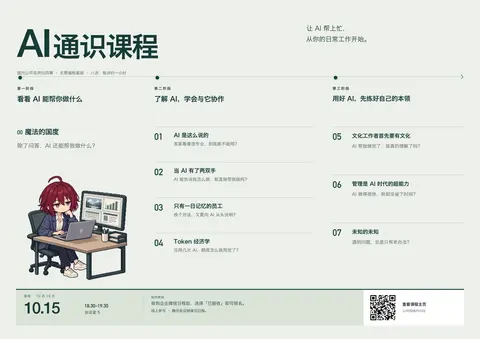
三版的结构已经分开了:A 用大标题和单个主角集中视线;B 把三阶段直接并排,便于看懂课程安排;C 用深色背景和横向分组增强海报感。八讲的标题与提问都从原文读取,第七讲也会有完整的位置。
干了 4 分钟,5 步
看 2 张图,运行 3 条命令,写 1 个文件,其他操作 2 次
等待子任务
Script completed
Wall time 0.0 seconds
Output:

{"key":"night","output_hint":"Generated images are saved to ~/.codex/generated_images/01a0eba1-a2de-7640-8df8-66d4bf5dac71 as ~/.codex/generated_images/01a0eba1-a2de-7640-8df8-66d4bf5dac71/exec-491f6412-3318-4faf-b2a0-8b45b22d8d47.png by default.\nIf you need to use a generated image at another path, copy it and leave the original in place unless the user explicitly asks you to delete it.\nThe generated image is already displayed to the user. There is no need to render it in the final response as a Markdown image or file link."}
[图片]
Generated images are saved to ~/.codex/generated_images/01a0eba1-a2de-7640-8df8-66d4bf5dac71 as ~/.codex/generated_images/01a0eba1-a2de-7640-8df8-66d4bf5dac71/exec-491f6412-3318-4faf-b2a0-8b45b22d8d47.png by default.
If you need to use a generated image at another path, copy it and leave the original in place unless the user explicitly asks you to delete it.
The generated image is already displayed to the user. There is no need to render it in the final response as a Markdown image or file link.
{"key":"mint","output_hint":"Generated images are saved to ~/.codex/generated_images/01a0eba1-a2de-7640-8df8-66d4bf5dac71 as ~/.codex/generated_images/01a0eba1-a2de-7640-8df8-66d4bf5dac71/exec-a1563a51-c489-40d1-a3f7-a722d56bf4af.png by default.\nIf you need to use a generated image at another path, copy it and leave the original in place unless the user explicitly asks you to delete it.\nThe generated image

…(中间省略 228 字)…

odex/generated_images/01a0eba1-a2de-7640-8df8-66d4bf5dac71/exec-a1563a51-c489-40d1-a3f7-a722d56bf4af.png by default.
If you need to use a generated image at another path, copy it and leave the original in place unless the user explicitly asks you to delete it.
The generated image is already displayed to the user. There is no need to render it in the final response as a Markdown image or file link.
思考:**Preparing laptop-lid edit**
Preparing laptop-lid edit
运行 mkdir -p assets/posters/variants && cp ~/.codex/generated_images/01a0eba1-a2de-7640-8df8-66d4bf5dac71/…
text(await tools.apply_patch("*** Begin Patch\n*** Update File: ~/code/ai-literacy-series/scripts/export-course-poster.py\n@@\n from pathlib import Path\n+import argparse\n@@\n root = Path(__file__).resolve().parent.parent\n-name = \"course-invitation\"\n-path = root / f\"assets/posters/{name}.html\"\n-html = path.read_text()\n-# Resolve SVG presentation attributes from the template's canonical CSS tokens.\n-# The HTML browser rendering already resolves these attributes natively.\n-colors = dict(re.findall(r\"--([a-z]+):\\s*(#[0-9A-Fa-f]{6})\", html))\n-html = re.sub(r'(fill|stroke)=\"var\\(--([a-z]+)\\)\"', lambda m: f'{m[1]}=\"{colors[m[2]]}\"', html)\n+parser = argparse.ArgumentParser(description=__doc__)\n+parser.add_argument(\"files\", nargs=\"*\", type=Path, help=\"HTML posters; defaults to the current invitation\")\n+parser.add_argument(\"--preview\", action=\"store_true\", help=\"Also export a 1680-pixel-wide preview\")\n+args = parser.parse_args()\n logging.getLogger(\"weasyprint\").setLevel(logging.ERROR)\n-page = HTML(string=html, base_url=str(path.parent))\n \n-result = page.render(stylesheets=[C

…(中间省略 2760 字)…

nts/illustration-mint-v1.png && cp ~/.codex/generated_images/01a0eba1-a2de-7640-8df8-66d4bf5dac71/exec-491f6412-3318-4faf-b2a0-8b45b22d8d47.png assets/posters/variants/illustration-night-v1.png && node scripts/build-poster-variants.mjs",workdir:"~/code/ai-literacy-series",max_output_tokens:1800}));
Script completed Wall time 0.2 seconds Output: {} {"chunk_id":"59c6df","wall_time_seconds":0.000006166,"exit_code":0,"original_token_count":17,"output":"已生成 3 版 A3 海报与对比页:assets/posters/variants/\n"}运行 uv run scripts/export-course-poster.py --preview assets/posters/variants/a-editorial.html assets/posters/variants/b-…
const results=await Promise.allSettled([
tools.view_image({path:"~/code/ai-literacy-series/assets/posters/variants/illustration-night-v1.png"}),
tools.exec_command({cmd:"uv run scripts/export-course-poster.py --preview assets/posters/variants/a-editorial.html assets/posters/variants/b-three-acts.html assets/posters/variants/c-night-session.html",workdir:"~/code/ai-literacy-series",sandbox_permissions:"require_escalated",justification:"导出三版 A3 海报用于视觉检查和对比。",prefix_rule:["uv","run","scripts/export-course-poster.py"],yield_time_ms:1000,max_output_tokens:1500})
]); for(const r of results){if(r.status==="fulfilled"&&r.value.image_url)image(r.value.image_url);else text(r);}
Script completed Wall time 7.3 seconds Output: [图片] {"status":"fulfilled","value":{"chunk_id":"3c0f05","wall_time_seconds":1.001577125,"session_id":91920,"original_token_count":0,"output":""}}调用 image_gen__imagegen
// @exec: {"yield_time_ms": 120000, "max_output_tokens": 1000}
const prompt=`Use case: precise-object-edit. Edit target: Image 1.
Make ONE correction: the visible exterior back of the laptop lid is physically incorrect because it displays a document. Replace all document/chart/text marks on that exterior back with a plain dark navy laptop lid with a small subtle non-branded inset rectangle. The actual display faces the character and is NOT visible to the viewer. Preserve the laptop silhouette, hinge, keyboard, trackpad, hand placement, and coherent perspective.
Also preserve everything else exactly: character identity, short wine-red hair and ahoge, deadpan face, report held in other hand, two folders, pose, precise pixel-art style, colors, framing, and genuinely transparent alpha background. Do not add any text, logos, or other objects. Do not redesign the illustration.`;
store("posterNightRepairPrompt",prompt);
const result = await tools.image_gen__imagegen({prompt,referenced_image_paths:["~/code/ai-literacy-series/assets/posters/variants/illustration-night-v1.png"],transparent_background:true});
store("posterArt_nightRepair",result);
text({output_hint:result.output_hint});
generatedImage(result);
Script completed Wall time 44.2 seconds Output: {"output_hint":"Generated images are saved to ~/.codex/generated_images/01a0eba1-a2de-7640-8df8-66d4bf5dac71 as ~/.codex/generated_images/01a0eba1-a2de-7640-8df8-66d4bf5dac71/exec-fed5b9a1-9d2e-4ae1-98e7-8252bd3716a4.png by default.\nIf you need to use a generated image at another path, copy it and leave the original in place unless the user explicitly asks you to delete it.\nThe generated image is already displayed to the user. There is no need to render it in the final response as a Markdown image or file link."} [图片] Generated images are saved to ~/.codex/generated_images/01a0eba1-a2de-7640-8df8-66d4bf5dac71 as ~/.codex/generated_images/01a0eba1-a2de-7640-8df8-66d4bf5dac71/exec-fed5b9a1-9d2e-4ae1-98e7-8252bd3716a4.png by default. If you need to use a generated image at another path, copy it and leave the original in place unless the user explicitly asks you to delete it. The generated image is already displayed to the user. There is no need to render it in the final response as a Markdown image or file link.运行 cp ~/.codex/generated_images/01a0eba1-a2de-7640-8df8-66d4bf5dac71/exec-fed5b9a1-9d2e-4ae1-98e7-8252bd3…
text(await tools.write_stdin({session_id:91920,chars:"",yield_time_ms:1000,max_output_tokens:1500}));
text(await tools.exec_command({cmd:"cp ~/.codex/generated_images/01a0eba1-a2de-7640-8df8-66d4bf5dac71/exec-fed5b9a1-9d2e-4ae1-98e7-8252bd3716a4.png assets/posters/variants/illustration-night-v2.png",workdir:"~/code/ai-literacy-series",max_output_tokens:500}));
const paths=["a-editorial","b-three-acts","c-night-session"];
for(const path of paths){const r=await tools.view_image({path:`~/code/ai-literacy-series/assets/posters/variants/${path}-preview.png`});image(r.image_url);}
Script completed Wall time 0.1 seconds Output: {"chunk_id":"38fba1","wall_time_seconds":0.000009875,"exit_code":0,"original_token_count":53,"output":"a-editorial: A3 PDF 420.00 × 297.00 mm; PNG 4961 × 3508 at 300 ppi\nb-three-acts: A3 PDF 420.00 × 297.00 mm; PNG 4961 × 3508 at 300 ppi\nc-night-session: A3 PDF 420.00 × 297.00 mm; PNG 4961 × 3508 at 300 ppi\n"} {"chunk_id":"17b8ce","wall_time_seconds":0.000009708,"exit_code":0,"original_token_count":0,"output":""} [图片] [图片] [图片]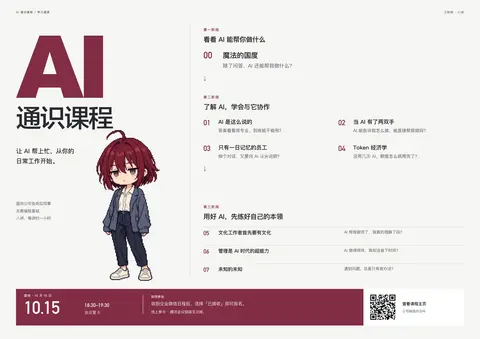
思考:**Refining three poster layouts**
Refining three poster layouts
思考:**Refining three poster layouts**
Refining three poster layouts
思考:**Refining three poster layouts** **Adding course micrograph…
Refining three poster layouts
Adding course micrographics
思考:**Refining three poster layouts** **Adding course micrograph…
Refining three poster layouts
Adding course micrographics
思考:**Refining three poster layouts** **Adding course micrograph…
Refining three poster layouts
Adding course micrographics
第一轮预览已经出来了。现在三版都去掉了拥挤的八个重复工位,插画也没有嵌入文字,标题和课程信息可以清楚排版。
我正在细查:补强 B 版里与课程对应的小图示,调整几处字号,并修正插画中“笔记本背面竟然显示了文档”的错误。
干了不到 1 分钟,1 步
运行 1 条命令,写 1 个文件
运行 node scripts/build-poster-variants.mjs;写入 build-poster-variants.mjs
text(await tools.apply_patch("*** Begin Patch\n*** Update File: ~/code/ai-literacy-series/scripts/build-poster-variants.mjs\n@@\n-const night = asset('assets/posters/variants/illustration-night-v1.png')\n+const night = asset('assets/posters/variants/illustration-night-v2.png')\n@@\n-function lesson(n) {\n+function detail(n) {\n+  const diagrams = {\n+    1: '<rect x=\"1\" y=\"2\" width=\"87\" height=\"27\" rx=\"2\"/><text x=\"10\" y=\"20\">AI:301</text><ellipse cx=\"66\" cy=\"15\" rx=\"19\" ry=\"11\" stroke=\"#963b4d\"/><path d=\"M99 16h25m-5-4 5 4-5 4\"/><text x=\"142\" y=\"20\">原文:3—5 楼</text><text x=\"248\" y=\"21\" font-size=\"19\">?</text>',\n+    2: '<path d=\"M2 2h19l7 7v20H2zM21 2v7h7M8 14h13M8 19h13M8 24h9M40 16h17m-5-4 5 4-5 4\"/><rect x=\"70\" y=\"3\" width=\"32\" height=\"25\" rx=\"1\"/><path d=\"M70 11h32M70 20h32M80 11v17M91 11v17M114 16h17m-5-4 5 4-5 4M145 2h20l7 7v20h-27zM165 2v7h7M152 15h13M152 20h13M184 16h17m-5-4 5 4-5 4\"/><rect x=\"215\" y=\"6\" width=\"31\" height=\"22\" rx=\"2\"/><path d=\"m216 7 14 11 15-11\"/><text x=\"262\" y=\"22\">待确认</text>',\n+    3: '<path d=\"M2 8V3h37l7 6h108

…(中间省略 4991 字)…

;padding:1.1mm 2mm;font-size:2.65mm;flex:none}.phase-0 .phase-heading h2{margin:0;font-size:5mm}.phase-0 .lesson{left:177mm;padding-left:16mm}\n*** End Patch"));
text(await tools.exec_command({cmd:"node scripts/build-poster-variants.mjs",workdir:"~/code/ai-literacy-series",max_output_tokens:800}));
Script completed Wall time 0.2 seconds Output: {} {"chunk_id":"1a8808","wall_time_seconds":0.000011166,"exit_code":0,"original_token_count":17,"output":"已生成 3 版 A3 海报与对比页:assets/posters/variants/\n"}
还是在这个基础上改吧,从一位专业的海报设计师的视角出发来改:
- 配色组合专业一点
- 文字就不要像素风,角色以及里面的画,可以再像素一点
- 图下的课程信息也应该要有设计感。之前的太素了。
- 还有就是标题,是否能更有噱头,当前这个标题有点太素了。
- 当前总体来说有点挤,也是真的,不过还好?
- (涉及他人,已略去)
注意,我们这个是公司内部的 AI 通识课程,所以人物仅仅只是占位符,其实并不重要来着。我们先讨论好,再开始?
(有删节)
(另有 3 张附图未收录)
好,先讨论,暂时不继续制作。就以你贴的这张“三阶段课程地图”为基础。我上一轮把角色的权重放得过高了;公司内部课程更应该突出同事的工作困惑,人物可以退到辅助位置。
愿意读的人能读懂,但海报还缺少一个让人开始读的理由。目前大标题、三个蓝色阶段标、橙色路径、红头发和八组粗体问题都在争夺注意力。文字量可以保留,首先要重新分配它们的分量。
我建议这样定方向。
标题从“课程名称”变成“一个值得停下来想的问题”。“AI 通识课程”保留为副标题。可以比较这三句:
标题 感觉 AI 做得这么快,为什么我还这么忙? 共鸣最直接,对应反复修改、核查和协作的实际困扰 会问 AI,然后呢? 简短、有悬念,也能贯穿三个阶段 让 AI 帮上忙,从你的日常工作开始。 亲切、稳妥,把现有副标题提升为主标题 我倾向第一句。用“我”来表达共同困惑,语气更适合同事之间。“提效三倍”可以借鉴它强调收益的思路,但具体倍数没有依据,也把这门课的价值缩得太窄。
视觉上,我建议做以下调整:
- 配色:墨蓝+雾白+青绿,少量琥珀色。墨蓝
#202C3C承担主要文字,雾白#F4F5F2做底,青绿#387C78统一阶段与路线,琥珀#C98D39只点亮日期等少数重点。降低现在亮蓝、橙色同时大面积出现的刺激感,插画也随之收敛颜色。 - 文字与插画分工明确。标题、阶段、问题、讲次以及图里的可读标签全部用普通字体。插画则增强清楚的像素颗粒,统一像素大小,减少现在这种介于像素画和光滑插画之间的效果。
- 人物减少,关键道具放大。保留少数角色作为叙事连接。核对原文、待确认的发送、项目资料、三次修改稿这些道具,比八次重复的人物更能说明课程。也能腾出空间,让细节真正看得清。
- 保留三阶段和连续路线,降低装饰的分量。路径变细,阶段标题形成统一的尺度;每格固定“问题—讲次—图示”的位置关系。八讲完整标题和痛点继续保留,通过对齐、间距和字重解决拥挤。
- 底部做成完整的活动信息区。把 10.15 做成第二个醒目的视觉点,旁边明确时间与会议室;中间安排企业微信报名和线上参与;右侧独立放二维码。二维码标注“查看课程主页”,与报名动作区分。它应该与整张海报共用颜色、对齐线和字体层级。
这样,读者第一眼看到与自己有关的问题,接着看懂三个阶段,愿意停留时再读八讲细节。原图里值得细看的内容还在,只是阅读顺序更明确了。
先定最影响整版的一件事:你更喜欢“AI 做得这么快,为什么我还这么忙?”这种工作共鸣,还是“会问 AI,然后呢?”这种简短悬念?(有删节)
- 配色:墨蓝+雾白+青绿,少量琥珀色。墨蓝
人物我觉得不用减少多少,每个阶段应该也还是要有这个人物的。上面这个其实有 75 分了
明白,这张已经成立,我们是在它的基础上精修。我刚才把改动幅度放大了。
人物数量基本保留,每个阶段都有角色,现有各讲里的人物也继续保留。同一个人贯穿不同工作场景,能把课程串成连续故事,这是这张图的优点。人物不需要成为宣传卖点,但可以承担叙事。
接下来的修改边界可以收紧为:
- 保留构图和内容关系:三阶段、八讲、连续路线,以及每讲的人物与道具组合。
- 优化配色:保留明快感,减少亮蓝色块和橙色路线同时抢眼,让主色、强调色各有用途。
- 重新排文字:全部使用普通字体;痛点最醒目,课程标题次之,图内标签再轻一些。现在太多文字同样粗重,是拥挤感的重要来源。
- 精修像素插画:统一像素颗粒,检查手势、道具、箭头和信息对应关系,让放大后的细节也合理。
- 整理间距和底部:给阶段之间、文字与插画之间留出呼吸;日期、时间、报名和二维码组成有层次的活动信息区。
标题也不用带着整张图重做。可以保留“AI 通识课程”的识别度,在现有标题区域加入一句更有吸引力的引导语,再比较效果。
所以我们现在的共识是:保留这张的故事感和丰富度,把颜色、字体、间距及活动信息打磨好。标题文案继续讨论,先不动图。
你给我的这几个标题选择,我都不太满意,我更喜欢之前那个,
(附图未收录)
这张参考的巧思很明确:粤语里的“对手”,既可以指竞争者,也可以指一双手。同一句话带出两种关系,读者会多看一眼。
换成普通话,我建议保留这个意思:
AI,
是你的对手,
还是你的双手?AI 通识课程
八讲 · 每讲约一小时 · 无需编程基础它也更能承接我们的三阶段:看看 AI 能做什么、学会与它协作、练好自己的本领。关注点落在人如何使用 AI,而且没有许下不可靠的效率承诺。
放回现有海报时,就在左上标题区调整:让“对手”和“双手”对齐,用字重或一处强调色形成呼应;“AI 通识课程”作为课程名称放在下面。保留下面的课程地图和人物,不照搬参考图的竖排。
标题可以沿着这句打磨,先不继续发散其他口号。
其实我觉得优化一下图片中的痛点描述,让它不要融入下面的漫画是不是好些?
(这里附了和上司讨论的截图,涉及他人,已略去)
(涉及他人,已略去)
把痛点从漫画中提出来,我赞成。不过,当前多数痛点已经位于插画上方;真正的问题是,它们与课名、图内标签的字重和颜色太接近,视觉上仍像漫画说明。
我建议保留现有地图,让每一格形成明确的顺序:
醒目的痛点问题 → 较小的讲次与课名 → 留白 → 漫画场景
痛点使用清晰的普通字体,位置统一、独立成行,角色和道具不侵入这块区域。这样,即使暂时不看漫画,也能顺着八个问题读懂“这门课与我有什么关系”。
文案可以先这样打磨,课名保持原样:
讲次 痛点文案草案 00 除了问答,AI 还能帮我干什么? 01 说得很专业,就能直接用? 02 能给建议,也能直接帮我做吗? 03 换个对话,又得从头交代? 04 没用几次,额度怎么就没了? 05 AI 做完了,我真的懂了吗? 06 AI 做得很快,我怎么没省下时间? 07 遇到新问题,怎么还是老办法? 漫画则继续保留人物和可推敲的细节,但减少解释性旁白。例如第六讲的三份反复修改的稿件、红色批注和时钟,本身就能表现困扰;上方的问题负责引起共鸣,具体怎么解决留给课程。
对于“不一定一开始就把老底透了”,我会把握这个程度:让同事清楚知道会讨论什么,同时保留对解决方法的好奇。三阶段、八讲和原有故事感都保留,先把痛点做成一条能快速扫读的文字主线。这比继续增加装饰,更能改善这张海报。
AI,
是你的对手,
还是你的双手?这个换成普通话,效果其实就差很多了,能不能上网找找更好的描述?
我去找一些中文 AI 课程、活动和广告的真实标题,重点看它们如何表达“人与 AI 的关系”,以及哪些写法在普通话里本身就有记忆点。
干了不到 1 分钟,1 步
搜索 3 次
搜索「AI 广告 文案 对手 双手 PREFACE」等 3 项
text(await tools.web__run({search_query:[{q:'AI 广告 文案 对手 双手 PREFACE'},{q:'AI 课程 海报 标题 人工智能 通识 人与AI'},{q:'AI 广告 不是 取代你 会用AI 文案'}],response_length:"long"}));Script completed Wall time 2.7 seconds Output: 如何利用AI分析竞争对手广告(提示词) | OpenAdLibrary (https://openadlibrary.com/zh-hans/blog/use-ai-to-analyze-competitor-ads/) citeturn9search0 [wordlim: 200] Published: 3 weeks ago; Crawled: 2 weeks ago; 利用AI分析竞争对手广告的最快方法是停止要求它“分析”单个截图,而是开始给它提供一批:从一个竞争对手或垂直领域拉取15到30个实时创意,将标题和每个图像的简短描述粘贴到LLM中,并要求它按钩子机制、声明类型和目标情感进行分组。 ... 一批广告能告诉你竞争对手在重复什么,这才是值得复制其结构的部分,而不是具体措辞。 # 如何利用AI分析竞争对手广告(提示词与工作流程) 用AI分析单个竞争对手广告几乎毫无意义。这里是基于批次的提示词序列,能真正揭示出竞争对手依赖哪些钩子和声明。 Image: OpenAdLibrary 编辑团队 OpenAdLibrary 编辑团队广告情报与原生广告研究 2026年9月4日 · 阅读约 6 分钟 本页内容 * 为什么单个广告分析失败 * 实际有效的提示词工作流程 * 该给模型输入什么(和不该输入什么) * 源数据来自哪里 * 一个实际示例结构 * 这个工作流程的常见错误 * 利用AI跟踪随时间的变化,而不仅仅是快照 * 这个工作流程不会告诉你什么 * 将分析转化为行动 利用AI分析竞争对手广告的最快方法是停止要求它“分析”单个截图,而是开始给它提供一批:从一个竞争对手或垂直领域拉取15到30个实时创意,将标题和每个图像的简短描述粘贴到LLM中,并要求它按钩子机制、声明类型和目标情感进行分组。-------------------------------------------------------------------------------- 竖版 9:16 高端科技商务公开课招生海报,扁平化简约科技风,… - 稿定 AI (https://www.gaoding.art/posts/197991458) citeturn9search1 [wordlim: 200] Published: 4 months ago; Crawled: 3 weeks ago; 现代简约科技风AI通识课招生海报,主标题为"AI通识课",副标题为"零基础入门AI工具实操",装饰文案为"AI赋能学习创作",卖点标签为"2天学习"、"零基础友好"、"三项实用技能"。包含课程信息:两期开班时间分别是7月13日-14日(周一、周二)、8月10日-11日(周一、周二),课程内容:AI制作网页、AI辅助编程、AI文档撰写,最终产出线上AI创意作品,适合零基础希望快速上手AI工具的学生。 ... 手绘风格图文卡片结尾页,标题:OpenClaw,职场人的效率神器;核心文案:"能动手的AI执行框架,搞定重复活、护隐私、适配工作流;普通职场人优先选「云部署+性价比模型」;行动建议:先从1个重复活(比如整理文件)开始试";背景延续蓝橙配色,搭配简笔职场人欢呼+效率提升示意图,整体积极有号召力,引导行动 1q004t6m9l-HB 现代简约科技风AI通识课招生海报,主标题为"AI通识课",副标题为"零基础入门AI工具实操" …(中间省略 13108 字)… -------------------------------------- 各位上班的键委们,我想问一下,ai工具出来之后对大家的工作有什么改变没有? (https://www.reddit.com/r/China_irl/comments/1n8a9gy) citeturn9reddit24 [wordlim: 200] Published: 1.1 years ago; Crawled: last year; 久而久之,大家就会觉得,用 AI 并不是帮自己省力,反而是给自己找麻烦。 ... 那我只要不是傻Ⅹ肯定就会让AI干。 ... 但是目前它还无法取代人类编程,一个不懂原理,只会写prompt的人不能做出实用的app。 ... 另外一个月100多的价格真的不贵,相当于请了一个你私人助理。 ... 广告文案这块已经没小编的事了,至少我这行业是这样,ai就完事了,出现的问题也很少
继续?
别说,像是这个,我觉得就非常带感 例如上面的纸条每个都放一个痛点什么的?
https://in.pinterest.com/pin/16958936097225271/
我觉得可以弄一个这个版本?
Codex(gpt-6-astra),9 月 29 日 15:45–17:01。已去掉系统提示词;路径、账号等信息已脱敏;工具的长输出已截断。