第三讲开场视频:初版制作与返工
从原作故事、概念隐喻和画风讨论开始,Claude Code 制作了 9 分 39 秒的手帐风初版。看过后,你指出故事画面太抽象、概念解释不够清楚,要求清理上下文后重新设计。这段记录截至返工准备,不包含站上 15 分 53 秒版本的后续制作;系统注入与无关私人资料有删节。
按下播放,用 454 秒看完这 454 分钟。
第三讲:《掟上今日子的备忘录》
我现在在准备这个课程的第三讲的 PPT,我的想法是打算用西尾维新这个作品中的人物设定,还有就是他里面的经典故事模版来将 Agent 这边的内容给串起来讲。
下面是我的一些点子 & 需要考虑的内容:
- 打算做一个十分钟的视频,像之前那样。一来先讲今日子的侦探小故事,第二幕就将这个小故事中的所有涉及到 Agent 的隐喻给揭晓。并以清晰易懂的方式让读者能够明白一个 Agent 的生命周期。
- 关于人物形象,我打算用 codex 的 image gen 来生成。到时候你可以 call 我来做这个设计。
- PPT 和视频的分工,我觉得应该是有区别的,PPT 在讲的时候,应该是利用视频中的一些关键元素来拆开,结合实际的 Agent 工具的使用情况来讲。
- 我之前有个主意就是,幕前幕后,关灯,开灯的设计。例如这个 PPT,夜间模式和白天模式,分别是两种情况?
- 我们这个 session 就是要做好这个视频。
上面所有的内容都有商量余地,不一定就要按着我说的来做。
[附件:今日子讲Agent概念大纲重构.pdf]
干了 3 分钟,8 步
读 2 个文件,运行 4 条命令,其他操作 2 次
思考:<thinking> Let me start. The user wants to plan a 10-minute …
<thinking>
Let me start. The user wants to plan a 10-minute video for lecture 3. This is a discussion/planning session first. Per AGENTS.md: "先与用户讨论本页讲什么、用什么例子,确认后制作". So first step is discussion.The PDF was read but I don't see its content in the result — "PDF file read: ... (1.2MB)". The content isn't shown. I need to read it with pages parameter perhaps. Let me re-read it.
Also memory: lecture-3-story memory, ai-tree-video memory (previous video "像之前那样"), stay-within-lecture-materials, design-taste, chinese-communication. Let me read relevant memory files.
First tool call should include update_plan. Plan:
- 读大纲 PDF 和第三讲现有材料
- 参考之前视频的做法
- 提出视频结构方案与用户讨论
...
Let me do the plan + read memory files + PDF.
update_plan
{
  "items": [
    {
      "content": "读大纲 PDF 和第三讲已有记录",
      "status": "in_progress"
    },
    {
      "content": "看之前视频的做法与产出形式",
      "status": "pending"
    },
    {
      "content": "提出视频结构方案供讨论",
      "status": "pending"
    }
  ],
  "scope": "first_task"
}
Plan shown (3 steps).
读取 今日子讲Agent概念大纲重构.pdf
{
  "file_path": "~/Downloads/今日子讲Agent概念大纲重构.pdf",
  "pages": "1-10"
}
PDF pages extracted: 8 page(s) from ~/Downloads/今日子讲Agent概念大纲重构.pdf (1.2MB) [图片] [图片] [图片] [图片] [图片] [图片] [图片] [图片]
运行 cd ~/.claude/projects/-Users-niracler-code-ai-literacy-series/mem…
cd ~/.claude/projects/-Users-niracler-code-ai-literacy-series/memory/ && cat lecture-3-story.md ai-tree-video.md (涉及无关私人记忆,已略去)
2026-10-09 discussion (nothing built yet, no files changed):

- Frame: the user rejected the realistic 「每天都是入职第一天的新同事」 frame and kept the magical premise from the 定位, an employee with only one day of memory. Cases inside it must be everyday office work anyone understands. The course-making directory stays the real case for chapter 4 only (outline 4.1/4.2), not the story body.
- Concept set I proposed (user did not object, not formally confirmed): three groups in the 「本讲新增概念」 box: 会话(Session)· 上下文窗口(Context Window); 工作区(Workspace)· 记忆(Memory); 技能(Skill). Umbrella 上下文工程(Context Engineerin

…(中间省略 24992 字)…

(涉及无关私人记忆索引,已略去)
运行 ls course/课程内容/ | head -50 && echo --- && cat "course/课程内容/03 - 掟上今日子的备忘录.md" &…
ls course/课程内容/ | head -50 && echo --- && cat "course/课程内容/03 - 掟上今日子的备忘录.md" && echo --- && ls course/课程内容/03 2>/dev/null; ls slides/pages/03 2>/dev/null; ls slides/*.md; echo ---; ls -la assets/videos/ai-tree/ 2>/dev/null
00 - 魔法的国度.md
01
01 - AI 是这么说的.md
02
02 - 当 AI 有了两双手.md
03 - 掟上今日子的备忘录.md
04 - Token 经济学.md
05 - 文化工作者首先要有文化.md
06 - 管理是 AI 时代的超能力.md
07 - 未知的未知.md
---
---
aliases:
tags:
date: 2026-09-07
modified: 2026-10-11
---

> [!abstract] 本讲定位
> 第三讲借用西尾维新小说《掟上今日子的备忘录》的人物设定,以「忘却侦探」掟上今日子为贯穿故事:她保有推理的本领,却一睡着就会忘掉当天的一切,所以原则上只接当天能破的案子。如果一项工作需要好几天,需要为她准备哪些信息,她又怎样利用这些信息了解任务、找到资料、遵循方法并接续进展?故事情节由课程自编,不要求学员读过原作。
>
> 围绕这一过程,解释一次会话开始时上下文(Context)中有哪些内容,以及工作过程中如何获取和补充信息,引出会话(Session)、上下文窗口(Context Window)、工作区(Workspace)、技能(Skill)、记忆(Memory)等概念及其相互关系。
>
> 在此基础上,以本课程的制作目录为实例,介绍基础的上下文工程(Context Engineering):怎样组织工作资料、说明和可复用的方法,让 AI 能够找到所需信息、理解工作要求,并在新的会话中继续推进任务。
>
> 本讲希望学员理解,营造适合 AI 协作的环境,本身就是使用 AI 的重要部分;不必把所有要求和背景都寄托在一段持续的聊天中。

^lecture-position

## 1 为什么总要从头交代

### 1.1 会话(Session):又要和她重新认识一次

用一两句话交代人物设定:今日子推理的本领一直都在,一睡着却会忘掉当天的一切,委托人每次来,她都说「初次见面」。对照新会话接不上昨天的进展、需要重新交代背景的困扰,引出会话(Session)。「一睡就忘」是故事设定,真实的边界是一次会话,不是固定的时

…(中间省略 1723 字)…

ff  28683564 Oct 15 16:25 landscape.mp4
-rw-r--r--@ 1 niracler  staff     74532 Oct 15 16:25 landscape.webp
-rw-r--r--@ 1 niracler  staff  28696200 Oct 15 16:25 portrait.mp4
-rw-r--r--@ 1 niracler  staff     69658 Oct 15 16:25 portrait.webp
运行 mkdir -p /private/tmp/claude-501/-Users-niracler-code-ai-literacy-series/743b3b…
mkdir -p /private/tmp/claude-501/-Users-niracler-code-ai-literacy-series/743b3bc9-18e0-4b84-934a-b0109f92ec0d/scratchpad/aitree && cd /private/tmp/claude-501/-Users-niracler-code-ai-literacy-series/743b3bc9-18e0-4b84-934a-b0109f92ec0d/scratchpad/aitree && which ffmpeg ffprobe && ffprobe -v error -show_entries format=duration:stream=codec_type,width,height,r_frame_rate -of compact ~/code/ai-literacy-series/assets/videos/ai-tree/landscape.mp4 && for t in 5 40 90 150 210 270; do ffmpeg -v error -y -ss $t -i ~/code/ai-literacy-series/assets/videos/ai-tree/landscape.mp4 -frames:v 1 -vf scale=640:-1 f$t.jpg; done; ls
/opt/homebrew/bin/ffmpeg
/opt/homebrew/bin/ffprobe
stream|codec_type=video|width=1280|height=720|r_frame_rate=24/1
stream|codec_type=audio|r_frame_rate=0/0
format|duration=313.708333
f150.jpg
f210.jpg
f270.jpg
f40.jpg
f5.jpg
f90.jpg
Shell cwd was reset to ~/code/ai-literacy-series
运行 cd /private/tmp/claude-501/-Users-niracler-code-ai-literacy-series/743b3bc9-18e…
cd /private/tmp/claude-501/-Users-niracler-code-ai-literacy-series/743b3bc9-18e0-4b84-934a-b0109f92ec0d/scratchpad/aitree && ffmpeg -v error -y -i f5.jpg -i f40.jpg -i f90.jpg -i f150.jpg -i f210.jpg -i f270.jpg -filter_complex "[0][1][2]hstack=3[a];[3][4][5]hstack=3[b];[a][b]vstack" grid.jpg && ls -la grid.jpg
-rw-r--r--@ 1 niracler  wheel  127970 Oct 26 10:18 grid.jpg
Shell cwd was reset to ~/code/ai-literacy-series
读取 grid.jpg
{
  "file_path": "/private/tmp/claude-501/-Users-niracler-code-ai-literacy-series/743b3bc9-18e0-4b84-934a-b0109f92ec0d/scratchpad/aitree/grid.jpg"
}
[图片]
wrap_up
{
  "recap": "我读完了 Gemini 大纲、第三讲现有的定位和大纲,也看了 ai-tree 视频的样帧。下面是视频结构建议和对你五点的回应,文件都没改。",
  "ask": "视频的案子用原作的须永昼兵卫案,还是借原作的套路自编一个?",
  "actions": [
    {
      "label": "自编案子",
      "message": "自编案子,保留百份资料、三天期限、熬夜失败、睡一觉后靠索引破案这套骨架。"
    },
    {
      "label": "用原作案子",
      "message": "用原作的须永昼兵卫案,先核实原作情节。"
    }
  ]
}
Shown in the next-step box.(涉及工具内部操作指令,已略去)
我读完了 Gemini 的大纲和第三讲现有的定位、大纲,也看了 ai-tree 视频的几帧。那支视频 5 分 14 秒,纸面手绘风,每一帧都由代码画出,字幕放在底部。下面先说总体判断,再回应你的五点。
总体判断
Gemini 这版最有用的是一条主线:今日子熬夜硬撑,桌上越堆越满,结果失败;改造事务所后,她睡一觉反而破了案。这条线本身就在论证上下文工程(Context Engineering)为什么有用,比一站讲一个概念的走法好。我建议在它上面再收紧一步:故事的主角是委托人,也就是观众,不是今日子。 今日子从头到尾没有变,推理本领一样,一睡就忘也一样。变的是委托人为她准备的事务所。本讲定位的最后一句说,营造适合 AI 协作的环境,本身就是使用 AI 的重要部分。故事的成长落在「你」身上,正好讲的就是这句话。
★ Insight ─────────────────────────────────────- 醒来第一眼看到的东西,可以按「谁写的」分成三样:天花板上的字是别人写好的,每天都一样,对应系统提示词(System Prompt);桌上的委托书写的是这个案子的要求,对应项目指令(Project Instructions);睡前留下的备忘录是她自己写给明天的,对应记忆(Memory)。Gemini 版把「手臂上的字」一会儿当系统提示词,一会儿当记忆,这里要统一。
- 书架上的手册平时只露出书脊,要用时才抽出来读。真实的技能(Skill)也是这样:开始时只加载名称和描述,正文按需读取。这个细节画出来,一眼就能看懂。
─────────────────────────────────────────────────
对你五点的回应
- 十分钟,分两幕:同意。第一幕用 5~6 分钟讲完一个完整的案子,第二幕用 4 分钟左右揭晓。第二幕只给每个道具点名,再画出一天的循环:醒来,读桌上的东西,查案取资料,桌面渐满,写备忘录,睡着,第二天醒来。这个循环就是一次会话(Session)的生命周期。第二幕不展开解释,解释留给 PPT,否则上课时会重复视频。
- 用 codex 生成人物:可以,到这一步时我写一份简短的说明给你。提醒一点:视频会和 ai-tree 一样放到网站上,建议画一位致敬原作的白发眼镜侦探,不照搬动画或日剧的造型。姿态控制在五个左右:醒来看天花板、伏案、翻手册、写备忘录、睡着。图越少,角色越不容易走样。
- PPT 和视频的分工:同意你的方向。视频负责建立整体印象和情绪,PPT 负责看实物:每页先放视频里的一个道具,再切到真实工具里对应的东西,例如项目说明文件、上下文用量、技能目录、课程目录里的进展记录。
- 幕前幕后,关灯开灯:这两层意思可以在同一个瞬间合上。第一幕结尾,她写完备忘录睡着,灯灭了,这一次会话也结束了。第二幕在黑暗中亮起幕后的灯,同一间事务所变成蓝图,每件道具亮出自己的名字。到了 PPT 上,可以延续成浅色页讲故事、深色页看真实工具(终端本来就是深色)。深浅按页决定,不靠全局切换。
- 这个 session 只做视频:好。PPT 这边只定分工原则,不动 slides。
先要定的一件事
10 月 9 日你定过一条规则:情节由课程自编,只借人物设定(最快的侦探,一睡就忘),不用厄介的名字,也不用原作的具体案件,学员不需要读过原作。Gemini 这版的主线直接用了原作的须永昼兵卫案(百本著作),也用了厄介。
你这次说的「经典故事模版」,我理解是原作每一集的套路:接到委托,说一句「初次见面」,当天破案,然后忘掉。这个套路可以直接用。具体的案子用不用原作的,需要你来定。我倾向自编,但保留骨架:上百份资料、三天期限、熬夜失败、睡一觉后靠索引破案。这样每条线索都可以围绕概念来设计,也不用逐条核对原作。用原作案子的好处是可以说「原著就是这么写的」,但须永案的具体情节我还没核实,用的话要先查证。
- 我觉得我们编的稿子没有西尾维新的的稿子好,所以我倾向于你再调研一下?西尾维新那边具体的故事?再找一些?或者我们可以几个故事串起来讲?这个视频的风格也值得讨论。
- 第二幕还是要展开解释的,应该这个视频是闭环的,时间我们不一定要限制在 10min 内,PPT 的区分点是具体落实到 workbuddy 这个工具上,这个概念是对应那个 GUI 的功能。
- 你觉得还有什么值得 review 的吗?还有就是要如何做到通俗易懂,能深入浅出?
干了 13 分钟,27 步
搜索 8 次,打开 9 个网页,运行 2 条命令,其他操作 8 次
update_plan
{
  "items": [
    {
      "content": "读之前两次调研的结论",
      "status": "in_progress"
    },
    {
      "content": "调研忘却侦探系列各卷案件",
      "status": "pending"
    },
    {
      "content": "挑出能对应概念的情节",
      "status": "pending"
    },
    {
      "content": "整理视频风格与讲法选项",
      "status": "pending"
    },
    {
      "content": "回复 review 点与深入浅出方法",
      "status": "pending"
    }
  ],
  "scope": "continuation"
}
Plan shown (5 steps).
查找工具
{ "query": "select:mcp__ccd_session_mgmt__get_session,mcp__ccd_session_mgmt__export_transcript,mcp__ccd_session_mgmt__search_session_transcripts,WebSearch,WebFetch", "max_results": 5 }search_session_transcripts
{
  "query": "置手紙",
  "include_archived": true,
  "limit": 10
}
No matching sessions found.
get_session
{
  "session_id": "local_f03ddddf-d9de-4763-972d-d6b757870349"
}
Session local_f03ddddf-d9de-4763-972d-d6b757870349 not found.
search_session_transcripts
{
  "query": "今日子",
  "include_archived": true,
  "limit": 10
}
检索结果中的课程相关片段:第 3 讲确定以《掟上今日子的备忘录》为故事主线,章节大纲已经重写。 (涉及私人周报及无关项目资料,已略去)
update_plan
{
  "advance": true
}
Plan updated: step 2 of 5 is in progress.
打开 ja.wikipedia.org/wiki/%E5%BF%98%E5%8D%B4%E6%8E%A2%E5%81%B5%…
{
  "url": "https://ja.wikipedia.org/wiki/忘却探偵シリーズ",
  "prompt": "List every volume of the series with its publication year, and for each volume list every story/chapter (case) with a 2-4 sentence plot summary: the client, the case, the time limit, how Kyoko solves it, and any special use of her memory loss (sleeping, notes on her arm, ceiling text, staying awake, memos, etc.). Also list the basic character settings of 掟上今日子 (forgetting rule, 最速の探偵, 置手紙探偵事務所, notes on arm, ceiling writing, fee, confidentiality) and 隠館厄介. Quote Japanese terms exactly."
}
The article doesn't contain per-case plot summaries, client details, time limits, or solution methods for each story. It gives only volume titles, dates, and sources, so I can't provide the case-by-case breakdown you asked for without inventing details. Below is what the article does cover. ## Volumes (講談社BOX) | No. | Title | First edition | Source | |---|---|---|---| | 1 | 掟上今日子の備忘録 | 2014 | Original | | 2 | 掟上今日子の推薦文 | 2015 | Not stated | | 3 | 掟上今日子の挑戦状 | 2015 | *Mephisto* (3 stories) | | 4 | 掟上今日子の遺言書 | 2015 | Original | | 5 | 掟上今日子の退職願 | 2015 | Not stated | | 6 | 掟上今日子の婚姻届 | 2016 | Not stated | | 7 | 掟上今日子の家計簿 | 2016 | *Mephisto* and original | | 8 | 掟上今日子の旅行記 | 2016 | Original | | 9 | 掟上今日子の裏表紙 | 2017 | Not stated | | 10 | 掟上今日子の色見本 | 2018 | Not stated | | 11 | 掟上今日子の乗車券 | 2018 | *Mephisto* and original | | 12 | 掟上今日子の設計図 | 2020 | Original | | 13 | 掟上今日子の鑑札票 | 2021 | Not stated | …(中间省略 1891 字)… 罪体質: he is often falsely accused of crimes. He cannot lie, and he regularly seeks help from detectives, with Kyoko as his most frequent one. - Admires Kyoko as a fan, but every time he hires her she greets him with 「初めまして」, which hurts him.
打开 ja.wikipedia.org/wiki/%E6%8E%9F%E4%B8%8A%E4%BB%8A%E6%97%A5%…
{
  "url": "https://ja.wikipedia.org/wiki/掟上今日子の備忘録",
  "prompt": "Give a per-episode plot summary of the TV drama (each of the 10 episodes): the client, the case, the deadline, how Kyoko solves it, and any use of her memory loss (sleeping, staying awake, notes written on her arm/body, ceiling message, memo, 初めまして, cleaning up). Also: any summary of the novel volume 1's chapters. Quote Japanese terms exactly. If the page doesn't have plots, say so plainly."
}
The page doesn't have per-episode plot summaries or chapter summaries for the first novel. It only gives episode metadata, short promotional taglines, and the basic premise. **TV drama (10 episodes, Oct 10 to Dec 12, 2015)** The episode list gives each air date, a promotional subtitle, the source novel for some episodes, and the director. The subtitles are marketing copy and don't describe what happens. Here is what they hint at, in my own words: - **Ep. 1 (Oct 10):** Kyoko's first case, introduced with a lead-in about her sleep-based memory loss. - **Ep. 2 (Oct 17):** A swimming coach's murder with a romantic angle. - **Ep. 3 (Oct 24):** A stolen painting, with Kyoko going undercover in disguise. - **Ep. 4 (Oct 31):** A contest-style case involving many competitors. - **Ep. 5 (Nov 7):** A mystery during a trip, with a rival detective. - **Ep. 6 (Nov 14):** A girls' school murder. - * …(中间省略 834 字)… no chapter breakdown or plot summary. For episode plots, the NTV official site linked on the page (ntv.co.jp/okitegami) or a dedicated drama recap would be better sources. For the novel's chapters, read the book or look for a reader guide.
搜索「掟上今日子の備忘録 小説 第一話 第二話 第三話 あらすじ ネタバレ 須永昼兵衛」
{
  "query": "掟上今日子の備忘録 小説 第一話 第二話 第三話 あらすじ ネタバレ 須永昼兵衛"
}
Web search results for query: "掟上今日子の備忘録 小説 第一話 第二話 第三話 あらすじ ネタバレ 須永昼兵衛" Links: [{"title":"掟上今日子の備忘録(単行本版)のレビュー【あらすじ・感想・ネタバレ】 - 電子書籍・無料漫画ならブックライブ","url":"https://booklive.jp/review/list/title_id/283310/vol_no/001"},{"title":"掟上今日子の備忘録(文庫版)のレビュー【あらすじ・感想・ネタバレ】 - 電子書籍・無料漫画ならブックライブ","url":"https://booklive.jp/review/list/title_id/60009939/vol_no/001"},{"title":"掟上今日子の備忘録(ドラマ)のあらすじ一覧","url":"https://thetv.jp/program/0000876428/plot/"},{"title":"掟上今日子の備忘録 / 西尾維新、眠ると記憶がリセットされる忘却探偵の活躍、あらすじと感想 - PHMPK.LOG","url":"https://phmpk.hatenablog.com/entry/2015/08/15/073000"},{"title":"掟上今日子の備忘録(完結)","url":"https://sp.handycomic.jp/product/index/title_id/60002561"},{"title":"【ドラマ感想】掟上今日子の備忘録3〜4話を観た【ネタバレあり】|鯖の味噌煮","url":"https://note.com/saba_miso1/n/nad569df24054"},{"title":"掟上今日子の備忘録(漫画) - マンガペディア","url":"https://mangapedia.com/%E6%8E%9F%E4%B8%8A%E4%BB%8A%E6%97%A5%E5%AD%90%E3%81%AE%E5%82%99%E5%BF%98%E9% …(中间省略 1418 字)… 代わりに、裸になれという条件を出すという締めくくりです。 **補足**:2015年の日本テレビのドラマ版(新垣結衣主演)でも、須永(演:原岡見伍)のエピソードが映像化されています。ただしドラマでは、原稿探しを依頼する編集者は紺藤ではなく重信(神保悟志)に変更されています。 (涉及工具内部操作指令,已略去)打开 netabare1.com/3676.html
{
  "url": "https://netabare1.com/3676.html",
  "prompt": "Summarize in detail, story by story (第一話 to 第五話), what happens, with special attention to: (1) how Kyoko's memory loss is used (sleeping, being drugged, notes written on her arm or body, the ceiling text, staying awake for days); (2) in the 須永昼兵衛 chapters (4-5): how many books she reads, how many days she stays awake, what happens to her condition, whether she falls asleep / sleeps on purpose, what notes she leaves for herself, and exactly how she reaches the conclusion (桃田朝美, the 7 novels). Report only what the page says."
}
The page is a review of the novel's first volume, not a full chapter-by-chapter summary. It covers only parts of the stories you asked about, and it does not number the 須永昼兵衛 section as 第四話 or 第五話. Where the page is silent, I say so. **Overview of the memory-loss setup** - Kyoko (掟上今日子) forgets everything once she sleeps, so she must solve each case before sleeping. She does not take cases that run past one day. - She keeps memories from before the memory loss began. The page quotes her saying that if she told the reviewer which novel she last remembered, that would reveal when her memory loss started. - She writes important information on her body in marker. Her arm reads "私は掟上今日子。25歳。置手紙探偵事務所所長。白髪、眼鏡。記憶が1日ごとにリセットされる". - The ceiling of her room reads "お前は今日から掟上今日子。探偵として生きていく". The reviewer argues this implies "掟上今日子" is not her birth name. - The page does not mention drugging, staying …(中间省略 1707 字)… nd 桃田. - **Notes Kyoko left for herself:** The page does not mention any notes written in this section. - **Sleep and condition:** The page does not say whether she slept deliberately or what happened to her condition during these chapters.
打开 wakatake-topics.com
{
  "url": "https://wakatake-topics.com/?p=2346",
  "prompt": "Summarize story by story what happens in volume 1. Focus on: how Kyoko's memory loss is used in each story (sleeping, being drugged with sleeping pills, notes written on her arm/body, ceiling text, staying awake). For the 須永昼兵衛 chapters: how many books she reads, how many days she stays awake, her physical/mental state, whether she ends up sleeping (on purpose or not), what she writes on herself before sleeping, and how she reaches the final conclusion. For 第一話 (SD card): how the culprit tries to use her memory loss (e.g., drugging her) and how notes on her body help her. Report only what the page says."
}
**Story 1: 消えたSDカード (The Missing SD Card)** - Culprit: Ms. Gifubu, a female researcher. Kyoko is drugged and falls asleep, which resets her memory. - Kyoko wakes and reads notes written on her body, under her clothes, that say she is a detective and currently working. - Using that information, she announces she has found the SD card's location and watches everyone's reactions. The one person who looks elsewhere is the culprit. - The notes on her body are how she recovers her bearings after the memory reset. **Story 2: 百万取引 (The Million-Yen Deal)** - The page does not describe any use of Kyoko's memory loss in this story. - The solution centers on the serial numbers of the 10,000-yen bills, which the manga artist used as passwords. The culprit was his assistant. **Story 3: 須永昼兵衛の遺作 (Sunaga Hirubei's Last Work)** - The page does not describe Kyoko sleeping, being drugged, or writing note …(中间省略 1676 字)… test work. The page says she is Sunaga's former partner, who died by suicide, and February is her birthday month. - Because the newest work still shows her alive and the story seems to continue, Kyoko concludes Sunaga did not intend to die.
打开 zh.moegirl.org.cn/%E5%BF%98%E5%8D%B4%E4%BE%A6%E6%8E%A2%E7%B…
{
  "url": "https://zh.moegirl.org.cn/忘却侦探系列",
  "prompt": "List each volume and each story inside with its plot summary, especially any use of Kyoko's memory rules: notes on her body, ceiling text, sleeping on purpose to reset, staying awake, being drugged, someone forging or erasing her notes, her 备忘录. Report only what the page says."
}
The web page content you provided contains only the title: "忘却侦探系列 - 萌娘百科 万物皆可萌的百科全书" (roughly, "Obliviion Detective Series - Moegirlpedia"). It has no volume list, story summaries, or details about Kyoko's memory rules, notes, ceiling text, sleep resets, drugging, or forged or erased memos. If you paste the full text of the page, I can list each volume and story and summarize the plot points you asked about, reporting only what the page says.
思考:核实了须永昼兵卫案的原作情节:今日子为读完须永百本著作连续熬夜,速度变慢,最终在浴室睡倒,醒来失忆,仅凭身上写的作品列表…
核实了须永昼兵卫案的原作情节:今日子为读完须永百本著作连续熬夜,速度变慢,最终在浴室睡倒,醒来失忆,仅凭身上写的作品列表反而看出规律破案——这与你要的「熬夜失败、重启后靠索引破案」高度吻合。接下来我查系列其他几卷的案子。
搜索「掟上今日子 わざと眠る 記憶をリセット 推理 どの巻 ネタバレ」
{
  "query": "掟上今日子 わざと眠る 記憶をリセット 推理 どの巻 ネタバレ"
}
Web search results for query: "掟上今日子 わざと眠る 記憶をリセット 推理 どの巻 ネタバレ" Links: [{"title":"掟上今日子の備忘録 第1話","url":"https://www.hulu.jp/watch/60627573"},{"title":"掟上今日子の鑑札票のレビュー【あらすじ・感想・ネタバレ】 - 電子書籍・無料漫画ならブックライブ","url":"https://booklive.jp/review/list/title_id/283310/vol_no/013"},{"title":"『掟上今日子の鑑札票』あらすじと感想(ネタバレ含む) - 講談杮落とし","url":"https://kokera25falldown.hatenablog.com/entry/2021/04/22/223336"},{"title":"掟上今日子の備忘録 / 西尾維新、眠ると記憶がリセットされる忘却探偵の活躍、あらすじと感想 - PHMPK.LOG","url":"https://phmpk.hatenablog.com/entry/2015/08/15/073000"},{"title":"ドラマ「掟上今日子の備忘録」最終回10話あらすじ 今日子の正体が判明する? - 今日も明日もドラマライフ","url":"https://dramalife-blues.hatenablog.com/entry/okitegami-finalepisode"},{"title":"掟上今日子の備忘録(漫画) - マンガペディア","url":"https://mangapedia.com/%E6%8E%9F%E4%B8%8A%E4%BB%8A%E6%97%A5%E5%AD%90%E3%81%AE%E5%82%99%E5%BF%98%E9%8C%B2-m4r39v2oe"},{"title":"掟上今日子の備忘録-最終回のあらすじと結末ネタバレ","url":"https://netabare1.com/3777.html"},{ …(中间省略 865 字)… 知識が失われてしまっていた。 **次に調べるなら:** 須永の事件で眠りが意図的だったかどうかを確かめる必要があります。他の巻にもわざと寝る場面があるかもしれません。候補として、確認できていませんが『挑戦状』『推薦文』『家計簿』あたりを個別に検索することをおすすめします。 (涉及工具内部操作指令,已略去)搜索「掟上今日子の挑戦状 あらすじ ネタバレ 三話 腕 メモ」
{
  "query": "掟上今日子の挑戦状 あらすじ ネタバレ 三話 腕 メモ"
}
Web search results for query: "掟上今日子の挑戦状 あらすじ ネタバレ 三話 腕 メモ" Links: [{"title":"掟上今日子の設計図のレビュー【あらすじ・感想・ネタバレ】 - 漫画・ラノベ(小説)・無料試し読みなら、電子書籍・コミックストア ブックライブ","url":"https://booklive.jp/review/list/title_id/283310/vol_no/012"},{"title":"『掟上今日子の挑戦状』既刊・関連作品一覧|講談社","url":"https://www.kodansha.co.jp/titles/1000025910"},{"title":"掟上今日子の忍法帖のレビュー【あらすじ・感想・ネタバレ】 - 電子書籍・無料漫画ならブックライブ","url":"https://booklive.jp/review/list/title_id/283310/vol_no/014"},{"title":"掟上今日子の鑑札票のレビュー【あらすじ・感想・ネタバレ】 - 電子書籍・無料漫画ならブックライブ","url":"https://booklive.jp/review/list/title_id/283310/vol_no/013"},{"title":"掟上今日子の挑戦状(単行本版)のレビュー【あらすじ・感想・ネタバレ】 - 漫画・ラノベ(小説)・無料試し読みなら、電子書籍・コミックストア ブックライブ","url":"https://booklive.jp/review/list/title_id/283310/vol_no/003"},{"title":"掟上今日子の挑戦状 / 西尾維新、アリバイ・密室・ダイイングメッセージを見事に看破する忘却探偵 - PHMPK.LOG","url":"https://phmpk.hatenablog.com/entry/2015/09/12/073000"},{"title":"『掟上今日子の鑑札票』あらすじと感想(ネタバレ含む) - 講談杮落とし" …(中间省略 2016 字)… .LOG review (phmpk.hatenablog.com/entry/2015/09/12/073000) or the ギスカブログ spoiler review (gisukajika.hatenablog.com/entry/bokyakutantei3). (涉及工具内部操作指令,已略去)打开 gisukajika.hatenablog.com/entry/bokyakutantei3
{
  "url": "https://gisukajika.hatenablog.com/entry/bokyakutantei3",
  "prompt": "For each of the three stories (アリバイ証言, 密室講義, 暗号表), summarize the plot and solution, and specifically how Kyoko's one-day memory is used or exploited (by the culprit, the client, or by Kyoko herself): e.g., the culprit using her as a witness because she'll forget, her notes on her body, a client lying to her, sleeping, staying awake, a deadline. Report only what the page says."
}
The page doesn't use the titles you gave (アリバイ証言, 密室講義, 暗号表). It describes the three stories as an alibi case, a locked-room case, and a dying-message case, so I've mapped them that way. It also gives only brief summaries, not full plots, and doesn't describe the solutions in detail. **1. Alibi case (アリバイ崩し)** - A suspect is found electrocuted in a bathroom. The suspect seems to have an alibi because they chatted with a stranger at a café at the time. - That stranger was Kyoko. Because her memory had reset, the alibi became incomplete. - The suspect was still not at the scene at the time of death, so the investigation considers other possibilities, such as the time of death being off. - The reviewer says the case turns out not to be a crime, which they found a bit disappointing. - The page doesn't say the culprit chose her as a witness because she would forget. It only says the meeting …(中间省略 938 字)… ed detail is the series premise. Her memory lasts one day and resets when she sleeps, so she must solve each case within that day. The page doesn't mention notes on her body, sleep or staying awake as plot devices, or a client lying to her.
搜索「掟上今日子の裏表紙 あらすじ ネタバレ 留置場 目覚める 死体 記憶」
{
  "query": "掟上今日子の裏表紙 あらすじ ネタバレ 留置場 目覚める 死体 記憶"
}
Web search results for query: "掟上今日子の裏表紙 あらすじ ネタバレ 留置場 目覚める 死体 記憶" Links: [{"title":"掟上今日子の裏表紙(単行本版)のレビュー【あらすじ・感想・ネタバレ】 - 漫画・ラノベ(小説)・無料試し読みなら、電子書籍・コミックストア ブックライブ","url":"https://booklive.jp/review/list/title_id/283310/vol_no/009"},{"title":"『掟上今日子の裏表紙』(西尾 維新,VOFAN) 製品詳細 講談社","url":"https://www.kodansha.co.jp/book/products/0000190305"},{"title":"掟上今日子の裏表紙(単行本版) - 西尾維新/VOFAN - 電子書籍・無料漫画ならブックライブ","url":"https://booklive.jp/product/index/title_id/283310/vol_no/009"},{"title":"掟上今日子の備忘録(ドラマ)のあらすじ一覧","url":"https://thetv.jp/program/0000876428/plot/"},{"title":"『掟上今日子の鑑札票』あらすじと感想(ネタバレ含む) - 講談杮落とし","url":"https://kokera25falldown.hatenablog.com/entry/2021/04/22/223336"},{"title":"【感想】掟上今日子の裏表紙 - うつろう好きを書き留めて","url":"https://mako-books.hatenablog.jp/entry/2024/04/26/110736"},{"title":"ドラマ「掟上今日子の備忘録 第9話」あらすじ・ネタバレ","url":"https://saku-ara.com/archives/649"},{"title":"掟上今日子の裏表紙のあらすじ感想!逮捕され容疑者になった今日 …(中间省略 945 字)… asu.com)。 真犯人の正体や「未必の故意」の詳細を知りたい場合は、taokasu.com/okitegami-back-cover/ と mako-books.hatenablog.jp のネタバレ記事を「真相」や「犯人」の語で絞り込んで再検索するのがよさそうです。 (涉及工具内部操作指令,已略去)打开 taokasu.com/okitegami-back-cover/
{
  "url": "https://taokasu.com/okitegami-back-cover/",
  "prompt": "Summarize the plot of 掟上今日子の裏表紙 in detail: how Kyoko wakes up with no memory at the scene, what she has (notes on her body? anything written?), how she investigates from the cell, what role 隠館厄介 plays as 「忘却探偵の専門家」 (what does his 今日子さん講義 teach 日怠井 about how to work with her?), and the final truth. Report only what the page says."
}
**Setup:** Kyoko is arrested for 強盗殺人 (robbery-murder). The page says the scene was a locked room in a wealthy family's home, and she was found asleep beside the body, covered in blood and holding the weapon. The page doesn't describe her waking up. By the time she appears, she has already lost her memory, so she doesn't know why she's there. **Items and writing:** The page never says she had notes on her body or anything written on her person. The only written clue it mentions is a dying message her previous self left for her current self. Ryō reads it at the scene, but the page doesn't say what form it took. Two other details matter: her business card is missing, and she carries euro currency. **Investigation from the cell:** Kyoko is relaxed in the cell. She wears costumes, has an officer buy her bento, reads, breaks the cell's security, sleeps, and leaves the reasoning to others. H …(中间省略 1268 字)… eelings. Ryō proves Kyoko's innocence but does not identify the real culprit. The page calls the culprit's reveal anticlimactic. It also says Mamoru is expected to be fired at the end of the volume, though the page presents this as a rumor.
搜索「掟上今日子の色見本 あらすじ ネタバレ 誘拐 親切守 記憶」
{
  "query": "掟上今日子の色見本 あらすじ ネタバレ 誘拐 親切守 記憶"
}
Web search results for query: "掟上今日子の色見本 あらすじ ネタバレ 誘拐 親切守 記憶" Links: [{"title":"掟上今日子の色見本 - 西尾維新/VOFAN - 電子書籍・無料漫画ならブックライブ","url":"https://booklive.jp/product/index/title_id/283310/vol_no/010"},{"title":"掟上今日子の色見本のレビュー【あらすじ・感想・ネタバレ】 - 漫画・ラノベ(小説)・無料試し読みなら、電子書籍・コミックストア ブックライブ","url":"https://booklive.jp/review/list/title_id/283310/vol_no/010"},{"title":"『掟上今日子の色見本』(西尾 維新,VOFAN,Veia) 製品詳細 講談社","url":"https://www.kodansha.co.jp/book/products/0000190604"},{"title":"掟上今日子の色見本 - 文芸・小説 西尾維新/VOFAN:電子書籍試し読み無料 - BOOK☆WALKER -","url":"https://bookwalker.jp/deeaee3a6d-095d-4dfe-a04c-aec1902bac38/"},{"title":"小説『掟上今日子の色見本』感想 - AYUTANINATUYA","url":"http://ayutani728.hateblo.jp/entry/2018/02/23/220000"},{"title":"「掟上今日子の色見本」西尾維新","url":"https://ameblo.jp/sorai-sorata/entry-12444575464.html"},{"title":"掟上今日子の備忘録(漫画) - マンガペディア","url":"https://mangapedia.com/%E6%8E%9F%E4%B8%8A%E4%BB%8A%E6%97%A5%E5%AD%90% …(中间省略 1065 字)… 報源について** 犯人の正体や結末の流れについては、もっと深く書かれたネタバレ解説を検索する必要があります。taokasu.comには「色見本のネタバレ感想と羽川翼の関係」という専用記事(2024年1月30日付)がありますが、今回の検索結果には本文が含まれていませんでした。 (涉及工具内部操作指令,已略去)搜索「掟上今日子の退職願 あらすじ 四人の女性警部 一日 ネタバレ」
{
  "query": "掟上今日子の退職願 あらすじ 四人の女性警部 一日 ネタバレ"
}
Web search results for query: "掟上今日子の退職願 あらすじ 四人の女性警部 一日 ネタバレ" Links: [{"title":"『掟上今日子の退職願』(西尾 維新):講談社文庫 製品詳細 講談社BOOK倶楽部","url":"https://bookclub.kodansha.co.jp/product?item=0000342150"},{"title":"掟上今日子の退職願(文庫版) - 西尾維新 - 漫画・無料試し読みなら、電子書籍ストア ブックライブ","url":"https://booklive.jp/product/index/title_id/60009939/vol_no/005"},{"title":"『掟上今日子の備忘録』から始まる「忘却探偵」シリーズを全巻ネタバレ紹介!","url":"https://honcierge.jp/articles/shelf_story/3902"},{"title":"掟上今日子の退職願(単行本版)のレビュー【あらすじ・感想・ネタバレ】 - 電子書籍・無料漫画ならブックライブ","url":"https://booklive.jp/review/list/title_id/283310/vol_no/005"},{"title":"掟上今日子の退職願(単行本版) - 西尾維新/VOFAN - 電子書籍・無料漫画ならブックライブ","url":"https://booklive.jp/product/index/title_id/283310/vol_no/005"},{"title":"掟上今日子の退職願","url":"https://booklog.jp/item/1/4062199068"},{"title":"掟上今日子の退職願 - ktr の不定記というか何というか","url":"https://www.ktrmagician.com/novel/2016/01/post_1131/"},{"title":"掟上今日子の退職願 by 西尾維新","url":"htt …(中间省略 1396 字)… ーではオリエント急行殺人事件を思い出したと書かれています。 各事件の犯人やトリックまで詳しく書いたネタバレは、今回の結果には見つかりませんでした。必要なら、honcierge.jpの全巻ネタバレ記事やブクログ(booklog.jp)のレビューを追加で調べるとよさそうです。 (涉及工具内部操作指令,已略去)搜索「掟上今日子の旅行記 あらすじ ネタバレ パリ 怪盗 厄介 記憶」
{
  "query": "掟上今日子の旅行記 あらすじ ネタバレ パリ 怪盗 厄介 記憶"
}
Web search results for query: "掟上今日子の旅行記 あらすじ ネタバレ パリ 怪盗 厄介 記憶" Links: [{"title":"『掟上今日子の備忘録』から始まる「忘却探偵」シリーズを全巻ネタバレ紹介!","url":"https://honcierge.jp/articles/shelf_story/3902"},{"title":"【感想・ネタバレ】掟上今日子の旅行記のレビュー - 漫画・無料試し読みなら、電子書籍ストア ブックライブ","url":"https://booklive.jp/review/list/title_id/283310/vol_no/008"},{"title":"掟上今日子の旅行記 - 文芸・小説 西尾維新/VOFAN:電子書籍試し読み無料 - BOOK☆WALKER -","url":"https://bookwalker.jp/dec8f037d6-66ba-480b-ab38-307bdacd03c7/"},{"title":"掟上今日子の旅行記ネタバレ感想【前編】!今日子さんがまさかの怪盗に!?","url":"https://mi1225.jugem.jp/?eid=204"},{"title":"掟上今日子の旅行記 - 西尾維新/VOFAN - 漫画・無料試し読みなら、電子書籍ストア ブックライブ","url":"https://booklive.jp/product/index/title_id/283310/vol_no/008"},{"title":"Amazon.co.jp: 掟上今日子の旅行記 : 西尾 維新, VOFAN: Japanese Books","url":"https://www.amazon.co.jp/%E6%8E%9F%E4%B8%8A%E4%BB%8A%E6%97%A5%E5%AD%90%E3%81%AE%E6%97%85%E8%A1%8C%E8%A8%98-%E8%A5%BF%E5%B0%BE-%E7%B6%AD%E6%96%B0/dp/4062203766 …(中间省略 1200 字)… は面白いという声がある一方、筆跡の偽造に厄介は気づくのに今日子が気づかないのは無理があるという意見もあります。事件の真相に肩透かし感がある、シリーズとしての進展がないといった不満も見られました。 結末(真犯人や依頼人の正体)は、今回の検索結果には詳しく出ていませんでした。 (涉及工具内部操作指令,已略去)打开 honcierge.jp/articles/shelf_story/3902
{
  "url": "https://honcierge.jp/articles/shelf_story/3902",
  "prompt": "For each volume covered, give the plot summary and spoilers, and especially every instance of how Kyoko's memory rules are used: notes on her body/arm, ceiling message, sleeping on purpose to reset, staying awake for days, being drugged, someone forging or erasing her notes, memos/備忘録 left for herself, things she remembers from before the amnesia (e.g., old novels), working with clients/police who must re-brief her, fees and confidentiality. Report only what the page says, per volume."
}
## 忘却探偵 Series: Per-Volume Summary (Spoilers) **1. 掟上今日子の備忘録** - Yakusuke, who is repeatedly framed for crimes, picks Kyoko from his phone's contacts. She greets him with "初めまして" each time they meet. - Her memory resets on sleep, including her own name. Cases are solved the same day. - Four linked stories: a research-lab data theft in which Yakusuke is the suspect, a kidnapping, and a mystery writer's unfinished manuscript and cause of death. - Page does not describe any notes, memos, or fees. **2. 掟上今日子の推薦文** - Guard Mamoru Oyagiri is fired and then assigned to protect a frame craftsman at an artists' atelier. - The title's "推薦文" (recommendation texts) were written by past Kyoko. The page doesn't say for whom or what they recommend. - Page does not describe the memory mechanics in detail. **3. 掟上今日子の挑戦状** - Kujirai picks her as an alibi witness. She answers his questions about her na …(中间省略 3123 字)… oted as written by past Kyoko. - **Fees:** only her refusal to solve cases for free (挑戦状) and her money-mindedness (退職願). - **Briefing police/clients again:** implied by the "初めまして" greetings in several volumes, but not described in detail.
搜索「掟上今日子の挑戦状 暗号表 眠って 記憶をリセット 解く ネタバレ 感想」
{
  "query": "掟上今日子の挑戦状 暗号表 眠って 記憶をリセット 解く ネタバレ 感想"
}
Web search results for query: "掟上今日子の挑戦状 暗号表 眠って 記憶をリセット 解く ネタバレ 感想" Links: [{"title":"『掟上今日子の備忘録』から始まる「忘却探偵」シリーズを全巻ネタバレ紹介!","url":"https://honcierge.jp/articles/shelf_story/3902"},{"title":"掟上今日子の備忘録(1)のレビュー【あらすじ・感想・ネタバレ】 - 漫画・ラノベ(小説)・無料試し読みなら、電子書籍・コミックストア ブックライブ","url":"https://booklive.jp/review/list/title_id/60002561/vol_no/001"},{"title":"掟上今日子の備忘録(文庫版)のレビュー【あらすじ・感想・ネタバレ】 - 電子書籍・無料漫画ならブックライブ","url":"https://booklive.jp/review/list/title_id/60009939/vol_no/001"},{"title":"掟上今日子の挑戦状(単行本版)のレビュー【あらすじ・感想・ネタバレ】 - 電子書籍・無料漫画ならブックライブ","url":"https://booklive.jp/review/list/title_id/283310/vol_no/003"},{"title":"掟上今日子の備忘録(単行本版)のレビュー【あらすじ・感想・ネタバレ】 - 電子書籍・無料漫画ならブックライブ","url":"https://booklive.jp/review/list/title_id/283310/vol_no/001"},{"title":"掟上今日子の備忘録 / 西尾維新、眠ると記憶がリセットされる忘却探偵の活躍、あらすじと感想 - PHMPK.LOG","url":"https://phmpk.hatenablog.com/entry/2015/08/15/073000"},{"title":"掟上今日子の挑戦状 / 西尾維新、アリ …(中间省略 1308 字)… 身や、眠ってから解く場面の詳しい流れを知りたい場合は、PHMPK.LOGの記事(phmpk.hatenablog.com/entry/2015/09/12/073000)を直接読むか、「暗号表」「ダイイングメッセージ」「眠る」などの語で絞り込んで再検索するのがよさそうです。 (涉及工具内部操作指令,已略去)打开 phmpk.hatenablog.com/entry/2015/09/12/073000
{
  "url": "https://phmpk.hatenablog.com/entry/2015/09/12/073000",
  "prompt": "Find the scene(s) where Kyoko deliberately sleeps to reset her memory in order to solve a case (which story, why she does it, what she leaves for herself before sleeping, and what happens after she wakes). Also describe how the alibi story uses her forgetting (the culprit choosing her as a witness). Report only what the page says; quote short Japanese phrases where helpful."
}
**Scene:** The first story, 「掟上今日子のアリバイ証言」 (the alibi story). **Why she sleeps:** Kyoko has been drawn into the case because she was the alibi witness, so she can't judge it objectively. The page says she asks Detective 肘折 to explain the situation to her, then sleeps to reset everything ("一度寝て全てをリセット"). It doesn't say why she thinks sleep is the right way to clear her mind. **What she leaves for herself:** The page doesn't mention any note or memo she leaves before sleeping. **What happens after she wakes:** She wakes with a clean slate and immediately works out the truth. The page says the man who seemed guilty, 鯨井, was not the killer. Instead, 鯨井 had been staging the death to look like murder. The victim, 宇奈木, had apparently killed himself using a time-delayed setup, and 鯨井 was helping to make it look like homicide so that his suicide wouldn't be seen as a retreat from competitive s …(中间省略 255 字)… t an hour so that other customers would remember them. That woman was Kyoko. Because she forgets everything after a day, the alibi she was meant to provide later failed to hold up ("意味をなしませんでした"), since she couldn't testify to it afterward.update_plan
{
  "advance": true
}
Plan updated: step 3 of 5 is in progress.
运行 cat >> ~/.claude/projects/-Users-niracler-code-ai-literacy-series…
cat >> ~/.claude/projects/-Users-niracler-code-ai-literacy-series/memory/lecture-3-story.md <<'EOF'

**2026-10-26, lecture 3 video session (decisions in the user's words):**
- The user now prefers Nishio's own stories: 「我觉得我们编的稿子没有西尾维新的稿子好」, and suggested stringing several stories together. This loosens the 10-09 「plot is our own, no 厄介」 rule; the structure choice is still open.
- Act 2 of the video must explain in depth (「第二幕还是要展开解释的」); the video is self-contained (「闭环」); no 10-minute cap. The PPT differs by landing each concept on a WorkBuddy GUI feature.
- Verified plots (sources: wakatake-topics.com/?p=2346, netabare1.com/3676.html, phmpk.hatenablog.com vol 3, honcierge.jp/articles/shelf_story/3902, Kodansha blurbs): vol 1 ch1 SD card, drugged mid-case, wakes and resumes from notes under her clothes; vol 1 ch3-5 須永昼兵衛, stays awake 3+ nights reading ~100 books, slows, collapses in the

…(中间省略 448 字)…

arm note 探偵→怪盗; vol 9 裏表紙, wakes holding a weapon, police call 厄介 as 「忘却探偵の専門家」 (chapter 「隠館厄介の今日子さん講義」, content unverified). The Gemini PDF's version of the 須永 case was roughly right but its 100-manuscript publishing frame is invented.
EOF
(Bash completed with no output)
运行 cd ~/.claude/projects/-Users-niracler-code-ai-literacy-series/mem…
cd ~/.claude/projects/-Users-niracler-code-ai-literacy-series/memory/ && sed -i '' 's|^- \[lecture-3-story\](lecture-3-story.md) — .*|- [lecture-3-story](lecture-3-story.md) — lecture 3 「掟上今日子的备忘录」: concept set, rename; 2026-10-26 video plan now uses Nishio'"'"'s own verified plots|' MEMORY.md && grep lecture-3 MEMORY.md
- [lecture-3-story](lecture-3-story.md) — lecture 3 「掟上今日子的备忘录」: concept set, rename; 2026-10-26 video plan now uses Nishio's own verified plots
Shell cwd was reset to ~/code/ai-literacy-series
wrap_up
{
  "recap": "原作的案子已经核实了九段,大多能对上第三讲的概念,只有技能(Skill)在原作里找不到对应。我准备了三种串法、三种视频风格,还有一份深入浅出的讲法和需要 review 的地方。还没开始写脚本,仓库里也没有改动。",
  "ask": "故事选哪种串法?",
  "actions": [
    {
      "label": "主线加插叙",
      "message": "用 B:须永案做主线,开头放 SD 卡案,中间插回忆,结尾用旅行记留悬念。"
    },
    {
      "label": "专家讲义框架",
      "message": "用 C:借第 9 卷的「今日子讲义」框架,厄介给第一次和她合作的人上课,一个案子讲一节。"
    }
  ]
}
Shown in the next-step box.(涉及工具内部操作指令,已略去)
我查到了原作的具体故事。下面依次是:能用的情节、三种串法、视频风格,然后回应你第 2、3 点。
原作里能用的情节(都已核实)
系列的基本设定:今日子每次见到厄介都说「初次见面」,这对应会话(Session)。另外,Gemini 版须永案的主线大致没错,但「出版社委托整理 100 份手稿」这层外壳是它编的。原作的真相是:须永有 7 部非系列作品都在 2 月出版,每部里都有一个叫桃田朝美的配角,年纪随真实时间增长;她的一生还没写完,所以须永不是自杀。
原作情节 对应概念 出处 天花板上是别人的笔迹:「从今天起你就是掟上今日子,作为侦探活下去」,她不知道是谁写的 系统提示词(System Prompt) 第 1 卷 手臂上写着姓名、年龄、事务所所长、记忆每天重置 记忆(Memory) 第 1 卷 SD 卡案:查到一半被下药睡着,醒来读到衣服下面写的「我是侦探,正在工作」,马上接着查 会话意外中断,靠记录接续 第 1 卷第 1 话 须永案:为了不忘,连着几夜不睡,读了近百本书,越读越慢,最后在浴室昏倒;醒来只剩作品列表,反而用「简单的头脑」看出了规律 上下文窗口(Context Window)、新开会话、索引 第 1 卷第 3~5 话 她记得失忆前读过的小说;说出记得的最后一本,就能推算出失忆从什么时候开始 训练知识与知识截止 第 1 卷 她自己成了不在场证人,判断受到牵扯;于是请警官讲一遍案情,故意睡一觉,醒来一眼看穿 新开会话,清掉妨碍判断的旧内容 第 3 卷《挑戦状》 厄介第一天说错话惹恼了她,过了一夜她就忘了,厄介重新「初次见面」 聊歪了就重开 第 6 卷《婚姻届》 有人趁她睡着,把手臂上的「我是侦探」改成「我是怪盗」,她醒来就照着当怪盗 记忆里写的内容她会完全相信,谁能写入很重要 第 8 卷《旅行記》 她醒来时手握凶器,身边是尸体;警方请来「忘却侦探专家」厄介 学员的角色 第 9 卷《裏表紙》 技能(Skill)在原作里找不到对应。
★ Insight ─────────────────────────────────────- 原作恰好把「记得」分成了三层:失忆前读过的书一直记得,对应训练时学到的知识,而且有截止时间;醒着的这一天知道的事,对应上下文(Context);写在身上、留给明天的字,对应记忆(Memory)。很多人以为 AI 记得是因为聊过,原作正好能把三者分开。
- 须永案的破案方式本身就是一条上下文工程的经验:塞满近百本书的头脑没有看出规律,清空后只看一份列表反而看出来了。这比我们自己编的案子更有说服力,因为原作写成这样,并不是为了讲 AI。
─────────────────────────────────────────────────
三种串法
- A 一案到底:只讲须永案。戏剧性最强,会话、上下文窗口、新开会话、索引都在里面;系统提示词靠开场的天花板交代,技能要另外加。
- B 主线加插叙(我推荐):须永案做主线,由厄介用第一人称讲。开场用 SD 卡案立下规则:一睡就忘,身上的字能救她。中段她决定熬夜时,厄介想起《挑戦状》里她故意睡一觉破了案,先埋伏笔。结尾用《旅行記》里被改写的手臂留个悬念:写在她身上的字,谁都能改吗?
- C 专家讲义:第 9 卷有一章叫「隠館厄介の今日子さん講義」,大意是厄介向第一次和她合作的警官讲她的情况(这一章的具体内容我没查到)。我们可以借这个框架,让厄介给观众上课,一个案子讲一节。这和课程本身很贴,但容易又变回一站一个概念的清单,也就是你之前嫌无聊的那种。
视频风格
- 延续 ai-tree 的手绘纸面:和系列最一致,但人物戏份多了以后,手绘线条撑不起表情。
- 轻小说插画加对话框:背景、人物立绘、底部文字框,像视觉小说那样。这最适合 codex 生成的人物,几张立绘换着表情就能演;厄介的第一人称旁白放进文字框也很自然;原作本来就是带插画的轻小说。
- 推理档案:案卷、证物板、红线,适合第二幕把线索一条条钉上去。
我倾向第一幕用插画加对话框,关灯后的第二幕切到蓝图或证物板。故事定下来以后,我做两三张静帧并排给你比较,再定风格。
第二幕展开,视频闭环
同意。第二幕我建议分五段:关灯后事务所变成蓝图,每件道具亮出名字;一天就是一次会话,从醒来读天花板到睡前写备忘录;三种「记得」;比喻在哪里不成立;最后收在「她从来没有变,变的是事务所,而你就是那位忘却侦探专家」。
视频里不出现 WorkBuddy 的界面,保持通用;但概念清单要和 WorkBuddy 的 GUI 功能一一对得上,这样 PPT 才好落地。
怎样做到深入浅出
- 一间屋子贯穿全片:所有概念都是这间屋子里的东西,观众只需记住一个空间。比如上下文窗口就是那张桌子,不再另画一个容器图。
- 先经历,后命名:第一幕不出现术语,到第二幕才贴标签。观众先看着她熬到第三天越读越慢,然后才听到「这叫上下文窗口」。
- 用同一个句式对照:「她一睡着就忘」对「会话一结束,模型就不记得」,只换名词,观众自己就能对上。
- 用三个问题区分概念:谁写的、什么时候读、放在哪里。比如天花板上的字是别人写的,每天醒来都读;备忘录是她自己写的,留给明天的自己读。
- 讲清比喻在哪里不成立,「深」就从这里来。真实的边界是会话结束,不是睡着。还有,她是只要不睡就不会忘,而很多工具在上下文快满时会自动压缩,就像有人趁她工作时把整张桌面扫成一页摘要,细节会丢。
值得 review 的地方
- 第 4 章的落点:大纲第 4 章用课程制作目录来讲持续协作,而你这次说 PPT 要落到 WorkBuddy 的 GUI。两者要不要并存需要你来定,大纲可能要跟着改。
- 概念和 WorkBuddy 功能的对应要先核对:10 月 9 日查到,WorkBuddy 每晚会把当天的会话整理成记忆,这正好就是「睡前写备忘录」。但上下文用量、自动压缩这些在 GUI 里有没有对应,我还不确定,需要单独查一次。你同意了我再去查。
- 技能的位置:原作里没有对应,要么加一件道具(书架上的办案手册),要么只在第二幕的蓝图里出现。
- 「失忆前读过的书」要不要讲:它能帮观众分清训练知识和记忆,放不放取决于第一讲讲到了哪里。
- 人物形象和剧透:codex 画的是致敬造型,还是照原作造型;另外,视频会揭开第 1 卷须永案的结局。
10 月 9 日定的「情节自编、不用厄介」那条规则,我已经按你这次的话在记录里改成了「倾向用原作」。串法还没有定。
Sources:
- Skill 以及 MCP 其实也可以加上的吧?例如我之前的设计?你觉得呢?常见的侦探工作流的 SOP,这种就是 SKill,她应该也有索引的吧,就是什么时候去用什么工具之类的?mcp 应该也可以准确指出?
- 「失忆前读过的书」也是要的,我觉得尽可能要更多的概念融入进去?之前我们的视频也有概念卡之类的?
- 不一定要完全按照我说的来,我说的所有都是建议,我希望你可以自己 review 一个你认为最好的方式?
干了 6 分钟,12 步
读 2 个文件,运行 8 条命令,其他操作 2 次
update_plan
{
  "items": [
    {
      "content": "查前两讲已经讲过哪些概念",
      "status": "in_progress"
    },
    {
      "content": "看 ai-tree 的词汇本和概念卡做法",
      "status": "pending"
    },
    {
      "content": "核实 MCP、技能、上下文腐化的准确说法",
      "status": "pending"
    },
    {
      "content": "设计完整的视频方案",
      "status": "pending"
    },
    {
      "content": "写成分场方案给你审",
      "status": "pending"
    }
  ],
  "scope": "continuation"
}
Plan shown (5 steps).
运行 ls course/课程设计/ && echo --- && sed -n '1,200p' course/课程设计/00-课程设计索引.md | head …
ls course/课程设计/ && echo --- && sed -n '1,200p' course/课程设计/00-课程设计索引.md | head -120
00-课程设计索引.md
01-为什么这样设计课程.md
03-课程讲稿编写规范.md
---
---
aliases:
tags:
date: 2026-08-26
modified: 2026-10-20
status: 已确认
type: reference
---
本仓库是课程内容的唯一编辑源。本文件说明课程文件的内容归属与判断顺序。仓库的制作和发布方法见 `README.md`,AI Agent 的工作边界见 `AGENTS.md`。

## 1 当前权威入口

| 入口 | 决定什么 |
| --- | --- |
| [[课程大纲]] | 整套课程的目标学生、八讲关系、章与节的结构、学习边界和全局内容边界;集中展示各讲定位 |
| `课程内容/0X - 标题.md` 中的本讲定位 | 对应讲次的定位正文,供大纲嵌入 |
| 仓库 `slides/NN.md` | 课件顺序、整讲配置、封面、章节过渡和结尾页 |
| 仓库 `slides/pages/NN/章节编号.md` | 对应页的具体内容、画面与备注;备注保存讲述补充、来源和必要设计说明 |
| [slides-review](../../.agents/skills/slides-review/SKILL.md) | 按章审查、改写和授课前复审的流程与呈现约定 |
| [[01-为什么这样设计课程]] | 说明课程骨架和设计原则的依据 |

逐页制作流程见仓库 `AGENTS.md`,决定写进画面还是备注见仓库 `slides/AGENTS.md` 第 2 节。

各讲入口用 `[!abstract] 本讲定位` 保存定位正文,以 `^lecture-position` 标识整个 Callout。[[课程大纲#5 各讲定位|各讲定位]] 嵌入这八个内容块;修改定位时只编辑对应各讲入口。定位已明确不表示其后的草稿和候选材料已确认。

## 2 参考与支撑材料

| 入口 | 用途 | 权威边界 |
| --- | --- | --- |
| `课程内容/0X - 标题.md` 中的既有讲稿与目录、`课程

…(中间省略 180 字)…

课程大纲]] 为准;各讲定位正文维护在对应各讲入口。
2. 判断某页具体讲什么时,以讨论确认并落实到该页 PPT 和备注的内容为准。旧讲稿与其不一致时,不自动回写旧讲稿。
3. 页面尚未制作时,按大纲讨论内容和例子;讲稿、研究与素材提供参考,不把未经本页讨论确认的候选内容直接定稿。
4. 需要理解设计理由时查阅 [[01-为什么这样设计课程]];课件操作与验证遵循仓库 `slides/AGENTS.md`。
5. 更新讲稿时,按 [[03-课程讲稿编写规范]] 维护指定范围。
运行 f=$(find course -name '课程大纲.md' | head -1); echo "$f"; wc -l "$f"; grep -n '^#'…
f=$(find course -name '课程大纲.md' | head -1); echo "$f"; wc -l "$f"; grep -n '^#' "$f"
course/课程大纲.md 180 course/课程大纲.md 10:## 1 课程概览 17:## 2 课程主线与阶段关系 27:## 3 课程目标与学习边界 37:## 4 八讲课程结构 52:## 5 各讲定位 56:### 5.1 第 0 讲 · 魔法的国度 73:### 5.2 第 1 讲 · AI 是这么说的 91:### 5.3 第 2 讲 · 当 AI 有了两双手 105:### 5.4 第 3 讲 · 掟上今日子的备忘录 120:### 5.5 第 4 讲 · Token 经济学 135:### 5.6 第 5 讲 · 文化工作者首先要有文化 149:### 5.7 第 6 讲 · 管理是 AI 时代的超能力 162:### 5.8 第 7 讲 · 未知的未知 175:## 6 全局内容边界运行 sed -n '27,52p;73,104p;120,180p' course/课程大纲.md
sed -n '27,52p;73,104p;120,180p' course/课程大纲.md
## 3 课程目标与学习边界

课程希望帮助学员理解 AI 能做什么、不能做什么,以及使用时需要考虑的条件、成本和责任;认识如何营造适合 AI 协作的环境,为把部分繁琐工作委托出去、把精力留给更重要的事情提供依据。

同时,课程引导学员思考自身的发展:完成工作不等于能力同步增长,执行能力扩张也不代替专业判断、管理能力和持续拓宽视野。

第 0—4 讲以建立理解为主,通过案例、演示和必要的方法说明联系真实工作。第 5—7 讲着重论述相关能力为什么重要,个人实践或外部材料用于支持论述,不承诺在一讲内教会这些能力,也不考核掌握程度。

课程不以到达某一能力阶段作为统一结课标准,不统一要求提交一套实际运行的 AI 工作方案。希望学员逐渐改变实际工作方式,是长期期待,不等同于课堂即可证明的学习成果。

## 4 八讲课程结构

本讲定位与章、节内容的确认分别推进。第 1、2 讲保留现有章节和正文;其余讲次在本讲定位的基础上继续讨论章、节内容。下表状态不代表所有材料都已制作完成。

| 讲次 | 标题与讲稿入口 | 本讲作用 | 当前状态 |
| --- | --- | --- | --- |
| 0 | [[课程内容/00 - 魔法的国度\|魔法的国度]] | 展示可能性,激发好奇心,交代课程安排与风险 | 封面、四章正文、课堂总结与 Q&A 已制作并发布 |
| 1 | [[课程内容/01 - AI 是这么说的\|AI 是这么说的]] | 理解回答的来源、可靠性与采用责任 | 讲稿已确认 |
| 2 | [[课程内容/02 - 当 AI 有了两双手\|当 AI 有了两双手]] | 理解 Agent 的行动方式、原理与控制取舍 | 封面、七页正文、两页过渡、课堂总结与 Q&A 已制作并发布 |
| 3 | [[课程内容/03 - 掟上今日子的备忘录\|掟上今日子的备忘录]] | 理解 Context,并认识适合 AI 协作的工作环境 | 本讲定位已明确;章、节内容待逐步确认 |
| 4 | [[课程内容/04 - Token 经济学\|Token 经济学]] | 建立资源投入、T

…(中间省略 4530 字)…

保持准确。模型、Agent 产品、价格和成本数据需要注明适用时间;长期判断与时效信息分开。
2. **可迁移性**:核心认识应能迁移到不同产品。WorkBuddy 作为统一的演示和可选实践环境,具体安排以各讲为准,不由工具决定课程结构。
3. **数据边界**:课程只使用公开、合成或脱敏材料,不写入未经脱敏的个人数据或内部业务数据。
4. **事实核查**:事实、数字、引语、案例和产品能力使用已提供、可核查的材料。制作中发现缺口时交由独立调研补齐,不把未验证内容写成确定结论。
运行 grep -rn "MCP\|Model Context Protocol" --include=*.md course slides | grep -v n…
grep -rn "MCP\|Model Context Protocol" --include=*.md course slides | grep -v node_modules | head -20; echo ---; grep -rln "技能\|Skill" --include=*.md slides/pages course/课程内容 | head; echo ---; grep -rn "知识截止\|训练截止\|cutoff\|Cutoff" --include=*.md course slides | grep -v node_modules | head
(eval):1: no matches found: --include=*.md
---
(eval):1: no matches found: --include=*.md
---
(eval):1: no matches found: --include=*.md
运行 grep -rn --include='*.md' -e "MCP" -e "Model Context Protocol" course slides 2>…
grep -rn --include='*.md' -e "MCP" -e "Model Context Protocol" course slides 2>/dev/null | grep -v node_modules | head -20; echo ---; grep -rln --include='*.md' -e "技能" -e "Skill" slides/pages course/课程内容 2>/dev/null | head; echo ---; grep -rn --include='*.md' -e "知识截止" -e "训练截止" -e "截止日期" -e "cutoff" course slides 2>/dev/null | grep -v node_modules | head
course/课程内容/02 - 当 AI 有了两双手.md:23:> 假设学员在第一讲后已经用过 WorkBuddy,不假设熟练程度。本讲采用教学材料与流程示意,不安排产品现场演示;合成情境和公开产品能力分开核查。单次工具调用细节与 Workspace 留到第三讲,MCP、Skill、RAG、多 Agent 和 Context Engineering 不在本讲展开。权限不作配置教程,只结合具体动作说明取舍。 course/课程内容/02/2.2.md:4:> 2.1 已经让学员看到研究过程会根据新信息继续推进,但尚未正式引入机制术语。本页承接「免费试看还不足以确认核心内容免费」的教学情境,正式引入工具调用与 Agent Loop:模型根据当前 Context 决定下一步,系统执行工具动作,结果加入 Context 后再次调用模型。Agent 是整体,模型和工具动作在系统内部协作。本页不以网页界面区分 Agent,不展开完整工具调用协议、Workspace、MCP、Skill、多 Agent 或权限配置。 slides/programming/slides.md:1198: <div class="p-1.5 bg-green-500/20 rounded-lg">👤 帮我研究 MCP 协议的安全风险</div> slides/programming/slides.md:1200: <v-click at="1"><div class="p-1.5 bg-purple-500/20 rounded-lg">💭 需要搜索 MCP 安全相关文章...</div></v-click> slides/programming/slides.md:1201: <v-click at="2"><div class="p-1.5 bg-orange-500/20 rounded-lg">⚡ <code class="accent">web_search</code>("MCP security vulnerabilities 2025")</div></v-click> sl …(中间省略 2392 字)… slides/programming/slides.md:1022:<sup>1</sup> 🔬 L1 | <a href="https://arxiv.org/abs/2005.11401" target="_blank">Meta AI RAG 论文</a> — 2020 年 Patrick Lewis 等人提出,将检索系统与生成模型结合,解决知识截止和幻觉问题<br> slides/programming/slides.md:1035:- 重点:解决知识截止和幻觉问题思考:第二讲定位里明确把工具调用细节与MCP等内容留到第三讲,所以MCP正好接上第二讲的口子;我也找到了`slides/pro…
第二讲定位里明确把工具调用细节与MCP等内容留到第三讲,所以MCP正好接上第二讲的口子;我也找到了
slides/programming里那版MCP页("AI世界的USB-C"等),应该就是你说的之前设计。接下来去看ai-tree的词汇本是怎么做的。update_plan
{
  "advance": true
}
Plan updated: step 2 of 5 is in progress.
运行 D=/private/tmp/claude-501/-Users-niracler-code-ai-literacy-series/743b3bc9-18e0…
D=/private/tmp/claude-501/-Users-niracler-code-ai-literacy-series/743b3bc9-18e0-4b84-934a-b0109f92ec0d/scratchpad/aitree; cd $D && for t in $(seq 0 10 310); do ffmpeg -v error -y -ss $t -i ~/code/ai-literacy-series/assets/videos/ai-tree/landscape.mp4 -frames:v 1 -vf "crop=330:170:0:0,scale=330:170" c$(printf %03d $t).png; done; ffmpeg -v error -y -pattern_type glob -i 'c*.png' -filter_complex "tile=8x4" vocab_grid.png 2>&1 | tail -2; ls vocab_grid.png
vocab_grid.png
Shell cwd was reset to ~/code/ai-literacy-series
读取 vocab_grid.png
{
  "file_path": "/private/tmp/claude-501/-Users-niracler-code-ai-literacy-series/743b3bc9-18e0-4b84-934a-b0109f92ec0d/scratchpad/aitree/vocab_grid.png"
}
[图片]
运行 D=/private/tmp/claude-501/-Users-niracler-code-ai-literacy-series/743b3bc9-18e0…
D=/private/tmp/claude-501/-Users-niracler-code-ai-literacy-series/743b3bc9-18e0-4b84-934a-b0109f92ec0d/scratchpad/aitree; cd $D && for t in 296 302 308 312; do ffmpeg -v error -y -ss $t -i ~/code/ai-literacy-series/assets/videos/ai-tree/landscape.mp4 -frames:v 1 -vf scale=960:-1 e$t.png; done; ffmpeg -v error -y -i e296.png -i e302.png -i e308.png -i e312.png -filter_complex "[0][1]hstack[a];[2][3]hstack[b];[a][b]vstack" end_grid.png && ls end_grid.png
end_grid.png
Shell cwd was reset to ~/code/ai-literacy-series
读取 end_grid.png
{
  "file_path": "/private/tmp/claude-501/-Users-niracler-code-ai-literacy-series/743b3bc9-18e0-4b84-934a-b0109f92ec0d/scratchpad/aitree/end_grid.png"
}
[图片]
运行 D=/private/tmp/claude-501/-Users-niracler-code-ai-literacy-series/743b3bc9-18e0…
D=/private/tmp/claude-501/-Users-niracler-code-ai-literacy-series/743b3bc9-18e0-4b84-934a-b0109f92ec0d/scratchpad/aitree; cd $D && rm -f p*.png; for t in $(seq 44 3 89); do ffmpeg -v error -y -ss $t -i ~/code/ai-literacy-series/assets/videos/ai-tree/landscape.mp4 -frames:v 1 -vf scale=480:-1 p$(printf %03d $t).png; done; ffmpeg -v error -y -pattern_type glob -i 'p*.png' -filter_complex "tile=4x4" pop_grid.png && ls pop_grid.png
(eval):1: no matches found: p*.png
pop_grid.png
Shell cwd was reset to ~/code/ai-literacy-series
不一定要按照之前的 ai-tree 的视频风格来做,我打算有点截然不同的感觉?
干了 19 分钟,20 步
搜索 1 次,打开 4 个网页,运行 2 条命令,写 8 个文件,其他操作 5 次
思考:好,不照搬 ai-tree 的风格,只借用其累积概念卡和纯代码出片的思路,画面会完全不同,我会在方案里说明。接下来先核实…
好,不照搬 ai-tree 的风格,只借用其累积概念卡和纯代码出片的思路,画面会完全不同,我会在方案里说明。接下来先核实 MCP、技能等概念的准确说法。
update_plan
{
  "advance": true
}
Plan updated: step 3 of 5 is in progress.
打开 modelcontextprotocol.io/docs/getting-started/intro
{
  "url": "https://modelcontextprotocol.io/docs/getting-started/intro",
  "prompt": "Quote exactly how the page defines MCP and any analogy it uses (e.g., USB-C). Also quote what MCP lets AI applications connect to (data sources, tools, workflows) and any examples given. Keep quotes short and exact."
}
> ## Documentation Index > Fetch the complete documentation index at: https://modelcontextprotocol.io/llms.txt > Use this file to discover all available pages before exploring further. # What is the Model Context Protocol (MCP)? MCP (Model Context Protocol) is an open-source standard for connecting AI applications to external systems. Using MCP, AI applications like Claude or ChatGPT can connect to data sources (e.g. local files, databases), tools (e.g. search engines, calculators) and workflows (e.g. specialized prompts)—enabling them to access key information and perform tasks. Think of MCP like a USB-C port for AI applications. Just as USB-C provides a standardized way to connect electronic devices, MCP provides a standardized way to connect AI applications to external systems. 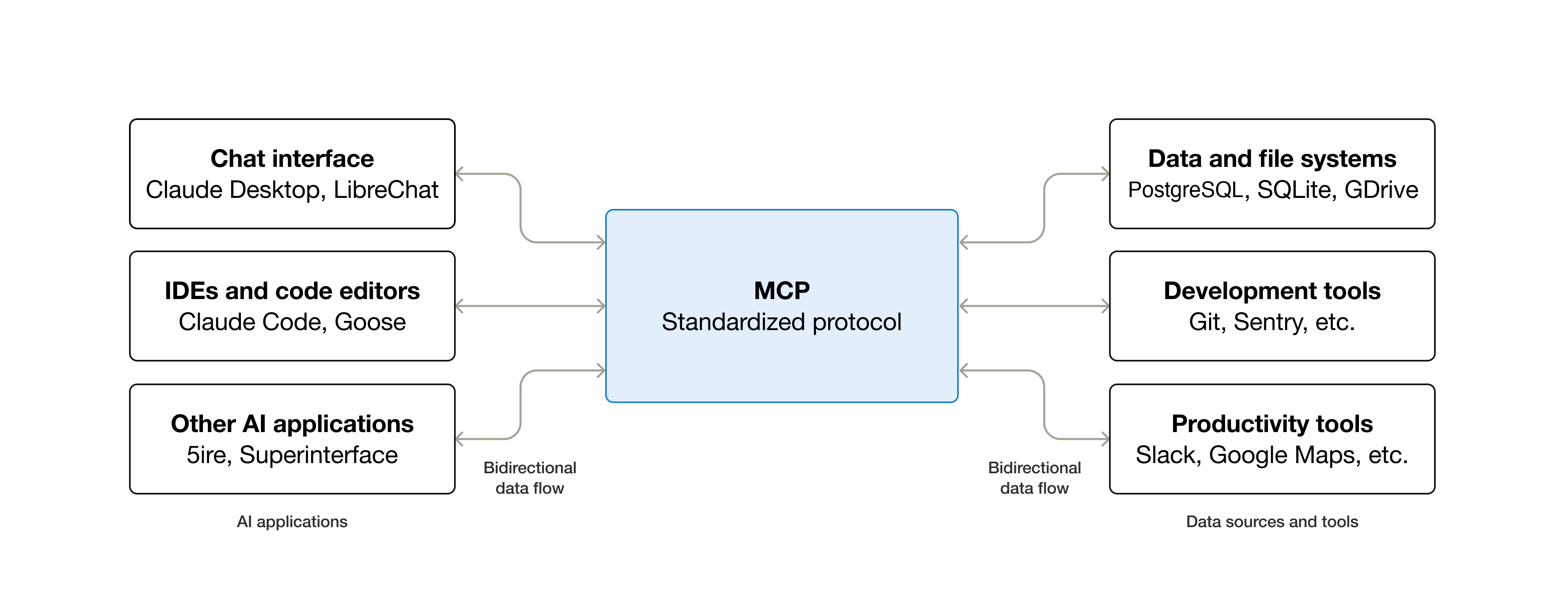… ty_best_practices.md)** > > Understand the security considerations and best practices for MCP ## Community > **[Contributing](https://modelcontextprotocol.io/community/contributing.md)** > > Learn how to get involved and contribute to MCP
打开 anthropic.com/engineering/equipping-agents-for-the-real-wor…
{
  "url": "https://www.anthropic.com/engineering/equipping-agents-for-the-real-world-with-agent-skills",
  "prompt": "Quote exactly: (1) the publication date; (2) how a skill is defined (folder, SKILL.md); (3) what is loaded into the system prompt at startup (name and description) and when the full SKILL.md body and additional files are loaded — the 'progressive disclosure' explanation; (4) any analogy used (onboarding guide for a new hire, a well-organized manual with table of contents, chapters, appendix). Keep quotes short and exact."
}
1. **Publication date:** "Oct 16, 2025" 2. **Skill definition:** "A skill is a directory containing a SKILL.md file." The article also describes skills as "organized folders of instructions, scripts, and resources." 3. **Startup and loading:** - **At startup:** "At startup, the agent pre-loads the `name` and `description` of every installed skill into its system prompt." - **Full body:** Claude loads the body only when a skill seems relevant. It "will load the skill by reading its full `SKILL.md` into context." - **Additional files:** These are the "third level (and beyond) of detail, which Claude can choose to navigate and discover only as needed." - **Progressive disclosure:** "Progressive disclosure is the core design principle that makes Agent Skills flexible and scalable." Metadata is the first level, the SKILL.md body is the second, and bundled files are the third and …(中间省略 81 字)… gent is like putting together an onboarding guide for a new hire." - **Manual:** Progressive disclosure is compared to "a well-organized manual that starts with a table of contents," followed by specific chapters and a detailed appendix.
打开 anthropic.com/engineering/effective-context-engineering-for…
{
  "url": "https://www.anthropic.com/engineering/effective-context-engineering-for-ai-agents",
  "prompt": "Quote exactly and briefly: (1) the publication date; (2) the definition of context engineering vs prompt engineering; (3) what it says about context rot / attention budget (as tokens increase, ability to recall decreases); (4) the definition of compaction; (5) structured note-taking / agentic memory and the Claude plays Pokémon example (notes, maps after context resets); (6) just-in-time retrieval: agents keep lightweight identifiers (file paths, queries, links) and load data at runtime with tools; (7) sub-agent architectures returning condensed summaries. Keep each quote short and exact."
}
1. **Publication date:** "Sep 29, 2025" 2. **Context engineering vs. prompt engineering:** - Context engineering: "Context engineering refers to the set of strategies for curating and maintaining the optimal set of tokens" - Prompt engineering: "Prompt engineering refers to methods for writing and organizing LLM instructions for optimal outcomes" 3. **Context rot / attention budget:** Context rot is described as "the model’s ability to accurately recall information from that context decreases." The article also says LLMs have an "attention budget" that they draw on when parsing large volumes of context. 4. **Compaction:** "Compaction is the practice of taking a conversation nearing the context window limit, summarizing its contents" 5. **Structured note-taking / agentic memory:** - Notes: "the agent regularly writes notes persisted to memory outside of the context window" …(中间省略 165 字)… ightweight identifiers (file paths, stored queries, web links, etc.)" and "dynamically load data into context at runtime using tools." 7. **Sub-agent architectures:** Each subagent "returns only a condensed, distilled summary of its work."
搜索「WorkBuddy MCP 技能 记忆 项目指令 腾讯 文档」
{
  "query": "WorkBuddy MCP 技能 记忆 项目指令 腾讯 文档"
}
Web search results for query: "WorkBuddy MCP 技能 记忆 项目指令 腾讯 文档" Links: [{"title":"腾讯 WorkBuddy AI Agent 深度指南:MCP协议 + Skills扩展 + 自定义模 - 文章 - 开发者社区 - 火山引擎","url":"https://developer.volcengine.com/articles/7630198321433051163"},{"title":"WorkBuddy 进阶教程:Skills、MCP、记忆与多任务实战","url":"https://news.qiniu.com/archives/1786500985404"},{"title":"WorkBuddy全攻略:AI工作台配置、Skill与MCP实战-CSDN博客","url":"https://blog.csdn.net/weixin_29061997/article/details/166665737"},{"title":"WorkBuddy 运行逻辑解读:桌面 AI Agent 如何把事真正做完 - 天戈朱 - 博客园","url":"https://www.cnblogs.com/tgzhu/p/21629693"},{"title":"WorkBuddy+MCP连接器:打通微信、飞书、腾讯文档全流程 - 今日头条","url":"https://www.toutiao.com/article/7648472754290754088/"},{"title":"人工智能 - WorkBuddy 完全指南:安装、模型接入、Skills 与 MCP 插件全解析 - 七牛云行业应用 - SegmentFault 思否","url":"https://segmentfault.com/a/1190000048110145"},{"title":"WorkBuddy 教程","url":"https://blog.csdn.net/youdiyunan/article/details/16349 …(中间省略 2524 字)… kBuddy 官方文档 记忆" or "WorkBuddy 帮助中心 MCP". That would confirm the exact menu paths and whether a feature specifically called "项目指令" exists. (涉及工具内部操作指令,已略去)打开 phmpk.hatenablog.com/entry/2015/08/15/073000
{
  "url": "https://phmpk.hatenablog.com/entry/2015/08/15/073000",
  "prompt": "For the 須永昼兵衛 chapters, report exactly what the page says about: (1) why Kyoko decides to read all of his books without sleeping and how many books; (2) where the 作品リスト (list of works) came from — did she write it on her body while reading, or was it provided; (3) what happened when she collapsed/slept; (4) how she reached the truth afterwards (February publication, 桃田朝美, non-series works) — did she re-read any books after waking; (5) her remark about the last novel she remembers revealing when her amnesia began. Also for 第一話: what was written on her body and where. Report only what the page says."
}
**Chapters 3–5 (須永昼兵衛)** 1. **Why she reads everything without sleeping:** The page says the full body of Sunaga's work is enormous and cannot be read in one day, even by Kyoko, who had already read about half of his books before her memory resets began. So she takes on the task overnight. The page also says she was reading his older works partly because she wanted to read the ones she hadn't yet read, using the request as cover. No exact number of books is given. 2. **Source of the 作品リスト:** The page never mentions a 作品リスト (list of works). It doesn't say where a list came from or whether she wrote one. The only mention of writing on her body is the memos found on her after the shower incident, and the page doesn't say who wrote them or when. 3. **What happened when she collapsed:** Kyoko's fatigue reached its limit, and she went to shower. Ryousuke fell asleep first. Kyoko then fell a …(中间省略 1066 字)… reading "身長190cmの厄介は信用できる" ("Ryousuke, 190 cm tall, can be trusted"). It says she noted "体に重要な情報?" ("important information?" on her body), with the question mark included in the original. It does not specify the exact location on her body.运行 grep -rhoE --include='*.md' "(智能体|代理)?(?Agent( Loop)?)?|工具调用([A-Za-z ]+)|Agent …
grep -rhoE --include='*.md' "(智能体|代理)?(?Agent( Loop)?)?|工具调用([A-Za-z ]+)|Agent Loop([^)]+)|[^ ]{0,6}(Agent[^)]*)" slides/pages/02 course/课程内容/02 2>/dev/null | sort | uniq -c | sort -rn | head -1593 Agent 20 Agent Loop 4 工具调用(tool call)
update_plan
{
  "advance": true
}
Plan updated: step 4 of 5 is in progress.
写入 第三讲视频方案.md
# 第三讲视频方案(草案 v1)

片名暂定《初次见面,今日子小姐》,取自原作第 1 卷第一话的标题「初めまして、今日子さん」。

## 一句话

第一幕讲原作的一个完整案子,镜头始终只拍今日子的桌面;第二幕关灯,镜头第一次拉远,桌上桌下的每样东西都换上 AI 的名字,最后让同一个案子在准备好的事务所里重办一遍。

## 五个设计判断

1. **一个主案贯穿,其他案子当判例。** 主线用须永昼兵卫案,序幕用 SD 卡案;《挑戦状》《婚姻届》《旅行記》只在第二幕各占一两句,用来证明某一条规律。把几个故事平铺着串起来,又会变回一站讲一个概念的清单。
2. **第一幕只拍桌面。** 桌面就是上下文窗口。书架、天花板、墙上的插口都在画面外,要用的东西只能从画面边缘滑进来。到第二幕镜头拉远,观众才发现:自己和她一样,一直只看得见桌面。
3. **先编号,后命名。** 第一幕里,要紧的东西出场时,旁边会立起一个黄色证物牌,只写编号;第二幕再把它们逐个翻成概念卡。这是推理剧本来的写法:线索先摆出来,到解答篇再说破。
4. **最后重办一次。** 原作里她熬夜失败,睡了一觉反而破了案。第二幕让厄介替她把事务所准备好,同一个案子分两天办完。所有概念在这一段一起用上,观众看到的就是一个跨天任务的完整生命周期。
5. **说清比喻在哪里不成立。** 例如:真实的「睡着」是会话结束,不是到了钟点;模型学到的是规律,不是把读过的书逐字记下。深入就从这些地方来。

## 结构与时长(约 16 分钟)

| 段落 | 内容 | 时长 |
| --- | --- | --- |
| 冷开场 | 她醒来,读天花板和手臂 | 0:40 |
| 第一幕 · 问题篇 | SD 卡案(序)→ 须永案:委托、不睡的三天、倒下、一张列表 | 约 6:30 |
| 关灯 | 桌面反相成蓝图 | 0:20 |
| 第二幕 · 解答篇 | 拉远、四个地方、一天的循环、为什么睡一觉反而破案、重办一次、最后一条规矩 | 约 7:40 |
| 尾声 | 第二天早上,「初次见面」;备忘录总览 | 0:40 |

课上可以在两幕

…(中间省略 6212 字)…

neering/equipping-agents-for-the-real-world-with-agent-skills)(2025-10-16):启动时只加载名字和描述,正文按需读取
  - [Anthropic:上下文工程](https://www.anthropic.com/engineering/effective-context-engineering-for-ai-agents)(2025-09-29):上下文腐化、压缩、结构化笔记、子 Agent 只交回摘要
File created successfully at: /private/tmp/claude-501/-Users-niracler-code-ai-literacy-series/743b3bc9-18e0-4b84-934a-b0109f92ec0d/scratchpad/第三讲视频方案.md(涉及工具内部操作指令,已略去)
修改 第三讲视频方案.md
{
  "replace_all": false,
  "file_path": "/private/tmp/claude-501/-Users-niracler-code-ai-literacy-series/743b3bc9-18e0-4b84-934a-b0109f92ec0d/scratchpad/第三讲视频方案.md",
  "old_string": "- 有人在她的茶里下了药,她睡着了。〔原作〕桌面一下子变白。\n- 她醒来,什么都不记得。卷起袖子,看到自己写的字:「我是侦探,正在工作」「身高 190 的厄介可以信任」。〔原作〕 证物④\n- 她接着查,宣布自己已经知道 SD 卡在哪,看谁的视线飘开,就这样抓到了真凶。〔原作〕\n- 第二天,厄介去道谢。她说:「初次见面。」〔原作设定〕 证物⑤",
  "new_string": "- 有人给她下了药,她睡着了。〔原作〕桌面一下子变白。\n- 她醒来,什么都不记得,却在衣服底下看到自己写的字:「我是侦探,正在工作」「身高 190 的厄介可以信任」。〔原作〕 证物④\n- 她接着查,宣布自己已经知道 SD 卡在哪,看谁的视线飘开,就这样抓到了真凶。〔原作〕\n- 第二天,厄介去道谢。她说:「初次见面。」〔添加,合乎原作设定:她每次见厄介都说「初次见面」〕 证物⑤"
}
The file /private/tmp/claude-501/-Users-niracler-code-ai-literacy-series/743b3bc9-18e0-4b84-934a-b0109f92ec0d/scratchpad/第三讲视频方案.md has been updated successfully.(涉及工具内部操作指令,已略去)
修改 第三讲视频方案.md
{
  "replace_all": false,
  "file_path": "/private/tmp/claude-501/-Users-niracler-code-ai-literacy-series/743b3bc9-18e0-4b84-934a-b0109f92ec0d/scratchpad/第三讲视频方案.md",
  "old_string": "- 推理作家须永昼兵卫去世,死于安眠药过量。是自杀还是意外?〔原作〕委托书放上桌。 证物⑥\n- 她是须永的读者,失忆以前读过他大约一半的书。〔原作〕 证物⑦\n- 要判断他的心意,得读完他近百部作品。一天读不完,睡着就全忘,所以她决定不睡,雇厄介看着她。〔原作〕",
  "new_string": "- 推理作家须永昼兵卫去世。那天晚上他服了过量的安眠药,于是有人怀疑他是自杀。〔原作〕她要查明的就是这件事,委托书放上桌。〔添加:委托书这件道具〕 证物⑥\n- 她是须永的忠实读者,失忆以前读过他大约一半的书。〔原作〕 证物⑦\n- 要判断他的心意,得读完他近百部作品。一天读不完,睡着就全忘,所以她决定不睡,请厄介陪着她,别让她睡着。〔原作〕"
}
The file /private/tmp/claude-501/-Users-niracler-code-ai-literacy-series/743b3bc9-18e0-4b84-934a-b0109f92ec0d/scratchpad/第三讲视频方案.md has been updated successfully.(涉及工具内部操作指令,已略去)
修改 第三讲视频方案.md
{
  "replace_all": false,
  "file_path": "/private/tmp/claude-501/-Users-niracler-code-ai-literacy-series/743b3bc9-18e0-4b84-934a-b0109f92ec0d/scratchpad/第三讲视频方案.md",
  "old_string": "### 须永案 · 不睡的三天(约 2:00)\n\n- 书一本本从画面边缘滑进来,摊上桌。书架始终在画面外。 证物⑧\n- 一份作品列表压在书堆里。〔原作有这份列表,它的来历各来源说法不一〕 证物⑨\n- 第三夜,她超过了自己最长三夜不睡的纪录,读得越来越慢。〔原作〕桌面堆满,列表被埋在最底下。 证物⑩(桌面本身)",
  "new_string": "### 须永案 · 不睡的几夜(约 2:00)\n\n- 书一本本从画面边缘滑进来,摊上桌。书架始终在画面外。 证物⑧\n- 一份作品列表压在书堆里。〔原作有这份列表,它的来历各来源说法不一〕 证物⑨\n- 到第四夜,她已经超过自己最长三夜不睡的纪录,读得越来越慢。〔原作〕桌面堆满,列表被埋在最底下。 证物⑩(桌面本身)"
}
The file /private/tmp/claude-501/-Users-niracler-code-ai-literacy-series/743b3bc9-18e0-4b84-934a-b0109f92ec0d/scratchpad/第三讲视频方案.md has been updated successfully.(涉及工具内部操作指令,已略去)
修改 第三讲视频方案.md
{
  "replace_all": false,
  "file_path": "/private/tmp/claude-501/-Users-niracler-code-ai-literacy-series/743b3bc9-18e0-4b84-934a-b0109f92ec0d/scratchpad/第三讲视频方案.md",
  "old_string": "- 她醒来,不记得这三天读过什么,手边只剩那份作品列表。〔原作〕\n- 用清空的头脑看这份列表,她看出:几部非系列作品都在二月出版,每部里都有一个叫桃田朝美的配角,随着时间长大、变老。桃田朝美确有其人,是须永年轻时的未婚妻,后来自杀;二月是她的生日月。最新一本里,她还活着,故事还没写完。〔原作〕\n- 结论:须永没打算离开。〔原作〕",
  "new_string": "- 她醒来,不记得这几天读过什么,但看到了那份作品列表。〔原作,有简化:原作里厄介还偷偷拿走了一张纸〕\n- 用清空的头脑看这份列表,她看出:七部非系列作品都在二月出版,每部里都有一个叫桃田朝美的配角,随着时间长大、变老。桃田朝美确有其人,须永十七岁时和她有过婚约,她后来自杀了;二月是她的生日月。最新一本里,她还活着,故事还没写完。〔原作〕\n- 结论:须永不是自杀。〔原作〕"
}
The file /private/tmp/claude-501/-Users-niracler-code-ai-literacy-series/743b3bc9-18e0-4b84-934a-b0109f92ec0d/scratchpad/第三讲视频方案.md has been updated successfully.(涉及工具内部操作指令,已略去)
修改 第三讲视频方案.md
{
  "replace_all": false,
  "file_path": "/private/tmp/claude-501/-Users-niracler-code-ai-literacy-series/743b3bc9-18e0-4b84-934a-b0109f92ec0d/scratchpad/第三讲视频方案.md",
  "old_string": "| 第一幕 · 问题篇 | SD 卡案(序)→ 须永案:委托、不睡的三天、倒下、一张列表 | 约 6:30 |",
  "new_string": "| 第一幕 · 问题篇 | SD 卡案(序)→ 须永案:委托、不睡的几夜、倒下、一张列表 | 约 6:30 |"
}
The file /private/tmp/claude-501/-Users-niracler-code-ai-literacy-series/743b3bc9-18e0-4b84-934a-b0109f92ec0d/scratchpad/第三讲视频方案.md has been updated successfully.(涉及工具内部操作指令,已略去)
修改 第三讲视频方案.md
{
  "replace_all": false,
  "file_path": "/private/tmp/claude-501/-Users-niracler-code-ai-literacy-series/743b3bc9-18e0-4b84-934a-b0109f92ec0d/scratchpad/第三讲视频方案.md",
  "old_string": "技能和 MCP 的区别放在这一段讲:每接一条线,就要把「这条线能办什么」的说明放上桌,接得越多,占得越多;",
  "new_string": "技能和 MCP 的区别放在这一段讲:每接一条线,通常就要把「这条线能办什么」的说明放上桌,接得越多,占得越多;"
}
The file /private/tmp/claude-501/-Users-niracler-code-ai-literacy-series/743b3bc9-18e0-4b84-934a-b0109f92ec0d/scratchpad/第三讲视频方案.md has been updated successfully.(涉及工具内部操作指令,已略去)
修改 第三讲视频方案.md
{
  "replace_all": false,
  "file_path": "/private/tmp/claude-501/-Users-niracler-code-ai-literacy-series/743b3bc9-18e0-4b84-934a-b0109f92ec0d/scratchpad/第三讲视频方案.md",
  "old_string": "- 答案三天来一直在桌上,只是被近百本书埋住了。",
  "new_string": "- 答案这几天一直在桌上,只是被近百本书埋住了。"
}
The file /private/tmp/claude-501/-Users-niracler-code-ai-literacy-series/743b3bc9-18e0-4b84-934a-b0109f92ec0d/scratchpad/第三讲视频方案.md has been updated successfully.(涉及工具内部操作指令,已略去)
运行 cd ~/.claude/projects/-Users-niracler-code-ai-literacy-series/mem…
cd ~/.claude/projects/-Users-niracler-code-ai-literacy-series/memory/ && cat >> lecture-3-story.md <<'EOF'
- Later 2026-10-26: user wants Skill and MCP in the video (Skill = detective SOPs with an index of when to use what), 「失忆前读过的书」 (pretraining / knowledge cutoff) too, 「尽可能要更多的概念融入进去」, with concept cards. Style must feel 「截然不同」 from the ai-tree video. Lecture 2's 定位 already defers MCP, Skill, RAG, 多 Agent and Context Engineering out of lecture 2. My draft treatment v1 (scratchpad, not in repo): one main case (須永) + SD-card prologue, other cases as Act 2 「判例」, camera locked on her desk in Act 1 (desk = context window), evidence markers → 20 concept cards, Act 2 ends with a prepared-office rerun; not yet approved.
EOF
(涉及通用私人偏好记忆,已略去)
(涉及无关私人记忆索引,已略去)
查找工具
{ "query": "select:mcp__ccd_view__show_pane", "max_results": 1 }show_pane
{
  "pane": "file",
  "path": "/private/tmp/claude-501/-Users-niracler-code-ai-literacy-series/743b3bc9-18e0-4b84-934a-b0109f92ec0d/scratchpad/第三讲视频方案.md",
  "line": 1
}
Showing the file pane. {"views":[{"placement":"primary"}],"open_panes":["file"],"transcript_view":"normal"}wrap_up
{
  "recap": "第三讲视频方案草案 v1 已经写好,在文件面板里打开了。主线是须永案,第一幕镜头只拍桌面,共 20 张概念卡,第二幕最后把案子重办一遍。画面还没做,仓库也没有改动。",
  "ask": "先按这版方案做风格静帧吗?",
  "actions": [
    {
      "label": "做风格静帧",
      "message": "方案方向可以,先做三个风格方向的静帧给我比较。"
    },
    {
      "label": "先改方案",
      "message": "先别做画面,方案里有几处我想改。"
    }
  ]
}
Shown in the next-step box.(涉及工具内部操作指令,已略去)
「衣服底下」还有各种写在身上的内容,这种有点过于二次元宅了,你觉得是否能简单调整一下?不过手臂上贴着一些纸条,然后说明自己在遇到什么情况下用查阅什么资料,这或许可以?(不一定,我们也能讨论的)
干了 4 分钟,18 步
运行 2 条命令,写 15 个文件,其他操作 1 次
思考:我会把方案改得更职场化:手臂上只贴写着「遇到什么情况翻哪本手册」的纸条,对应技能目录,而「写给明天自己的话」则改成随身《…
我会把方案改得更职场化:手臂上只贴写着「遇到什么情况翻哪本手册」的纸条,对应技能目录,而「写给明天自己的话」则改成随身《备忘录》对应记忆。接下来我先按这个方向修改方案草稿,理由放在最后说明。
修改 第三讲视频方案.md
{
  "replace_all": false,
  "file_path": "/private/tmp/claude-501/-Users-niracler-code-ai-literacy-series/743b3bc9-18e0-4b84-934a-b0109f92ec0d/scratchpad/第三讲视频方案.md",
  "old_string": "- 她看手臂:「我是掟上今日子。25 岁。置手纸侦探事务所所长。白发,眼镜。记忆每天重置。」〔原作〕 证物②\n- 桌角有一张手册目录:《不在场证明》《密室》《暗号》,每个书名后面一行「什么时候用」。〔添加:三个书名取自第 3 卷的三个案子〕 证物③",
  "new_string": "- 她翻开枕边的《备忘录》,第一页是自己的笔迹:「我是掟上今日子。25 岁。置手纸侦探事务所所长。白发,眼镜。记忆每天重置。」〔原作写在手臂上,本片改进备忘录〕 证物②\n- 她的手臂上贴着几张纸条:「遇到不在场证明,翻《不在场证明》」「遇到密室,翻《密室》」「遇到暗号,翻《暗号》」。〔添加:三本手册的书名取自第 3 卷的三个案子〕 证物③"
}
The file /private/tmp/claude-501/-Users-niracler-code-ai-literacy-series/743b3bc9-18e0-4b84-934a-b0109f92ec0d/scratchpad/第三讲视频方案.md has been updated successfully.(涉及工具内部操作指令,已略去)
修改 第三讲视频方案.md
{
  "replace_all": false,
  "file_path": "/private/tmp/claude-501/-Users-niracler-code-ai-literacy-series/743b3bc9-18e0-4b84-934a-b0109f92ec0d/scratchpad/第三讲视频方案.md",
  "old_string": "- 研究所的 SD 卡失窃,厄介是嫌疑人之一。〔原作〕她查得飞快,桌上摊开嫌疑人名单和平面图。\n- 有人给她下了药,她睡着了。〔原作〕桌面一下子变白。\n- 她醒来,什么都不记得,却在衣服底下看到自己写的字:「我是侦探,正在工作」「身高 190 的厄介可以信任」。〔原作〕 证物④",
  "new_string": "- 研究所的 SD 卡失窃,厄介是嫌疑人之一。〔原作〕她查得飞快,桌上摊开嫌疑人名单和平面图,一边查一边在备忘录里记上几笔。\n- 有人给她下了药,她睡着了。〔原作〕桌面一下子变白。\n- 她醒来,什么都不记得。翻开备忘录,最后几行是她查案时记下的:「我是侦探,正在工作」「身高 190 的厄介可以信任」。〔原作写在身上,本片改进备忘录〕 证物④"
}
The file /private/tmp/claude-501/-Users-niracler-code-ai-literacy-series/743b3bc9-18e0-4b84-934a-b0109f92ec0d/scratchpad/第三讲视频方案.md has been updated successfully.(涉及工具内部操作指令,已略去)
修改 第三讲视频方案.md
{
  "replace_all": false,
  "file_path": "/private/tmp/claude-501/-Users-niracler-code-ai-literacy-series/743b3bc9-18e0-4b84-934a-b0109f92ec0d/scratchpad/第三讲视频方案.md",
  "old_string": "- 她翻手册目录,找不到一本讲「一天办不完的案子」:她向来只接一天能破的案子。〔添加,合乎原作设定〕",
  "new_string": "- 她看看手臂上的纸条,没有一张写着遇到「一天办不完的案子」该翻什么:她向来只接一天能破的案子。〔添加,合乎原作设定〕"
}
The file /private/tmp/claude-501/-Users-niracler-code-ai-literacy-series/743b3bc9-18e0-4b84-934a-b0109f92ec0d/scratchpad/第三讲视频方案.md has been updated successfully.(涉及工具内部操作指令,已略去)
修改 第三讲视频方案.md
{
  "replace_all": false,
  "file_path": "/private/tmp/claude-501/-Users-niracler-code-ai-literacy-series/743b3bc9-18e0-4b84-934a-b0109f92ec0d/scratchpad/第三讲视频方案.md",
  "old_string": "| 身上 | 手臂上的字 | 记忆 | 跨天保留 |\n| 桌外 | 书架、手册柜、插口 | 工作区、技能、MCP | 不会忘,但要拿上桌才用得上 |",
  "new_string": "| 随身 | 手臂上的纸条、备忘录 | 技能的目录、记忆 | 跨天保留,醒来先读 |\n| 桌外 | 书架、手册柜、插口 | 工作区、技能的正文、MCP | 不会忘,但要拿上桌才用得上 |"
}
The file /private/tmp/claude-501/-Users-niracler-code-ai-literacy-series/743b3bc9-18e0-4b84-934a-b0109f92ec0d/scratchpad/第三讲视频方案.md has been updated successfully.(涉及工具内部操作指令,已略去)
修改 第三讲视频方案.md
{
  "replace_all": false,
  "file_path": "/private/tmp/claude-501/-Users-niracler-code-ai-literacy-series/743b3bc9-18e0-4b84-934a-b0109f92ec0d/scratchpad/第三讲视频方案.md",
  "old_string": "2. 第一眼:天花板(系统提示词)、手臂(记忆)、委托书(项目指令)、手册目录(技能的名字和用途)、插口清单(MCP 的工具说明)先放上桌。还没开始干活,桌面已经被占掉一块。",
  "new_string": "2. 第一眼:天花板(系统提示词)、备忘录(记忆)、委托书(项目指令)、手臂上的纸条(技能的名字和用途)、插口清单(MCP 的工具说明)先放上桌。还没开始干活,桌面已经被占掉一块。"
}
The file /private/tmp/claude-501/-Users-niracler-code-ai-literacy-series/743b3bc9-18e0-4b84-934a-b0109f92ec0d/scratchpad/第三讲视频方案.md has been updated successfully.(涉及工具内部操作指令,已略去)
修改 第三讲视频方案.md
{
  "replace_all": false,
  "file_path": "/private/tmp/claude-501/-Users-niracler-code-ai-literacy-series/743b3bc9-18e0-4b84-934a-b0109f92ec0d/scratchpad/第三讲视频方案.md",
  "old_string": "6. 睡前:把要紧的写在身上(记忆)。",
  "new_string": "6. 睡前:把要紧的写进备忘录(记忆)。"
}
The file /private/tmp/claude-501/-Users-niracler-code-ai-literacy-series/743b3bc9-18e0-4b84-934a-b0109f92ec0d/scratchpad/第三讲视频方案.md has been updated successfully.(涉及工具内部操作指令,已略去)
修改 第三讲视频方案.md
{
  "replace_all": false,
  "file_path": "/private/tmp/claude-501/-Users-niracler-code-ai-literacy-series/743b3bc9-18e0-4b84-934a-b0109f92ec0d/scratchpad/第三讲视频方案.md",
  "old_string": "手册则只把目录放上桌,正文用到时才去柜子里拿。",
  "new_string": "手册则只在手臂上贴一张纸条,正文用到时才去柜子里拿。手臂贴不了几张,纸条上只能写「遇到什么,翻哪本」。"
}
The file /private/tmp/claude-501/-Users-niracler-code-ai-literacy-series/743b3bc9-18e0-4b84-934a-b0109f92ec0d/scratchpad/第三讲视频方案.md has been updated successfully.(涉及工具内部操作指令,已略去)
修改 第三讲视频方案.md
{
  "replace_all": false,
  "file_path": "/private/tmp/claude-501/-Users-niracler-code-ai-literacy-series/743b3bc9-18e0-4b84-934a-b0109f92ec0d/scratchpad/第三讲视频方案.md",
  "old_string": "- 替她写一本她从来没有过的手册《长案》:一天办不完的案子,先列总目录,再分批读,每批写一页摘要,睡前写下进度(技能)。",
  "new_string": "- 替她写一本她从来没有过的手册《长案》:一天办不完的案子,先列总目录,再分批读,每批写一页摘要,睡前写下进度。再在她手臂上添一张纸条:「遇到一天办不完的案子,翻《长案》」(技能)。"
}
The file /private/tmp/claude-501/-Users-niracler-code-ai-literacy-series/743b3bc9-18e0-4b84-934a-b0109f92ec0d/scratchpad/第三讲视频方案.md has been updated successfully.(涉及工具内部操作指令,已略去)
修改 第三讲视频方案.md
{
  "replace_all": false,
  "file_path": "/private/tmp/claude-501/-Users-niracler-code-ai-literacy-series/743b3bc9-18e0-4b84-934a-b0109f92ec0d/scratchpad/第三讲视频方案.md",
  "old_string": "第一天,她醒来,读天花板、手臂、委托书和手册目录,翻开《长案》,分批往下读,桌面始终没有堆满。睡前,她在手臂上写下:",
  "new_string": "第一天,她醒来,读天花板、备忘录和委托书,看到手臂上新添的纸条,翻开《长案》,分批往下读,桌面始终没有堆满。睡前,她在备忘录里写下:"
}
The file /private/tmp/claude-501/-Users-niracler-code-ai-literacy-series/743b3bc9-18e0-4b84-934a-b0109f92ec0d/scratchpad/第三讲视频方案.md has been updated successfully.(涉及工具内部操作指令,已略去)
修改 第三讲视频方案.md
{
  "replace_all": false,
  "file_path": "/private/tmp/claude-501/-Users-niracler-code-ai-literacy-series/743b3bc9-18e0-4b84-934a-b0109f92ec0d/scratchpad/第三讲视频方案.md",
  "old_string": "第 8 卷《旅行記》:在巴黎,有人趁她睡着,把她手臂上的「我是侦探」改成了「我是怪盗」,她醒来后就照着当起了怪盗。〔原作〕\n\n她对写在身上的字深信不疑,所以谁能往她身上写字,这件事很重要(提示词注入)。",
  "new_string": "第 8 卷《旅行記》:在巴黎,有人趁她睡着,把「我是侦探」改成了「我是怪盗」,她醒来后就照着当起了怪盗。〔原作改的是手臂上的字,本片改成备忘录的第一行〕\n\n她对备忘录里的字深信不疑,所以谁能往备忘录里写字,这件事很重要(提示词注入)。"
}
The file /private/tmp/claude-501/-Users-niracler-code-ai-literacy-series/743b3bc9-18e0-4b84-934a-b0109f92ec0d/scratchpad/第三讲视频方案.md has been updated successfully.(涉及工具内部操作指令,已略去)
修改 第三讲视频方案.md
{
  "replace_all": false,
  "file_path": "/private/tmp/claude-501/-Users-niracler-code-ai-literacy-series/743b3bc9-18e0-4b84-934a-b0109f92ec0d/scratchpad/第三讲视频方案.md",
  "old_string": "第二天早上,白色的桌面。她醒来,读天花板,读手臂。厄介敲门。",
  "new_string": "第二天早上,白色的桌面。她醒来,读天花板,翻开备忘录。厄介敲门。"
}
The file /private/tmp/claude-501/-Users-niracler-code-ai-literacy-series/743b3bc9-18e0-4b84-934a-b0109f92ec0d/scratchpad/第三讲视频方案.md has been updated successfully.(涉及工具内部操作指令,已略去)
修改 第三讲视频方案.md
{
  "replace_all": false,
  "file_path": "/private/tmp/claude-501/-Users-niracler-code-ai-literacy-series/743b3bc9-18e0-4b84-934a-b0109f92ec0d/scratchpad/第三讲视频方案.md",
  "old_string": "| 13 | 技能(Skill) | 办案手册 | 目录放在桌上,正文用到才翻 | 本讲 |",
  "new_string": "| 13 | 技能(Skill) | 手臂上的纸条和柜里的手册 | 纸条写什么时候用,手册用到才翻 | 本讲 |"
}
The file /private/tmp/claude-501/-Users-niracler-code-ai-literacy-series/743b3bc9-18e0-4b84-934a-b0109f92ec0d/scratchpad/第三讲视频方案.md has been updated successfully.(涉及工具内部操作指令,已略去)
修改 第三讲视频方案.md
{
  "replace_all": false,
  "file_path": "/private/tmp/claude-501/-Users-niracler-code-ai-literacy-series/743b3bc9-18e0-4b84-934a-b0109f92ec0d/scratchpad/第三讲视频方案.md",
  "old_string": "| 15 | 记忆(Memory) | 手臂上的字 | 睡前写下,第二天醒来先读 | 本讲 |",
  "new_string": "| 15 | 记忆(Memory) | 随身的备忘录 | 边查边记,醒来先读 | 本讲 |"
}
The file /private/tmp/claude-501/-Users-niracler-code-ai-literacy-series/743b3bc9-18e0-4b84-934a-b0109f92ec0d/scratchpad/第三讲视频方案.md has been updated successfully.(涉及工具内部操作指令,已略去)
修改 第三讲视频方案.md
{
  "replace_all": false,
  "file_path": "/private/tmp/claude-501/-Users-niracler-code-ai-literacy-series/743b3bc9-18e0-4b84-934a-b0109f92ec0d/scratchpad/第三讲视频方案.md",
  "old_string": "今日子约 8 种(醒来仰望、读手臂、飞快查案、",
  "new_string": "今日子约 8 种(醒来仰望、翻备忘录、飞快查案、"
}
The file /private/tmp/claude-501/-Users-niracler-code-ai-literacy-series/743b3bc9-18e0-4b84-934a-b0109f92ec0d/scratchpad/第三讲视频方案.md has been updated successfully.(涉及工具内部操作指令,已略去)
修改 第三讲视频方案.md
{
  "replace_all": false,
  "file_path": "/private/tmp/claude-501/-Users-niracler-code-ai-literacy-series/743b3bc9-18e0-4b84-934a-b0109f92ec0d/scratchpad/第三讲视频方案.md",
  "old_string": "- 作品列表的来历:各来源说法不一,视频不交代是谁写的。",
  "new_string": "- 作品列表的来历:各来源说法不一,视频不交代是谁写的。\n- 写在身上的字:原作里她把要记的写在手臂和身上。本片只在手臂上贴纸条(技能的目录),她自己要记的写进随身的备忘录(记忆)。"
}
The file /private/tmp/claude-501/-Users-niracler-code-ai-literacy-series/743b3bc9-18e0-4b84-934a-b0109f92ec0d/scratchpad/第三讲视频方案.md has been updated successfully.(涉及工具内部操作指令,已略去)
运行 grep -n -e "手册目录" -e "写在身上" -e "手臂上的字" -e "读手臂" -e "身上写字" -e "衣服" "/private/tmp…
grep -n -e "手册目录" -e "写在身上" -e "手臂上的字" -e "读手臂" -e "身上写字" -e "衣服" "/private/tmp/claude-501/-Users-niracler-code-ai-literacy-series/743b3bc9-18e0-4b84-934a-b0109f92ec0d/scratchpad/第三讲视频方案.md"
44:- 她醒来,什么都不记得。翻开备忘录,最后几行是她查案时记下的:「我是侦探,正在工作」「身高 190 的厄介可以信任」。〔原作写在身上,本片改进备忘录〕 证物④
138:第 8 卷《旅行記》:在巴黎,有人趁她睡着,把「我是侦探」改成了「我是怪盗」,她醒来后就照着当起了怪盗。〔原作改的是手臂上的字,本片改成备忘录的第一行〕
219:- 写在身上的字:原作里她把要记的写在手臂和身上。本片只在手臂上贴纸条(技能的目录),她自己要记的写进随身的备忘录(记忆)。
运行 cat >> ~/.claude/projects/-Users-niracler-code-ai-literacy-series…
cat >> ~/.claude/projects/-Users-niracler-code-ai-literacy-series/memory/lecture-3-story.md <<'EOF'
- 2026-10-26: the user finds notes written under her clothes / all over her body 「有点过于二次元宅了」 for this audience and suggested paper slips on her arm saying when to consult what. Draft now: arm slips = skill index (「遇到 X,翻《Y》」), her own notes go in a carried 《备忘录》 notebook = Memory (the lecture title then names the concept); 旅行記's rewrite moved to the notebook's first line. Awaiting the user's confirmation.
EOF
(Bash completed with no output)
wrap_up
{
  "recap": "第三讲视频方案草案 v1 已写好,并按你的意见改过:身上不再写字,手臂贴纸条,对应技能(Skill)的目录;她自己记的东西写进随身的《备忘录》,对应记忆(Memory)。画面还没做,仓库也没有改动。",
  "ask": "纸条和备忘录这样分工可以吗?",
  "actions": [
    {
      "label": "可以,做静帧",
      "message": "纸条和备忘录这样分工可以,接着做三个风格方向的静帧给我比较。"
    },
    {
      "label": "再讨论一下",
      "message": "纸条和备忘录的分工我还想再讨论一下。"
    }
  ]
}
Shown in the next-step box.(涉及工具内部操作指令,已略去)
第一幕只拍桌面的话,我觉得有点死板诶,我希望这个视频能有趣一点?你觉得可以如何设计?例如有个可爱的角色之类的?具体场景还有什么的?
干了 2 分钟,4 步
搜索 2 次,打开 1 个网页,其他操作 1 次
update_plan
{
  "items": [
    {
      "content": "核实原作里可以做笑点的人物设定",
      "status": "in_progress"
    },
    {
      "content": "设计可爱角色、场景与笑点",
      "status": "pending"
    },
    {
      "content": "把新方向讲清楚,等你选",
      "status": "pending"
    }
  ],
  "scope": "continuation"
}
Plan shown (3 steps).
搜索「掟上今日子 同じ服を二度着ない 設定 ファッション 毎回違う服」
{
  "query": "掟上今日子 同じ服を二度着ない 設定 ファッション 毎回違う服"
}
Web search results for query: "掟上今日子 同じ服を二度着ない 設定 ファッション 毎回違う服" Links: [{"title":"岡田将生が織りなすコミカルとシリアスのバランスが絶妙!新垣結衣主演「掟上今日子の備忘録」|スカパー!: スポーツ&音楽ライブ、アイドル、アニメ、ドラマ、映画など","url":"https://www.skyperfectv.co.jp/article/detail/5267"},{"title":"脱・いつも同じ服! 「あの人おしゃれ」と思わせる4つのルール|「マイナビウーマン」","url":"https://woman.mynavi.jp/article/170912-3/"},{"title":"『続・続・最後から二番目の恋』スタイリストさんに聞いた!小泉今日子さんの衣装の秘密 vol.1 オフィス編【ウェブエクラ編集長シオヤの「あら、素敵☆ 手帖」#101】|Web eclat(ウェブエクラ)","url":"https://eclat.hpplus.jp/chiefeditorcolumn/sutekinote/140829/"},{"title":"ファッションは同じものを最低3枚、できれば5枚買うべき :: デイリーポータルZ","url":"https://dailyportalz.jp/kiji/dont-worry-about-fashion-anymore"},{"title":"TV 掟上今日子の備忘録 (2015) - allcinema","url":"https://www.allcinema.net/cinema/354284"},{"title":"同じ服を何回も着てしまう","url":"https://ameblo.jp/echi0623/entry-12872085392.html"},{"title":"「また同じ服」は悪いこと? - Shift C 世界基準のファッションのエシカル度評価サービス powered by Good On You","url":"ht …(中间省略 2122 字)… firm it:** - 掟上今日子 おしゃれ 同じ服 原作 - 掟上今日子 pixiv百科事典 or ニコニコ大百科 (fan wiki pages for the character) - 掟上今日子の備忘録 衣装 新垣結衣 (the drama's costumes) (涉及工具内部操作指令,已略去)搜索「掟上今日子 料金 守銭奴 経費 依頼料 設定」
{
  "query": "掟上今日子 料金 守銭奴 経費 依頼料 設定"
}
Web search results for query: "掟上今日子 料金 守銭奴 経費 依頼料 設定" Links: [{"title":"『掟上今日子の備忘録』(西尾 維新) 製品詳細 講談社","url":"https://www.kodansha.co.jp/book/products/0000312005"},{"title":"掟上今日子の備忘録(単行本版) - 西尾維新/VOFAN - 電子書籍・無料漫画ならブックライブ","url":"https://booklive.jp/product/index/title_id/283310/vol_no/001"},{"title":"『掟上今日子の保険証』(西尾 維新) 製品詳細 講談社","url":"https://www.kodansha.co.jp/book/products/0000410059"},{"title":"『掟上今日子の乗車券』(西尾 維新) 製品詳細 講談社","url":"https://www.kodansha.co.jp/book/products/0000313901"},{"title":"『掟上今日子の備忘録』(西尾 維新,VOFAN) 製品詳細 講談社","url":"https://www.kodansha.co.jp/book/products/0000188947"},{"title":"『掟上今日子の忍法帖』(西尾 維新) 製品詳細 講談社","url":"https://bookclub.kodansha.co.jp/product?item=0000364846"},{"title":"掟上今日子の備忘録の動画配信サービス・視聴方法・サブスクまとめ|Filmarksドラマ","url":"https://filmarks.com/dramas/1539/3007/vod"},{"title":"ドラマ「掟上今日子の備忘録」はどこで見れる?動画を無料で視聴できる配信サイトまとめ","url":"https://cho-animedia.jp/media/ …(中间省略 1277 字)… 典」, 「掟上今日子 ニコニコ大百科」, or 「忘却探偵 報酬 即日」. Fan wikis and character pages are more likely to describe her pricing and money-loving personality. (涉及工具内部操作指令,已略去)打开 dic.pixiv.net/a/%E6%8E%9F%E4%B8%8A%E4%BB%8A%E6%97%A5%E5%AD%…
{
  "url": "https://dic.pixiv.net/a/掟上今日子",
  "prompt": "List the character traits described: appearance (white hair, glasses), fashion (does it say she never wears the same outfit twice?), personality (cheerful, polite, money-minded/守銭奴, fast), her catchphrases or habitual lines (e.g., 初めまして), fee policy, habits (writing on her body, sleeping), and any notable comedic traits. Quote short Japanese phrases exactly. Report only what the page says."
}
The server returned HTTP 403 Forbidden. The response body was not retrieved. (涉及工具内部操作指令,已略去)
(中途打断)
我说的有趣不是指搞笑人物,我指的是,我们这个故事本身就要足够吸引人,以及各种视频中的场景也应该尽可能到位?第一幕尽可能本身的故事也要足够有趣才行。不要为了强行讲后面的概念,而只留各种零碎的片段。
干了 11 分钟,19 步
搜索 1 次,运行 2 条命令,写 12 个文件,其他操作 4 次
思考:明白了问题所在:v1第一幕为了铺垫概念把须永案切得太碎,塞了太多道具和插曲。下一版我会把第3~5话的须永案完整讲清楚,概…
明白了问题所在:v1第一幕为了铺垫概念把须永案切得太碎,塞了太多道具和插曲。下一版我会把第3~5话的须永案完整讲清楚,概念留到第二幕单独拆解——现在先查清第3话寻宝游戏和遗稿的情节细节。
update_plan
{
  "items": [
    {
      "content": "查清须永案第 3~5 话的完整情节",
      "status": "in_progress"
    },
    {
      "content": "把第一幕设计成完整的故事",
      "status": "pending"
    },
    {
      "content": "设计第二幕怎样从故事里拆概念",
      "status": "pending"
    },
    {
      "content": "把新方向讲清楚,等你审",
      "status": "pending"
    }
  ],
  "scope": "continuation"
}
Plan shown (4 steps).
搜索「掟上今日子の備忘録 第三話 お暇ですか今日子さん 須永昼兵衛 宝探し 別荘 カセットテープ 過去形 ネタバレ」
{
  "query": "掟上今日子の備忘録 第三話 お暇ですか今日子さん 須永昼兵衛 宝探し 別荘 カセットテープ 過去形 ネタバレ"
}
Web search results for query: "掟上今日子の備忘録 第三話 お暇ですか今日子さん 須永昼兵衛 宝探し 別荘 カセットテープ 過去形 ネタバレ" Links: [{"title":"掟上今日子の備忘録(文庫版)のレビュー【あらすじ・感想・ネタバレ】 - 電子書籍・無料漫画ならブックライブ","url":"https://booklive.jp/review/list/title_id/60009939/vol_no/001"},{"title":"掟上今日子の備忘録 / 西尾維新、眠ると記憶がリセットされる忘却探偵の活躍、あらすじと感想 - PHMPK.LOG","url":"https://phmpk.hatenablog.com/entry/2015/08/15/073000"},{"title":"西尾維新「掟上今日子の備忘録」感想 - 本やらなんやらの感想置き場","url":"https://spaceplace.hatenablog.jp/entry/okitegami-kyoko-1"},{"title":"【ドラマ感想】掟上今日子の備忘録3〜4話を観た【ネタバレあり】|鯖の味噌煮","url":"https://note.com/saba_miso1/n/nad569df24054"},{"title":"掟上今日子の備忘録(漫画) - マンガペディア","url":"https://mangapedia.com/%E6%8E%9F%E4%B8%8A%E4%BB%8A%E6%97%A5%E5%AD%90%E3%81%AE%E5%82%99%E5%BF%98%E9%8C%B2-m4r39v2oe"},{"title":"ドラマ「掟上今日子の備忘録 第5話」あらすじ・ネタバレ","url":"https://saku-ara.com/archives/471"},{"title":"ドラマ「掟上今日子の備忘録 第3話」あらすじ・ネタバレ","url":"https://saku-ara.com/archives/322"},{" …(中间省略 1159 字)… していましたが、彼女は自殺しています。 - ドラマ版では、須永のエピソードは第3話ではなく**第5話**です(ドラマ第3話は美術館の話)。第5話ではカセットテープに書かれた番号は、金庫を解除する鍵となっていた。金庫を開けると、そこにカセットテープを読み込む機器が入っていた。 (涉及工具内部操作指令,已略去)思考:第3话情节比预期精彩,我核实了须永的藏宝游戏设定、厄介隐瞒死讯、今日子识破真相的过程,以及最后磁带原稿的揭示;尤其她在车…
第3话情节比预期精彩,我核实了须永的藏宝游戏设定、厄介隐瞒死讯、今日子识破真相的过程,以及最后磁带原稿的揭示;尤其她在车上那句关于失忆起点的台词处理得很自然,不生硬。我会按"先讲好故事"的方案重写。
update_plan
{
  "advance": true
}
Plan updated: step 2 of 4 is in progress.
写入 第三讲视频方案.md
# 第三讲视频方案(草案 v2)

片名暂定《初次见面,今日子小姐》,取自原作第 1 卷第一话的标题「初めまして、今日子さん」。

## 一句话

第一幕完整讲好原作第 1 卷的须永昼兵卫案(第 3~5 话),只管把故事讲好;第二幕关灯,回放第一幕的几个时刻,把藏在里面的 AI 工作方式一样一样拆出来,最后让这个案子在准备好的事务所里重办一次。

## 这一版改了什么

- 第一幕不再为概念服务:去掉 SD 卡序幕、证物牌、手臂纸条、手册目录,也不再只拍桌面。须永案从寻宝讲到真相,情节按原作走。
- 概念全部放到第二幕讲。第一幕本身已经带出十来个概念(见文末概念卡),技能、MCP、子 Agent 这几个故事里没有的,在第二幕的「重办一次」里出现。
- 第一幕要做成一部真正的动画短片:有场景、有光线变化、有声音,不是图解。

## 故事的核心:忘记与记住

这个案子里有三种和记忆的关系:

- 今日子每天都会忘记一切。
- 厄介记得和她的每一次相遇,她却每次都说「初次见面」。
- 须永几十年没有忘记一个人,把她写进了每年二月出版的书里。

三个人放在一起,故事的落点就很清楚:记得住的,从来不是脑子,而是写下来的东西。这也正是第二幕要讲的道理。第一幕不说破,只让观众感受到。

「初次见面」在全片出现三次,每次分量不同:第一次在新干线上,轻轻带过;第二次在她倒下后醒来,最让人难过;第三次在全片结尾,厄介笑着接受。

## 结构与时长(约 17 分钟)

| 段落 | 内容 | 时长 |
| --- | --- | --- |
| 序 | 白色的早晨:她醒来,读天花板和备忘录 | 0:50 |
| 第三话 · 有空吗,今日子小姐 | 新干线、隐瞒的死讯、别墅寻宝、磁带 | 2:30 |
| 第四话 · 打扰了,今日子小姐 | 自杀的疑问、不睡的几夜、浴室 | 3:00 |
| 第五话 · 再见了,今日子小姐 | 初次见面、作品列表、桃田朝美 | 2:30 |
| 关灯 | 转入幕后 | 0:20 |
| 第二幕 · 解答篇 | 回放与拆解、一天的循环、重办一次、最后一条规矩 |

…(中间省略 6920 字)…

neering/equipping-agents-for-the-real-world-with-agent-skills)(2025-10-16):启动时只加载名字和描述,正文按需读取
  - [Anthropic:上下文工程](https://www.anthropic.com/engineering/effective-context-engineering-for-ai-agents)(2025-09-29):上下文腐化、压缩、结构化笔记、子 Agent 只交回摘要
The file /private/tmp/claude-501/-Users-niracler-code-ai-literacy-series/743b3bc9-18e0-4b84-934a-b0109f92ec0d/scratchpad/第三讲视频方案.md has been updated successfully.(涉及工具内部操作指令,已略去)
运行 grep -n -e "每年" -e "一年年" -e "编辑的委托" -e "委托的编辑" -e "十四个" -e "须永的书房" "/private/tm…
grep -n -e "每年" -e "一年年" -e "编辑的委托" -e "委托的编辑" -e "十四个" -e "须永的书房" "/private/tmp/claude-501/-Users-niracler-code-ai-literacy-series/743b3bc9-18e0-4b84-934a-b0109f92ec0d/scratchpad/第三讲视频方案.md"
21:- 须永几十年没有忘记一个人,把她写进了每年二月出版的书里。
67:- 须永的书房,夜里。书塔一座座立起来,台灯、咖啡、钟,窗外天黑了又亮。她读得飞快,一边在备忘录里记下每本书的书名和出版年月。〔改编:原作有一份作品列表,来历各来源说法不一〕
72:- 厄介把她安顿好。这几夜读过的书,全没了。他收起她的笔记,让她好好休息,打电话给委托的编辑:对不起。〔原作〕
81:- 几十年来,须永在每年二月出版的书里,让她一年年长大、变老。最新一本里,她还活着,她的故事还没写完。〔原作〕
100:- 编辑的委托:项目指令(Project Instructions),说明这个案子要回答什么。
151:- 厄介:「须永先生记住一个人几十年,靠的不是脑子,是每年二月写下的一本书。今日子每天都会忘记,靠的是醒来时手边的备忘录。AI 也一样,它能记住的,只有写下来、放在它手边的东西。」
171:| 10 | 项目指令(Project Instructions) | 编辑的委托 | 第一幕 | 本讲 |
173:| 12 | 工作区(Workspace) | 须永的书房和书架 | 第一幕 | 本讲 |
183:二十个概念里,十四个在第一幕的故事里自然出现,没有一个是为讲概念加的情节。「上下文腐化」的中文译名还要再定。
修改 第三讲视频方案.md
{
  "replace_all": false,
  "file_path": "/private/tmp/claude-501/-Users-niracler-code-ai-literacy-series/743b3bc9-18e0-4b84-934a-b0109f92ec0d/scratchpad/第三讲视频方案.md",
  "old_string": "- 须永几十年没有忘记一个人,把她写进了每年二月出版的书里。",
  "new_string": "- 须永几十年没有忘记一个人,把她写进了七本在二月出版的书里。"
}
The file /private/tmp/claude-501/-Users-niracler-code-ai-literacy-series/743b3bc9-18e0-4b84-934a-b0109f92ec0d/scratchpad/第三讲视频方案.md has been updated successfully.(涉及工具内部操作指令,已略去)
修改 第三讲视频方案.md
{
  "replace_all": false,
  "file_path": "/private/tmp/claude-501/-Users-niracler-code-ai-literacy-series/743b3bc9-18e0-4b84-934a-b0109f92ec0d/scratchpad/第三讲视频方案.md",
  "old_string": "- 须永的书房,夜里。书塔一座座立起来,台灯、咖啡、钟,窗外天黑了又亮。她读得飞快,一边在备忘录里记下每本书的书名和出版年月。〔改编:原作有一份作品列表,来历各来源说法不一〕",
  "new_string": "- 夜里,一间堆满书的房间。书塔一座座立起来,台灯、咖啡、钟,窗外天黑了又亮。她读得飞快,一边在备忘录里记下每本书的书名和出版年月。〔改编:原作有一份作品列表,来历各来源说法不一;在哪里读的待核〕"
}
The file /private/tmp/claude-501/-Users-niracler-code-ai-literacy-series/743b3bc9-18e0-4b84-934a-b0109f92ec0d/scratchpad/第三讲视频方案.md has been updated successfully.(涉及工具内部操作指令,已略去)
修改 第三讲视频方案.md
{
  "replace_all": false,
  "file_path": "/private/tmp/claude-501/-Users-niracler-code-ai-literacy-series/743b3bc9-18e0-4b84-934a-b0109f92ec0d/scratchpad/第三讲视频方案.md",
  "old_string": "他收起她的笔记,让她好好休息,打电话给委托的编辑:对不起。〔原作〕",
  "new_string": "他收起她的笔记,让她好好休息,打电话给委托人:对不起。〔原作〕"
}
The file /private/tmp/claude-501/-Users-niracler-code-ai-literacy-series/743b3bc9-18e0-4b84-934a-b0109f92ec0d/scratchpad/第三讲视频方案.md has been updated successfully.(涉及工具内部操作指令,已略去)
修改 第三讲视频方案.md
{
  "replace_all": false,
  "file_path": "/private/tmp/claude-501/-Users-niracler-code-ai-literacy-series/743b3bc9-18e0-4b84-934a-b0109f92ec0d/scratchpad/第三讲视频方案.md",
  "old_string": "- 几十年来,须永在每年二月出版的书里,让她一年年长大、变老。最新一本里,她还活着,她的故事还没写完。〔原作〕",
  "new_string": "- 几十年来,须永在这七本二月出版的书里,让她一点点长大、变老。最新一本里,她还活着,她的故事还没写完。〔原作〕"
}
The file /private/tmp/claude-501/-Users-niracler-code-ai-literacy-series/743b3bc9-18e0-4b84-934a-b0109f92ec0d/scratchpad/第三讲视频方案.md has been updated successfully.(涉及工具内部操作指令,已略去)
修改 第三讲视频方案.md
{
  "replace_all": false,
  "file_path": "/private/tmp/claude-501/-Users-niracler-code-ai-literacy-series/743b3bc9-18e0-4b84-934a-b0109f92ec0d/scratchpad/第三讲视频方案.md",
  "old_string": "- 编辑的委托:项目指令(Project Instructions),说明这个案子要回答什么。",
  "new_string": "- 委托:项目指令(Project Instructions),说明这个案子要回答什么。"
}
The file /private/tmp/claude-501/-Users-niracler-code-ai-literacy-series/743b3bc9-18e0-4b84-934a-b0109f92ec0d/scratchpad/第三讲视频方案.md has been updated successfully.(涉及工具内部操作指令,已略去)
修改 第三讲视频方案.md
{
  "replace_all": false,
  "file_path": "/private/tmp/claude-501/-Users-niracler-code-ai-literacy-series/743b3bc9-18e0-4b84-934a-b0109f92ec0d/scratchpad/第三讲视频方案.md",
  "old_string": "- 厄介:「须永先生记住一个人几十年,靠的不是脑子,是每年二月写下的一本书。",
  "new_string": "- 厄介:「须永先生记住一个人几十年,靠的不是脑子,是七本在二月出版的书。"
}
The file /private/tmp/claude-501/-Users-niracler-code-ai-literacy-series/743b3bc9-18e0-4b84-934a-b0109f92ec0d/scratchpad/第三讲视频方案.md has been updated successfully.(涉及工具内部操作指令,已略去)
修改 第三讲视频方案.md
{
  "replace_all": false,
  "file_path": "/private/tmp/claude-501/-Users-niracler-code-ai-literacy-series/743b3bc9-18e0-4b84-934a-b0109f92ec0d/scratchpad/第三讲视频方案.md",
  "old_string": "| 10 | 项目指令(Project Instructions) | 编辑的委托 | 第一幕 | 本讲 |",
  "new_string": "| 10 | 项目指令(Project Instructions) | 委托 | 第一幕 | 本讲 |"
}
The file /private/tmp/claude-501/-Users-niracler-code-ai-literacy-series/743b3bc9-18e0-4b84-934a-b0109f92ec0d/scratchpad/第三讲视频方案.md has been updated successfully.(涉及工具内部操作指令,已略去)
修改 第三讲视频方案.md
{
  "replace_all": false,
  "file_path": "/private/tmp/claude-501/-Users-niracler-code-ai-literacy-series/743b3bc9-18e0-4b84-934a-b0109f92ec0d/scratchpad/第三讲视频方案.md",
  "old_string": "| 12 | 工作区(Workspace) | 须永的书房和书架 | 第一幕 | 本讲 |",
  "new_string": "| 12 | 工作区(Workspace) | 堆满须永作品的书架 | 第一幕 | 本讲 |"
}
The file /private/tmp/claude-501/-Users-niracler-code-ai-literacy-series/743b3bc9-18e0-4b84-934a-b0109f92ec0d/scratchpad/第三讲视频方案.md has been updated successfully.(涉及工具内部操作指令,已略去)
修改 第三讲视频方案.md
{
  "replace_all": false,
  "file_path": "/private/tmp/claude-501/-Users-niracler-code-ai-literacy-series/743b3bc9-18e0-4b84-934a-b0109f92ec0d/scratchpad/第三讲视频方案.md",
  "old_string": "二十个概念里,十四个在第一幕的故事里自然出现,没有一个是为讲概念加的情节。「上下文腐化」的中文译名还要再定。",
  "new_string": "二十个概念里,十三个在第一幕的故事里自然出现,其余七个留到第二幕。「上下文腐化」的中文译名还要再定。"
}
The file /private/tmp/claude-501/-Users-niracler-code-ai-literacy-series/743b3bc9-18e0-4b84-934a-b0109f92ec0d/scratchpad/第三讲视频方案.md has been updated successfully.(涉及工具内部操作指令,已略去)
修改 第三讲视频方案.md
{
  "replace_all": false,
  "file_path": "/private/tmp/claude-501/-Users-niracler-code-ai-literacy-series/743b3bc9-18e0-4b84-934a-b0109f92ec0d/scratchpad/第三讲视频方案.md",
  "old_string": "- 作品列表的来历,以及她醒来后有没有重读那七本。",
  "new_string": "- 作品列表的来历,以及她醒来后有没有重读那七本。\n- 她是在哪里通宵读书的,浴室又在哪里。"
}
The file /private/tmp/claude-501/-Users-niracler-code-ai-literacy-series/743b3bc9-18e0-4b84-934a-b0109f92ec0d/scratchpad/第三讲视频方案.md has been updated successfully.(涉及工具内部操作指令,已略去)
修改 第三讲视频方案.md
{
  "replace_all": false,
  "file_path": "/private/tmp/claude-501/-Users-niracler-code-ai-literacy-series/743b3bc9-18e0-4b84-934a-b0109f92ec0d/scratchpad/第三讲视频方案.md",
  "old_string": "  - [本やらなんやらの感想置き場](https://spaceplace.hatenablog.jp/entry/okitegami-kyoko-1) 等书评(经搜索摘要):寻宝、隐瞒死讯、过去式、修正带、磁带、知识截止的原话",
  "new_string": "  - 寻宝、隐瞒死讯、过去式、修正带、磁带、知识截止的原话:来自多篇书评的搜索摘要,包括 [本やらなんやらの感想置き場](https://spaceplace.hatenablog.jp/entry/okitegami-kyoko-1) 和 [ブックライブ读者评论](https://booklive.jp/review/list/title_id/60009939/vol_no/001),还没有逐篇打开核对"
}
The file /private/tmp/claude-501/-Users-niracler-code-ai-literacy-series/743b3bc9-18e0-4b84-934a-b0109f92ec0d/scratchpad/第三讲视频方案.md has been updated successfully.(涉及工具内部操作指令,已略去)
运行 cd ~/.claude/projects/-Users-niracler-code-ai-literacy-series/mem…
cd ~/.claude/projects/-Users-niracler-code-ai-literacy-series/memory/ && cat > story-first.md <<'EOF'
---
name: story-first
description: Teaching stories must be compelling on their own; never chop a story into concept fragments; "fun" means a good story and well-realized scenes, not gag characters
metadata:
  type: feedback
---

On 2026-10-26 (lecture 3 video), after I proposed a cute mascot and comic gags to make Act 1 less rigid, the user said: 「我说的有趣不是指搞笑人物,我指的是,我们这个故事本身就要足够吸引人,以及各种视频中的场景也应该尽可能到位?第一幕尽可能本身的故事也要足够有趣才行。不要为了强行讲后面的概念,而只留各种零碎的片段。」 Earlier they had also called a desk-only camera 「有点死板」.

**Why:** my v1 Act 1 sliced the 須永 case into concept stations (prologue case, evidence markers, inserted props), which made the story fragmentary; the user judges a story by whether it is gripping in itself.

**How to apply:** tell the story whole and faithfully first, with real scenes, lig

…(中间省略 830 字)…

ng the user's review; open choice: whole ch 3-5 vs start at ch 4.
EOF
echo "- [story-first](story-first.md) — teaching stories must grip on their own; don't fragment them for concepts; fun ≠ gag characters" >> MEMORY.md && tail -2 MEMORY.md
- [story-first](story-first.md) — teaching stories must grip on their own; don't fragment them for concepts; fun ≠ gag characters
Shell cwd was reset to ~/code/ai-literacy-series
(涉及通用私人偏好记忆,已略去)
show_pane
{
  "pane": "file",
  "path": "/private/tmp/claude-501/-Users-niracler-code-ai-literacy-series/743b3bc9-18e0-4b84-934a-b0109f92ec0d/scratchpad/第三讲视频方案.md",
  "line": 1
}
Showing the file pane. {"views":[{"placement":"primary"}],"open_panes":["file"],"transcript_view":"normal"}wrap_up
{
  "recap": "方案改成了 v2:第一幕完整讲原作的须永案(第 3~5 话),不再为概念拆碎;概念全部放到第二幕,回放故事里的时刻来讲。文档已在文件面板打开;还没有分镜和画面,仓库也没有改动。",
  "ask": "第一幕要从寻宝讲起(第 3~5 话整段)吗?",
  "actions": [
    {
      "label": "整段讲",
      "message": "第一幕用第 3~5 话整段,从寻宝讲起。接下来出分镜。"
    },
    {
      "label": "从第 4 话讲",
      "message": "去掉寻宝,第一幕从自杀的疑问讲起。接下来出分镜。"
    }
  ]
}
Shown in the next-step box.(涉及工具内部操作指令,已略去)
我把方案改成了 v2,在文件面板里打开了:/private/tmp/claude-501/-Users-niracler-code-ai-literacy-series/743b3bc9-18e0-4b84-934a-b0109f92ec0d/scratchpad/第三讲视频方案.md
改了什么
第一幕完整讲原作第 1 卷的须永案,从第 3 话讲到第 5 话,情节按原作走,只管把故事讲好。SD 卡序幕、证物牌、手册目录和只拍桌面的镜头都去掉了。你提议的手臂纸条,现在只在第二幕「重办一次」里出现,当技能的目录用。
故事本身很好看:
- 爱玩的推理作家须永,从不直接交稿,总让编辑按提示去找原稿。
- 新干线上传来他的死讯,厄介怕今日子难过,瞒着她,只说是寻宝。
- 今日子从厄介一直用过去式说起须永,猜到了真相。
- 第四条提示被修正带盖住,她举到光下读出来,答案是去找「不存在的东西」:原稿录在一盘磁带里。
- 然后是他是不是自杀的疑问。她连着几夜不睡,读须永近百部作品,最后在浴室冷水下倒下。
- 醒来后她什么都不记得了,只凭一份作品列表,看出七部非系列作品都在二月出版。
- 每一本里都有一个叫桃田朝美的配角,一点点长大、变老。她是须永十七岁时约定结婚、后来自杀的女子。
故事的落点是「忘记与记住」。今日子每天都会忘;厄介记得她,她却每次都说「初次见面」;须永几十年没忘记一个人,把她写进了七本书里。「初次见面」在全片出现三次:第一次轻轻带过,第二次在她倒下后醒来,最让人难过,第三次在结尾,厄介笑着接受。
概念怎么讲
全部放到第二幕。第二幕回放第一幕的几个时刻,在画面上叠加说明。二十个概念里,十三个在第一幕里本来就有,没有为了讲概念去加情节;技能、MCP、子 Agent 等七个,在第二幕「重办一次」和后面的案例里出现。
★ Insight ─────────────────────────────────────- 第一幕不提概念,反而让第二幕更好讲。观众脑子里已经有画面,名字一出来就能对上。这也是推理小说「问题篇」和「解答篇」的老办法:解答篇回头去看前面的场景,同一个场景就有了新的意思。
- 最好的概念载体就藏在原作里。今日子不肯说自己读过须永的哪几本,因为「从那本书的出版日期,你就能猜到我从什么时候开始失忆」。这句话就是知识截止(Knowledge Cutoff),一点也不用硬塞。
─────────────────────────────────────────────────
还要注意的
- 有两处改编,文档里标了〔改编〕:原作写在身上的字,改到了备忘录里;她醒来后「只读这七本」是我补的过渡,几个来源都没说清她是怎样从列表走到桃田朝美的。
- 有几处细节只有书评摘要佐证,还没逐篇核对,列在文档的「待核实的原作细节」里。比如自杀的疑问是谁委托的、她在哪里通宵读书。你手边如果有原作,对照第 3~5 话核一遍最稳。
- 全片约 17 分钟。我建议第一幕从寻宝讲起:寻宝先让观众认识这个爱藏东西的作家,最后他把最深的秘密藏在七本书里,才有分量;知识截止那句原话也在这一段。
Sources:
哦,请注意,我们不能假设听众看过这作品,其余的,按你推荐的就好,可以着手弄点静帧了?让我看看画风什么的?
好的。记下了:不能假设观众看过原作。我先在方案里补上这条,再开始做静帧。
人物和场景插画按你原来的安排,由你用 codex 生成。所以这次我分两步:
- 我先用代码画能画的部分:一种纯代码出图的平面风格,以及字幕、章名卡、第二幕图解这些不管选哪种画风都要用的画面元素。
- 再给你两组 codex 提示词,画同样两个镜头,出图后一起并排比较。
干了 6 分钟,9 步
运行 4 条命令,写 2 个文件,其他操作 3 次
update_plan
{
  "items": [
    {
      "content": "方案补上「不假设看过原作」",
      "status": "in_progress"
    },
    {
      "content": "查本机可用的字体和渲染工具",
      "status": "pending"
    },
    {
      "content": "用代码画两个镜头的平面风静帧",
      "status": "pending"
    },
    {
      "content": "做章名卡和第二幕图解静帧",
      "status": "pending"
    },
    {
      "content": "写两组 codex 提示词",
      "status": "pending"
    },
    {
      "content": "渲染、自审并拼成对比板",
      "status": "pending"
    }
  ],
  "scope": "continuation"
}
Plan shown (6 steps).
修改 第三讲视频方案.md
{
  "replace_all": false,
  "file_path": "/private/tmp/claude-501/-Users-niracler-code-ai-literacy-series/743b3bc9-18e0-4b84-934a-b0109f92ec0d/scratchpad/第三讲视频方案.md",
  "old_string": "## 故事的核心:忘记与记住",
  "new_string": "## 写给没看过原作的观众\n\n不假设观众看过原作,片子要让第一次听说今日子的人也看得懂:\n\n- 每个人物第一次出场就交代清楚:她是谁,他是谁,两人什么关系。例如厄介一开口就说「我委托过她很多次,她每次都对我说初次见面」。\n- 规则在序里讲清楚(一睡着就忘,所以只接当天能破的案子),后面每次用到,都用画面再提醒一次,比如钟、窗外的天色、她揉眼睛。\n- 片中不出现卷号、原作章节和原作专有名词。第二幕的判例只说「她办过的另一个案子」,不说「第 3 卷《挑戦状》」。章名「有空吗,今日子小姐」这类句子本身就看得懂,可以保留。\n- 原作信息放在片尾字幕:「故事取材自西尾维新《掟上今日子的备忘录》」。\n\n## 故事的核心:忘记与记住"
}
The file /private/tmp/claude-501/-Users-niracler-code-ai-literacy-series/743b3bc9-18e0-4b84-934a-b0109f92ec0d/scratchpad/第三讲视频方案.md has been updated successfully.(涉及工具内部操作指令,已略去)
运行 sed -i '' -e 's|^- 判例,第 3 卷《挑戦状》:|- 判例(片中只说「她办过的另一个案子」;原作第 3 卷《挑戦状》):|' -e 's|^…
sed -i '' -e 's|^- 判例,第 3 卷《挑戦状》:|- 判例(片中只说「她办过的另一个案子」;原作第 3 卷《挑戦状》):|' -e 's|^第 8 卷《旅行記》:在巴黎|她办过的另一个案子(原作第 8 卷《旅行記》):在巴黎|' "/private/tmp/claude-501/-Users-niracler-code-ai-literacy-series/743b3bc9-18e0-4b84-934a-b0109f92ec0d/scratchpad/第三讲视频方案.md" && grep -n -e "另一个案子" "/private/tmp/claude-501/-Users-niracler-code-ai-literacy-series/743b3bc9-18e0-4b84-934a-b0109f92ec0d/scratchpad/第三讲视频方案.md"
21:- 片中不出现卷号、原作章节和原作专有名词。第二幕的判例只说「她办过的另一个案子」,不说「第 3 卷《挑戦状》」。章名「有空吗,今日子小姐」这类句子本身就看得懂,可以保留。
130:- 判例(片中只说「她办过的另一个案子」;原作第 3 卷《挑戦状》):她自己成了不在场证明的证人,判断受到牵扯,于是请警官把案情讲一遍,故意睡一觉,醒来一眼看穿。〔原作〕要点:必要时开新会话,只带一份简报。
154:她办过的另一个案子(原作第 8 卷《旅行記》):在巴黎,有人趁她睡着,把「我是侦探」改成了「我是怪盗」,她醒来后就照着当起了怪盗。〔原作改的是手臂上的字,本片改成备忘录的第一行〕
update_plan
{
  "advance": true
}
Plan updated: step 2 of 6 is in progress.
运行 ls "/Applications/Google Chrome.app/Contents/MacOS/" 2>/dev/null; which codex 2…
ls "/Applications/Google Chrome.app/Contents/MacOS/" 2>/dev/null; which codex 2>/dev/null; echo ---; for d in /System/Library/Fonts /System/Library/Fonts/Supplemental /Library/Fonts ~/Library/Fonts "/System/Library/AssetsV2/com_apple_MobileAsset_Font7"; do ls "$d" 2>/dev/null | grep -i -E "hannotate|hanzipen|songti|kaiti|stkaiti|libian|wawati|weibei|xingkai|yuanti|pingfang|lxgw|source han|noto serif cjk|noto sans cjk|zcool|ma shan|long cang|liu jian" ; done | sort -u | head -40; echo ---; find /System/Library/AssetsV2 -maxdepth 3 -iname "*.ttc" 2>/dev/null | grep -i -E "hannotate|hanzipen|kaiti|songti|libian|wawati|weibei|xingkai|yuanti" | head -20
Google Chrome
/opt/homebrew/bin/codex
---
Songti.ttc
---
运行 find /System/Library/Fonts /Library/Fonts ~/Library/Fonts /System/Library/Asset…
find /System/Library/Fonts /Library/Fonts ~/Library/Fonts /System/Library/AssetsV2 -iname "*.tt[cf]" -o -iname "*.otf" 2>/dev/null | grep -i -E "pingfang|hannotate|hanzipen|kaiti|songti|libian|wawati|weibei|xingkai|yuanti|hiragino|lxgw|wenkai|sourcehan|notoserifcjk|notosanscjk|smiley|klee|toppan|yu ?mincho|yumin|tsukushi|zen|shippori|kosugi" | sed 's|.*/||' | sort -u | head -50; echo ---; codex --version 2>/dev/null; codex --help 2>/dev/null | head -30
Hannotate.ttc Hanzipen.ttc Hiragino Sans GB.ttc Hiragino_Sans_CNS.ttc Kaiti.ttc Klee.ttc Libian.ttc PingFang.ttc Songti.ttc ToppanBunkyuGothicPr6N.ttc ToppanBunkyuMidashiGothicStdN-ExtraBold.otf ToppanBunkyuMidashiMinchoStdN-ExtraBold.otf ToppanBunkyuMinchoPr6N-Regular.otf TsukushiAMaruGothic.ttc TsukushiBMaruGothic.ttc WeibeiSC-Bold.otf WeibeiTC-Bold.otf Xingkai.ttc YuMincho.ttc Yuanti.ttc --- codex-cli 0.163.0 Codex CLI If no subcommand is specified, options will be forwarded to the interactive CLI. Usage: codex [OPTIONS] [PROMPT] codex [OPTIONS] <COMMAND> [ARGS] Commands: agents Browse all agent sessions on the shared local app-server daemon exec Run Codex non-interactively [aliases: e] review Run a code review non-interactively login Manage login logout Remove stored authentication credentials mcp …(中间省略 872 字)… the most recent) queue Queue a message for an existing session archive Archive a saved session by id or session name delete Permanently delete a saved session by id or session name思考:系统已具备 headless Chrome、codex 0.163 及手札体、翩翩体、宋体、楷体等字体,可用两种手写体区…
系统已具备 headless Chrome、codex 0.163 及手札体、翩翩体、宋体、楷体等字体,可用两种手写体区分天花板笔迹与备忘录笔迹。接下来开始绘制第一个镜头:长夜。
update_plan
{
  "advance": true
}
Plan updated: step 3 of 6 is in progress.
写入 c-night.html
<!doctype html>
<html lang="zh-CN"><head><meta charset="utf-8">
<title>C 平面风 · 长夜</title>
<style>
  html, body { margin: 0; padding: 0; background: #000; }
  .frame { position: relative; width: 1920px; height: 1080px; overflow: hidden; }
  svg { display: block; }
  .chapter { position: absolute; left: 72px; top: 56px; font: 500 24px "PingFang SC"; letter-spacing: .2em; color: rgba(226, 233, 241, .62); }
  .sub { position: absolute; left: 0; right: 0; bottom: 78px; text-align: center; font: 400 42px "PingFang SC"; letter-spacing: .06em; color: #f3f0ea; text-shadow: 0 2px 14px rgba(0, 0, 0, .7); }
</style></head>
<body>
<div class="frame">
<svg id="s" width="1920" height="1080" viewBox="0 0 1920 1080" xmlns="http://www.w3.org/2000/svg">
  <defs>
    <linearGradient id="wall" x1="0" y1="0" x2="0" y2="1">
      <stop offset="0" stop-color="#0c1726"/><stop offset="1" stop-color="#15243a"/>


…(中间省略 11086 字)…

', 1812, 800, 150, 34, 0.8);
  tower('tableBooks', 1168, 690, 92, 5);
  tower('frontBooks', -30, 1110, 280, 28, 0.55);
  tower('frontBooks', 372, 1120, 230, 10, 0.6);
  tower('frontBooks', 1690, 1130, 250, 9, 0.5);
</script>
</body></html>
File created successfully at: /private/tmp/claude-501/-Users-niracler-code-ai-literacy-series/743b3bc9-18e0-4b84-934a-b0109f92ec0d/scratchpad/frames/c-night.html(涉及工具内部操作指令,已略去)
运行 D=/private/tmp/claude-501/-Users-niracler-code-ai-literacy-series/743b3bc9-18e0…
D=/private/tmp/claude-501/-Users-niracler-code-ai-literacy-series/743b3bc9-18e0-4b84-934a-b0109f92ec0d/scratchpad/frames; cat > $D/render.sh <<'EOF'
#!/bin/zsh
# Render frame HTML files to 1920x1080 PNGs with headless Chrome.
# Usage: render.sh name [name...]   (renders <dir>/<name>.html to <dir>/<name>.png)
dir=${0:A:h}
chrome="/Applications/Google Chrome.app/Contents/MacOS/Google Chrome"
for n in "$@"; do
  "$chrome" --headless=new --disable-gpu --hide-scrollbars --force-device-scale-factor=1 \
    --window-size=1920,1080 --virtual-time-budget=4000 --default-background-color=00000000 \
    --screenshot="$dir/$n.png" "file://$dir/$n.html" >/dev/null 2>&1
  ls -la "$dir/$n.png"
done
EOF
chmod +x $D/render.sh && $D/render.sh c-night
-rw-r--r--@ 1 niracler wheel 1418950 Oct 26 12:22 /private/tmp/claude-501/-Users-niracler-code-ai-literacy-series/743b3bc9-18e0-4b84-934a-b0109f92ec0d/scratchpad/frames/c-night.png
是啊,你也可以调用 codex 生成图片是吧
干了 3 分钟,7 步
读 1 个文件,运行 6 条命令
读取 c-night.png
{
  "file_path": "/private/tmp/claude-501/-Users-niracler-code-ai-literacy-series/743b3bc9-18e0-4b84-934a-b0109f92ec0d/scratchpad/frames/c-night.png"
}
[图片]
运行 codex exec --help 2>/dev/null | head -60; echo ---; codex features list 2>/dev/…
codex exec --help 2>/dev/null | head -60; echo ---; codex features list 2>/dev/null | head -40; echo ---; ls ~/.codex 2>/dev/null; grep -n -i -E "image|feature" ~/.codex/config.toml 2>/dev/null | head -20
Run Codex non-interactively Usage: codex exec [OPTIONS] [PROMPT] codex exec [OPTIONS] <COMMAND> [ARGS] Commands: resume Resume a previous session by id or pick the most recent with --last fork Fork a previous session by id into a new session review Run a code review against the current repository help Print this message or the help of the given subcommand(s) Arguments: [PROMPT] Initial instructions for the agent. If not provided as an argument (or if `-` is used), instructions are read from stdin. If stdin is piped and a prompt is also provided, stdin is appended as a `<stdin>` block Options: -c, --config <key=value> Override a configuration value that would otherwise be loaded from `~/.codex/config.toml`. Use a dotted path (`foo.bar.baz`) to override nested values. The `value` portion is parsed as …(中间省略 4752 字)… state state_5.sqlite state_5.sqlite-shm state_5.sqlite-wal thread-writer-locks thread_history_1.sqlite tmp transcription-history.jsonl vendor_imports venvs version.json visualizations worktrees 26:[features.context_management] 99:[features]运行 codex features list 2>/dev/null | grep -i -E "image|imagegen|gen" ; echo ---; l…
codex features list 2>/dev/null | grep -i -E "image|imagegen|gen" ; echo ---; ls -la ~/.codex/generated_images | head; find ~/.codex/generated_images -type f | head -5
(涉及私人模型配置,已略去)
image_generation                         stable             true
(涉及无关功能开关、历史出图目录及私人模型配置,已略去)
思考:代码生成的「长夜」画面已经出来,整体可看,但台灯像魔杖、厄介睡姿也不自然,我待会儿修一下。接下来我会调用本机 codex…
代码生成的「长夜」画面已经出来,整体可看,但台灯像魔杖、厄介睡姿也不自然,我待会儿修一下。接下来我会调用本机 codex 的图片生成功能,用同一组提示词分别出「动画电影」和「墨线淡彩」两种画风的「长夜」和「白色的早晨」,和代码画的平面风并排比较。
运行 codex exec --help 2>/dev/null | sed -n '60,140p'
codex exec --help 2>/dev/null | sed -n '60,140p'
--dangerously-bypass-approvals-and-sandbox Skip all confirmation prompts and execute commands without sandboxing. EXTREMELY DANGEROUS. Intended solely for running in environments that are externally sandboxed --dangerously-bypass-hook-trust Run enabled hooks without requiring persisted hook trust for this invocation. DANGEROUS. Intended only for automation that already vets hook sources -C, --cd <DIR> Tell the agent to use the specified directory as its working root --worktree Run the session in a new managed Git worktree --add-dir <DIR> Additional directories that should be writable alongside the primary workspace --thread-source <SOURCE> Source classification for newly created or forked threads --cyber-access-program <PROGRAM> Request an experimental Cyber acc …(中间省略 878 字)… ts to stdout as JSONL -o, --output-last-message <FILE> Specifies file where the last message from the agent should be written -h, --help Print help (see a summary with '-h') -V, --version Print version运行 D=/private/tmp/claude-501/-Users-niracler-code-ai-literacy-series/743b3bc9-18e0…
D=/private/tmp/claude-501/-Users-niracler-code-ai-literacy-series/743b3bc9-18e0-4b84-934a-b0109f92ec0d/scratchpad/frames; mkdir -p $D/prompts && cd $D/prompts
KYOKO="a young woman in her mid-twenties with a chin-length bob of pure white hair with straight-cut bangs and thin round silver-rimmed glasses, wearing a long dark cardigan over a white blouse"
YAKU="a very tall, lanky young man with messy black hair in a plain white shirt"
NIGHT="Late night in a small room crowded with towers of hardcover novels stacked almost to the ceiling. In the center, ${KYOKO}, sits at a low wooden table reading a hardcover novel, seen in profile; a single desk lamp with a shade lights her face and the pages with warm amber light, while the rest of the room falls into deep blue shadow. A small open notebook with a coral cover lies on the table beside a coffee mug. On a sofa at the right, ${YAKU} has fallen

…(中间省略 2362 字)…

the generated image file into the current directory as $n.png. Do nothing else.
<<<PROMPT
$p
PROMPT>>>" >/dev/null 2>&1
    ls -la "$dir/$n.png" 2>/dev/null || echo "$n: no image copied"
  ) &
done
wait
EOF
chmod +x ../gen.sh && wc -w *.txt
159 a-morning.txt 223 a-night.txt 184 b-morning.txt 248 b-night.txt 814 total Shell cwd was reset to ~/code/ai-literacy-series运行 /private/tmp/claude-501/-Users-niracler-code-ai-literacy-series/743b3bc9-18e0-4…
/private/tmp/claude-501/-Users-niracler-code-ai-literacy-series/743b3bc9-18e0-4b84-934a-b0109f92ec0d/scratchpad/frames/gen.sh a-night b-night a-morning b-morning
图像生成命令未执行:自动安全检查暂时未返回结果。
(涉及工具内部操作指令,已略去)
运行 /private/tmp/claude-501/-Users-niracler-code-ai-literacy-series/743b3bc9-18e0-4…
/private/tmp/claude-501/-Users-niracler-code-ai-literacy-series/743b3bc9-18e0-4b84-934a-b0109f92ec0d/scratchpad/frames/gen.sh a-night b-night a-morning b-morning
图像生成命令未执行:自动安全检查暂时未返回结果。
(涉及工具内部操作指令,已略去)
现在是 codex 画的吗?其实我倾向于你尽可能用你自己写代码画,就像是网络上一些 opus5.5 的视频一样,然后迫不得已的情况再用 codex 的 image gen,上面这个 c-night.png 我不太满意
干了不到 1 分钟,2 步
运行 1 条命令,其他操作 1 次
思考:`c-night.png`确实是代码画的,调用codex两次都因权限临时错误没跑起来。这张图我也觉得构图失衡、配色灰扑扑…
c-night.png确实是代码画的,调用codex两次都因权限临时错误没跑起来。这张图我也觉得构图失衡、配色灰扑扑、细节粗糙,下一轮我会用代码分别画出剪影、纸雕、线描三种风格的同一镜头,供你挑选。update_plan
{
  "items": [
    {
      "content": "方案补上「不假设看过原作」",
      "status": "completed"
    },
    {
      "content": "查本机可用的字体和渲染工具",
      "status": "completed"
    },
    {
      "content": "同一镜头做剪影、纸雕、线描三种画风",
      "status": "in_progress"
    },
    {
      "content": "自审并修正三张静帧",
      "status": "pending"
    },
    {
      "content": "拼成对比板给你选",
      "status": "pending"
    }
  ],
  "scope": "continuation"
}
Plan shown (5 steps).
运行 cat >> ~/.claude/projects/-Users-niracler-code-ai-literacy-series…
cat >> ~/.claude/projects/-Users-niracler-code-ai-literacy-series/memory/lecture-3-story.md <<'EOF'
- 2026-10-26 visuals: the user prefers that I draw the video with my own code 「就像是网络上一些 opus5.5 的视频一样」, using codex image gen only 「迫不得已」. They were not satisfied with my first code frame (flat navy/brown vector room, procedural book towers, crude face and lamp). Next: same shot (third night, 4 a.m.) in three code-drawn styles (silhouette, paper-cut, ink line) for them to pick. codex prompts kept in scratchpad frames/prompts as a fallback; codex itself has image_generation enabled (images land in ~/.codex/generated_images).
EOF
(Bash completed with no output)
有必要可以调研一下最新最潮的,opus5.5 视频制作方案
好,先调研,再接着画。同一个镜头三种画风的计划不变,调研结果可能会影响用什么工具来画、做成什么样子。
干了 11 分钟,27 步
搜索 5 次,打开 5 个网页,读 3 个文件,运行 9 条命令,写 2 个文件,其他操作 3 次
update_plan
{
  "items": [
    {
      "content": "调研用 Opus 5.5 写代码做视频的新做法",
      "status": "in_progress"
    },
    {
      "content": "定下制作工具链",
      "status": "pending"
    },
    {
      "content": "同一镜头做剪影、纸雕、线描三种画风",
      "status": "pending"
    },
    {
      "content": "自审并修正三张静帧",
      "status": "pending"
    },
    {
      "content": "拼成对比板给你选",
      "status": "pending"
    }
  ],
  "scope": "continuation"
}
Plan shown (5 steps).
搜索「Claude Opus 5.5 video made with code animation Remotion」
{
  "query": "Claude Opus 5.5 video made with code animation Remotion"
}
Web search results for query: "Claude Opus 5.5 video made with code animation Remotion" Links: [{"title":"How to build motion design studio with Opus 5.5 ( Full-course )","url":"https://x.com/0xMovez/article/2104216919033192746"},{"title":"Eric Buess on X: \"Claude Opus 5.5 can't generate an image or a video directly. It can write code that draws, animates and edits one, and this week people have been finding out how far that goes. A few that stood out to me, with credit to the people who made them:\" / X","url":"https://x.com/EricBuess/status/2103226548413182366"},{"title":"Claude Opus 5.5 Animated Every Motion Graphic in This Video (I Didn't Keyframe a Thing) - YouTube","url":"https://www.youtube.com/watch?v=Ll45R_Z8tQc"},{"title":"Claude Code Can Now Automate Your Videos (Remotion + Opus 5.5) - YouTube","url":"https://www.youtube.com/watch?v=6_rCyryA6hg"},{"title":"2026-10-04 Claude …(中间省略 3602 字)… exactly 2 prompts to create this video" and called the result not beautiful, but it's pretty damn good for 2 tiny paragraphs of writing. (涉及工具内部操作指令,已略去)搜索「Claude Code video production skill Remotion HyperFrames 2026」
{
  "query": "Claude Code video production skill Remotion HyperFrames 2026"
}
Web search results for query: "Claude Code video production skill Remotion HyperFrames 2026" Links: [{"title":"GitHub - wilwaldon/Claude-Code-Video-Toolkit: Skills, MCP servers, and tools for producing video with Claude Code. Covers programmatic video (Remotion, Manim), screen recording, YouTube clipping, and FFmpeg post-processing. · GitHub","url":"https://github.com/wilwaldon/Claude-Code-Video-Toolkit"},{"title":"Claude for Video Editing in 2026: What Works, What Breaks, and the Real Pipeline","url":"https://cutback.video/blog/claude-for-video-editing-in-2026-what-works-what-breaks-and-the-real-pipeline"},{"title":"Best Video Generation Skills for Claude Code Agents (2026)","url":"https://pexo.ai/blog/best-video-generation-skills-for-claude-code-agents-2026-3772"},{"title":"How to generate video with Claude Code: Remotion or HyperFrames","url":"https://yugraphik.com/en/blog/artificial …(中间省略 3451 字)… d Cutback blogs are vendor content. Pexo ranks its own product first, and Cutback is promoting its Selects tool for editing real footage. (涉及工具内部操作指令,已略去)搜索「Opus 5.5 做视频 代码 动画 Remotion 教程」
{
  "query": "Opus 5.5 做视频 代码 动画 Remotion 教程"
}
Web search results for query: "Opus 5.5 做视频 代码 动画 Remotion 教程" Links: [{"title":"GitHub - joeseesun/opus-video-prompts: Claude Opus 5.5 用代码生成视频:全网案例与可直接复制的提示词","url":"https://github.com/joeseesun/opus-video-prompts"},{"title":"宝玉 on X: \"https://t.co/LAqhpQoY1c\" / X","url":"https://x.com/dotey/status/2105181393638531536"},{"title":"xilo on X: \"https://t.co/loAKjljtVn\" / X","url":"https://x.com/xilo2991/status/2104912748794589515"},{"title":"Creating Videos with Claude Code's Opus 5.5 and Remotion","url":"https://note.com/asei_ikarashi/n/nadd9e078a492?hl=en"},{"title":"Opus 5.5: Motion Engineering (FULL GUIDE)","url":"https://x.com/aiedge_/article/2112552093483671966"},{"title":"Making Videos with Opus 5.5: Workflow and Prompt Resources","url":"https://blog.cosine.ren/en/post/opus-5-5-motion-video-resources/"},{"title":"How to build motion design studio with Opus 5.5 ( Full-course )", …(中间省略 1977 字)… emotion 和 Three.js:Remotion 是基于时间轴、渲染成 MP4 的叙事方式。 - **日文:** note.com 上有一篇 用 Claude Code 的 Opus 5.5 加 Remotion 做视频的文章,附 15 秒公司介绍视频的示例和提示词。 (涉及工具内部操作指令,已略去)打开 github.com/joeseesun/opus-video-prompts
{
  "url": "https://github.com/joeseesun/opus-video-prompts",
  "prompt": "Summarize: (1) the categories of example videos collected (product promo, data story, animated short, music video, explainer...) and especially any narrative/story animated shorts with characters — what stack (HTML/Canvas/SVG, Three.js, Remotion, HyperFrames, p5.js, Blender) and how characters/scenes were drawn without image generation; (2) the recommended workflow steps (script → storyboard → stills → animation → audio → render); (3) tips on visual quality and on audio (voiceover, music, sound effects made by code or TTS); (4) any prompt template structure. Quote short phrases exactly where useful."
}
## 1. Categories of example videos The repository collects 54 cases in these groups: - **Product ads and launch videos:** startup launch clips, SaaS promos, a remade-ad for a fictional brand, and an After Effects ad driven by Claude. - **Motion graphics:** a 15-second designer showreel and a looping UI shape-morph piece. - **Explainers:** Transformer and relativity explainers, a Manim paper walkthrough, a cocktail recipe, atmospheric circulation with narration, and a physics competition problem. - **Narrative animated shorts:** the largest group for your question, covered in section 2 below. - **Music videos:** a p5.js hand-drawn MV, a hybrid MV, and a lyric-video format. The page does not quote any lyrics. - **Art and 3D:** Three.js scenes such as an underwater mechanism and a prehistoric island, plus a Blender procedural shot. - **Documentary and editing:** a Runway-based documentary …(中间省略 4315 字)… er template, from the business explainer case, uses placeholders such as "[DESCRIBE WHAT YOU SELL…]" to fill in a few details. The minimal one-line prompts also work, but the page presents them as quick tests rather than finished pipelines.
打开 blog.cosine.ren/en/post/opus-5-5-motion-video-resources/
{
  "url": "https://blog.cosine.ren/en/post/opus-5-5-motion-video-resources/",
  "prompt": "Summarize the workflow and resources for making videos with Opus 5.5: tools/frameworks used, the recommended process (storyboard, stills first, review loop), tips for quality (camera language, references, determinism), audio approach (TTS, synthesized music), and any notes about narrative/character animation. Quote short phrases exactly where useful."
}
## Opus 5.5 Video Workflow: Summary **Tools and frameworks** - **Remotion** (React) for long videos, episodes, and reusable timelines. - **HyperFrames**, an HTML-to-video renderer built for agents. - **Plain HTML + Canvas/WebGL**, rendered frame by frame with no dependencies. The author's tutorial and the group-theory promo used this approach. - **Three.js / `@remotion/three`** for 3D scenes, and **code-driven Blender** when materials need realistic physics. - Useful skills include Remotion's official skills, Guizang's product-video skill, `video-use` for editing footage, and Meng To's 3D skills. **Recommended process** 1. **Gather materials first.** Collect docs, screenshots, and reference videos, and require every narration claim to trace to a source. 2. **Script sentence by sentence,** each tied to a shot. 3. **Produce stills or a short preview first.** Render everything only after …(中间省略 2305 字)… d the holographic card split 2D artwork into layers with added depth. The dance-trailer example generated footage with image and video models, then used Opus for editing. The article doesn't describe a detailed character-animation pipeline.
打开 help.apiyi.com/en/claude-opus-5-5-code-to-video-guide-en.ht…
{
  "url": "https://help.apiyi.com/en/claude-opus-5-5-code-to-video-guide-en.html",
  "prompt": "Summarize the four components (SVG assets, voiceover, animation, subtitles): what tools are used for each (e.g., which TTS, how subtitles are timed to audio, which animation framework), the end-to-end pipeline, and any tips about drawing characters or illustrations as SVG with code. Quote short phrases exactly where useful."
}
## The Four Components **1. SVG visual assets** - Claude writes SVG directly as XML text, covering icons, flowcharts, axes, logo animations, and character silhouettes. Because SVG is vector-based, these assets stay sharp at 1080p and 4K. - For photorealistic imagery, Claude takes an "invoke rather than generate" approach. It calls an image model for backgrounds or uses screenshots you supply. HyperFrames provides a `/media-use` skill for handling image, icon, and audio assets. **2. Voiceover and audio** - **TTS services:** ElevenLabs (which returns word-level timestamps), gtts, espeak-ng, and supertonic. The open-source claude-explains project supports several of these. - **Sound effects:** The Web Audio API can synthesize clicks and transitions in code, so no audio files are needed. - **Background music:** Licensed tracks are added as assets, and code handles fades and volume ducking. …(中间省略 1793 字)… so the output matches your identity. - **Set layout limits:** Define safe margins and maximum font sizes in the prompt to reduce overflow. - **Use visual review:** Send keyframe screenshots back to the model to catch and fix layout issues.
搜索「宝玉 Claude Opus 5.5 是怎么做出视频的 baoyu.io」
{
  "query": "宝玉 Claude Opus 5.5 是怎么做出视频的 baoyu.io"
}
Web search results for query: "宝玉 Claude Opus 5.5 是怎么做出视频的 baoyu.io" Links: [{"title":"Claude Opus 5.5 是怎么做出视频的","url":"https://x.com/dotey/article/2105181393638531536"},{"title":"宝玉 on X: \"https://t.co/LAqhpQoY1c\" / X","url":"https://x.com/dotey/status/2105181393638531536"},{"title":"Claude Opus 5.5 做视频:从口播稿到成片,全流程跑通我主要用Opus5.5做知识科普、IP获客类的视频,放 - 掘金","url":"https://juejin.cn/post/7693225151680774154"},{"title":"Claude Opus 5.5 视频教程","url":"https://ai-bot.cn/claude-opus-5-5-video-making-tutorial/"},{"title":"怎么用 Claude Opus 5.5 做视频 - 附7 个实战案例与提示词","url":"https://ai-bot.cn/claude-opus-5-5-video-tutorial/"},{"title":"Claude Opus 5.5 做视频为什么这么强?原理、实测和保姆级教程","url":"https://benx.ai/blog/posts/claude-opus-5-5-video/"},{"title":"Claude Opus 5.5 是怎么做出视频的","url":"https://m.aitntnews.com/newDetail.html?newId=29909"},{"title":"Claude Opus 5.5 是怎么做出视频的","url":"https://www.jxxy.net/ai/articles/opus5 …(中间省略 2091 字)… Three.js, then a headless browser captures each frame and FFmpeg combines them into an MP4. - There's also a hands-on guide on juejin.cn. (涉及工具内部操作指令,已略去)搜索「p5.brush watercolor hand-drawn Opus 5.5 animated short stor…」
{
  "query": "p5.brush watercolor hand-drawn Opus 5.5 animated short story characters code"
}
Web search results for query: "p5.brush watercolor hand-drawn Opus 5.5 animated short story characters code" Links: [{"title":"GitHub - az9713/opus-5.5-musical-cartoon: 15-second Clawd cartoon made only with code by Claude Opus 5.5 (p5.js + p5.brush, synthesized score) · GitHub","url":"https://github.com/az9713/opus-5.5-musical-cartoon"},{"title":"GitHub - tuzhechen2005/painted-animation: Hand-painted watercolour animation & lyric videos made in code by Claude Opus 5.5 — a Claude Code skill","url":"https://github.com/tuzhechen2005/painted-animation"},{"title":"opus-video-skills/skills/painted-animation/SKILL.md at main · tuzhechen2005/opus-video-skills · GitHub","url":"https://github.com/tuzhechen2005/opus-video-skills/blob/main/skills/painted-animation/SKILL.md"},{"title":"GitHub - JohnHeibel/ClaudeAnimationBase: A starter kit for animating hand-painted cartoons with Claude: p5.js + p5 …(中间省略 4112 字)… h the storyboard done first. - On choosing a library: Name one when you need a specific look: Three.js for 3D, p5.brush for hand-painted. (涉及工具内部操作指令,已略去)打开 github.com/JohnHeibel/ClaudeAnimationBase
{
  "url": "https://github.com/JohnHeibel/ClaudeAnimationBase",
  "prompt": "Summarize the starter kit: file structure, how a scene is written (pure function of t), how characters are drawn and acted (key views, emotions, faces), the render pipeline (Puppeteer/headless Chrome, frame rate, GPU notes, render time), the self-review workflow (storyboard, contact sheets, frame strips), the license, and the main rules in ANIMATION_GUIDE.md (timing, transitions, animation principles, common LLM failure modes). Quote short phrases exactly where useful."
}
# Claude Animation Base: Summary The page is the README for a starter kit for animating hand-painted cartoons with Claude. It uses p5.js and p5.brush, and it is built around the Clawd character. The README says it works with Claude Opus 5.5 and was used to make the music video "I'm Upping My P(doom)." The page covers only part of what you asked for, so I note the gaps below. ## File structure - **ANIMATION_GUIDE.md**: the rules, workflow, and full API. The README says to "Read it first." - **src/clawd.js**: the character, including views, emotions, eyes, mouths, hats, emotes, and dances. - **src/core.js**: painting, timing, motion helpers, camera, light, and paper. - **src/timeline.js**: shots, loops, and the brush-wipe transition. - **src/config.js**: length and tempo. - **src/scenes/**: where your video goes. `demo.js` is the example. - **render.mjs**: the headless renderer. - **stu …(中间省略 2011 字)… viewer and core principles of character animation, but the page doesn't detail them. It also doesn't list common LLM failure modes. The README mentions an analysis of what the model "did and didn't do well," but the page doesn't include it.
打开 github.com/tuzhechen2005/opus-video-skills/blob/main/skills…
{
  "url": "https://github.com/tuzhechen2005/opus-video-skills/blob/main/skills/painted-animation/SKILL.md",
  "prompt": "Summarize the skill's workflow and rules: shot list format ('reads'), how characters and backgrounds are painted with p5.brush, how camera moves are done, rules about text on screen, palettes, paper texture, timing, self-review (contact sheets), render settings and performance tips. Quote short phrases exactly where useful."
}
**Overview:** The painted-animation skill makes hand-painted watercolour-and-ink cartoon videos in code. p5.js and p5.brush render each frame in headless Chrome, and ffmpeg encodes the MP4. The default star is Clawd. Every frame is a pure function of time `t`. **Workflow** 1. **Scaffold:** Run `new_project.sh`, then read `ANIMATION_GUIDE.md` in full. For music videos, also read `references/music-video.md`. For lyric videos, measure tempo with `scripts/beat_grid.py`. 2. **Storyboard:** Write `STORYBOARD.md` with a logline, world and palette arc, motif, the character's emotion arc, and shots. Each shot lists its **reads**, the timed list of what the viewer must understand. Show it to the user before building, unless they say to proceed. 3. **Build shot by shot:** Set `duration`, `bpm`, `offset` and `audio` in `src/config.js`. Put each scene in an IIFE-wrapped file under `src/scenes/`. Bl …(中间省略 2131 字)… --chrome=<path>`. **Gaps:** The page doesn't cover camera move implementation in detail, paper texture, or specific palette guidance. It also omits the full Clawd API and emotion list, which live in `ANIMATION_GUIDE.md` and `src/clawd.js`.
思考:调研确认,手绘水彩风格视频目前的最佳做法是用 p5.js + p5.brush 逐帧画,能避免扁平纯色块、粗轮廓这类问题…
调研确认,手绘水彩风格视频目前的最佳做法是用 p5.js + p5.brush 逐帧画,能避免扁平纯色块、粗轮廓这类问题(正是 c-night 遇到的)。接下来我会装上这套工具,用笔刷逐帧重画静帧。
update_plan
{
  "items": [
    {
      "content": "调研用 Opus 5.5 写代码做视频的新做法",
      "status": "completed"
    },
    {
      "content": "搭好 p5.js 加 p5.brush 的绘制环境",
      "status": "in_progress"
    },
    {
      "content": "用笔刷画「长夜」的水彩和墨线两版",
      "status": "pending"
    },
    {
      "content": "自审并修正静帧",
      "status": "pending"
    },
    {
      "content": "拼成对比板给你选",
      "status": "pending"
    }
  ],
  "scope": "continuation"
}
Plan shown (5 steps).
运行 D=/private/tmp/claude-501/-Users-niracler-code-ai-literacy-series/743b3bc9-18e0…
D=/private/tmp/claude-501/-Users-niracler-code-ai-literacy-series/743b3bc9-18e0-4b84-934a-b0109f92ec0d/scratchpad/painted-lib; mkdir -p "$D" && cd "$D" && npm init -y >/dev/null 2>&1 && npm install --no-audit --no-fund p5@1.11.3 p5.brush 2>&1 | tail -3 && ls node_modules/p5.brush && cat node_modules/p5.brush/package.json | grep -E '"(version|license|main|module)"'
npm error For a full report see:
npm error ~/.npm/_logs/2026-10-26T04_37_56_680Z-eresolve-report.txt
npm error A complete log of this run can be found in: ~/.npm/_logs/2026-10-26T04_37_56_680Z-debug-0.log
ls: node_modules/p5.brush: No such file or directory
运行 cd /private/tmp/claude-501/-Users-niracler-code-ai-literacy-series/743b3bc9-18e…
cd /private/tmp/claude-501/-Users-niracler-code-ai-literacy-series/743b3bc9-18e0-4b84-934a-b0109f92ec0d/scratchpad/painted-lib && npm view p5.brush version peerDependencies license 2>&1 | head -12; echo ---; npm view p5 version 2>&1 | tail -1
version = '2.2.3' peerDependencies = { p5: '^2.2' } license = 'MIT' --- 2.3.4 Shell cwd was reset to ~/code/ai-literacy-series运行 cd /private/tmp/claude-501/-Users-niracler-code-ai-literacy-series/743b3bc9-18e…
cd /private/tmp/claude-501/-Users-niracler-code-ai-literacy-series/743b3bc9-18e0-4b84-934a-b0109f92ec0d/scratchpad/painted-lib && npm install --no-audit --no-fund p5@~2.2 p5.brush@2.2.3 2>&1 | tail -2 && ls node_modules/p5.brush node_modules/p5/lib 2>/dev/null | head -30 && grep -E '"version"' node_modules/p5/package.json node_modules/p5.brush/package.json
added 21 packages in 5s
node_modules/p5.brush:
LICENSE.md
README.md
dist
package.json
src

node_modules/p5/lib:
p5.esm.js
p5.esm.min.js
p5.js
p5.min.js
p5.webgpu.esm.js
p5.webgpu.js
p5.webgpu.min.js
node_modules/p5/package.json:  "version": "2.2.3",
node_modules/p5.brush/package.json:  "version": "2.2.3",
Shell cwd was reset to ~/code/ai-literacy-series
运行 cd /private/tmp/claude-501/-Users-niracler-code-ai-literacy-series/743b3bc9-18e…
cd /private/tmp/claude-501/-Users-niracler-code-ai-literacy-series/743b3bc9-18e0-4b84-934a-b0109f92ec0d/scratchpad/painted-lib/node_modules/p5.brush && ls dist && wc -l README.md && sed -n '1,200p' README.md
brush.esm.js brush.esm.js.map brush.js brush.js.map p5.brush.esm.js p5.brush.esm.js.map p5.brush.js p5.brush.js.map 1265 README.md  # p5.brush.js p5.brush.js adds natural drawing tools to p5.js — pencils, charcoal, markers, watercolor fills, hatch patterns, and vector fields that bend strokes organically. It's built for generative art and high-resolution printing. [Visit the library website here! (more examples soon)](https://p5-brush.cargo.site/) > 🖌️ **[Try the interactive Brush Maker →](https://acamposuribe.github.io/p5.brush/tools/brush-maker.html)** > Design custom brushes with live preview and generate ready-to-paste `brush.add()` code. > 🌊 **[Try the interactive Flow Field Generator →](https://acamposuribe.github.io/p5.brush/tools/flowfield-maker.html)** > Design custom vector fields with live preview and generate ready-to-paste `brush.ad …(中间省略 8755 字)… rokeWeight()` | [Exposed Classes](#exposed-classes) | `brush.Polygon()`, `brush.Plot()`, `brush.Position()` | | | | [Utility Functions](#utility-functions) | upgrade notes, angle behavior | Shell cwd was reset to ~/code/ai-literacy-series运行 cd /private/tmp/claude-501/-Users-niracler-code-ai-literacy-series/743b3bc9-18e…
cd /private/tmp/claude-501/-Users-niracler-code-ai-literacy-series/743b3bc9-18e0-4b84-934a-b0109f92ec0d/scratchpad/painted-lib/node_modules/p5.brush && sed -n '200,1265p' README.md | grep -v '^\s*$' | sed -n '1,400p' | cut -c1-220
| | | [Utility Functions](#utility-functions) | upgrade notes, angle behavior | --- <sub>[back to table](#table-of-functions)</sub> ### Configuration This section covers functions for initializing the drawing system and configuring how the library behaves in your sketch. In particular, `brush.scaleBrushes()` is usually important when you use the built-in brushes. > **Seeding**: p5.brush automatically hooks into p5's `randomSeed()` and `noiseSeed()`. Calling either of those functions seeds both p5 and the library simultaneously — no separate `brush.seed()` call is needed. - `brush.load(buffer)` - **Description**: Redirects brush drawing to a secondary canvas target. **Not needed for the main canvas** — the library initializes automatically when `createCanvas()` is called. Pass a `p5.Graphics` buffer or an act - **Parameters**: - `buffer` (p5.Graphics | p5.Framebuffer): Optional. …(中间省略 20825 字)… er the color and transparency of the fill. --- - `brush.noFill()` - **Description**: Disables the fill for subsequent drawing operations. Useful for creating shapes or lines without a fill. Shell cwd was reset to ~/code/ai-literacy-series运行 cd /private/tmp/claude-501/-Users-niracler-code-ai-literacy-series/743b3bc9-18e…
cd /private/tmp/claude-501/-Users-niracler-code-ai-literacy-series/743b3bc9-18e0-4b84-934a-b0109f92ec0d/scratchpad/painted-lib/node_modules/p5.brush && awk '/^- `brush.noFill\(\)`/,0' README.md | grep -v '^\s*$' | grep -v -E '^\s+(```|//)' | cut -c1-200 | sed -n '1,170p'
- `brush.noFill()` - **Description**: Disables the fill for subsequent drawing operations. Useful for creating shapes or lines without a fill. - **Usage**: brush.noFill(); --- - `brush.wash(color, opacity)` - **Description**: Enables a fast solid fill pass for subsequent shapes. Unlike `fill()`, `wash()` does not simulate watercolor bleed or texture; it draws a direct flat color with the given opacity. - **Parameters**: - `color` (String|p5.Color): The wash color. - `opacity` (Number): Opacity from 0 to 255. - **Usage**: brush.wash("#f7e4a0", 255); brush.circle(width / 2, height / 2, 180); brush.noWash(); --- - `brush.noWash()` - **Description**: Disables wash mode for subsequent geometry. - **Usage**: brush.noWash(); --- - `brush.fillBleed(strength, direction, angle)` - **Description**: Adjust the bleed intensity for the fill operation, mimick …(中间省略 9060 字)… ured anticlockwise from the x-axis. - `length` (Number): The length of the segment. - `pressure` (Number): The pressure at the start of the segment, influencing properties like width. Shell cwd was reset to ~/code/ai-literacy-series运行 cd /private/tmp/claude-501/-Users-niracler-code-ai-literacy-series/743b3bc9-18e…
cd /private/tmp/claude-501/-Users-niracler-code-ai-literacy-series/743b3bc9-18e0-4b84-934a-b0109f92ec0d/scratchpad/painted-lib/node_modules/p5.brush && awk '/^- `brush.spline/,0' README.md | grep -v '^\s*$' | grep -v -E '^\s+(```)' | cut -c1-200 | sed -n '1,140p'
- `brush.spline(array_points, curvature)` - **Description**: Draw a spline curve through a series of control points. The curve connects the start and end points directly, using intermediate points to shape the path. These splines are segmen - **Parameters**: - `array_points` (Array<Array<number>>): An array of points, where each point is `[x, y]` or `[x, y, pressure]`. The optional pressure value at each point influences brush width along the curve. - `curvature` (Number): Optional. The curvature of the spline, ranging from 0 to 1. A value of 0 produces straight segments. - **Returns**: `brush.Plot` — the rendered plot. Store it to apply `.hatch()`, `.mass()`, `.fill()`, or `.draw()` later at a different position. - **Note**: This is a simplified alternative to beginShape() - endShape() operations, useful for certain stroke() applications. - **Usage**: let points = …(中间省略 7801 字)… polygon's vertices, each vertex being an object with `x` and `y` properties. - `.sides`: An array representing the different segments that make up the polygon. --- #### Class: `brush.Plot` Shell cwd was reset to ~/code/ai-literacy-series思考:p5.brush 2.2 用 MIT 许可、基于 WebGL,支持水彩、墨线、排线及手绘抖动效果。接下来我先写个小测试,…
p5.brush 2.2 用 MIT 许可、基于 WebGL,支持水彩、墨线、排线及手绘抖动效果。接下来我先写个小测试,确认无头 Chrome 能调用 GPU 并理清坐标系,再正式作画。
update_plan
{
  "advance": true
}
Plan updated: step 3 of 5 is in progress.
写入 probe.html
<!doctype html>
<html><head><meta charset="utf-8">
<style>html,body{margin:0;background:#000}main{width:1920px;height:1080px;overflow:hidden}</style>
<script src="../painted-lib/node_modules/p5/lib/p5.min.js"></script>
<script src="../painted-lib/node_modules/p5.brush/dist/p5.brush.js"></script>
</head><body><main></main>
<script>
  // Probe: coordinate origin, watercolor fill, ink line, and render time in headless Chrome.
  const t0 = performance.now();
  function setup() {
    pixelDensity(1);
    createCanvas(1920, 1080, WEBGL).parent(document.querySelector('main'));
    randomSeed(3); noiseSeed(3);
    brush.scaleBrushes(3);
    noLoop();
  }
  function draw() {
    background('#efe8dc');
    translate(-width / 2, -height / 2);
    brush.noStroke();
    brush.fill('#2f3d6b', 170); brush.fillBleed(0.25); brush.fillTexture(0.5, 0.4);
    brush.rect(100, 100, 600, 400);
    brush.fill('

…(中间省略 99 字)…

h.set('pen', '#1f2128', 1.2);
    brush.line(100, 700, 1800, 760);
    brush.set('HB', '#1f2128', 1);
    brush.rect(900, 600, 300, 200);
    document.title = 'done ' + Math.round(performance.now() - t0) + 'ms';
  }
</script></body></html>
File created successfully at: /private/tmp/claude-501/-Users-niracler-code-ai-literacy-series/743b3bc9-18e0-4b84-934a-b0109f92ec0d/scratchpad/painted/probe.html(涉及工具内部操作指令,已略去)
运行 D=/private/tmp/claude-501/-Users-niracler-code-ai-literacy-series/743b3bc9-18e0…
D=/private/tmp/claude-501/-Users-niracler-code-ai-literacy-series/743b3bc9-18e0-4b84-934a-b0109f92ec0d/scratchpad/painted; C="/Applications/Google Chrome.app/Contents/MacOS/Google Chrome"; cd "$D" && for flags in "--use-angle=metal" "--use-angle=swiftshader --enable-unsafe-swiftshader"; do s=$(date +%s); "$C" --headless=new $flags --hide-scrollbars --force-device-scale-factor=1 --window-size=1920,1080 --virtual-time-budget=20000 --screenshot="$D/probe-${flags%% *}.png" "file://$D/probe.html" >/dev/null 2>&1; echo "$flags -> $(( $(date +%s) - s ))s"; done; ls -la "$D"/*.png--use-angle=metal -> 3s --use-angle=swiftshader --enable-unsafe-swiftshader -> 0s -rw-r--r--@ 1 niracler wheel 382864 Oct 26 12:39 /private/tmp/claude-501/-Users-niracler-code-ai-literacy-series/743b3bc9-18e0-4b84-934a-b0109f92ec0d/scratchpad/painted/probe---use-angle=metal.png -rw-r--r--@ 1 niracler wheel 8508 Oct 26 12:39 /private/tmp/claude-501/-Users-niracler-code-ai-literacy-series/743b3bc9-18e0-4b84-934a-b0109f92ec0d/scratchpad/painted/probe---use-angle=swiftshader.png Shell cwd was reset to ~/code/ai-literacy-series
读取 probe---use-angle=metal.png
{
  "file_path": "/private/tmp/claude-501/-Users-niracler-code-ai-literacy-series/743b3bc9-18e0-4b84-934a-b0109f92ec0d/scratchpad/painted/probe---use-angle=metal.png"
}
[图片]
思考:GPU渲染(Metal加速)跑通了,每张约3秒,水彩晕染边缘和纸纹效果都出来了,软件渲染路径则是空白。接下来开始画正式镜…
GPU渲染(Metal加速)跑通了,每张约3秒,水彩晕染边缘和纸纹效果都出来了,软件渲染路径则是空白。接下来开始画正式镜头「第三夜」:新构图为她托脸半眯眼读书、桌角三个空咖啡杯暗示连熬几夜、窗外天将亮、厄介仰头睡在沙发上,同一构图将出水彩和墨线两版。
写入 night.html
<!doctype html>
<html lang="zh-CN"><head><meta charset="utf-8">
<title>第三夜 · 笔刷静帧</title>
<style>
  html, body { margin: 0; background: #000; }
  main { position: relative; width: 1920px; height: 1080px; overflow: hidden; }
  main canvas { display: block; }
  .glow, .vig { position: absolute; inset: 0; pointer-events: none; }
  .wc .glow { background: radial-gradient(circle at 1000px 600px, rgba(255, 214, 150, .5) 0, rgba(255, 186, 110, .2) 240px, rgba(255, 170, 90, 0) 520px); mix-blend-mode: screen; }
  .wc .vig { background: radial-gradient(ellipse 70% 75% at 52% 56%, rgba(0, 0, 0, 0) 55%, rgba(18, 16, 38, .55) 100%); mix-blend-mode: multiply; }
  .ink .glow { background: radial-gradient(circle at 1000px 600px, rgba(255, 220, 160, .22) 0, rgba(255, 220, 160, 0) 420px); mix-blend-mode: multiply; }
  .chapter { position: absolute; left: 76px; top: 52px; font: 400 26px "Songti SC"; letter

…(中间省略 12645 字)…

s frame the shot.
    tower(-30, 260, 1110, 900, false);
    tower(200, 190, 1110, 960, false);
    tower(1700, 250, 1120, 950, false);

    document.title = 'done ' + Math.round(performance.now() - t0) + 'ms';
  }
</script>
</body></html>
File created successfully at: /private/tmp/claude-501/-Users-niracler-code-ai-literacy-series/743b3bc9-18e0-4b84-934a-b0109f92ec0d/scratchpad/painted/night.html(涉及工具内部操作指令,已略去)
运行 D=/private/tmp/claude-501/-Users-niracler-code-ai-literacy-series/743b3bc9-18e0…
D=/private/tmp/claude-501/-Users-niracler-code-ai-literacy-series/743b3bc9-18e0-4b84-934a-b0109f92ec0d/scratchpad/painted; cat > "$D/shot.sh" <<'EOF'
#!/bin/zsh
# Render a painted frame with GPU-backed headless Chrome.
# Usage: shot.sh page.html out.png [query]
dir=${0:A:h}
chrome="/Applications/Google Chrome.app/Contents/MacOS/Google Chrome"
s=$(date +%s)
"$chrome" --headless=new --use-angle=metal --hide-scrollbars --force-device-scale-factor=1 \
  --window-size=1920,1080 --virtual-time-budget=60000 \
  --screenshot="$dir/$2" "file://$dir/$1${3:+?$3}" >/dev/null 2>&1
echo "$2: $(( $(date +%s) - s ))s, $(stat -f %z "$dir/$2") bytes"
EOF
chmod +x "$D/shot.sh" && "$D/shot.sh" night.html night-wc.png s=wc && "$D/shot.sh" night.html night-ink.png s=ink
night-wc.png: 3s, 2563146 bytes night-ink.png: 1s, 1346598 bytes
读取 night-wc.png
{
  "file_path": "/private/tmp/claude-501/-Users-niracler-code-ai-literacy-series/743b3bc9-18e0-4b84-934a-b0109f92ec0d/scratchpad/painted/night-wc.png"
}
[图片]
读取 night-ink.png
{
  "file_path": "/private/tmp/claude-501/-Users-niracler-code-ai-literacy-series/743b3bc9-18e0-4b84-934a-b0109f92ec0d/scratchpad/painted/night-ink.png"
}
[图片]
你上面这些我都听不喜欢的,能有萌一点或者,还是换一种画风,我不太有其他画风可以选吗?弄点截然不同的几个方向?
干了不到 1 分钟,2 步
运行 1 条命令,其他操作 1 次
思考:这几版方向不对,问题出在画风本身。这次我会换成Q版扁平、像素RPG、3D微缩模型、纸雕灯箱四种更适合代码绘制且容易画萌的…
这几版方向不对,问题出在画风本身。这次我会换成Q版扁平、像素RPG、3D微缩模型、纸雕灯箱四种更适合代码绘制且容易画萌的风格,同一镜头各出一张供你挑选。
update_plan
{
  "items": [
    {
      "content": "Q 版扁平静帧",
      "status": "in_progress"
    },
    {
      "content": "像素 RPG 静帧",
      "status": "pending"
    },
    {
      "content": "3D 微缩模型静帧",
      "status": "pending"
    },
    {
      "content": "纸雕灯箱静帧",
      "status": "pending"
    },
    {
      "content": "自审修正并拼成对比板",
      "status": "pending"
    }
  ],
  "scope": "continuation"
}
Plan shown (5 steps).
运行 cat >> ~/.claude/projects/-Users-niracler-code-ai-literacy-series…
cat >> ~/.claude/projects/-Users-niracler-code-ai-literacy-series/memory/lecture-3-story.md <<'EOF'
- 2026-10-26 style rounds: rejected so far — flat navy/brown vector room (c-night), p5.brush watercolour night and ink-line versions (「你上面这些我都听不喜欢的」). The user asked for something 「萌一点」 or 「截然不同的几个方向」. Next round: same third-night shot in Q版扁平, 像素 RPG, 3D 微缩 (three.js) and 纸雕灯箱, side by side. Research note: the trending Opus 5.5 narrative shorts use p5.js + p5.brush painted animation (ClaudeAnimationBase, painted-animation skill), but the user did not like that look here.
EOF
cd /private/tmp/claude-501/-Users-niracler-code-ai-literacy-series/743b3bc9-18e0-4b84-934a-b0109f92ec0d/scratchpad/painted-lib && npm view three version time.modified 2>/dev/null | head -3
version = '0.186.1'
time.modified = '2026-09-24T14:42:21.613Z'
Shell cwd was reset to ~/code/ai-literacy-series
要还不行就退回之前 ai-tree 的画法也可以的,还有就是隔壁 sunsmart session 那个风格我也觉得不错
好,两条退路我都记下了。我先去隔壁 sunsmart 那个 session 看看它的风格,再决定这一轮怎么出方向。
干了 32 分钟,47 步
读 9 个文件,运行 16 条命令,写 14 个文件,其他操作 8 次
search_session_transcripts
{ "query": "sunsmart", "limit": 10 }(涉及私人周报、无关项目内部背景及安全问题,已略去)
运行 git log --oneline -5 --all -- '*profile-mesh*' 2>/dev/null | head; find . -path…
git log --oneline -5 --all -- '*profile-mesh*' 2>/dev/null | head; find . -path ./node_modules -prune -o -ipath '*profile*mesh*' -print 2>/dev/null | grep -v node_modules | head -20 (涉及无关项目目录,已略去)
4d549d5 feat(site): add unlisted session replays 104a5c9 feat(site): add the final video, voice samples and all versions to the Profile session 1fd3799 feat(site): add the Profile explainer video session as an unlisted replay ./.claude/worktrees/unlisted-session-replay-4e1e89/dist/sessions/profile-mesh-video ./.claude/worktrees/unlisted-session-replay-4e1e89/assets/sessions/profile-mesh-video ./.claude/worktrees/unlisted-session-replay-4e1e89/assets/sessions/profile-mesh-video/af64718e5dc4.webp ./.claude/worktrees/unlisted-session-replay-4e1e89/assets/sessions/profile-mesh-video/5331718b7199.webp ./.claude/worktrees/unlisted-session-replay-4e1e89/assets/sessions/profile-mesh-video/8a4794072949.webp ./.claude/worktrees/unlisted-session-replay-4e1e89/assets/sessions/profile-mesh-video/22d96a50e189.webp ./.claude/worktrees/unlisted-session-replay-4e1e89/assets/sessions/profile-mesh-video/04 …(中间省略 1203 字)… /assets/sessions/profile-mesh-video/8def22e37665.webp ./.claude/worktrees/unlisted-session-replay-4e1e89/assets/sessions/profile-mesh-video/17f0d93d00ec.webp (涉及无关项目目录,已略去)
运行 W=~/code/ai-literacy-series/.claude/worktrees/unlisted-session-re…
W=~/code/ai-literacy-series/.claude/worktrees/unlisted-session-replay-4e1e89/assets/sessions/profile-mesh-video; ls -la "$W" | grep -v -E '\.webp$' | head -20; ls "$W"/*.mp4 2>/dev/null; find ~/code/sunsmart-services/docs -iname '*.mp4' 2>/dev/null | head; find ~/code/sunsmart-services -maxdepth 4 -iname '*video*' -not -path '*/node_modules/*' 2>/dev/null | head
total 70120 drwxr-xr-x@ 41 niracler staff 1312 Oct 23 23:09 . drwxr-xr-x@ 32 niracler staff 1024 Oct 23 23:08 .. -rw-r--r--@ 1 niracler staff 33546714 Oct 23 23:09 2acb09034a9c.mp4 -rw-r--r--@ 1 niracler staff 105840 Oct 23 23:09 464aa876e8e0.mp3 -rw-r--r--@ 1 niracler staff 101808 Oct 23 23:09 52c5bc530844.mp3 -rw-r--r--@ 1 niracler staff 112032 Oct 23 23:09 9cc65513620a.mp3 -rw-r--r--@ 1 niracler staff 104976 Oct 23 23:09 a358c84362ed.mp3 -rw-r--r--@ 1 niracler staff 532615 Oct 23 23:11 session.json ~/code/ai-literacy-series/.claude/worktrees/unlisted-session-replay-4e1e89/assets/sessions/profile-mesh-video/2acb09034a9c.mp4 ~/code/sunsmart-services/docs/videos/profile-mesh/out/profile-mesh.mp4 ~/code/sunsmart-services/docs/videos
运行 V=~/code/sunsmart-services/docs/videos/profile-mesh; ls "$V"; ech…
V=~/code/sunsmart-services/docs/videos/profile-mesh; ls "$V"; echo ---; ls "$V"/src 2>/dev/null | head -30; echo ---; O=/private/tmp/claude-501/-Users-niracler-code-ai-literacy-series/743b3bc9-18e0-4b84-934a-b0109f92ec0d/scratchpad/sunsmart; mkdir -p $O; ffprobe -v error -show_entries format=duration:stream=width,height,r_frame_rate -of compact "$V/out/profile-mesh.mp4"; d=$(ffprobe -v error -show_entries format=duration -of csv=p=0 "$V/out/profile-mesh.mp4"); for i in 1 2 3 4 5 6 7 8 9; do t=$(echo "$d*($i-0.5)/9" | bc -l); ffmpeg -v error -y -ss $t -i "$V/out/profile-mesh.mp4" -frames:v 1 -vf scale=640:-1 $O/s$i.png; done; ffmpeg -v error -y -i $O/s1.png -i $O/s2.png -i $O/s3.png -i $O/s4.png -i $O/s5.png -i $O/s6.png -i $O/s7.png -i $O/s8.png -i $O/s9.png -filter_complex "[0][1][2]hstack=3[a];[3][4][5]hstack=3[b];[6][7][8]hstack=3[c];[a][b][c]vstack=3" $O/grid.png && ls -la $O/grid.png
README.md build.mjs cache index.html out script.md stage.css stage.js tts.py --- --- stream|width=1920|height=1080|r_frame_rate=25/1| stream|r_frame_rate=0/0 format|duration=397.200000 -rw-r--r--@ 1 niracler wheel 1121216 Oct 26 12:51 /private/tmp/claude-501/-Users-niracler-code-ai-literacy-series/743b3bc9-18e0-4b84-934a-b0109f92ec0d/scratchpad/sunsmart/grid.png
读取 grid.png
{ "file_path": "/private/tmp/claude-501/-Users-niracler-code-ai-literacy-series/743b3bc9-18e0-4b84-934a-b0109f92ec0d/scratchpad/sunsmart/grid.png" }[图片]
思考:看完SunSmart那支片子,确认它和ai-tree是同一套暖色纸面手帐风格——手写标题、便利贴、胶带卡片、台灯和描边字…
看完SunSmart那支片子,确认它和ai-tree是同一套暖色纸面手帐风格——手写标题、便利贴、胶带卡片、台灯和描边字幕框。这给我启发:第三讲《备忘录》可以做成今日子的手帐本,延续这套纸面风格,再加上车票、磁带等专属元素,接下来我去拆解SunSmart的具体配色、字体和组件实现方式。
运行 V=~/code/sunsmart-services/docs/videos/profile-mesh; sed -n '1,80…
V=~/code/sunsmart-services/docs/videos/profile-mesh; sed -n '1,80p' "$V/README.md"; echo ---; wc -l "$V"/stage.css "$V"/stage.js "$V"/build.mjs "$V"/index.html "$V"/tts.py; echo ---; sed -n '1,140p' "$V/stage.css"
# 一份 Profile 的旅程 (涉及无关项目资料,已略去)约 5 分半,横屏 1080p,云希配音。 - 旁白、字幕、分镜和事实依据都在 [script.md](script.md),改稿只改这一个文件。 - 画面在 `stage.js`:每个动作绑在旁白的某个词上,例如 `cue('type', '占用模式')`。改了旁白后,如果引用的词找不到,预览和渲染都会直接报错。 - 画面只由时间决定,同一份代码既能在浏览器里预览,也能逐帧渲染成视频。 ## 制作 需要 Node.js 22 以上、ffmpeg、uv 和 Google Chrome,不需要 `npm install`。 ```bash node build.mjs audio ``` 按段合成配音(edge-tts,`zh-CN-YunxiNeural`,语速 +5%),并生成带词级时间戳的时间轴。没改动的段落会跳过。生成后用浏览器打开 `index.html` 就能预览,空格播放,左右方向键前后跳 5 秒。 ```bash node build.mjs stills ``` 每段截 3 张静帧到 `out/stills/`,用来检查排版。加段落名可以只截某几段,例如 `node build.mjs stills run manual`。 ```bash node build.mjs video ``` 逐帧渲染并合成 `out/profile-mesh.mp4`,同时输出字幕 `out/profile-mesh.srt`。整片约 12 分钟。 换音色或语速用环境变量,例如 `VOICE=zh-CN-XiaoxiaoNeural RATE=+0% node build.mjs audio`。 `cache/` 和 `out/` 是生成目录,不提交。 --- 51 ~/code/sunsmart-services/docs/videos/profile-mesh/stage.css …(中间省略 2210 字)… 5; color: #bdb3a0; font-size: 14px; } body.render #controls { display: none; } #controls button, #controls select { background: #2d2820; color: #eee3cc; border: 1px solid #4a4234; border-radius: 6px; padding: 6px 12px; } #scrub { flex: 1; }运行 V=~/code/sunsmart-services/docs/videos/profile-mesh; sed -n '1,12…
V=~/code/sunsmart-services/docs/videos/profile-mesh; sed -n '1,120p' "$V/stage.js"; echo ...; grep -n -E "^(function|const|let) [a-zA-Z_]+ ?=?" "$V/stage.js" | head -60
// 舞台:一份 Profile 从界面走到灯里。画面只由时间 T 决定(__seek(T)),浏览器预览和逐帧渲染共用。 // 每个动作都绑在旁白的词上:cue('type', '占用模式') 返回 script.md 里 <!-- seg: type --> 那段旁白念到这个词的时刻。 // 改了旁白后,这里引用的词如果找不到会直接报错,提醒同步修改。 (() => { try { main(); } catch (e) { globalThis.__error = String((e && e.stack) || e); const pre = document.createElement('pre'); pre.style.cssText = 'position:fixed;inset:0;z-index:99;margin:0;padding:24px;background:#fff;color:#b00;white-space:pre-wrap'; pre.textContent = globalThis.__error; document.body.append(pre); } function main() { const TL = globalThis.TIMELINE; if (!TL) throw new Error('还没有时间轴:先运行 node build.mjs audio'); const RENDER = new URLSearchParams(location.search).has('render'); const C = { ink: '#3b3428', muted: '#8a7f6c', line: '#6b5f4c', card: '#fbf6ea', paper: '#f3ead6', sig: '#2f6fb3', sigBg: '#dbe8f5', ven: '#d9822b', venBg: '# …(中间省略 4507 字)… ; parent.append(e); return e; }; function text(parent, x, y, html, style = '', cls = '') { const d = div('t ' + cls); d.style.cssText = `left:${x}px;top:${y}px;${style}`; d.innerHTML = html; parent.append(d); ...思考:已验证 SunSmart 的时间驱动 HTML/SVG 配音方案可直接复用。这轮先放弃纸雕方向,从手帐备忘录风格(A)开…
已验证 SunSmart 的时间驱动 HTML/SVG 配音方案可直接复用。这轮先放弃纸雕方向,从手帐备忘录风格(A)开始画,另外还准备了 Q 版扁平、像素 RPG、3D 微缩三个备选方向。
update_plan
{ "items": [ { "content": "A 手帐备忘录(延续纸面风)", "status": "in_progress" }, { "content": "B Q 版扁平", "status": "pending" }, { "content": "C 像素 RPG", "status": "pending" }, { "content": "D 3D 微缩模型", "status": "pending" }, { "content": "自审修正并拼成对比板", "status": "pending" } ], "scope": "continuation" }Plan shown (5 steps).
写入 kyoko.js
// Shared chibi character drawings for the style boards, as SVG markup in local coordinates. // 今日子 lives in a 240x260 box (head centre at 120,104); 厄介 lives in a 440x320 box. // `look` switches line weight and fills so the same pose works for the notebook doodle and the flat look. window.Chibi = { kyoko(look) { const L = look.line, I = look.ink; const f = (k) => look.fill[k]; return ` <g> <path d="M78 176 Q120 160 162 176 L178 252 L62 252 Z" fill="${f('cardigan')}" stroke="${I}" stroke-width="${L}" stroke-linejoin="round"/> <path d="M108 170 L120 188 L132 170 Z" fill="${f('collar')}" stroke="${I}" stroke-width="${L * 0.8}" stroke-linejoin="round"/> <g transform="rotate(-8 120 104)"> <circle cx="120" cy="106" r="66" fill="${f('skin')}" stroke="${I}" stroke-width="${L}"/> <ellipse cx="82" cy="136" rx="11" ry="6.5" fill="${f('blush')}" op …(中间省略 4409 字)… r="17" fill="${f('bubble')}" stroke="${f('bubbleLine')}" stroke-width="${L * 0.7}" opacity=".85"/> <path d="M260 132 Q264 128 270 129" fill="none" stroke="#ffffff" stroke-width="${L * 0.9}" stroke-linecap="round"/> </g>`; }, };File created successfully at: /private/tmp/claude-501/-Users-niracler-code-ai-literacy-series/743b3bc9-18e0-4b84-934a-b0109f92ec0d/scratchpad/styles/kyoko.js(涉及工具内部操作指令,已略去)
修改 kyoko.js
{ "replace_all": false, "file_path": "/private/tmp/claude-501/-Users-niracler-code-ai-literacy-series/743b3bc9-18e0-4b84-934a-b0109f92ec0d/scratchpad/styles/kyoko.js", "old_string": " <circle cx=\"268\" cy=\"140\" r=\"17\" fill=\"${f('bubble')}\" stroke=\"${f('bubbleLine')}\" stroke-width=\"${L * 0.7}\" opacity=\".85\"/>\n <path d=\"M260 132 Q264 128 270 129\" fill=\"none\" stroke=\"#ffffff\" stroke-width=\"${L * 0.9}\" stroke-linecap=\"round\"/>", "new_string": " <circle cx=\"270\" cy=\"104\" r=\"17\" fill=\"${f('bubble')}\" stroke=\"${f('bubbleLine')}\" stroke-width=\"${L * 0.7}\" opacity=\".85\"/>\n <path d=\"M262 96 Q266 92 272 93\" fill=\"none\" stroke=\"#ffffff\" stroke-width=\"${L * 0.9}\" stroke-linecap=\"round\"/>" }The file /private/tmp/claude-501/-Users-niracler-code-ai-literacy-series/743b3bc9-18e0-4b84-934a-b0109f92ec0d/scratchpad/styles/kyoko.js has been updated successfully.(涉及工具内部操作指令,已略去)
写入 a-notebook.html
<!doctype html> <html lang="zh-CN"><head><meta charset="utf-8"> <title>A 手帐备忘录</title> <style> :root { --paper: #f3ead6; --card: #fbf6ea; --ink: #3b3428; --muted: #8a7f6c; --line: #6b5f4c; --coral: #e9795a; --hand: "HanziPen SC", "Hannotate SC", "Kaiti SC", serif; --sans: "PingFang SC", sans-serif; } html, body { margin: 0; background: var(--paper); } #stage { position: relative; width: 1920px; height: 1080px; overflow: hidden; background: var(--paper); color: var(--ink); font-family: var(--sans); } #stage > svg { position: absolute; inset: 0; } .t { position: absolute; white-space: nowrap; line-height: 1.3; } .hand { font-family: var(--hand); } .caption { position: absolute; left: 50%; top: 984px; translate: -50% 0; font-size: 34px; padding: 6px 30px; background: var(--card); border: 2px solid var(--line); border-radius: 6px; white-space: nowrap; } </style> <scri …(中间省略 10511 字)… ="3" stroke-linecap="round" opacity=".9"><line x1="736" y1="616" x2="716" y2="642"/><line x1="772" y1="618" x2="772" y2="650"/><line x1="808" y1="616" x2="830" y2="640"/></g> ${stack(-40, 1, 0, 0)} </g>`; </script> </body></html>File created successfully at: /private/tmp/claude-501/-Users-niracler-code-ai-literacy-series/743b3bc9-18e0-4b84-934a-b0109f92ec0d/scratchpad/styles/a-notebook.html(涉及工具内部操作指令,已略去)
运行 D=/private/tmp/claude-501/-Users-niracler-code-ai-literacy-series/743b3bc9-18e0…
D=/private/tmp/claude-501/-Users-niracler-code-ai-literacy-series/743b3bc9-18e0-4b84-934a-b0109f92ec0d/scratchpad/styles; cat > "$D/shot.sh" <<'EOF' #!/bin/zsh # Screenshot a style frame at 1920x1080 with GPU-backed headless Chrome. # Usage: shot.sh page.html out.png dir=${0:A:h} "/Applications/Google Chrome.app/Contents/MacOS/Google Chrome" --headless=new --use-angle=metal --hide-scrollbars \ --force-device-scale-factor=1 --window-size=1920,1080 --virtual-time-budget=20000 \ --screenshot="$dir/$2" "file://$dir/$1" >/dev/null 2>&1 echo "$2: $(stat -f %z "$dir/$2") bytes" EOF chmod +x "$D/shot.sh" && "$D/shot.sh" a-notebook.html a-notebook.pnga-notebook.png: 2281726 bytes
读取 a-notebook.png
{ "file_path": "/private/tmp/claude-501/-Users-niracler-code-ai-literacy-series/743b3bc9-18e0-4b84-934a-b0109f92ec0d/scratchpad/styles/a-notebook.png" }[图片]
思考:A 版风格终于对了,但还有三处要改:白发要改成齐刘海波波头、厄介的腿要落地、夜色要再加深;另外我在作品列表里特意留了两个…
A 版风格终于对了,但还有三处要改:白发要改成齐刘海波波头、厄介的腿要落地、夜色要再加深;另外我在作品列表里特意留了两个"2月"作为彩蛋线索。
修改 kyoko.js
{ "replace_all": false, "file_path": "/private/tmp/claude-501/-Users-niracler-code-ai-literacy-series/743b3bc9-18e0-4b84-934a-b0109f92ec0d/scratchpad/styles/kyoko.js", "old_string": " <path d=\"M48 106 C44 50 84 24 120 24 C158 24 198 50 194 106 L194 150 C194 162 180 166 174 156 L174 116 C164 102 154 96 140 94 L102 94 C88 96 76 104 66 116 L66 156 C60 166 46 162 48 150 Z\"\n fill=\"${f('hair')}\" stroke=\"${I}\" stroke-width=\"${L}\" stroke-linejoin=\"round\"/>\n <path d=\"M66 116 C78 102 90 96 102 94 L140 94 C154 96 164 102 174 116\" fill=\"none\" stroke=\"${I}\" stroke-width=\"${L * 0.7}\"/>\n <path d=\"M76 52 Q100 36 128 36\" fill=\"none\" stroke=\"${f('hairShine')}\" stroke-width=\"${L * 2.2}\" stroke-linecap=\"round\" opacity=\".9\"/>\n <path d=\"M84 70 L90 92 M110 66 L112 92 M140 68 L136 92 M164 74 L156 94\" stroke=\"${f('hairLine')}\" s …(中间省略 734 字)… oke-linecap=\"round\" opacity=\".9\"/>\n <path d=\"M120 36 Q114 60 118 84 M96 44 Q92 64 96 84 M146 44 Q150 64 146 84\" fill=\"none\" stroke=\"${f('hairLine')}\" stroke-width=\"${L * 0.6}\" stroke-linecap=\"round\" opacity=\".9\"/>" }The file /private/tmp/claude-501/-Users-niracler-code-ai-literacy-series/743b3bc9-18e0-4b84-934a-b0109f92ec0d/scratchpad/styles/kyoko.js has been updated successfully.(涉及工具内部操作指令,已略去)
修改 a-notebook.html
{ "replace_all": false, "file_path": "/private/tmp/claude-501/-Users-niracler-code-ai-literacy-series/743b3bc9-18e0-4b84-934a-b0109f92ec0d/scratchpad/styles/a-notebook.html", "old_string": " <g transform=\"translate(884 514) scale(.62)\">${Chibi.yakusuke(doodle)}</g>", "new_string": " <g transform=\"translate(876 566) scale(.66)\">${Chibi.yakusuke(doodle)}</g>" }The file /private/tmp/claude-501/-Users-niracler-code-ai-literacy-series/743b3bc9-18e0-4b84-934a-b0109f92ec0d/scratchpad/styles/a-notebook.html has been updated successfully.(涉及工具内部操作指令,已略去)
修改 a-notebook.html
{ "replace_all": false, "file_path": "/private/tmp/claude-501/-Users-niracler-code-ai-literacy-series/743b3bc9-18e0-4b84-934a-b0109f92ec0d/scratchpad/styles/a-notebook.html", "old_string": " <div class=\"t hand\" style=\"left:1010px;top:486px;font-size:40px;color:#6d78b8;rotate:-12deg\">Zzz</div>", "new_string": " <div class=\"t hand\" style=\"left:1096px;top:520px;font-size:40px;color:#6d78b8;rotate:-12deg\">Zzz</div>" }The file /private/tmp/claude-501/-Users-niracler-code-ai-literacy-series/743b3bc9-18e0-4b84-934a-b0109f92ec0d/scratchpad/styles/a-notebook.html has been updated successfully.(涉及工具内部操作指令,已略去)
修改 a-notebook.html
{ "replace_all": false, "file_path": "/private/tmp/claude-501/-Users-niracler-code-ai-literacy-series/743b3bc9-18e0-4b84-934a-b0109f92ec0d/scratchpad/styles/a-notebook.html", "old_string": " <line x1=\"0\" y1=\"0\" x2=\"0\" y2=\"9\" stroke=\"#8f95c9\" stroke-width=\"2.2\" opacity=\".55\"/>", "new_string": " <line x1=\"0\" y1=\"0\" x2=\"0\" y2=\"9\" stroke=\"#7d84c2\" stroke-width=\"2.6\" opacity=\".7\"/>" }The file /private/tmp/claude-501/-Users-niracler-code-ai-literacy-series/743b3bc9-18e0-4b84-934a-b0109f92ec0d/scratchpad/styles/a-notebook.html has been updated successfully.(涉及工具内部操作指令,已略去)
运行 /private/tmp/claude-501/-Users-niracler-code-ai-literacy-series/743b3bc9-18e0-4…
/private/tmp/claude-501/-Users-niracler-code-ai-literacy-series/743b3bc9-18e0-4b84-934a-b0109f92ec0d/scratchpad/styles/shot.sh a-notebook.html a-notebook.png
a-notebook.png: 2323396 bytes
读取 a-notebook.png
{ "file_path": "/private/tmp/claude-501/-Users-niracler-code-ai-literacy-series/743b3bc9-18e0-4b84-934a-b0109f92ec0d/scratchpad/styles/a-notebook.png" }[图片]
思考:A版已修好波波头和厄介的长腿,可以拿来比较。接下来画B版:用同一套Q版人物,配马卡龙色夜晚背景、贴纸式描边和圆体字幕。
A版已修好波波头和厄介的长腿,可以拿来比较。接下来画B版:用同一套Q版人物,配马卡龙色夜晚背景、贴纸式描边和圆体字幕。
update_plan
{ "advance": true }Plan updated: step 2 of 5 is in progress.
写入 b-flat.html
<!doctype html> <html lang="zh-CN"><head><meta charset="utf-8"> <title>B Q版扁平</title> <style> html, body { margin: 0; background: #3a3d7c; } #stage { position: relative; width: 1920px; height: 1080px; overflow: hidden; font-family: "Yuanti SC", "PingFang SC", sans-serif; } #stage > svg { position: absolute; inset: 0; } .pill { position: absolute; white-space: nowrap; border-radius: 999px; } .chapter { left: 64px; top: 48px; padding: 8px 26px; font-size: 26px; color: #fff4e6; background: rgba(28, 26, 70, .45); letter-spacing: .08em; } .sub { left: 50%; translate: -50% 0; top: 968px; padding: 12px 40px; font-size: 40px; color: #ffffff; background: rgba(28, 26, 70, .72); letter-spacing: .04em; } .zzz { position: absolute; font: 700 46px "Yuanti SC"; color: #e4dcff; text-shadow: 0 3px 0 #2b2752; } </style> <script src="kyoko.js"></script> </head> <body> <div id="stage"> <svg …(中间省略 7981 字)… -linejoin="round"/> <ellipse cx="1110" cy="612" rx="44" ry="9" fill="#fff6d2"/> <g fill="#fff6d2"><circle cx="1000" cy="660" r="5"/><circle cx="1180" cy="676" r="4"/><circle cx="1040" cy="700" r="3"/></g>`; </script> </body></html>File created successfully at: /private/tmp/claude-501/-Users-niracler-code-ai-literacy-series/743b3bc9-18e0-4b84-934a-b0109f92ec0d/scratchpad/styles/b-flat.html(涉及工具内部操作指令,已略去)
运行 /private/tmp/claude-501/-Users-niracler-code-ai-literacy-series/743b3bc9-18e0-4…
/private/tmp/claude-501/-Users-niracler-code-ai-literacy-series/743b3bc9-18e0-4b84-934a-b0109f92ec0d/scratchpad/styles/shot.sh b-flat.html b-flat.png
b-flat.png: 355025 bytes
读取 b-flat.png
{ "file_path": "/private/tmp/claude-501/-Users-niracler-code-ai-literacy-series/743b3bc9-18e0-4b84-934a-b0109f92ec0d/scratchpad/styles/b-flat.png" }[图片]
思考:B图完成:马卡龙色调的夜晚场景,呈现窗外月色与四点多的钟面,厄介睡着冒泡的细节萌感满分。接下来画C的像素RPG风格——在…
B图完成:马卡龙色调的夜晚场景,呈现窗外月色与四点多的钟面,厄介睡着冒泡的细节萌感满分。接下来画C的像素RPG风格——在320×180画布上逐像素绘制再放大6倍,程序自动加描边,台灯光用抖动画出光晕,字幕套进RPG对话框并加上角色名牌。
update_plan
{ "advance": true }Plan updated: step 3 of 5 is in progress.
写入 c-pixel.html
<!doctype html> <html lang="zh-CN"><head><meta charset="utf-8"> <title>C 像素 RPG</title> <style> html, body { margin: 0; background: #14112e; } #stage { position: relative; width: 1920px; height: 1080px; overflow: hidden; font-family: "PingFang SC", sans-serif; } canvas { position: absolute; inset: 0; width: 1920px; height: 1080px; image-rendering: pixelated; } .box { position: absolute; background: #14112e; color: #f4f1ff; border: 6px solid #f4f1ff; box-shadow: inset 0 0 0 6px #5b56a0; } .dialog { left: 48px; top: 834px; width: 1812px; height: 186px; padding: 46px 64px; box-sizing: border-box; font-size: 46px; letter-spacing: .06em; } .name { left: 96px; top: 792px; padding: 6px 30px; font-size: 34px; background: #6f80dc; box-shadow: none; } .arrow { position: absolute; right: 70px; bottom: 40px; width: 0; height: 0; border-left: 14px solid transparent; border-right: 14px s …(中间省略 9646 字)… over 厄介. const Z = (x, y, s) => { R('#e4dcff', x, y, s, 1); for (let i = 1; i < s - 1; i++) P('#e4dcff', x + s - 1 - i, y + i); R('#e4dcff', x, y + s - 1, s, 1); }; Z(276, 50, 6); Z(284, 44, 4); Z(290, 40, 3); </script> </body></html>File created successfully at: /private/tmp/claude-501/-Users-niracler-code-ai-literacy-series/743b3bc9-18e0-4b84-934a-b0109f92ec0d/scratchpad/styles/c-pixel.html(涉及工具内部操作指令,已略去)
运行 /private/tmp/claude-501/-Users-niracler-code-ai-literacy-series/743b3bc9-18e0-4…
/private/tmp/claude-501/-Users-niracler-code-ai-literacy-series/743b3bc9-18e0-4b84-934a-b0109f92ec0d/scratchpad/styles/shot.sh c-pixel.html c-pixel.png
c-pixel.png: 48869 bytes
读取 c-pixel.png
{ "file_path": "/private/tmp/claude-501/-Users-niracler-code-ai-literacy-series/743b3bc9-18e0-4b84-934a-b0109f92ec0d/scratchpad/styles/c-pixel.png" }[图片]
思考:像素风整体效果不错,灯光抖动和对话框都挺有老游戏味儿,但需要修两处:今日子的眼镜太密像墨镜,得改成露脸的大圆框;另外「厄…
像素风整体效果不错,灯光抖动和对话框都挺有老游戏味儿,但需要修两处:今日子的眼镜太密像墨镜,得改成露脸的大圆框;另外「厄介」的名字牌被对话框压住了半截。
修改 c-pixel.html
{ "replace_all": false, "file_path": "/private/tmp/claude-501/-Users-niracler-code-ai-literacy-series/743b3bc9-18e0-4b84-934a-b0109f92ec0d/scratchpad/styles/c-pixel.html", "old_string": " for (const cx of [11, 19]) { for (const [dx, dy] of [[-2, -1], [-1, -2], [0, -2], [1, -2], [2, -1], [2, 0], [2, 1], [1, 2], [0, 2], [-1, 2], [-2, 1], [-2, 0]]) put('#1b1636', cx + dx, 14 + dy); put('#1b1636', cx - 1, 14); put('#1b1636', cx, 15); put('#1b1636', cx + 1, 14); }\n put('#1b1636', 14, 13); put('#1b1636', 15, 13); put('#1b1636', 16, 13);", "new_string": " for (const cx of [11, 19]) {\n for (const [dx, dy] of [[-1, -3], [0, -3], [1, -3], [2, -2], [3, -1], [3, 0], [3, 1], [2, 2], [1, 3], [0, 3], [-1, 3], [-2, 2], [-3, 1], [-3, 0], [-3, -1], [-2, -2]]) put('#2b2752', cx + dx, 15 + dy);\n put('#1b1636', cx - 1, 15); put('#1b1636', cx, 16); put('#1b1636', cx + 1, 15);\n put('#ffffff', cx - 1, 13);\n }\n put('#2b2752', 15, 14);" }The file /private/tmp/claude-501/-Users-niracler-code-ai-literacy-series/743b3bc9-18e0-4b84-934a-b0109f92ec0d/scratchpad/styles/c-pixel.html has been updated successfully.(涉及工具内部操作指令,已略去)
修改 c-pixel.html
{ "replace_all": false, "file_path": "/private/tmp/claude-501/-Users-niracler-code-ai-literacy-series/743b3bc9-18e0-4b84-934a-b0109f92ec0d/scratchpad/styles/c-pixel.html", "old_string": " put('#ff9fb3', 8, 18); put('#ff9fb3', 9, 18); put('#ff9fb3', 21, 18); put('#ff9fb3', 22, 18);", "new_string": " put('#ff9fb3', 7, 19); put('#ff9fb3', 8, 19); put('#ff9fb3', 22, 19); put('#ff9fb3', 23, 19);" }The file /private/tmp/claude-501/-Users-niracler-code-ai-literacy-series/743b3bc9-18e0-4b84-934a-b0109f92ec0d/scratchpad/styles/c-pixel.html has been updated successfully.(涉及工具内部操作指令,已略去)
修改 c-pixel.html
{ "replace_all": false, "file_path": "/private/tmp/claude-501/-Users-niracler-code-ai-literacy-series/743b3bc9-18e0-4b84-934a-b0109f92ec0d/scratchpad/styles/c-pixel.html", "old_string": " .name { left: 96px; top: 792px; padding: 6px 30px; font-size: 34px; background: #6f80dc; box-shadow: none; }", "new_string": " .name { left: 96px; top: 784px; padding: 4px 30px; font-size: 34px; background: #6f80dc; box-shadow: none; z-index: 2; }" }The file /private/tmp/claude-501/-Users-niracler-code-ai-literacy-series/743b3bc9-18e0-4b84-934a-b0109f92ec0d/scratchpad/styles/c-pixel.html has been updated successfully.(涉及工具内部操作指令,已略去)
运行 /private/tmp/claude-501/-Users-niracler-code-ai-literacy-series/743b3bc9-18e0-4…
/private/tmp/claude-501/-Users-niracler-code-ai-literacy-series/743b3bc9-18e0-4b84-934a-b0109f92ec0d/scratchpad/styles/shot.sh c-pixel.html c-pixel.png
c-pixel.png: 49521 bytes
运行 D=/private/tmp/claude-501/-Users-niracler-code-ai-literacy-series/743b3bc9-18e0…
D=/private/tmp/claude-501/-Users-niracler-code-ai-literacy-series/743b3bc9-18e0-4b84-934a-b0109f92ec0d/scratchpad/styles; ffmpeg -v error -y -i $D/c-pixel.png -vf "crop=560:420:540:330" $D/c-pixel-crop.png && echo ok
ok
读取 c-pixel-crop.png
{ "file_path": "/private/tmp/claude-501/-Users-niracler-code-ai-literacy-series/743b3bc9-18e0-4b84-934a-b0109f92ec0d/scratchpad/styles/c-pixel-crop.png" }[图片]
思考:眼镜已改成大圆框,镜片里透出闭眼困倦的神情。接下来用 three.js 搭建画 D 的 3D 微缩玩具屋场景,先安装 t…
眼镜已改成大圆框,镜片里透出闭眼困倦的神情。接下来用 three.js 搭建画 D 的 3D 微缩玩具屋场景,先安装 three.js 并处理浏览器加载 ES 模块所需的 Chrome 参数设置。
update_plan
{ "advance": true }Plan updated: step 4 of 5 is in progress.
运行 cd /private/tmp/claude-501/-Users-niracler-code-ai-literacy-series/743b3bc9-18e…
cd /private/tmp/claude-501/-Users-niracler-code-ai-literacy-series/743b3bc9-18e0-4b84-934a-b0109f92ec0d/scratchpad/painted-lib && npm install --no-audit --no-fund three@0.186.1 2>&1 | tail -1 && ls node_modules/three/build/ && ls node_modules/three/examples/jsm/geometries/ | grep -i round
added 1 package in 3s three.cjs three.core.js three.module.js three.tsl.js three.webgpu.js three.webgpu.nodes.js RoundedBoxGeometry.js Shell cwd was reset to ~/code/ai-literacy-series
写入 d-diorama.html
<!doctype html> <html lang="zh-CN"><head><meta charset="utf-8"> <title>D 3D 微缩</title> <style> html, body { margin: 0; background: #1b1840; } #stage { position: relative; width: 1920px; height: 1080px; overflow: hidden; font-family: "PingFang SC", sans-serif; background: radial-gradient(ellipse 80% 90% at 50% 45%, #3d3a86 0%, #26235c 55%, #171437 100%); } canvas { position: absolute; inset: 0; } .chapter { position: absolute; left: 64px; top: 50px; color: #e9e4ff; font-size: 26px; letter-spacing: .12em; opacity: .8; } .sub { position: absolute; left: 50%; translate: -50% 0; top: 970px; padding: 10px 38px; font-size: 40px; color: #fff; background: rgba(15, 12, 40, .6); border-radius: 14px; white-space: nowrap; letter-spacing: .04em; } </style> <script type="importmap">{ "imports": { "three": "../painted-lib/node_modules/three/build/three.module.js", "three/addons/": " …(中间省略 8669 字)… HemisphereLight('#8f94ec', '#3a2f58', 1.25)); const dawn = new THREE.DirectionalLight('#ffb3c4', 0.9); dawn.position.set(-14, 6, 2); scene.add(dawn); renderer.render(scene, cam); document.title = 'rendered'; </script> </body></html>File created successfully at: /private/tmp/claude-501/-Users-niracler-code-ai-literacy-series/743b3bc9-18e0-4b84-934a-b0109f92ec0d/scratchpad/styles/d-diorama.html(涉及工具内部操作指令,已略去)
运行 D=/private/tmp/claude-501/-Users-niracler-code-ai-literacy-series/743b3bc9-18e0…
D=/private/tmp/claude-501/-Users-niracler-code-ai-literacy-series/743b3bc9-18e0-4b84-934a-b0109f92ec0d/scratchpad/styles; "/Applications/Google Chrome.app/Contents/MacOS/Google Chrome" --headless=new --use-angle=metal --allow-file-access-from-files --hide-scrollbars --force-device-scale-factor=1 --window-size=1920,1080 --virtual-time-budget=20000 --screenshot="$D/d-diorama.png" "file://$D/d-diorama.html" >/dev/null 2>&1; ls -la $D/d-diorama.png
-rw-r--r--@ 1 niracler wheel 683494 Oct 26 13:12 /private/tmp/claude-501/-Users-niracler-code-ai-literacy-series/743b3bc9-18e0-4b84-934a-b0109f92ec0d/scratchpad/styles/d-diorama.png
读取 d-diorama.png
{ "file_path": "/private/tmp/claude-501/-Users-niracler-code-ai-literacy-series/743b3bc9-18e0-4b84-934a-b0109f92ec0d/scratchpad/styles/d-diorama.png" }[图片]
思考:D版氛围感不错,但台灯挡脸、人物偏小,厄介背光看不出睡觉状态,刘海也画得生硬。我会挪动台灯位置、放大人物约三成,给厄介补…
D版氛围感不错,但台灯挡脸、人物偏小,厄介背光看不出睡觉状态,刘海也画得生硬。我会挪动台灯位置、放大人物约三成,给厄介补上闭眼和鼻涕泡细节,并把镜头拉近些。
运行 F=/private/tmp/claude-501/-Users-niracler-code-ai-literacy-series/743b3bc9-18e0…
F=/private/tmp/claude-501/-Users-niracler-code-ai-literacy-series/743b3bc9-18e0-4b84-934a-b0109f92ec0d/scratchpad/styles/d-diorama.html; python3 -I - "$F" <<'PY' import sys, re p = sys.argv[1]; s = open(p, encoding='utf-8').read() rep = [ ("cam.position.set(22, 17, 24); cam.lookAt(0.6, 1.3, 0); cam.zoom = 1.18;", "cam.position.set(22, 17, 24); cam.lookAt(0.9, 1.4, -1.0); cam.zoom = 1.42;"), ("cyl(0.32, 0.36, 0.1, '#8f86d6', 2.0, 1.14, 0.0);\n cyl(0.05, 0.05, 1.4, '#2b2752', 2.0, 1.85, -0.05, { rz: 0.25 });\n const shade = add(new THREE.ConeGeometry(0.62, 0.62, 40, 1, true), mat('#ffd36e', { side: THREE.DoubleSide }), 1.7, 2.62, 0.05, { rz: 0.35 });\n ball(0.17, new THREE.MeshBasicMaterial({ color: '#fff4cf' }), 1.62, 2.4, 0.05, { cast: false });\n const lampLight = new THREE.PointLight('#ffc879', 34, 14, 1.6);\n lampLight.position.set(1.55, 2.25, 0.25);", "cyl(0.32, 0.36, 0.1, ' …(中间省略 2221 字)… gle=metal --allow-file-access-from-files --hide-scrollbars --force-device-scale-factor=1 --window-size=1920,1080 --virtual-time-budget=20000 --screenshot="$D/d-diorama.png" "file://$D/d-diorama.html" >/dev/null 2>&1; ls -la $D/d-diorama.pngpatched -rw-r--r--@ 1 niracler wheel 689940 Oct 26 13:14 /private/tmp/claude-501/-Users-niracler-code-ai-literacy-series/743b3bc9-18e0-4b84-934a-b0109f92ec0d/scratchpad/styles/d-diorama.png
读取 d-diorama.png
{ "file_path": "/private/tmp/claude-501/-Users-niracler-code-ai-literacy-series/743b3bc9-18e0-4b84-934a-b0109f92ec0d/scratchpad/styles/d-diorama.png" }[图片]
思考:D版效果不错,今日子变成戴大圆眼镜打瞌睡的小玩偶,台灯和书堆影子都到位,厄介的脸背光但够用作方向预览。四张都齐了,我来拼…
D版效果不错,今日子变成戴大圆眼镜打瞌睡的小玩偶,台灯和书堆影子都到位,厄介的脸背光但够用作方向预览。四张都齐了,我来拼一张对比板。
update_plan
{ "advance": true }Plan updated: step 5 of 5 is in progress.
写入 board.html
<!doctype html> <html lang="zh-CN"><head><meta charset="utf-8"> <title>第三讲视频画风对比</title> <style> html, body { margin: 0; background: #ece6d8; font-family: "PingFang SC", sans-serif; color: #2f2a22; } .board { width: 1920px; padding: 28px 0 0; box-sizing: border-box; } h1 { margin: 0 0 18px 40px; font: 600 30px "PingFang SC"; } h1 span { font-weight: 400; color: #7a705e; font-size: 22px; margin-left: 14px; } .grid { display: grid; grid-template-columns: 920px 920px; gap: 26px 32px; padding: 0 24px 30px 24px; } figure { margin: 0; } img { width: 920px; height: 517.5px; display: block; border-radius: 6px; box-shadow: 0 4px 14px rgba(60, 45, 20, .18); } figcaption { margin-top: 10px; font-size: 24px; } figcaption b { display: inline-block; width: 34px; } figcaption span { color: #7a705e; font-size: 19px; margin-left: 8px; } </style></head> <body> <div class="board"> <h1 …(中间省略 324 字)… <img src="c-pixel.png"><figcaption><b>C</b>像素 RPG<span>老游戏过场,字幕进对话框</span></figcaption></figure> <figure><img src="d-diorama.png"><figcaption><b>D</b>3D 微缩模型<span>玩具小屋,真实灯光和投影</span></figcaption></figure> </div> </div> </body></html>File created successfully at: /private/tmp/claude-501/-Users-niracler-code-ai-literacy-series/743b3bc9-18e0-4b84-934a-b0109f92ec0d/scratchpad/styles/board.html(涉及工具内部操作指令,已略去)
运行 D=/private/tmp/claude-501/-Users-niracler-code-ai-literacy-series/743b3bc9-18e0…
D=/private/tmp/claude-501/-Users-niracler-code-ai-literacy-series/743b3bc9-18e0-4b84-934a-b0109f92ec0d/scratchpad/styles; "/Applications/Google Chrome.app/Contents/MacOS/Google Chrome" --headless=new --hide-scrollbars --force-device-scale-factor=1 --window-size=1920,1240 --virtual-time-budget=5000 --screenshot="$D/board.png" "file://$D/board.html" >/dev/null 2>&1; ls -la $D/board.png
-rw-r--r--@ 1 niracler wheel 1066854 Oct 26 13:17 /private/tmp/claude-501/-Users-niracler-code-ai-literacy-series/743b3bc9-18e0-4b84-934a-b0109f92ec0d/scratchpad/styles/board.png
读取 board.png
{ "file_path": "/private/tmp/claude-501/-Users-niracler-code-ai-literacy-series/743b3bc9-18e0-4b84-934a-b0109f92ec0d/scratchpad/styles/board.png" }[图片]
show_pane
{ "pane": "file", "path": "/private/tmp/claude-501/-Users-niracler-code-ai-literacy-series/743b3bc9-18e0-4b84-934a-b0109f92ec0d/scratchpad/styles/board.png" }Showing the file pane. {"views":[{"placement":"primary"}],"open_panes":["file"],"transcript_view":"normal"}运行 cat >> ~/.claude/projects/-Users-niracler-code-ai-literacy-series…
cat >> ~/.claude/projects/-Users-niracler-code-ai-literacy-series/memory/lecture-3-story.md <<'EOF' - 2026-10-26 later: the user said falling back to the ai-tree look is fine and they also like the SunSmart Profile video's style (sunsmart-services docs/videos/profile-mesh: paper #f3ead6, HanziPen/Hannotate hand font, taped cards, sticky notes, pendant lamp, 词汇本 counter, caption box; time-driven HTML/SVG stage with edge-tts 云希 word timestamps, `node build.mjs audio|stills|video`). Board of four code-drawn directions for the third-night shot made in scratchpad styles/board.png: A 手帐备忘录 (house paper style + chibi doodles + her memo props), B Q版扁平, C 像素 RPG, D three.js 3D 微缩. I recommended A; awaiting the user's pick. EOF
(Bash completed with no output)
wrap_up
{ "recap": "四种画风的对比板已在文件面板打开:手帐备忘录、Q 版扁平、像素 RPG、3D 微缩,全部用代码画成,没用 codex。我推荐 A 手帐备忘录。还没有做动画和配音,仓库也没有改动。", "ask": "选哪个方向往下做?", "actions": [ { "label": "选 A 手帐", "message": "用 A 手帐备忘录这个方向往下做。" }, { "label": "选 B Q 版", "message": "用 B Q 版扁平这个方向往下做。" } ] }Shown in the next-step box.(涉及工具内部操作指令,已略去)
对比板在文件面板里打开了:/private/tmp/claude-501/-Users-niracler-code-ai-literacy-series/743b3bc9-18e0-4b84-934a-b0109f92ec0d/scratchpad/styles/board.png
四张画的是同一个镜头:第三夜凌晨四点,今日子撑着脸打瞌睡,厄介在沙发上睡着冒鼻涕泡。全部用代码画成,没用 codex。
四个方向
- A 手帐备忘录:沿用 ai-tree 和 SunSmart 的纸面、胶带、手写字和字幕框,故事画成贴在本子上的 Q 版涂鸦。旁边贴着她的便利贴「别睡!」、作品列表、新干线车票,还有三圈咖啡渍。作品列表里我放了两个「2 月」,给看得仔细的观众留一条线索。
- B Q 版扁平:整幅画面,马卡龙色的夜晚,最萌。
- C 像素 RPG:像老游戏的过场动画,字幕放进对话框。
- D 3D 微缩模型:一间玩具小屋,有真实的灯光和投影。
我推荐 A
- 这一讲就叫《备忘录》,把整支片子做成她的备忘录本,题目和画面是一回事。
- 第二幕要讲概念,概念卡、列表、便利贴在纸面上本来就自然,两幕可以用同一套画面语言。
- 它延续了你已经认可的风格。SunSmart 那套做法也能直接沿用:画面按时间驱动,动作卡在旁白的词上,edge-tts 配音带词级时间戳,一条命令出静帧,一条命令出片。
如果你想要更沉浸、更萌的整幅画面,就选 B。C 和 D 也能做,但要撑十几分钟,风险更大:C 的细节有限,D 的人物动作难做。
★ Insight ─────────────────────────────────────- 前几版失败的原因相同:都在追求「像真的」。写实的人脸和光影,代码画不准,画不准的地方又最抢眼。这一轮四种画风都主动风格化:大头、大圆眼镜、粗描边、色块和像素,画得不准的地方反而成了可爱的地方。
- 调研里一个反复出现的经验也印证了这一点:先出静帧,自己看过、改过,再做动画。D 版第一张台灯挡住了她的脸,就是渲染出来看了才发现的。
─────────────────────────────────────────────────
调研出处:
那就第一个吧,不过这今日子不够可爱。宝玉老师这个解说很好,就按他这里说的原理作吧。
好,就用 A。先把宝玉那篇讲原理的文章完整读一遍,把他说的做法落到我们的流程里;同时重新设计今日子,做一张有几个方案的角色设定稿给你挑。
干了 12 分钟,8 步
打开 1 个网页,读 2 个文件,运行 2 条命令,写 1 个文件,其他操作 2 次
update_plan
{ "items": [ { "content": "精读宝玉的文章,抽出制作原理", "status": "in_progress" }, { "content": "按原理定下我们的制作流程", "status": "pending" }, { "content": "今日子角色设定稿:三个更可爱的方案", "status": "pending" }, { "content": "自审角色稿并拼成对比", "status": "pending" } ], "scope": "continuation" }Plan shown (4 steps).
打开 jxxy.net/ai/articles/opus55-video-how/
{ "url": "https://www.jxxy.net/ai/articles/opus55-video-how/", "prompt": "This is a copy of 宝玉's article \"Claude Opus 5.5 是怎么做出视频的\". Summarize it faithfully and in detail, section by section: (1) the core principle (Opus writes programs; each frame is a function of time; browser renders; frames captured; ffmpeg), (2) the five steps — planning, visuals, motion, sound, capture/compositing — with every concrete technique, tool and rule mentioned in each (e.g., storyboard, script, JS + Canvas vs SVG, hand-drawn style, GSAP timeline seek, determinism, TTS choice and how audio drives timing, subtitles, frame capture method, ffmpeg settings, review loop), (3) his own prompt and what he asked for, (4) comparisons with video models and limitations, (5) any practical tips or warnings. Quote short Chinese phrases exactly where they carry the key point." }# Summary: "Claude Opus 5.5 是怎么做出视频的" (How Claude Opus 5.5 Makes Videos) **1. Core principle** Opus 5.5 has no video-generation ability. It takes text, image, and file input and outputs text. The videos come from programs it writes. Each frame is a function of time: given a timestamp such as 2.5 seconds, the code can draw that exact moment. A browser or rendering tool then captures the frames one by one, and FFmpeg assembles them into an MP4. The article describes Opus as playing two roles, "导演和程序员" (director and programmer). **2. The five steps** - **Planning:** Opus writes a script and splits it into shots, each with content, duration, and narration. In the cited 156.6-second MV project (PDoomVideo), the author supplied only one character design. The model wrote a STORYBOARD.md file that fixed the character design, set a color arc from warm cream to space purple to alert red, requi …(中间省略 5245 字)… no network calls. - Render in parallel across browser processes to save time. - For realism-heavy shots, plan a hybrid pipeline that brings in a video model. - Budget for usage limits and watch for output-length ceilings on large projects.
思考:读完宝玉那篇后,确认原理与 SunSmart 做法基本一致,记下规划、画面动作、声音、截帧合成、三条禁令和自查这几条要点…
读完宝玉那篇后,确认原理与 SunSmart 做法基本一致,记下规划、画面动作、声音、截帧合成、三条禁令和自查这几条要点,第三项待补。接下来画今日子的三套角色设定方案(圆圆的、绘本豆豆眼、少女漫),每套配默认、犯困、初次见面笑三种表情。
update_plan
{ "items": [ { "content": "精读宝玉的文章,抽出制作原理", "status": "completed" }, { "content": "按原理定下我们的制作流程", "status": "completed" }, { "content": "今日子角色设定稿:三个更可爱的方案", "status": "in_progress" }, { "content": "自审角色稿并拼成对比", "status": "pending" } ], "scope": "continuation" }Plan shown (4 steps).
写入 kyoko-sheet.html
<!doctype html> <html lang="zh-CN"><head><meta charset="utf-8"> <title>今日子 · 角色设定</title> <style> :root { --paper: #f3ead6; --ink: #3b3428; --muted: #8a7f6c; --hand: "HanziPen SC", "Hannotate SC", "Kaiti SC", serif; } html, body { margin: 0; background: var(--paper); } #stage { position: relative; width: 1920px; height: 1080px; overflow: hidden; background: var(--paper); color: var(--ink); font-family: "PingFang SC", sans-serif; } #stage > svg { position: absolute; inset: 0; } .t { position: absolute; white-space: nowrap; } .hand { font-family: var(--hand); } .lab { font-size: 22px; color: var(--muted); } </style></head> <body> <div id="stage"> <svg id="s" width="1920" height="1080" viewBox="0 0 1920 1080" xmlns="http://www.w3.org/2000/svg"> <defs> <filter id="grain" x="0" y="0" width="100%" height="100%"> <feTurbulence type="fractalNoise" baseFrequency= …(中间省略 10956 字)… ize:19px">犯困</div><div class="t lab" style="left:${cx + 96}px;top:1000px;font-size:19px">初次见面</div>`; }); document.getElementById('cols').innerHTML = out; document.getElementById('labels').innerHTML = labels; </script> </body></html>File created successfully at: /private/tmp/claude-501/-Users-niracler-code-ai-literacy-series/743b3bc9-18e0-4b84-934a-b0109f92ec0d/scratchpad/styles/kyoko-sheet.html(涉及工具内部操作指令,已略去)
运行 /private/tmp/claude-501/-Users-niracler-code-ai-literacy-series/743b3bc9-18e0-4…
/private/tmp/claude-501/-Users-niracler-code-ai-literacy-series/743b3bc9-18e0-4b84-934a-b0109f92ec0d/scratchpad/styles/shot.sh kyoko-sheet.html kyoko-sheet.png
kyoko-sheet.png: 2055743 bytes
读取 kyoko-sheet.png
{ "file_path": "/private/tmp/claude-501/-Users-niracler-code-ai-literacy-series/743b3bc9-18e0-4b84-934a-b0109f92ec0d/scratchpad/styles/kyoko-sheet.png" }[图片]
思考:三个方案的草图都画好了,但发现方案一刘海翘起了美人尖、方案三刘海像锯齿且镜片反光过重、下排头像与说明文字重叠,接下来我会…
三个方案的草图都画好了,但发现方案一刘海翘起了美人尖、方案三刘海像锯齿且镜片反光过重、下排头像与说明文字重叠,接下来我会逐一修正这些问题。
运行 F=/private/tmp/claude-501/-Users-niracler-code-ai-literacy-series/743b3bc9-18e0…
F=/private/tmp/claude-501/-Users-niracler-code-ai-literacy-series/743b3bc9-18e0-4b84-934a-b0109f92ec0d/scratchpad/styles/kyoko-sheet.html; python3 -I - "$F" <<'PY' import sys p = sys.argv[1]; s = open(p, encoding='utf-8').read() rep = [ # variant 1: soft bangs that hang down in clumps instead of a widow's peak ("C92 64 88 40 86 10 Q86 -12 98 -30 Q86 -12 70 -10 Q60 -30 46 -34 Q36 -10 22 -12 Q14 -36 0 -40 Q-14 -36 -22 -12 Q-36 -10 -46 -34 Q-60 -30 -70 -10 Q-86 -12 -98 -30 Q-86 -12 -86 10 C-88 40 -92 64 -100 74 Z", "C92 64 88 40 88 8 Q90 -20 98 -40 Q88 -20 74 -8 Q68 -26 56 -30 Q48 -14 38 -4 Q30 -24 20 -28 Q10 -14 0 -2 Q-10 -14 -20 -28 Q-30 -24 -38 -4 Q-48 -14 -56 -30 Q-68 -26 -74 -8 Q-88 -20 -98 -40 Q-90 -20 -88 8 C-88 40 -92 64 -100 74 Z"), ("Pn('M86 10 C88 40 92 62 100 74 C108 40 110 0 104 -36 C98 -24 90 -10 86 10 Z', HAIR2) + Pn('M-86 10 C-88 40 -92 62 -100 74 C-108 40 -110 0 -104 - …(中间省略 2514 字)… s = s.replace(a, b) open(p, 'w', encoding='utf-8').write(s) print('patched') PY /private/tmp/claude-501/-Users-niracler-code-ai-literacy-series/743b3bc9-18e0-4b84-934a-b0109f92ec0d/scratchpad/styles/shot.sh kyoko-sheet.html kyoko-sheet.pngpatched kyoko-sheet.png: 2037979 bytes
读取 kyoko-sheet.png
{ "file_path": "/private/tmp/claude-501/-Users-niracler-code-ai-literacy-series/743b3bc9-18e0-4b84-934a-b0109f92ec0d/scratchpad/styles/kyoko-sheet.png" }[图片]
那就第一个吧
干了 13 分钟,10 步
读 2 个文件,运行 3 条命令,写 2 个文件,其他操作 3 次
思考:好,我采用方案一,把它落实到具体镜头,并用同一套画法设计厄介,将两人放进同一张设定稿。接下来按第一步写一份 `STYLE…
好,我采用方案一,把它落实到具体镜头,并用同一套画法设计厄介,将两人放进同一张设定稿。接下来按第一步写一份
STYLE.md,定下人物与画面规则,后续镜头都依此绘制。update_plan
{ "items": [ { "content": "把方案一做成可复用的角色模块", "status": "in_progress" }, { "content": "按同一画法设计厄介", "status": "pending" }, { "content": "用新角色重画「第三夜」镜头", "status": "pending" }, { "content": "写 STYLE.md 锁定画面规则", "status": "pending" } ], "scope": "continuation" }Plan shown (4 steps).
运行 ls && echo --- && ls assets assets/videos 2>/dev/null && cat >> ~…
ls && echo --- && ls assets assets/videos 2>/dev/null && cat >> ~/.claude/projects/-Users-niracler-code-ai-literacy-series/memory/lecture-3-story.md <<'EOF' - 2026-10-26 decisions: style A 手帐备忘录 chosen (「那就第一个吧」), but the first chibi 今日子 was 「不够可爱」; from the character sheet the user picked 方案一 · 圆圆的 (two-head chibi, big glossy eyes behind large thin round glasses, ahoge, soft clumped white bob with lavender shading, cat mouth, blush hatching, round white collar with a coral bow). Follow 宝玉's article principles: script → storyboard with a locked style file → frame = f(t) → timestamped TTS as master clock → headless capture + ffmpeg; no clock reads, seeded randomness, no network while rendering; review stills before animating. EOF
AGENTS.md README.md assets build course dist node_modules package.json pnpm-lock.yaml pnpm-workspace.yaml research scripts site slides --- assets: diagrams images posters sessions videos assets/videos: ai-tree
写入 chars.js
// Character drawings for the lecture 3 video, as SVG markup in local coordinates. // Heads are centred on (0, 0) with a face radius of about 100; scale them where they are placed. // 今日子 is design 方案一 (圆圆的); 厄介 is drawn with the same face, line and eye construction. (() => { const INK = '#3b3428'; const C = { skin: '#fde3cf', blush: '#f6a0ac', blushLine: '#e5838f', mouth: '#d4626a', hair: 'url(#hairG)', hairShade: '#d8d2ef', card: '#7f8cc4', cardShade: '#6774b2', collar: '#fffaf2', coral: '#e9795a', yHair: '#3d3650', yHairShade: '#5b5374', shirt: '#fdfdff', shirtShade: '#dfe3f0', trousers: '#4b5288', slipper: '#e9a0a8', bubble: '#d6ecff', bubbleLine: '#7aa5d8', sweat: '#9cc8f0', }; const P = (d, fill = 'none', w = 3.2, extra = '') => `<path d="${d}" fill="${fill}" stroke="${INK}" stroke-width="${w}" stroke-linejoin="round" stroke-linecap="round" ${extra}/>`; co …(中间省略 9145 字)… le(250, 268, 13, C.skin) + `<g transform="translate(300 76) rotate(22) scale(.6)">${yakusukeHead('sleep')}</g>`; } window.Cast = { defs, kyokoHead, kyokoBust, kyokoPropped, yakusukeHead, yakusukeBust, yakusukeAsleep, zz }; })();File created successfully at: /private/tmp/claude-501/-Users-niracler-code-ai-literacy-series/743b3bc9-18e0-4b84-934a-b0109f92ec0d/scratchpad/styles/chars.js(涉及工具内部操作指令,已略去)
写入 cast-sheet.html
<!doctype html> <html lang="zh-CN"><head><meta charset="utf-8"> <title>角色设定 · 今日子与厄介</title> <style> :root { --paper: #f3ead6; --ink: #3b3428; --muted: #8a7f6c; --hand: "HanziPen SC", "Hannotate SC", "Kaiti SC", serif; } html, body { margin: 0; background: var(--paper); } #stage { position: relative; width: 1920px; height: 1080px; overflow: hidden; background: var(--paper); color: var(--ink); font-family: "PingFang SC", sans-serif; } #stage > svg { position: absolute; inset: 0; } .t { position: absolute; white-space: nowrap; } .hand { font-family: var(--hand); } .lab { font-size: 20px; color: var(--muted); } </style> <script src="chars.js"></script> </head> <body> <div id="stage"> <svg width="1920" height="1080" viewBox="0 0 1920 1080" xmlns="http://www.w3.org/2000/svg"> <defs id="defs"> <filter id="grain" x="0" y="0" width="100%" height="100%"> <feTurbu …(中间省略 2180 字)… yakusukeHead(e)}</g>`; labs += `<div class="t lab" style="left:${x - 60}px;top:${yy + 80}px">${name}</div>`; }); document.getElementById('art').innerHTML = art; document.getElementById('labs').innerHTML = labs; </script> </body></html>File created successfully at: /private/tmp/claude-501/-Users-niracler-code-ai-literacy-series/743b3bc9-18e0-4b84-934a-b0109f92ec0d/scratchpad/styles/cast-sheet.html(涉及工具内部操作指令,已略去)
运行 /private/tmp/claude-501/-Users-niracler-code-ai-literacy-series/743b3bc9-18e0-4…
/private/tmp/claude-501/-Users-niracler-code-ai-literacy-series/743b3bc9-18e0-4b84-934a-b0109f92ec0d/scratchpad/styles/shot.sh cast-sheet.html cast-sheet.png
cast-sheet.png: 1928718 bytes
读取 cast-sheet.png
{ "file_path": "/private/tmp/claude-501/-Users-niracler-code-ai-literacy-series/743b3bc9-18e0-4b84-934a-b0109f92ec0d/scratchpad/styles/cast-sheet.png" }[图片]
思考:角色设定稿完成:今日子沿用方案一的样子,厄介则用同款圆脸和带高光大眼,配黑色乱发、八字眉,并加了睡觉冒鼻涕泡、听到「初次…
角色设定稿完成:今日子沿用方案一的样子,厄介则用同款圆脸和带高光大眼,配黑色乱发、八字眉,并加了睡觉冒鼻涕泡、听到「初次见面」时发愣冒冷汗、松口气这三个表情。接下来把两人放进「第三夜」那个镜头里看看实际效果。
update_plan
{ "items": [ { "content": "把方案一做成可复用的角色模块", "status": "completed" }, { "content": "按同一画法设计厄介", "status": "completed" }, { "content": "用新角色重画「第三夜」镜头", "status": "in_progress" }, { "content": "写 STYLE.md 锁定画面规则", "status": "pending" } ] }计划更新失败:缺少 scope 字段。 (涉及工具内部操作指令,已略去)
运行 F=/private/tmp/claude-501/-Users-niracler-code-ai-literacy-series/743b3bc9-18e0…
F=/private/tmp/claude-501/-Users-niracler-code-ai-literacy-series/743b3bc9-18e0-4b84-934a-b0109f92ec0d/scratchpad/styles/a-notebook.html; python3 -I - "$F" <<'PY' import sys p = sys.argv[1]; s = open(p, encoding='utf-8').read() rep = [ ('<script src="kyoko.js"></script>', '<script src="chars.js"></script>'), ('<g transform="translate(430 448)">${Chibi.kyoko(doodle)}</g>', '<g transform="translate(550 552) scale(.66)">${Cast.kyokoPropped(\'sleepy\')}</g>'), ('<g transform="translate(876 566) scale(.66)">${Chibi.yakusuke(doodle)}</g>', '<g transform="translate(876 566) scale(.66)">${Cast.yakusukeAsleep()}</g>'), (" const sq = document.getElementById('squares');", " document.querySelector('defs').insertAdjacentHTML('beforeend', Cast.defs());\n const sq = document.getElementById('squares');"), ] for a, b in rep: assert a in s, a[:60] s = s.replace(a, b) open(p, 'w', encoding='utf-8').write(s) print('patched') PY /private/tmp/claude-501/-Users-niracler-code-ai-literacy-series/743b3bc9-18e0-4b84-934a-b0109f92ec0d/scratchpad/styles/shot.sh a-notebook.html a-notebook-v2.pngpatched a-notebook-v2.png: 2327708 bytes
update_plan
{ "items": [ { "content": "把方案一做成可复用的角色模块", "status": "completed" }, { "content": "按同一画法设计厄介", "status": "completed" }, { "content": "用新角色重画「第三夜」镜头", "status": "in_progress" }, { "content": "写 STYLE.md 锁定画面规则", "status": "pending" } ], "scope": "continuation" }Plan shown (4 steps).
读取 a-notebook-v2.png
{ "file_path": "/private/tmp/claude-501/-Users-niracler-code-ai-literacy-series/743b3bc9-18e0-4b84-934a-b0109f92ec0d/scratchpad/styles/a-notebook-v2.png" }[图片]
这个 codex 弄出来的,也挺可爱,你觉得可以参考么?
(1 张附图未收录)
你也可以借用 codex 来帮你做具体的工作、例如画图还是什么的。然后,我现在去开会了,大概要一个小时,你主动推进直到第一版视频出来吧。
干了 100 分钟,16 步
读 2 个文件,运行 8 条命令,写 2 个文件,收到 1 份子任务结果,其他操作 3 次
思考:这张角色设定图很合适,我会用它作为参考让 codex 画人物和场景插画,手帐、便利贴、字幕等其余部分仍由我用代码实现。先…
这张角色设定图很合适,我会用它作为参考让 codex 画人物和场景插画,手帐、便利贴、字幕等其余部分仍由我用代码实现。先检查这张图是否已保存到本地,确认后继续推进到第一版成片。
update_plan
{ "items": [ { "content": "找到参考图,读 SunSmart 的构建脚本", "status": "in_progress" }, { "content": "写第一版脚本和分镜", "status": "pending" }, { "content": "用 codex 照参考图画场景插画", "status": "pending" }, { "content": "搭舞台:手帐画面、字幕、概念卡", "status": "pending" }, { "content": "合成配音并生成时间轴", "status": "pending" }, { "content": "截静帧自查并修正", "status": "pending" }, { "content": "渲染第一版成片", "status": "pending" } ], "scope": "continuation" }Plan shown (7 steps).
运行 ls -la /private/tmp/claude-501/-Users-niracler-code-ai-literacy-series/743b3bc9…
ls -la /private/tmp/claude-501/-Users-niracler-code-ai-literacy-series/743b3bc9-18e0-4b84-934a-b0109f92ec0d/images/ 2>/dev/null; ls -t ~/.codex/generated_images/*/ 2>/dev/null | head -5; find ~/.codex/generated_images -newer /private/tmp/claude-501/-Users-niracler-code-ai-literacy-series/743b3bc9-18e0-4b84-934a-b0109f92ec0d/scratchpad/第三讲视频方案.md -type f 2>/dev/null | head
total 520 drwxr-xr-x@ 3 niracler wheel 96 Oct 26 11:01 . drwx------@ 5 niracler wheel 160 Oct 26 11:01 .. -rw-------@ 1 niracler wheel 264380 Oct 26 11:01 1.webp ~/.codex/generated_images/01a1762e-3567-7831-9d6d-ec49f93bf7d9/: exec-1f3e0b4d-32ad-449e-a0d6-771c100d2998.png exec-49aa6f18-a94f-48fd-b02d-b842e04d6449.png ~/.codex/generated_images/01a17230-85b1-7b92-ac7b-41f768275c11/: ~/.codex/generated_images/01a1762e-3567-7831-9d6d-ec49f93bf7d9/exec-1f3e0b4d-32ad-449e-a0d6-771c100d2998.png
运行 V=~/code/sunsmart-services/docs/videos/profile-mesh; cat "$V/tts.…
V=~/code/sunsmart-services/docs/videos/profile-mesh; cat "$V/tts.py"; echo ---; cat "$V/build.mjs"; echo ---; cat "$V/index.html"; echo ---; sed -n '1,40p' "$V/script.md"
# 按段合成旁白,并记下每个词的时间戳,供画面对齐。 # 用法:uv run --with edge-tts python tts.py <segments.json> <输出目录> # segments.json 是 [{"id": "s00", "text": "..."}];已合成且文本、音色、语速没变的段落会跳过。 import asyncio import hashlib import json import os import sys import edge_tts VOICE = os.environ.get("VOICE", "zh-CN-YunxiNeural") RATE = os.environ.get("RATE", "+5%") async def synth(text, mp3): words = [] comm = edge_tts.Communicate(text, VOICE, rate=RATE, boundary="WordBoundary") with open(mp3, "wb") as f: async for chunk in comm.stream(): if chunk["type"] == "audio": f.write(chunk["data"]) elif chunk["type"].endswith("Boundary"): words.append({"t": round(chunk["offset"] / 1e7, 3), "d": round(chunk["duration"] / 1e7, 3), "w": chunk["text"]}) return words async def main(seg_path, out_dir): os.makedirs(out_dir, exist_ok=True) for seg …(中间省略 13197 字)… (涉及无关项目术语资料,已略去) 画面上的术语一律写成「中文(英文)」;旁白念中文,原本就用英文念的名字(如 Light LC)照旧。 ## 旁白与分镜 每段:旁白(配音原文)→ 字幕短句 → 画面。 ### 开场思考:SunSmart 的构建流程我已理清,打算在此基础上改造:男声配厄介旁白、女声配今日子台词。你贴的设定图没存进会话目录,…
SunSmart 的构建流程我已理清,打算在此基础上改造:男声配厄介旁白、女声配今日子台词。你贴的设定图没存进会话目录,不过 codex 出图目录里有两张刚生成的图,应该就是它,我去确认一下。
运行 for f in ~/.codex/generated_images/01a1762e-3567-7831-9d6d-ec49f93bf7d9/*.png; …
for f in ~/.codex/generated_images/01a1762e-3567-7831-9d6d-ec49f93bf7d9/*.png; do echo "$f"; sips -g pixelWidth -g pixelHeight "$f" | tail -2; stat -f '%Sm' "$f"; done; ls ~/.codex/generated_images/01a17230-85b1-7b92-ac7b-41f768275c11/
~/.codex/generated_images/01a1762e-3567-7831-9d6d-ec49f93bf7d9/exec-1f3e0b4d-32ad-449e-a0d6-771c100d2998.png pixelWidth: 1536 pixelHeight: 1024 Oct 26 13:56:22 2026 ~/.codex/generated_images/01a1762e-3567-7831-9d6d-ec49f93bf7d9/exec-49aa6f18-a94f-48fd-b02d-b842e04d6449.png pixelWidth: 1536 pixelHeight: 1024 Oct 26 11:18:05 2026 exec-3ba4db25-ebeb-41e1-8882-eeceb4a5cd26.png
读取 exec-1f3e0b4d-32ad-449e-a0d6-771c100d2998.png
{ "file_path": "~/.codex/generated_images/01a1762e-3567-7831-9d6d-ec49f93bf7d9/exec-1f3e0b4d-32ad-449e-a0d6-771c100d2998.png" }[图片]
思考:找到图了,已复制进项目作参考图。接下来我让 codex 按这张图的画风生成厄介的设定稿,同时我开始写第一版旁白。
找到图了,已复制进项目作参考图。接下来我让 codex 按这张图的画风生成厄介的设定稿,同时我开始写第一版旁白。
update_plan
{ "advance": true }Plan updated: step 2 of 7 is in progress.
运行 P=/private/tmp/claude-501/-Users-niracler-code-ai-literacy-series/743b3bc9-18e0…
P=/private/tmp/claude-501/-Users-niracler-code-ai-literacy-series/743b3bc9-18e0-4b84-934a-b0109f92ec0d/scratchpad/kyoko-video; mkdir -p $P/ref $P/art $P/prompts $P/cache $P/out && cp ~/.codex/generated_images/01a1762e-3567-7831-9d6d-ec49f93bf7d9/exec-1f3e0b4d-32ad-449e-a0d6-771c100d2998.png $P/ref/kyoko-sheet.png && cat > $P/gen.sh <<'EOF' #!/bin/zsh # Generate one illustration per prompt file with codex's image tool, several at a time. # Usage: gen.sh name [name...] reads prompts/<name>.txt, writes art/<name>.png # Reference sheets in ref/ are attached so the characters stay on model. dir=${0:A:h} refs=() for r in "$dir"/ref/*.png; do refs+=(-i "$r"); done for n in "$@"; do ( p=$(cat "$dir/prompts/$n.txt") codex exec --skip-git-repo-check -s workspace-write -C "$dir" "${refs[@]}" -o "$dir/prompts/$n.log" \ "Use your image generation tool to create exactly one image (la …(中间省略 1068 字)… ittle snot bubble; sitting on the floor holding a phone, apologising; waving goodbye with a warm smile; standing next to a small chibi 今日子 to show the height difference. Title at the top in the same font style: 隐馆厄介 · Q 版设定 EOF ls $P $P/ref/private/tmp/claude-501/-Users-niracler-code-ai-literacy-series/743b3bc9-18e0-4b84-934a-b0109f92ec0d/scratchpad/kyoko-video: art cache gen.sh out prompts ref /private/tmp/claude-501/-Users-niracler-code-ai-literacy-series/743b3bc9-18e0-4b84-934a-b0109f92ec0d/scratchpad/kyoko-video/ref: kyoko-sheet.png
运行 /private/tmp/claude-501/-Users-niracler-code-ai-literacy-series/743b3bc9-18e0-4…
/private/tmp/claude-501/-Users-niracler-code-ai-literacy-series/743b3bc9-18e0-4b84-934a-b0109f92ec0d/scratchpad/kyoko-video/gen.sh yakusuke-sheet
Command running in background with ID: b82m24ijg. Output is being written to: /private/tmp/claude-501/-Users-niracler-code-ai-literacy-series/743b3bc9-18e0-4b84-934a-b0109f92ec0d/tasks/b82m24ijg.output. (涉及工具内部操作指令,已略去)
思考:设定稿还在后台生成,我先着手写旁白稿:片长约12分钟,按SunSmart格式给每段旁白标段名并对应画面代码,今日子的台词…
设定稿还在后台生成,我先着手写旁白稿:片长约12分钟,按SunSmart格式给每段旁白标段名并对应画面代码,今日子的台词单独标出配女声。
写入 script.md
# 《初次见面,今日子小姐》旁白稿(第一版) 第三讲的开场视频。第一幕讲原作第 1 卷须永昼兵卫案,第二幕回放故事里的时刻,讲清 Agent 怎样工作。 - 讲述者是隐馆厄介(云希),今日子的台词用晓晓。每段前的 `<!-- seg: … -->` 是画面代码引用这一段用的名字;`voice=kyoko` 表示这段由今日子说。 - 片中不出现卷号和原作专有名词,片尾注明故事取材自西尾维新《掟上今日子的备忘录》。 - 画面上的术语写成「中文(英文)」,旁白只念中文。 ## 旁白与分镜 ### 序 · 白色的早晨 <!-- seg: n01 --> > 她叫掟上今日子,是一名侦探,而且是最快的侦探。她有一个特别的地方:一睡着,就会把这一天的一切忘得干干净净。 <!-- seg: n02 --> > 所以每天早上醒来,她都要先看两样东西。一样是天花板上的一行字,不知道是谁写的:从今天起,你是掟上今日子,作为侦探活下去。另一样,是她枕边的备忘录。 <!-- seg: n03 --> > 也正因为这样,她只接当天就能破的案子。 <!-- seg: n04 --> > 我叫隐馆厄介,身高一米九,天生容易被冤枉。每次被冤枉,我就去找她。我委托过她很多次,可她每一次见到我,说的都是同一句话。 <!-- seg: k01 voice=kyoko --> > 初次见面,我是忘却侦探,掟上今日子。 ### 第三话 · 有空吗,今日子小姐 <!-- seg: n05 --> > 那一天,我们坐在去寻宝的新干线上。推理作家须永昼兵卫有个怪习惯:写完的书稿从来不直接交,而是藏起来,让编辑照着他给的提示去找。这一次,场地就在他自己的住处。 <!-- seg: n06 --> > 今日子是须永的忠实读者,一路上都在聊他的书。我问她读过哪几本,她却不肯说。 <!-- seg: k02 voice=kyoko --> > 要是说出我记得的最后一本,你从出版日期,就能猜到我是从什么时候开始失忆的。 <!-- seg: n07 --> > 就在这时,我的手机响了。须永先生,去世了。 …(中间省略 3143 字)… 指令的文字,叫提示词注入。 ### 尾声 <!-- seg: n48 --> > 须永先生记住一个人几十年,靠的不是脑子,是一本本在二月出版的书。今日子每天都会忘记,靠的是醒来时手边的备忘录。AI 也一样,它能记住的,只有写下来、放在它手边的东西。 <!-- seg: n49 --> > 第二天早上,我又敲响了事务所的门。 <!-- seg: k06 voice=kyoko --> > 初次见面,我是掟上今日子。 <!-- seg: n50 --> > 初次见面。
File created successfully at: /private/tmp/claude-501/-Users-niracler-code-ai-literacy-series/743b3bc9-18e0-4b84-934a-b0109f92ec0d/scratchpad/kyoko-video/script.md(涉及工具内部操作指令,已略去)
- 子任务交回结果:Background command "Generate Yakusuke's character sheet with codex in the background" completed (exit code 0)
运行 P=/private/tmp/claude-501/-Users-niracler-code-ai-literacy-series/743b3bc9-18e0…
P=/private/tmp/claude-501/-Users-niracler-code-ai-literacy-series/743b3bc9-18e0-4b84-934a-b0109f92ec0d/scratchpad/kyoko-video; cat /private/tmp/claude-501/-Users-niracler-code-ai-literacy-series/743b3bc9-18e0-4b84-934a-b0109f92ec0d/tasks/b82m24ijg.output; ls -la $P/art; tail -5 $P/prompts/yakusuke-sheet.log 2>/dev/null
yakusuke-sheet ok [exited with code 0] total 3928 drwxr-xr-x@ 3 niracler wheel 96 Oct 26 14:49 . drwxr-xr-x@ 9 niracler wheel 288 Oct 26 15:00 .. -rw-r--r--@ 1 niracler wheel 2008854 Oct 26 14:49 yakusuke-sheet.png Saved as `art/yakusuke-sheet.png`.
读取 yakusuke-sheet.png
{ "file_path": "/private/tmp/claude-501/-Users-niracler-code-ai-literacy-series/743b3bc9-18e0-4b84-934a-b0109f92ec0d/scratchpad/kyoko-video/art/yakusuke-sheet.png" }[图片]
思考:厄介的设定稿完成了,画法和今日子一致,还附带身高对比图,我已存入参考图目录。接下来让 codex 并行生成 14 张场景…
厄介的设定稿完成了,画法和今日子一致,还附带身高对比图,我已存入参考图目录。接下来让 codex 并行生成 14 张场景插画,覆盖第一幕所有关键时刻及第二幕的巴黎怪盗,预计每张约 10 分钟。
运行 P=/private/tmp/claude-501/-Users-niracler-code-ai-literacy-series/743b3bc9-18e0…
P=/private/tmp/claude-501/-Users-niracler-code-ai-literacy-series/743b3bc9-18e0-4b84-934a-b0109f92ec0d/scratchpad/kyoko-video; mv $P/art/yakusuke-sheet.png $P/ref/yakusuke-sheet.png; cd $P/prompts common="Cute chibi illustration in exactly the same art style as the reference sheets (soft cel shading, clean thin lines, warm cream palette), now as a full scene with a soft painted background. No text, no letters, no captions anywhere in the image." w() { printf '%s\n%s\n' "$2" "$common" > "$1.txt"; } w morning "A bright early-morning bedroom, almost all white: white walls, white bedding, sheer curtains. 今日子 has just woken up and sits up in bed in white pajamas, NOT wearing her glasses, looking straight up at the ceiling with a blank, puzzled expression. On the bedside table lie her red glasses and her mustard-yellow notebook. The upper part of the picture (the ceiling) is plain and empty. S …(中间省略 2996 字)… tel room with the Eiffel Tower lit up outside the window. 今日子 wears a black domino mask and a black cape over her outfit, posing proudly as a phantom thief, holding her mustard-yellow notebook. 厄介 panics in the background." ls *.txt | wc -l15 Shell cwd was reset to ~/code/ai-literacy-series
运行 /private/tmp/claude-501/-Users-niracler-code-ai-literacy-series/743b3bc9-18e0-4…
/private/tmp/claude-501/-Users-niracler-code-ai-literacy-series/743b3bc9-18e0-4b84-934a-b0109f92ec0d/scratchpad/kyoko-video/gen.sh morning train hint cassette question nights bathroom phone hajimemashite list asami sleep ending paris
Command running in background with ID: b7dtus7v6. Output is being written to: /private/tmp/claude-501/-Users-niracler-code-ai-literacy-series/743b3bc9-18e0-4b84-934a-b0109f92ec0d/tasks/b7dtus7v6.output. (涉及工具内部操作指令,已略去)
思考:插画生成的同时,我搭建制作框架:修改 tts.py 实现分段配音(旁白用云希、台词用晓晓),完善 build.mjs 处…
插画生成的同时,我搭建制作框架:修改 tts.py 实现分段配音(旁白用云希、台词用晓晓),完善 build.mjs 处理配音与排版截图,并用 stage.js 构建手帐风格舞台,包含胶带照片卡、便利贴、字幕和第二幕的概念累加效果。
update_plan
{ "items": [ { "content": "找到参考图,读 SunSmart 的构建脚本", "status": "completed" }, { "content": "写第一版脚本和分镜", "status": "completed" }, { "content": "用 codex 照参考图画场景插画", "status": "in_progress" }, { "content": "搭舞台:手帐画面、字幕、概念卡", "status": "in_progress" }, { "content": "合成配音并生成时间轴", "status": "pending" }, { "content": "截静帧自查并修正", "status": "pending" }, { "content": "渲染第一版成片", "status": "pending" } ], "scope": "continuation" }Plan shown (7 steps).(涉及工具内部操作指令,已略去)
写入 tts.py
# 按段合成旁白,并记下每个词的时间戳,供画面对齐。 # 用法:uv run --with edge-tts python tts.py <segments.json> <输出目录> # segments.json 是 [{"id": "n01", "voice": "yaku", "text": "..."}];已合成且文本、音色、语速没变的段落会跳过。 # 厄介的旁白用云希,今日子的台词用晓晓。 import asyncio import hashlib import json import os import sys import edge_tts VOICES = { "yaku": ("zh-CN-YunxiNeural", "+5%"), "kyoko": ("zh-CN-XiaoxiaoNeural", "+0%"), } async def synth(text, voice, rate, mp3): words = [] comm = edge_tts.Communicate(text, voice, rate=rate, boundary="WordBoundary") with open(mp3, "wb") as f: async for chunk in comm.stream(): if chunk["type"] == "audio": f.write(chunk["data"]) elif chunk["type"].endswith("Boundary"): words.append({"t": round(chunk["offset"] / 1e7, 3), "d": round(chunk["duration"] / 1e7, 3), "w": chunk["text"]}) return words async def main(seg_path …(中间省略 768 字)… else: sys.exit(f"{seg['id']} 合成失败") json.dump(words, open(words_path, "w", encoding="utf-8"), ensure_ascii=False) print(seg["id"], len(words), "words", flush=True) asyncio.run(main(sys.argv[1], sys.argv[2]))File created successfully at: /private/tmp/claude-501/-Users-niracler-code-ai-literacy-series/743b3bc9-18e0-4b84-934a-b0109f92ec0d/scratchpad/kyoko-video/tts.py(涉及工具内部操作指令,已略去)
(中途打断)
这几张图感觉都不如你设计的,那就继续吧你做到哪里了?
干了 10 分钟,3 步
运行 1 条命令,其他操作 2 次
思考:好,确定用自己代码画的手帐画风,角色用方案一。目前旁白稿和配音脚本已完成,接下来要做出片脚本、舞台和各场景画面,再配音、…
好,确定用自己代码画的手帐画风,角色用方案一。目前旁白稿和配音脚本已完成,接下来要做出片脚本、舞台和各场景画面,再配音、截帧自查、渲染成片;后台的 codex 插画任务不再需要,我先停掉以免浪费额度。
查找工具
{ "query": "select:TaskStop", "max_results": 1 }TaskStop
{ "task_id": "b7dtus7v6" }{"message":"Successfully stopped task: b7dtus7v6 (/private/tmp/claude-501/-Users-niracler-code-ai-literacy-series/743b3bc9-18e0-4b84-934a-b0109f92ec0d/scratchpad/kyoko-video/gen.sh morning train hint cassette question nights bathroom phone hajimemashite list asami sleep ending paris)","task_id":"b7dtus7v6","task_type":"local_bash","command":"/private/tmp/claude-501/-Users-niracler-code-ai-literacy-series/743b3bc9-18e0-4b84-934a-b0109f92ec0d/scratchpad/kyoko-video/gen.sh morning train hint cassette question nights bathroom phone hajimemashite list asami sleep ending paris"}运行 sleep 1; pgrep -fl "codex exec" | head -20; echo ---; ls -la /private/tmp/claud…
sleep 1; pgrep -fl "codex exec" | head -20; echo ---; ls -la /private/tmp/claude-501/-Users-niracler-code-ai-literacy-series/743b3bc9-18e0-4b84-934a-b0109f92ec0d/scratchpad/kyoko-video/art/
继续吧?你在干啥?为什么要这么久?是卡在哪里了?
干了 13 分钟,3 步
运行 2 条命令,其他操作 1 次
思考:之前卡住是因为检查进程状态的命令报错导致会话中断,加上codex画图太慢;现在已改用代码直接作图,速度会快很多。接下来我…
之前卡住是因为检查进程状态的命令报错导致会话中断,加上codex画图太慢;现在已改用代码直接作图,速度会快很多。接下来我先确认文件完整性和配音工具是否正常可用。
update_plan
{ "items": [ { "content": "确认文件和配音工具可用", "status": "in_progress" }, { "content": "写出片脚本和手帐舞台", "status": "pending" }, { "content": "用代码画各个场景", "status": "pending" }, { "content": "合成配音并生成时间轴", "status": "pending" }, { "content": "截静帧自查并修正", "status": "pending" }, { "content": "渲染第一版成片", "status": "pending" } ], "scope": "continuation" }Plan shown (6 steps).
运行 pgrep -fl "codex exec" | head -5; echo "codex procs: $(pgrep -f 'codex exec' | …
pgrep -fl "codex exec" | head -5; echo "codex procs: $(pgrep -f 'codex exec' | wc -l)"; P=/private/tmp/claude-501/-Users-niracler-code-ai-literacy-series/743b3bc9-18e0-4b84-934a-b0109f92ec0d/scratchpad; ls $P/kyoko-video $P/styles | head -40; which uv node ffmpeg; node --version
codex procs: 0 /private/tmp/claude-501/-Users-niracler-code-ai-literacy-series/743b3bc9-18e0-4b84-934a-b0109f92ec0d/scratchpad/kyoko-video: art cache gen.sh out prompts ref script.md tts.py /private/tmp/claude-501/-Users-niracler-code-ai-literacy-series/743b3bc9-18e0-4b84-934a-b0109f92ec0d/scratchpad/styles: a-notebook-v2.png a-notebook.html a-notebook.png b-flat.html b-flat.png board.html board.png c-pixel-crop.png c-pixel.html c-pixel.png cast-sheet.html cast-sheet.png chars.js d-diorama.html d-diorama.png kyoko-sheet.html kyoko-sheet.png kyoko.js shot.sh ~/.local/bin/uv /opt/homebrew/bin/node /opt/homebrew/bin/ffmpeg v26.12.1
思考:文件、进程状态都确认没问题,node、uv、ffmpeg 都可用。接下来基于 SunSmart 的 `build.mjs…
文件、进程状态都确认没问题,node、uv、ffmpeg 都可用。接下来基于 SunSmart 的
build.mjs改写出片脚本以支持各段音色,写完就先在后台跑配音,和画面制作并行进行。运行 P=/private/tmp/claude-501/-Users-niracler-code-ai-literacy-series/743b3bc9-18e0…
P=/private/tmp/claude-501/-Users-niracler-code-ai-literacy-series/743b3bc9-18e0-4b84-934a-b0109f92ec0d/scratchpad/kyoko-video; cp ~/code/sunsmart-services/docs/videos/profile-mesh/build.mjs $P/build.mjs && python3 -I - "$P/build.mjs" <<'PY' import sys p = sys.argv[1]; s = open(p, encoding='utf-8').read() rep = [ ("// 生成《一份 Profile 的旅程》:读 script.md → 按段配音 → 排时间轴 → 逐帧截图 → 合成。", "// 生成《初次见面,今日子小姐》:读 script.md → 按段配音 → 排时间轴 → 逐帧截图 → 合成。\n// 改自 sunsmart-services 的 profile-mesh 视频:每段可以指定音色(voice=kyoko 用晓晓,默认云希)。"), ("// node build.mjs video 逐帧渲染并合成 out/profile-mesh.mp4", "// node build.mjs video 逐帧渲染并合成 out/kyoko-v1.mp4"), ("const TAIL = 6.0; // 片尾留白(词汇本回顾)", "const TAIL = 7.0; // 片尾留白(片尾字幕)"), (" segs.push({ id: nextId, chapter, text: quote.join(''), caption: '' });", " segs.push({ id: nextId.id, voice: nextId.voice, chapter, text: quo …(中间省略 1418 字)… n'); let n=0,k=0,chars=0; for (const l of lines){ const m=l.match(/^<!-- seg: ([\w-]+)(?: voice=(\w+))? -->$/); if(m){ n++; if(m[2]) k++; } if(l.startsWith('> ')) chars+=l.length-2; } console.log('segments', n, 'kyoko', k, 'chars', chars);"ok segments 56 kyoko 6 chars 2537 Shell cwd was reset to ~/code/ai-literacy-series
出片脚本改好了。旁白一共 56 段、2537 字,估计 9 到 10 分钟。现在在后台合成配音。
干了 8 分钟,10 步
运行 4 条命令,写 4 个文件,收到 1 份子任务结果,其他操作 1 次
运行 cd /private/tmp/claude-501/-Users-niracler-code-ai-literacy-series/743b3bc9-18e…
cd /private/tmp/claude-501/-Users-niracler-code-ai-literacy-series/743b3bc9-18e0-4b84-934a-b0109f92ec0d/scratchpad/kyoko-video && node build.mjs audio 2>&1 | tail -5
Command running in background with ID: bmt7zjqt1. Output is being written to: /private/tmp/claude-501/-Users-niracler-code-ai-literacy-series/8495e7f8-b4a9-4c0b-ac22-bb427e6710ad/tasks/bmt7zjqt1.output. (涉及工具内部操作指令,已略去) Session cwd remains ~/code/ai-literacy-series; directory changes made by the backgrounded command do not apply to subsequent commands.
思考:配音正在后台合成,我接下来开始绘制场景。每个场景会用代码画在1140×700的卡片里,沿用方案一的人物,并共用统一定义的…
配音正在后台合成,我接下来开始绘制场景。每个场景会用代码画在1140×700的卡片里,沿用方案一的人物,并共用统一定义的渐变、纹理和抖动滤镜,先创建场景库
scenes.js。运行 P=/private/tmp/claude-501/-Users-niracler-code-ai-literacy-series/743b3bc9-18e0…
P=/private/tmp/claude-501/-Users-niracler-code-ai-literacy-series/743b3bc9-18e0-4b84-934a-b0109f92ec0d/scratchpad; cp $P/styles/chars.js $P/kyoko-video/chars.js && sed -n '/document.getElementById(.scene.).innerHTML = `/,/`;/p' $P/styles/a-notebook.html | head -60
document.getElementById('scene').innerHTML = ` <g filter="url(#wobble)"> <rect x="150" y="240" width="1000" height="530" fill="url(#hatch)" opacity=".75"/> <rect x="190" y="268" width="290" height="250" fill="url(#dawn)" filter="url(#pencil)"/> <g stroke="#3b3428" stroke-width="3.2" fill="none" stroke-linejoin="round"> <rect x="190" y="268" width="290" height="250"/><line x1="335" y1="268" x2="335" y2="518"/><line x1="190" y1="392" x2="480" y2="392"/> <path d="M190 518 L190 492 L226 492 L238 480 L262 480 L274 492 L300 492 L300 474 L336 474 L336 492 L370 492 L382 482 L418 482 L430 492 L480 492 L480 518" fill="#7c80b8"/> </g> <path d="M372 300 l6 14 l14 6 l-14 6 l-6 14 l-6 -14 l-14 -6 l14 -6 Z" fill="#fff6cf" stroke="#3b3428" stroke-width="2"/> <circle cx="252" cy="306" r="4" fill="#fff6cf"/><circle cx="440" cy="346" r="3" fill="#fff6 …(中间省略 2064 字)… oke="#e8b54c" stroke-width="3" stroke-linecap="round" opacity=".9"><line x1="736" y1="616" x2="716" y2="642"/><line x1="772" y1="618" x2="772" y2="650"/><line x1="808" y1="616" x2="830" y2="640"/></g> ${stack(-40, 1, 0, 0)} </g>`;写入 scenes.js
// 场景卡:每个函数返回一张 1140×700 的 SVG 内容,手帐涂鸦风,人物来自 chars.js。 // 共用的渐变、纹理和抖动滤镜在 index.html 的 <svg id="shared"> 里定义。 (() => { const INK = '#3b3428'; const NOTE = '#d9a441'; // 她的备忘录:芥末黄 const BC = ['#f2a7a0', '#f6cf7e', '#a8d5b9', '#9fb4e6', '#d3b0e0', '#f3b98f', '#c9d98b', '#e8e0cf']; const P = (d, fill = 'none', w = 3.2) => `<path d="${d}" fill="${fill}" stroke="${INK}" stroke-width="${w}" stroke-linejoin="round" stroke-linecap="round"/>`; const R = (x, y, w, h, fill, sw = 3.2, rx = 4) => `<rect x="${x}" y="${y}" width="${w}" height="${h}" rx="${rx}" fill="${fill}" stroke="${INK}" stroke-width="${sw}"/>`; const T = (x, y, s, txt, fill = INK, anchor = 'start', font = 'HanziPen SC') => `<text x="${x}" y="${y}" font-family="${font}" font-size="${s}" fill="${fill}" text-anchor="${anchor}">${txt}</text>`; const at = (x, y, s, m, rot = 0) => `<g transform="translate(${x} ${y}) rotate($ …(中间省略 16968 字)… "#f6cf7e" stroke="${INK}" stroke-width="3"/> ${at(330, 340, 1.0, Cast.kyokoBust('smile'))}${at(800, 290, 1.12, Cast.yakusukeBust('smile'))} ${sparkle(620, 130, 14)}${sparkle(1000, 560, 12, '#f2a7a0')}`); window.Scenes = S; })();File created successfully at: /private/tmp/claude-501/-Users-niracler-code-ai-literacy-series/743b3bc9-18e0-4b84-934a-b0109f92ec0d/scratchpad/kyoko-video/scenes.js(涉及工具内部操作指令,已略去)
- 子任务交回结果:Background command "Synthesize narration and build the timeline" completed (exit code 0)
运行 cat /private/tmp/claude-501/-Users-niracler-code-ai-literacy-series/8495e7f8-b4…
cat /private/tmp/claude-501/-Users-niracler-code-ai-literacy-series/8495e7f8-b4a9-4c0b-ac22-bb427e6710ad/tasks/bmt7zjqt1.output; ls /private/tmp/claude-501/-Users-niracler-code-ai-literacy-series/743b3bc9-18e0-4b84-934a-b0109f92ec0d/scratchpad/kyoko-video/cache | head
配音:56 段 时间轴:共 578.9 秒(9 分 39 秒) [exited with code 0] narration.m4a narration.wav segments.json timeline.js voice
思考:配音合成完成,56段共9分39秒。接下来编写舞台文件 index.html、stage.css 和 stage.js,让…
配音合成完成,56段共9分39秒。接下来编写舞台文件 index.html、stage.css 和 stage.js,让画面随时间同步呈现场景切换、便利贴道具、概念卡、动态图解和字幕等元素。
update_plan
{ "items": [ { "content": "确认文件和配音工具可用", "status": "completed" }, { "content": "写出片脚本和手帐舞台", "status": "in_progress" }, { "content": "用代码画各个场景", "status": "completed" }, { "content": "合成配音并生成时间轴", "status": "completed" }, { "content": "截静帧自查并修正", "status": "pending" }, { "content": "渲染第一版成片", "status": "pending" } ], "scope": "continuation" }Plan shown (6 steps).
写入 index.html
<!doctype html> <html lang="zh-CN"> <head> <meta charset="utf-8"> <title>初次见面,今日子小姐</title> <link rel="stylesheet" href="stage.css"> </head> <body> <svg id="shared" width="0" height="0" style="position:absolute" aria-hidden="true"> <defs> <filter id="wobble" x="-5%" y="-5%" width="110%" height="110%"> <feTurbulence type="fractalNoise" baseFrequency=".035" numOctaves="2" seed="9" result="w"/> <feDisplacementMap in="SourceGraphic" in2="w" scale="3.2" xChannelSelector="R" yChannelSelector="G"/> </filter> <pattern id="hatch" width="9" height="9" patternUnits="userSpaceOnUse" patternTransform="rotate(-35)"> <line x1="0" y1="0" x2="0" y2="9" stroke="#7d84c2" stroke-width="2.6" opacity=".7"/> </pattern> <radialGradient id="lampGlow" cx="0.5" cy="0.5" r="0.5"><stop offset="0" stop-color="#ffd67a" stop-opacity=".75"/><stop offset="1" stop-color="#ffd67a" st …(中间省略 524 字)… dio id="voice" src="cache/narration.m4a" preload="auto"></audio> <script src="cache/timeline.js" onerror="void 0"></script> <script src="chars.js"></script> <script src="scenes.js"></script> <script src="stage.js"></script> </body> </html>File created successfully at: /private/tmp/claude-501/-Users-niracler-code-ai-literacy-series/743b3bc9-18e0-4b84-934a-b0109f92ec0d/scratchpad/kyoko-video/index.html(涉及工具内部操作指令,已略去)
写入 stage.css
/* 手帐纸面风,沿用 ai-tree 和 SunSmart 的配色与字体:纸 #f3ead6,墨 #3b3428,手写体翩翩体。 */ :root { --paper: #f3ead6; --card: #fbf6ea; --ink: #3b3428; --muted: #8a7f6c; --line: #6b5f4c; --note: #d9a441; --coral: #e9795a; --red: #c0392b; --hand: "HanziPen SC", "Hannotate SC", "Kaiti SC", serif; --sans: "PingFang SC", "Hiragino Sans GB", sans-serif; } * { box-sizing: border-box; } html, body { margin: 0; background: #2a251d; color: var(--ink); font-family: var(--sans); } body.render { background: var(--paper); overflow: hidden; } #viewport { position: relative; width: 100vw; height: calc(100vh - 52px); overflow: hidden; } body.render #viewport { width: 1920px; height: 1080px; } #stage { position: absolute; left: 0; top: 0; width: 1920px; height: 1080px; overflow: hidden; transform-origin: 0 0; background: var(--paper) url("data:image/svg+xml,%3Csvg xmlns='http://www.w3.org/2000/svg' width='300' height= …(中间省略 4205 字)… ackground: #1d1a15; color: #bdb3a0; font-size: 14px; } body.render #controls { display: none; } #controls button { background: #2d2820; color: #eee3cc; border: 1px solid #4a4234; border-radius: 6px; padding: 6px 12px; } #scrub { flex: 1; }File created successfully at: /private/tmp/claude-501/-Users-niracler-code-ai-literacy-series/743b3bc9-18e0-4b84-934a-b0109f92ec0d/scratchpad/kyoko-video/stage.css(涉及工具内部操作指令,已略去)
写入 stage.js
// 舞台:画面只由时间 T 决定(__seek(T)),浏览器预览和逐帧渲染共用。 // 每个动作绑在旁白的词上:cue('n02', '天花板') 是 n02 那段旁白念到「天花板」的时刻。旁白改了、词找不到时会直接报错。 (() => { try { main(); } catch (e) { globalThis.__error = String((e && e.stack) || e); const pre = document.createElement('pre'); pre.style.cssText = 'position:fixed;inset:0;z-index:99;margin:0;padding:24px;background:#fff;color:#b00;white-space:pre-wrap'; pre.textContent = globalThis.__error; document.body.append(pre); } function main() { const TL = globalThis.TIMELINE; if (!TL) throw new Error('还没有时间轴:先运行 node build.mjs audio'); const RENDER = new URLSearchParams(location.search).has('render'); if (RENDER) document.body.classList.add('render'); document.getElementById('shared').querySelector('defs').insertAdjacentHTML('beforeend', Cast.defs()); // ───────── 旁白时间 ───────── const seg = Object.fromEntries(TL.segments.map((s) …(中间省略 23935 字)… => { if (e.code === 'Space') { e.preventDefault(); play.click(); } if (e.code === 'ArrowRight' || e.code === 'ArrowLeft') { T = clamp(T + (e.code === 'ArrowRight' ? 5 : -5), 0, TL.duration); audio.currentTime = T; seek(T); } }); } })();File created successfully at: /private/tmp/claude-501/-Users-niracler-code-ai-literacy-series/743b3bc9-18e0-4b84-934a-b0109f92ec0d/scratchpad/kyoko-video/stage.js(涉及工具内部操作指令,已略去)
运行 cd /private/tmp/claude-501/-Users-niracler-code-ai-literacy-series/743b3bc9-18e…
cd /private/tmp/claude-501/-Users-niracler-code-ai-literacy-series/743b3bc9-18e0-4b84-934a-b0109f92ec0d/scratchpad/kyoko-video && sed -i '' 's/^\.concept { left: 1300px;/.concept { left: 1300px; top: 0;/' stage.css && grep -c "top: 0;" stage.css && timeout 600 node build.mjs stills 2>&1 | tail -5; ls out/stills | wc -l3 静帧:/private/tmp/claude-501/-Users-niracler-code-ai-literacy-series/743b3bc9-18e0-4b84-934a-b0109f92ec0d/scratchpad/kyoko-video/out/stills 168 Shell cwd was reset to ~/code/ai-literacy-series
所有段落都截出了静帧,一共 168 张,没有报「找不到关键词」,说明画面上的动作都对上了旁白里的词。我把每段中间那张拼成联系表,逐页检查。
干了不到 1 分钟,4 步
读 1 个文件,运行 2 条命令,写 1 个文件
运行 cd /private/tmp/claude-501/-Users-niracler-code-ai-literacy-series/743b3bc9-18e…
cd /private/tmp/claude-501/-Users-niracler-code-ai-literacy-series/743b3bc9-18e0-4b84-934a-b0109f92ec0d/scratchpad/kyoko-video/out && mkdir -p sheets && rm -f sheets/* && ls stills/*-2.png | sort -V > /tmp/claude-list.txt 2>/dev/null || true; python3 -I - <<'PY' import subprocess, glob, re, os os.chdir('/private/tmp/claude-501/-Users-niracler-code-ai-literacy-series/743b3bc9-18e0-4b84-934a-b0109f92ec0d/scratchpad/kyoko-video/out') tl = open('../cache/timeline.js', encoding='utf-8').read() order = re.findall(r'"id":"([a-z]\d+)"', tl) files = [f'stills/{i}-2.png' for i in order] for k in range(0, len(files), 16): chunk = files[k:k+16] args = [] for f in chunk: args += ['-i', f] n = len(chunk) filt = ''.join(f'[{i}]scale=480:270[v{i}];' for i in range(n)) + ''.join(f'[v{i}]' for i in range(n)) + f'xstack=inputs={n}:layout=' + '|'.join(f'{(i%4)*480}_{(i//4)*270}' for i in range(n)) + ':fill=black' subprocess.run(['ffmpeg','-v','error','-y',*args,'-filter_complex',filt,f'sheets/sheet{k//16+1}.png'], check=True) print('sheet', k//16+1, chunk[0], '…', chunk[-1]) PY命令未执行:内置安全检查拒绝删除操作。 (涉及工具内部操作指令及重复命令回显,已略去)
写入 sheets.py
# Tile the middle still of every segment into 4x4 contact sheets, in timeline order. # Usage: python3 -I sheets.py <video project dir> import os import re import subprocess import sys root = sys.argv[1] out = os.path.join(root, 'out') os.makedirs(os.path.join(out, 'sheets'), exist_ok=True) tl = open(os.path.join(root, 'cache', 'timeline.js'), encoding='utf-8').read() order = re.findall(r'"id":"([a-z]\d+)"', tl) files = [os.path.join(out, 'stills', f'{i}-2.png') for i in order] for k in range(0, len(files), 16): chunk = files[k:k + 16] args = [] for f in chunk: args += ['-i', f] n = len(chunk) filt = ''.join(f'[{i}]scale=480:270[v{i}];' for i in range(n)) + ''.join(f'[v{i}]' for i in range(n)) filt += f'xstack=inputs={n}:layout=' + '|'.join(f'{(i % 4) * 480}_{(i // 4) * 270}' for i in range(n)) + ':fill=black' dest = os.path.join(out, 'sheets', f'sheet{k // 16 + 1}.png') subprocess.run(['ffmpeg', '-v', 'error', '-y', *args, '-filter_complex', filt, dest], check=True) print(dest, os.path.basename(chunk[0]), '...', os.path.basename(chunk[-1]))File created successfully at: /private/tmp/claude-501/-Users-niracler-code-ai-literacy-series/8495e7f8-b4a9-4c0b-ac22-bb427e6710ad/scratchpad/sheets.py(涉及工具内部操作指令,已略去)
运行 python3 -I /private/tmp/claude-501/-Users-niracler-code-ai-literacy-series/8495…
python3 -I /private/tmp/claude-501/-Users-niracler-code-ai-literacy-series/8495e7f8-b4a9-4c0b-ac22-bb427e6710ad/scratchpad/sheets.py /private/tmp/claude-501/-Users-niracler-code-ai-literacy-series/743b3bc9-18e0-4b84-934a-b0109f92ec0d/scratchpad/kyoko-video
/private/tmp/claude-501/-Users-niracler-code-ai-literacy-series/743b3bc9-18e0-4b84-934a-b0109f92ec0d/scratchpad/kyoko-video/out/sheets/sheet1.png n01-2.png ... n13-2.png /private/tmp/claude-501/-Users-niracler-code-ai-literacy-series/743b3bc9-18e0-4b84-934a-b0109f92ec0d/scratchpad/kyoko-video/out/sheets/sheet2.png n14-2.png ... n27-2.png /private/tmp/claude-501/-Users-niracler-code-ai-literacy-series/743b3bc9-18e0-4b84-934a-b0109f92ec0d/scratchpad/kyoko-video/out/sheets/sheet3.png n28-2.png ... n43-2.png /private/tmp/claude-501/-Users-niracler-code-ai-literacy-series/743b3bc9-18e0-4b84-934a-b0109f92ec0d/scratchpad/kyoko-video/out/sheets/sheet4.png n44-2.png ... n50-2.png
读取 sheet1.png
{ "file_path": "/private/tmp/claude-501/-Users-niracler-code-ai-literacy-series/743b3bc9-18e0-4b84-934a-b0109f92ec0d/scratchpad/kyoko-video/out/sheets/sheet1.png" }[图片]
第一页联系表(序到第四话)整体没问题:卡片切换、右栏便利贴、字幕都在位置上。早晨那一场今日子被床头挡得有点小,先记下。看下一页。
干了不到 1 分钟,1 步
读 1 个文件
读取 sheet2.png
{ "file_path": "/private/tmp/claude-501/-Users-niracler-code-ai-literacy-series/743b3bc9-18e0-4b84-934a-b0109f92ec0d/scratchpad/kyoko-video/out/sheets/sheet2.png" }[图片]
第二页没有大问题:熬夜、浴室、打电话、「初次见面」、列表上圈出的「2 月」、七本书、关灯和第一张回放卡都对。看后两页。
干了 3 分钟,7 步
读 3 个文件,运行 4 条命令
读取 sheet3.png
{ "file_path": "/private/tmp/claude-501/-Users-niracler-code-ai-literacy-series/743b3bc9-18e0-4b84-934a-b0109f92ec0d/scratchpad/kyoko-video/out/sheets/sheet3.png" }[图片]
思考:第三页发现问题:桌面图解里的书没有摊开摆放,而是挤成一排跑到左上角「她脑子里的桌子」文字旁边,其余元素都正常。我放大这一…
第三页发现问题:桌面图解里的书没有摊开摆放,而是挤成一排跑到左上角「她脑子里的桌子」文字旁边,其余元素都正常。我放大这一帧查看细节。
运行 cd /private/tmp/claude-501/-Users-niracler-code-ai-literacy-series/743b3bc9-18e…
cd /private/tmp/claude-501/-Users-niracler-code-ai-literacy-series/743b3bc9-18e0-4b84-934a-b0109f92ec0d/scratchpad/kyoko-video/out && ffmpeg -v error -y -i stills/n33-2.png -vf "crop=1200:760:80:180,scale=900:-1" /private/tmp/claude-501/-Users-niracler-code-ai-literacy-series/8495e7f8-b4a9-4c0b-ac22-bb427e6710ad/scratchpad/n33crop.png && echo ok
ok Shell cwd was reset to ~/code/ai-literacy-series
读取 n33crop.png
{ "file_path": "/private/tmp/claude-501/-Users-niracler-code-ai-literacy-series/8495e7f8-b4a9-4c0b-ac22-bb427e6710ad/scratchpad/n33crop.png" }[图片]
思考:放大查看后发现问题:书本都堆到了画面顶部,说明每本书自身的位移变换没生效,只剩外层旋转起了作用。我打算给页面加个 `?t…
放大查看后发现问题:书本都堆到了画面顶部,说明每本书自身的位移变换没生效,只剩外层旋转起了作用。我打算给页面加个
?t=秒数参数以跳转到任意时刻,再导出该帧的 DOM 查看实际的 transform 值。运行 cd /private/tmp/claude-501/-Users-niracler-code-ai-literacy-series/743b3bc9-18e…
cd /private/tmp/claude-501/-Users-niracler-code-ai-literacy-series/743b3bc9-18e0-4b84-934a-b0109f92ec0d/scratchpad/kyoko-video && python3 -I - stage.js <<'PY' import sys p = sys.argv[1]; s = open(p, encoding='utf-8').read() a = " globalThis.__seek = (t) => seek(+t);\n seek(0);" b = " globalThis.__seek = (t) => seek(+t);\n const T0 = new URLSearchParams(location.search).get('t');\n seek(T0 ? +T0 : 0);" assert a in s s = s.replace(a, b) open(p, 'w', encoding='utf-8').write(s) print('ok') PY T=$(node -e "globalThis.globalThis=globalThis; eval(require('fs').readFileSync('cache/timeline.js','utf8')); const s=TIMELINE.segments.find(x=>x.id==='n33'); console.log((s.start+s.end)/2)"); echo "t=$T"; "/Applications/Google Chrome.app/Contents/MacOS/Google Chrome" --headless=new --dump-dom --virtual-time-budget=5000 "file://$PWD/index.html?render&t=$T" 2>/dev/null | grep -o '<g transform="translate([^"]*) rotate([^"]*)"><g transform="[^"]*"' | head -3ok t=369.1919999999998 Shell cwd was reset to ~/code/ai-literacy-series
运行 cd /private/tmp/claude-501/-Users-niracler-code-ai-literacy-series/743b3bc9-18e…
cd /private/tmp/claude-501/-Users-niracler-code-ai-literacy-series/743b3bc9-18e0-4b84-934a-b0109f92ec0d/scratchpad/kyoko-video && "/Applications/Google Chrome.app/Contents/MacOS/Google Chrome" --headless=new --dump-dom --virtual-time-budget=5000 "file://$PWD/index.html?render&t=369.19" 2>/dev/null > /private/tmp/claude-501/-Users-niracler-code-ai-literacy-series/8495e7f8-b4a9-4c0b-ac22-bb427e6710ad/scratchpad/dom.html; F=/private/tmp/claude-501/-Users-niracler-code-ai-literacy-series/8495e7f8-b4a9-4c0b-ac22-bb427e6710ad/scratchpad/dom.html; wc -c $F; grep -o '第1本' $F | head -2; grep -o '.\{400\}第1本' $F | head -1269987 /private/tmp/claude-501/-Users-niracler-code-ai-literacy-series/8495e7f8-b4a9-4c0b-ac22-bb427e6710ad/scratchpad/dom.html 第1本 transform="translate(0.0 0.0) rotate(6.7 105.00195659231485 337.88444703579154)" style="opacity: 1; visibility: visible;"><g transform="translate(105.00195659231485 337.88444703579154) scale(1.000)"><rect x="-60" y="-38" width="120" height="76" rx="6" fill="#f2a7a0" stroke="#3b3428" stroke-width="3"></rect><text y="7.92" font-family="HanziPen SC" font-size="22" text-anchor="middle" fill="#3b3428">第1本 Shell cwd was reset to ~/code/ai-literacy-series
思考:找到问题了:缓存 transform 用的属性名 `_x` 和书本坐标字段撞名了,导致第二帧起坐标被覆盖,书全飞到左上角…
找到问题了:缓存 transform 用的属性名
_x和书本坐标字段撞名了,导致第二帧起坐标被覆盖,书全飞到左上角。我把坐标字段改名为_cx、_cy,然后重新截取这几段的静帧。运行 cd /private/tmp/claude-501/-Users-niracler-code-ai-literacy-series/743b3bc9-18e…
cd /private/tmp/claude-501/-Users-niracler-code-ai-literacy-series/743b3bc9-18e0-4b84-934a-b0109f92ec0d/scratchpad/kyoko-video && python3 -I - stage.js <<'PY' import sys p = sys.argv[1]; s = open(p, encoding='utf-8').read() s = s.replace("g._x = x; g._y = y; return g;", "g._cx = x; g._cy = y; return g;") s = s.replace("const tx = (520 - b._x) * comp, ty = (430 - b._y) * comp, sc = 1 - 0.8 * comp;", "const tx = (520 - b._cx) * comp, ty = (430 - b._cy) * comp, sc = 1 - 0.8 * comp;") s = s.replace("rotate(${b._r} ${b._x} ${b._y})`);", "rotate(${b._r} ${b._cx} ${b._cy})`);") s = s.replace("`translate(${b._x} ${b._y}) scale(${sc.toFixed(3)})`", "`translate(${b._cx} ${b._cy}) scale(${sc.toFixed(3)})`") assert '_x} ${b._y}' not in s and 'b._x' not in s open(p, 'w', encoding='utf-8').write(s) print('ok') PY node build.mjs stills n32 n33 n34 n35 2>&1 | tail -1 && ffmpeg -v error -y -i out/stills/ …(中间省略 113 字)… 1[a];[1]scale=960:-1[b];[2]scale=960:-1[c];[3]scale=960:-1[d];[a][b]hstack[x];[c][d]hstack[y];[x][y]vstack" /private/tmp/claude-501/-Users-niracler-code-ai-literacy-series/8495e7f8-b4a9-4c0b-ac22-bb427e6710ad/scratchpad/desk4.png && echo okok 静帧:/private/tmp/claude-501/-Users-niracler-code-ai-literacy-series/743b3bc9-18e0-4b84-934a-b0109f92ec0d/scratchpad/kyoko-video/out/stills ok Shell cwd was reset to ~/code/ai-literacy-series
读取 desk4.png
{ "file_path": "/private/tmp/claude-501/-Users-niracler-code-ai-literacy-series/8495e7f8-b4a9-4c0b-ac22-bb427e6710ad/scratchpad/desk4.png" }[图片]
修好了:书一本本摊上桌,占用涨到 91% 变红;压缩时整桌书缩成「一页摘要」;会话意外结束时,桌面渐渐清空。看最后一页联系表。
干了 12 分钟,3 步
读 1 个文件,运行 1 条命令,其他操作 1 次
读取 sheet4.png
{ "file_path": "/private/tmp/claude-501/-Users-niracler-code-ai-literacy-series/743b3bc9-18e0-4b84-934a-b0109f92ec0d/scratchpad/kyoko-video/out/sheets/sheet4.png" }[图片]
思考:最后一页检查无误,整片内容都已理顺。现在开始在后台渲染第一版成片,共约14,600帧,预计耗时十几到二十分钟。
最后一页检查无误,整片内容都已理顺。现在开始在后台渲染第一版成片,共约14,600帧,预计耗时十几到二十分钟。
update_plan
{ "items": [ { "content": "确认文件和配音工具可用", "status": "completed" }, { "content": "写出片脚本和手帐舞台", "status": "completed" }, { "content": "用代码画各个场景", "status": "completed" }, { "content": "合成配音并生成时间轴", "status": "completed" }, { "content": "截静帧自查并修正", "status": "completed" }, { "content": "渲染第一版成片", "status": "in_progress" } ], "scope": "continuation" }Plan shown (6 steps).
运行 cd /private/tmp/claude-501/-Users-niracler-code-ai-literacy-series/743b3bc9-18e…
cd /private/tmp/claude-501/-Users-niracler-code-ai-literacy-series/743b3bc9-18e0-4b84-934a-b0109f92ec0d/scratchpad/kyoko-video && node build.mjs video 2>&1 | tr '\r' '\n' | tail -3
Command running in background with ID: b5xqln9pw. Output is being written to: /private/tmp/claude-501/-Users-niracler-code-ai-literacy-series/8495e7f8-b4a9-4c0b-ac22-bb427e6710ad/tasks/b5xqln9pw.output. (涉及工具内部操作指令,已略去) Session cwd remains ~/code/ai-literacy-series; directory changes made by the backgrounded command do not apply to subsequent commands.
渲染在后台跑。趁这段时间把进展记进记忆,免得会话再中断时丢了上下文:项目在哪、用了哪些决定、codex 场景图你已经否掉。
干了不到 1 分钟,3 步
运行 1 条命令,写 1 个文件,其他操作 1 次
运行 cat >> ~/.claude/projects/-Users-niracler-code-ai-literacy-series…
cat >> ~/.claude/projects/-Users-niracler-code-ai-literacy-series/memory/lecture-3-story.md <<'EOF' - 2026-10-26 v1 video build: project in old-session scratchpad `.../743b3bc9-.../scratchpad/kyoko-video/` (script.md 56 segs ≈ 9:39, tts.py per-segment voice 云希/晓晓, build.mjs adapted from SunSmart, stage.js + scenes.js + chars.js, all code-drawn). The user rejected codex scene art (「这几张图感觉都不如你设计的」) — keep characters code-drawn (方案一). codex char sheets for 今日子/厄介 exist in ref/ but are unused. Rendering out/kyoko-v1.mp4. Debug tip: index.html?render&t=SEC seeks to a time; don't reuse `_x` on elements (set() caches transforms there). EOF
(Bash completed with no output)
写入 README.md
# 初次见面,今日子小姐(第一版) 第三讲的开场视频。手帐纸面风,人物和场景全部由代码绘制,约 9 分 40 秒,横屏 1080p。做法改自 sunsmart-services 的 Profile 讲解视频。 - 旁白在 [script.md](script.md),改稿只改这一个文件。厄介的旁白用云希,今日子的台词(`voice=kyoko`)用晓晓。 - 人物在 `chars.js`,场景卡在 `scenes.js`,画面调度在 `stage.js`。画面只由时间决定,例如 `cue('n02', '天花板')` 是 n02 那段念到「天花板」的时刻。 ## 制作 需要 Node.js 22 以上、ffmpeg、uv 和 Google Chrome。 ```bash node build.mjs audio ``` 按段合成配音并生成时间轴。之后用浏览器打开 `index.html` 就能预览:空格播放,左右方向键跳 5 秒;加 `?render&t=秒数` 可以直接停在某一刻。 ```bash node build.mjs stills ``` 每段截 3 张静帧到 `out/stills/`,用来自查。 ```bash node build.mjs video ``` 逐帧渲染并合成 `out/kyoko-v1.mp4`,同时输出字幕 `out/kyoko-v1.srt`。File created successfully at: /private/tmp/claude-501/-Users-niracler-code-ai-literacy-series/743b3bc9-18e0-4b84-934a-b0109f92ec0d/scratchpad/kyoko-video/README.md(涉及工具内部操作指令,已略去)
wrap_up
{ "recap": "第一版已经全部用代码画好、配好音,静帧自查过一遍,桌面图解的 bug 也修了。现在正在后台渲染成片(约 9 分 40 秒),渲染完我会接着检查并把视频发给你。" }Nothing is pending, so the app draws no box; the recap is the session's status.(涉及工具内部操作指令,已略去)
刚才卡住是因为会话中断了:上一条检查命令报了内部错误,会话断开后重新连上,中间什么都没推进。再往前慢,主要是 codex 画一张图要 10 分钟左右。之后全部改成代码绘制,进度快了很多。
现在的进度:
- 画面:全部用代码画。人物用你选的方案一(今日子和厄介),场景有早晨、新干线、寻宝提示、影音室、熬夜、浴室门外、「初次见面」、作品列表、七本书、关灯,以及第二幕的回放卡和四块会动的图解。
- 配音:56 段,全片 9 分 39 秒。厄介的旁白用云希,今日子的台词用晓晓,字幕按句出现。
- 自查:每段都截了静帧检查。修了一个 bug:桌面图解里的书本来会飞到左上角,现在能一本本摊到桌上,占用涨到 91% 变红,压缩成「一页摘要」后再清空。
- 成片:正在后台渲染,渲染完我会抽几帧检查,再把视频发给你。
codex 生成的那批场景插画已经停掉了,没有用在片子里。项目在 /private/tmp/claude-501/-Users-niracler-code-ai-literacy-series/743b3bc9-18e0-4b84-934a-b0109f92ec0d/scratchpad/kyoko-video。
干了不到 1 分钟,2 步
运行 1 条命令,收到 1 份子任务结果
- 子任务交回结果:Background command "Render the first full cut of the video" completed (exit code 0)
运行 cat /private/tmp/claude-501/-Users-niracler-code-ai-literacy-series/8495e7f8-b4…
cat /private/tmp/claude-501/-Users-niracler-code-ai-literacy-series/8495e7f8-b4a9-4c0b-ac22-bb427e6710ad/tasks/b5xqln9pw.output | tail -3; V=/private/tmp/claude-501/-Users-niracler-code-ai-literacy-series/743b3bc9-18e0-4b84-934a-b0109f92ec0d/scratchpad/kyoko-video/out/kyoko-v1.mp4; ls -la "$V"; ffprobe -v error -show_entries format=duration,size:stream=codec_type,codec_name,width,height,r_frame_rate -of compact "$V"
成片:/private/tmp/claude-501/-Users-niracler-code-ai-literacy-series/743b3bc9-18e0-4b84-934a-b0109f92ec0d/scratchpad/kyoko-video/out/kyoko-v1.mp4 [exited with code 0] -rw-r--r--@ 1 niracler wheel 136424521 Oct 26 17:22 /private/tmp/claude-501/-Users-niracler-code-ai-literacy-series/743b3bc9-18e0-4b84-934a-b0109f92ec0d/scratchpad/kyoko-video/out/kyoko-v1.mp4 stream|codec_name=h264|codec_type=video|width=1920|height=1080|r_frame_rate=25/1| stream|codec_name=aac|codec_type=audio|r_frame_rate=0/0 format|duration=579.000000|size=136424521
渲染完成:9 分 39 秒,1080p、25 帧,带配音,文件 136 MB。我从成片本身抽几帧检查一遍,再确认音轨不是空的。
干了 2 分钟,6 步
读 1 个文件,运行 3 条命令,其他操作 2 次
运行 V=/private/tmp/claude-501/-Users-niracler-code-ai-literacy-series/743b3bc9-18e0…
V=/private/tmp/claude-501/-Users-niracler-code-ai-literacy-series/743b3bc9-18e0-4b84-934a-b0109f92ec0d/scratchpad/kyoko-video/out/kyoko-v1.mp4; O=/private/tmp/claude-501/-Users-niracler-code-ai-literacy-series/8495e7f8-b4a9-4c0b-ac22-bb427e6710ad/scratchpad/check; mkdir -p $O; i=0; for t in 3 40 95 150 200 255 300 330 370 440 520 576; do i=$((i+1)); ffmpeg -v error -y -ss $t -i "$V" -frames:v 1 -vf scale=480:-1 $O/f$(printf %02d $i).png; done; ffmpeg -v error -y -i $O/f01.png -i $O/f02.png -i $O/f03.png -i $O/f04.png -i $O/f05.png -i $O/f06.png -i $O/f07.png -i $O/f08.png -i $O/f09.png -i $O/f10.png -i $O/f11.png -i $O/f12.png -filter_complex "[0][1][2][3]hstack=4[a];[4][5][6][7]hstack=4[b];[8][9][10][11]hstack=4[c];[a][b][c]vstack=3" $O/video-check.png && ffmpeg -v error -i "$V" -af volumedetect -vn -f null - 2>&1 | grep -E "mean_volume|max_volume"
(Bash completed with no output)
运行 V=/private/tmp/claude-501/-Users-niracler-code-ai-literacy-series/743b3bc9-18e0…
V=/private/tmp/claude-501/-Users-niracler-code-ai-literacy-series/743b3bc9-18e0-4b84-934a-b0109f92ec0d/scratchpad/kyoko-video/out/kyoko-v1.mp4; ffmpeg -hide_banner -i "$V" -af volumedetect -vn -f null - 2>&1 | grep -E "mean_volume|max_volume"; ls -la /private/tmp/claude-501/-Users-niracler-code-ai-literacy-series/8495e7f8-b4a9-4c0b-ac22-bb427e6710ad/scratchpad/check/video-check.png
[Parsed_volumedetect_0 @ 0x768ec09080] mean_volume: -18.8 dB [Parsed_volumedetect_0 @ 0x768ec09080] max_volume: -1.4 dB -rw-r--r--@ 1 niracler wheel 634796 Oct 26 17:22 /private/tmp/claude-501/-Users-niracler-code-ai-literacy-series/8495e7f8-b4a9-4c0b-ac22-bb427e6710ad/scratchpad/check/video-check.png
读取 video-check.png
{ "file_path": "/private/tmp/claude-501/-Users-niracler-code-ai-literacy-series/8495e7f8-b4a9-4c0b-ac22-bb427e6710ad/scratchpad/check/video-check.png" }[图片]
思考:成片抽查没问题——第一幕、第二幕回放、桌面图解、一天循环、重办清单和片尾都对得上,音轨响度也正常(均值-18.8dB,峰…
成片抽查没问题——第一幕、第二幕回放、桌面图解、一天循环、重办清单和片尾都对得上,音轨响度也正常(均值-18.8dB,峰值-1.4dB)。另外发现「一天的循环」右侧标签被卡片边缘截断,我会把这个问题和其他已知问题一起列出来,先把成片发给你。
把文件发给你
{ "files": [ "/private/tmp/claude-501/-Users-niracler-code-ai-literacy-series/743b3bc9-18e0-4b84-934a-b0109f92ec0d/scratchpad/kyoko-video/out/kyoko-v1.mp4" ], "caption": "第三讲开场视频第一版:《初次见面,今日子小姐》,9 分 39 秒,画面全部由代码绘制", "status": "proactive", "display": "render" }1 file delivered to user.
运行 cat >> ~/.claude/projects/-Users-niracler-code-ai-literacy-series…
cat >> ~/.claude/projects/-Users-niracler-code-ai-literacy-series/memory/lecture-3-story.md <<'EOF' - 2026-10-26 evening: v1 rendered and sent (out/kyoko-v1.mp4, 9:39, 1080p25, 136 MB, narration only, no music). Known issues not yet fixed: lifecycle-loop labels cut off at the card edge; invented years on the seven-books covers (1964–2009) and invented list entries (53–61 with dates) are illustrative, not from the original, and should become non-specific; morning scene shows 今日子 small behind the headboard; characters are static busts (no blinking/mouth/arm motion); Paris mask reads like sunglasses; 晓晓 voice not listened to. Awaiting the user's review. EOF
(Bash completed with no output)
wrap_up
{ "recap": "第一版成片已经发给你:9 分 39 秒,1080p,画面全部由代码绘制,配音用云希和晓晓,没有配乐。抽查过成片画面和音轨。还有几处已知问题没修,书封上的年份是编的,要先改掉。", "ask": "先按已知问题修出第二版吗?", "actions": [ { "label": "先修第二版", "message": "先按已知问题清单修出第二版:截断的标签、编出来的年份、早晨那场、巴黎的面具。" }, { "label": "等我看完", "message": "先别改,等我看完第一版再一起说要改哪里。" } ] }Shown in the next-step box.(涉及工具内部操作指令,已略去)
第一版做出来了,视频已经发给你:《初次见面,今日子小姐》,9 分 39 秒,1080p。
这一版有什么
- 画面:手帐纸面风,人物用你选的方案一,场景全部用代码画。第一幕讲须永案,从新干线、寻宝、磁带讲到熬夜、浴室和那七本二月出版的书;中间一段「关灯」,转进第二幕。第二幕回放第一幕的几个时刻,配四块会动的图解:桌面、一天的循环、重办一次、20 个词的总览。
- 概念:第二幕一共贴出 20 张概念卡,左上角「备忘录 n/20」跟着累加。
- 声音:厄介的旁白用云希,今日子的台词用晓晓,字幕按句出现。没有配乐和音效。
- 做法:照宝玉讲的原理。先写旁白稿,配音带时间戳,当作总时钟;画面只由时间决定,动作卡在旁白的词上;再用无头 Chrome 逐帧截图,ffmpeg 合成。先截静帧自查,再渲染成片。
已知问题(还没修)
- 事实:七本书封面上的年份(1964 到 2009),和作品列表里的编号、年月,都是我为了画面编的,原作里没有。按课程的规矩不能让人误以为是真的,要改成不写具体年份。
- 画面:「一天的循环」右侧的标签被卡片边缘截断了;早晨那一场,今日子被床头挡得太小;巴黎的面具看着像墨镜;人物都是静止的半身像,不眨眼也不张嘴。
- 声音:我没法试听,晓晓的语气合不合适要你听一下。另外还没有配乐。
★ Insight ─────────────────────────────────────- 「画面只由时间决定」的好处,这次在修 bug 时体现得很明显。用
?render&t=369直接停在出问题的那一刻,导出 DOM,马上就看出坐标被缓存覆盖了,不用把视频从头播一遍。 - 这个 bug 本身也值得记住:单帧截图是对的,连续渲染才出错。所以静帧自查要截在连续播放之后,不能每次都重新加载页面。
─────────────────────────────────────────────────
项目文件都在 /private/tmp/claude-501/-Users-niracler-code-ai-literacy-series/743b3bc9-18e0-4b84-934a-b0109f92ec0d/scratchpad/kyoko-video。旁白改
script.md,人物改chars.js,场景改scenes.js,画面调度改stage.js。用浏览器打开index.html就能边听边预览。从现在这些定帧来看,还是太过普通了,不够让我觉得惊艳。
- 现在基于手帐的视觉效果,在第一幕看来,给人觉得太过抽象了,观众很难在自己的大脑将整个故事复原回来。是不是应该弄好各种场景?有些其实我们也能编一下的?而且叙事感觉还不够顺畅?
- 我希望我们可以重新 compact 一下,或者说是重新开一个 session,将我们那些错误的干扰项的记忆给清理了,仅仅保留最核心的一些要求。然后再重新从零设计这个视频。尽量各种记忆清理干净,不要影响后续的 模型 推理。
- Skill 其实没有在这个故事中体现吧。以及有很多概念感觉都只是简单提到了,但是讲的时候不够清楚?有时候这故事没提到,我们也能试着编一下的
我将漫画给下载下来了,仅供你参考 ~/Documents/Codex/2026-10-26/tachimanga/outputs/掟上今日子的備忘錄
明白。这一版的问题不在细节,而在路子:手帐拼贴让故事太抽象,概念也只是点到为止。你要的做法是开一个干净的新会话,从零重新设计。
我分两步做:
- 先清理记忆:把这次视频攒下来的走错的方向、试过又否掉的画风和过程记录全部删掉,只留下你确认过的核心要求,写成一份短文件;
- 再给你开一个新会话,起点只有这份要求和你下载的漫画。
先看看漫画目录和现有的记忆文件。
干了 2 分钟,7 步
运行 3 条命令,写 1 个文件,其他操作 3 次
update_plan
{ "items": [ { "content": "看漫画目录和现有记忆", "status": "in_progress" }, { "content": "整理核心要求,清掉干扰的记忆", "status": "pending" }, { "content": "开新会话从零重新设计", "status": "pending" } ], "scope": "continuation" }Plan shown (3 steps).
运行 M="~/Documents/Codex/2026-10-26/tachimanga/outputs/掟上今日子的備忘錄"; ls…
M="~/Documents/Codex/2026-10-26/tachimanga/outputs/掟上今日子的備忘錄"; ls "$M" | head -20; echo "files: $(find "$M" -type f | wc -l)"; find "$M" -maxdepth 2 -type d | head -10; echo ---; cd ~/.claude/projects/-Users-niracler-code-ai-literacy-series/memory && grep -l -i -E "lecture 3|lecture-3|今日子|kyoko|厄介" *.md; wc -w lecture-3-story.md story-first.md user-ideas-are-suggestions.md design-taste.md
分话 单行本 番外 files: 1718 ~/Documents/Codex/2026-10-26/tachimanga/outputs/掟上今日子的備忘錄 ~/Documents/Codex/2026-10-26/tachimanga/outputs/掟上今日子的備忘錄/分话 ~/Documents/Codex/2026-10-26/tachimanga/outputs/掟上今日子的備忘錄/单行本 ~/Documents/Codex/2026-10-26/tachimanga/outputs/掟上今日子的備忘錄/番外 ~/Documents/Codex/2026-10-26/tachimanga/outputs/掟上今日子的備忘錄/分话/第07话 ~/Documents/Codex/2026-10-26/tachimanga/outputs/掟上今日子的備忘錄/分话/第04话 ~/Documents/Codex/2026-10-26/tachimanga/outputs/掟上今日子的備忘錄/分话/第15话 ~/Documents/Codex/2026-10-26/tachimanga/outputs/掟上今日子的備忘錄/分话/第16话 ~/Documents/Codex/2026-10-26/tachimanga/outputs/掟上今日子的備忘錄/分话/第18话 ~/Documents/Codex/2026-10-26/tachimanga/outputs/掟上今日子的備忘錄/分话/第12话 --- MEMORY.md lecture-3-story.md story-first.md user-ideas-are-suggestions.md term-format.md 2025 lecture-3-story.md 149 story-first.md 110 user-ideas-are-suggestions.md 1125 design-taste.md 3409 total Shell cwd was reset to ~/code/ai-literacy-series运行 cd ~/.claude/projects/-Users-niracler-code-ai-literacy-series/mem…
cd ~/.claude/projects/-Users-niracler-code-ai-literacy-series/memory && grep -n -i -E "lecture 3|lecture-3|今日子|kyoko|厄介" term-format.md user-ideas-are-suggestions.md story-first.md | cut -c1-220; echo ---; ls "~/Documents/Codex/2026-10-26/tachimanga/outputs/掟上今日子的備忘錄/分话" | sort -V | tr '\n' ' '; echo; ls "~/Documents/Codex/2026-10-26/tachimanga/outputs/掟上今日子的備忘錄/单行本" "~/Documents/Codex/2026-10-26/tachimanga/outputs/掟上今日子的備忘錄/番外" | head
term-format.md:13:**Why:** 2026-10-09, in the lecture 3 concept/metaphor table I mixed bare 「Agent」「Context 工程」 with paired terms; the user corrected it to 「术语应该是中文搭配括号的英文」. Le story-first.md:8:On 2026-10-26 (lecture 3 video), after I proposed a cute mascot and comic gags to make Act 1 less rigid, the user said: 「我说的有趣不是指搞笑人物,我指的是,我们这个故事本身� story-first.md:12:**How to apply:** tell the story whole and faithfully first, with real scenes, light and sound; let concepts be extracted afterwards (e.g. an explanation act that replays moments). Add a concept-only pr user-ideas-are-suggestions.md:8:On 2026-10-26 (lecture 3 video), the user said 「上面所有的内容都有商量余地」 and later 「不一定要完全按照我说的来,我说的所有都是建议,我希望你� --- 第01话 第02话 第03话 第04话 第05话 第06话 第07话 第08话 第09话 第10话 第11话 第12话 第13话 第14话 第15话 第16话 第17话 第18话 第19话 ~/Documents/Codex/2026-10-26/tachimanga/outputs/掟上今日子的備忘錄/单行本: 第01卷 第02卷 第03卷 第04卷 第05卷 ~/Documents/Codex/2026-10-26/tachimanga/outputs/掟上今日子的備忘錄/番外: 番外01 番外02 Shell cwd was reset to ~/code/ai-literacy-series
思考:漫画全套19话、5卷单行本、2篇番外都确认了。记忆里相关的三份文件中,`lecture-3-story.md`和`sto…
漫画全套19话、5卷单行本、2篇番外都确认了。记忆里相关的三份文件中,
lecture-3-story.md和story-first.md内容已过时或和你这次的说法冲突,我删掉它们,只保留通用偏好文件user-ideas-are-suggestions.md,再新建一份只记录你确认过的核心要求的文件。update_plan
{ "advance": true }Plan updated: step 2 of 3 is in progress.
写入 lecture-3-video.md
--- name: lecture-3-video description: Core requirements for the lecture 3 opening video (掟上今日子的备忘录); the first attempt was discarded on 2026-10-26 and the design restarts from scratch metadata: type: project --- On 2026-10-26 the user asked to restart the design of the lecture 3 opening video in a clean session, keeping only these confirmed requirements. The first cut (a notebook-collage look) was judged 「太过普通了,不够让我觉得惊艳」; it is not a template. **What it is** - Opening video for lecture 3 「掟上今日子的备忘录」. It borrows Nishio Isin's character setting and classic story pattern (the forgetful detective who loses everything when she sleeps, so she only takes one-day cases; 隐馆厄介 keeps hiring her and always hears 「初次见面」) to explain how an AI Agent works. - Act 1 is a detective story; act 2 reveals the metaphors and explains them clearly, including the Agent lifecycle. Self-contained (「闭环」), no f …(中间省略 1819 字)… -driven video pipeline (HTML stage, edge-tts with word timestamps, `node build.mjs audio|stills|video`): sunsmart-services/docs/videos/profile-mesh - The outline's 定位 for lecture 3 still says 「故事情节由课程自编」; change it only when the user asks.
File created successfully at: ~/.claude/projects/-Users-niracler-code-ai-literacy-series/memory/lecture-3-video.md
运行 cd ~/.claude/projects/-Users-niracler-code-ai-literacy-series/mem…
cd ~/.claude/projects/-Users-niracler-code-ai-literacy-series/memory && rm lecture-3-story.md story-first.md && python3 -I - MEMORY.md <<'PY' import sys p = sys.argv[1] lines = open(p, encoding='utf-8').read().splitlines() out = [] for l in lines: if l.startswith('- [lecture-3-story]'): out.append('- [lecture-3-video](lecture-3-video.md) — lecture 3 opening video: core requirements only; design restarts from scratch (2026-10-26)') elif l.startswith('- [story-first]'): continue else: out.append(l) open(p, 'w', encoding='utf-8').write('\n'.join(out) + '\n') PY cat MEMORY.md; echo ---; ls; grep -rn "story-first\|lecture-3-story" . || echo "no dangling links"(涉及无关私人记忆及索引,已略去) no dangling links Shell cwd was reset to ~/code/ai-literacy-series
思考:记忆清理完成:删除了`lecture-3-story.md`和`story-first.md`,新建的`lecture-…
记忆清理完成:删除了
lecture-3-story.md和story-first.md,新建的lecture-3-video.md只保留已确认的核心要求,索引也已清理无旧链接;其他无关记忆未动。接下来开新会话。查找工具
{ "query": "select:mcp__ccd_session__start_session", "max_results": 1 }
Claude Code(claude-opus-5-5),10 月 26 日 10:18–17:52。已去掉系统提示词;路径、账号等信息已脱敏;工具的长输出已截断。